Stable Diffusion is the strongest free way to fake a real camera. It is open source, runs at no cost on your own machine or through free web interfaces, and its community realism checkpoints rival the paid models. This guide commits to Stable Diffusion alone, explains how it reads a prompt, and breaks down five prompts phrase by phrase, negative prompt included.
Free, open, and built for control
Stable Diffusion is open source, so you can run it endlessly at no cost on your own GPU or through free online interfaces. That freedom matters, but the real reason it wins for photorealism is the community around it. Thousands of fine-tuned realism checkpoints exist, and the best of them produce skin, light, and texture that stand next to any paid tool.
It also hands you the controls the polished tools hide. You get a negative prompt to push the fake look out, a guidance dial to keep results natural, and a seed you can lock. Learn those levers and you can steer a frame toward realism deliberately rather than by luck.
Three no-cost ways to run it
| Route | Cost | Best for |
|---|---|---|
| Local install | Free | Automatic1111, Forge, or ComfyUI on your own GPU. Unlimited images and full control. |
| Free web interface | Free tier | Sites such as Mage, Tensor.Art, or Leonardo give daily free credits with SD models. |
| Realism checkpoint | Free | Download a photo model like RealVisXL, Juggernaut XL, or epiCRealism from the community. |
Six habits that separate real from rendered
01 - Open with a photo anchor
Begin with RAW photo or photograph of, then describe the scene. Realism checkpoints are tuned to treat that opener as a signal to render like a camera, not an illustration.
02 Write a strong negative prompt
This is Stable Diffusion's superpower. Listing cgi, 3d render, plastic skin, and oversaturated tells the model what to avoid, which removes the fake look faster than any positive word.
03 - Name the camera, lens, and aperture
Gear language maps to real optics. A focal length and f-stop set depth of field and compression, which is most of what makes a frame read as photographed.
04 - State the light source and quality
Say where the light comes from and how soft it is. Directional, soft, or backlit light beats generic bright light and gives the scene believable shadow.
05 - Weight a word only when needed
You can boost a term with brackets, like (visible skin pores:1.2), but use it sparingly. Over-weighting hardens the image and breaks the natural look you are after.
06 - Choose the checkpoint first
The base model matters more than any single word. A dedicated realism checkpoint does more for believability than a perfect prompt on a generic model.
04 - THE CONTACT SHEET
Five prompts, taken apart
Each frame is a complete Stable Diffusion prompt with its negative prompt, followed by a breakdown of every clause so you can swap the subject and keep the realism intact.
Candid daylight portrait
PROMPT RAW photo, candid close-up portrait of a woman in her early thirties mid-laugh, head turned toward soft window light from the left, natural skin with visible pores and fine lines, 85mm lens, f/1.4, shallow depth of field, warm afternoon tones, subtle film grain, highly detailed, professional photograph |
NEGATIVE PROMPT cgi, 3d render, illustration, plastic skin, airbrushed, smooth, oversaturated, cartoon, deformed, extra fingers, watermark, text |
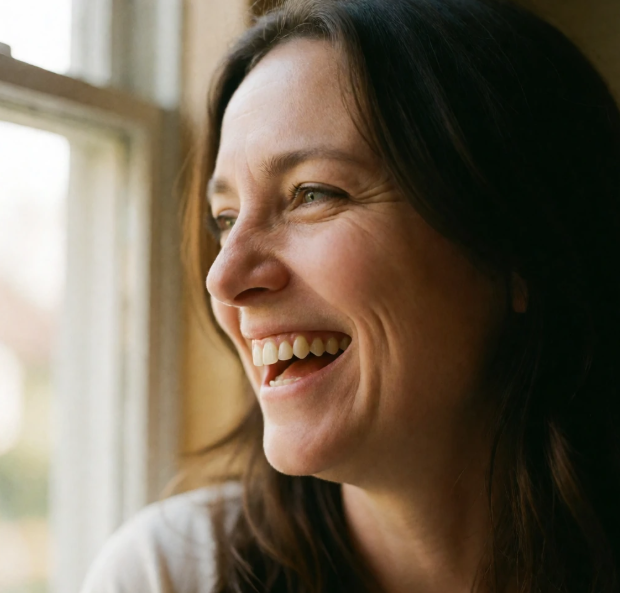
| Clause | Why it is there |
|---|---|
| RAW photo | Signals the realism checkpoint to render like a camera rather than art. |
| window light, left | Gives directional soft light with real falloff and a natural shadow side. |
| pores, fine lines | Forces skin texture, the number one cure for the plastic AI face. |
| 85mm at f/1.4 | Sets portrait compression and the shallow focus that reads as a real lens. |
| negative prompt | Blocks plastic skin and render artifacts so the face stays believable. |
Rainy street at dusk
PROMPT RAW photo, documentary street photograph of an elderly food vendor at a rainy market at dusk, wet pavement reflecting glowing neon signs, 35mm lens, f/2.8, natural ambient light, realistic skin and fabric texture, muted cinematic color grade, high detail |
NEGATIVE PROMPT cgi, 3d, render, illustration, painting, oversaturated, plastic, cartoon, blurry, lowres, watermark, text |
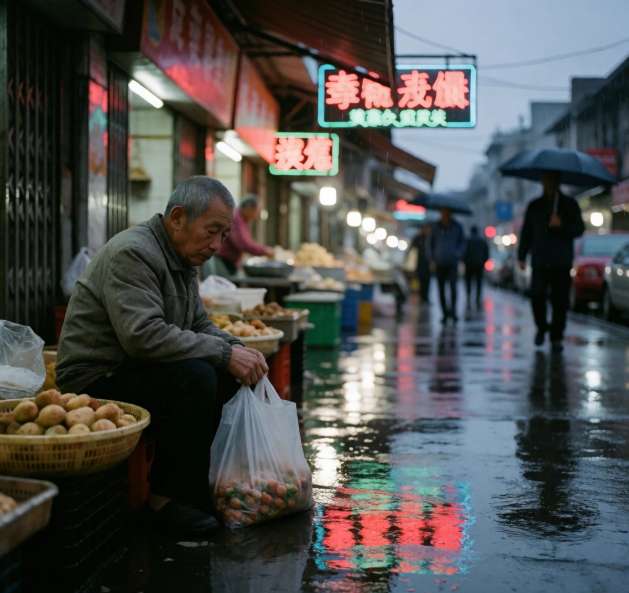
| Clause | Why it is there |
|---|---|
| documentary | Steers toward reportage framing instead of a polished studio setup. |
| wet pavement, neon | Reflections and wet surfaces add physical accuracy that sells the scene. |
| 35mm at f/2.8 | A classic street focal length with moderate depth so context stays readable. |
| muted color grade | Holds color back from oversaturation for a consistent believable palette. |
| negative prompt | Removes the painted and cartoon looks that a night scene can drift into. |
Product still life
PROMPT RAW photo, close-up product shot of a matte ceramic coffee cup with thin steam, on a weathered oak table beside a window, soft morning light raking across the surface, dust motes in the beam, 100mm macro lens, f/5.6, sharp focus on the rim, true to life color, commercial photography, highly detailed |
NEGATIVE PROMPT cgi, 3d render, illustration, plastic look, oversaturated, cartoon, smooth, blurry, watermark, text, logo |

| Clause | Why it is there |
|---|---|
| matte ceramic, oak | Named materials give real surfaces to render instead of generic shine. |
| raking light | Reveals texture and micro-shadow, the hallmark of studio product work. |
| dust motes in beam | Tiny airborne particles are a subtle realism cue a clean render lacks. |
| 100mm macro f/5.6 | Macro framing with a mid aperture keeps it crisp but still photographic. |
| negative prompt | Kills the plastic and over-smooth surfaces product renders fall into. |
Lifestyle interior
PROMPT RAW photo, candid photo of a cozy Scandinavian living room in soft afternoon light, a cat asleep on a linen sofa, dust motes in a low sunbeam across the floor, natural wear on the wood and wool, 35mm lens, f/2, shallow depth of field, warm natural color, gentle contrast, realistic |
NEGATIVE PROMPT cgi, 3d render, illustration, showroom, oversaturated, plastic, cartoon, hdr halo, watermark, text |
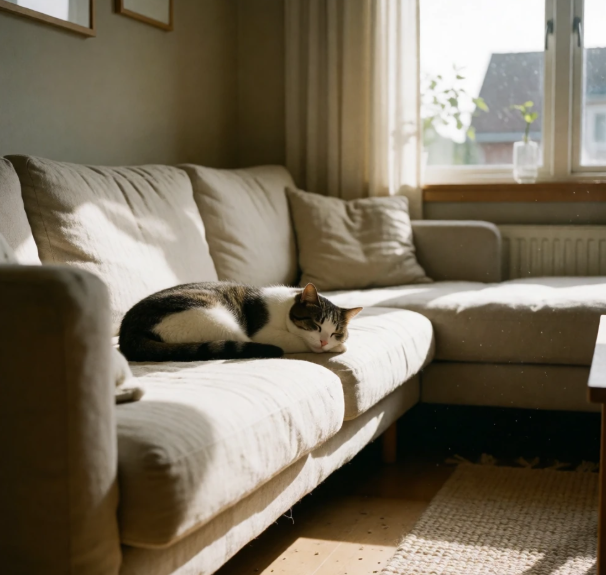
| Clause | Why it is there |
|---|---|
| candid photo | Keeps the room lived-in and unstyled, not a perfect showroom render. |
| low sunbeam, motes | A single directional beam plus floating dust gives depth and honesty. |
| natural wear | Asks for flaws so surfaces do not look factory-fresh and fake. |
| 35mm at f/2 | A reportage focal length with soft depth that feels like a real snapshot. |
| negative prompt | Blocks the showroom and hdr-halo look interiors tend to produce. |
Golden hour landscape
PROMPT RAW photo, wide landscape of a misty pine valley at sunrise, golden light rays through low fog, dew on the foreground foliage, distant hazy mountains, 24mm lens, f/11, deep focus, natural dynamic range, atmospheric perspective, fine detail, nature photography |
NEGATIVE PROMPT cgi, 3d render, illustration, painting, oversaturated, cartoon, overprocessed, hdr halo, watermark, text |
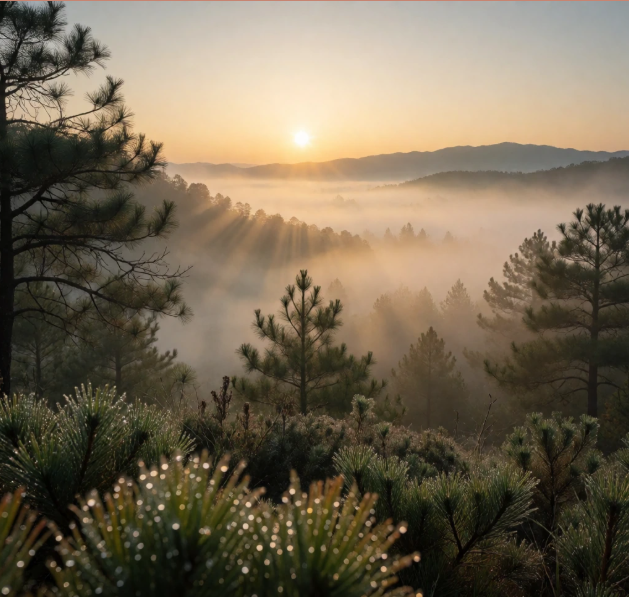
| Clause | Why it is there |
|---|---|
| light rays, fog | Volumetric light instantly reads as a real dawn scene. |
| dew on foliage | A near detail gives the eye a sharp anchor and a sense of true scale. |
| 24mm at f/11 | A wide lens and small aperture keep the whole scene sharp, as landscapes are shot. |
| atmospheric depth | Distant haze and falloff create real depth, not a flat painted backdrop. |
| negative prompt | Prevents the overprocessed, painterly finish landscapes slip into. |
Settings Cheat Sheet
Dial these in when you run it
Good words still need good settings. These are safe starting values for SDXL realism checkpoints. Nudge them once you see your first result.
| Setting | Start value | What it controls |
|---|---|---|
| Checkpoint | realism model | The single biggest factor. Use RealVisXL, Juggernaut XL, or epiCRealism |
| CFG scale | 4 to 7 | Lower stays natural and photographic, higher over-bakes and hardens edges |
| Steps | 25 to 35 | Enough sampling for clean detail without diminishing returns |
| Sampler | DPM++ 2M Karras | A reliable default that holds natural texture and stable results |
| Resolution | near 1 megapixel | SDXL is trained near 1024 pixels. Set the ratio, then upscale after |
| Seed | lock when close | Fix the seed once a frame is nearly right so you tweak wording, not luck |
Workflow
Work it like a real shoot
The tool is free, but realism still comes from iteration. Generate, look hard, and name whatever still reads as fake. If the skin is too smooth, add pores and strengthen the negative. If the light is flat, give it a direction and a source. If the color pops too hard, drop the CFG and ask for a muted grade.
Lock the seed once a frame is close, then change only one thing at a time so you learn what each word and setting does. That is how a contact sheet turns into a keeper.
The Verdict
Free, and good enough to fool the eye
If you want photorealism without paying, Stable Diffusion is the clear choice. It costs nothing, it is open, and with a strong realism checkpoint it produces skin, light, and texture that hold up next to the paid tools. The negative prompt and the CFG dial give you real control over the fake look, which is exactly what realism demands.
The trade-off is effort. You do more of the work yourself, from choosing a checkpoint to tuning settings, and a local install needs a capable GPU. But that same openness is why it keeps improving and why it stays free. Pick a realism checkpoint, write like a photographer, lean on the negative prompt, and iterate one change at a time.
Bottom line. Use a realism checkpoint, pair every prompt with a good negative, and iterate. Do that and Stable Diffusion will hand you frames that are hard to tell from a real camera, for free.
Post Comment
Share your thoughts about this article.
Be the first to post a comment!