The market for AI writing software pulled apart over the past year. General assistants such as ChatGPT and Claude grew capable enough that a large share of routine drafting no longer needs a dedicated app, and the standalone tools that survived responded by getting narrower and sharper: brand governance, search optimization, predictive scoring, and team workflow automation. The result is a field where the right answer depends almost entirely on what kind of content gets produced and who produces it.
That split makes a flat ranking close to useless. A solo blogger optimizing for organic traffic, a marketing team protecting a brand voice across fifty assets a week, and an editor polishing finished copy each need a different instrument. The seven platforms below cover that full spread, from general language models to specialized SEO and editing layers. Each one was scored against the same rubric so the trade-offs stay visible rather than buried under marketing language.
How the Tools Were Scored
Every platform was run through the Five-Lens Content Test, a fixed rubric built around the stages a piece of writing actually passes through before it goes live. Each lens carries a maximum of ten points, for a combined ceiling of fifty. Scores reflect editorial assessment from hands-on use against representative tasks rather than vendor-supplied figures, which keeps the comparison consistent across very different products.
| Lens | What it measures |
|---|---|
| Draft quality | How close raw output sits to publishable prose: coherence over long passages, factual restraint, and freedom from filler. |
| SEO and structure | Keyword guidance, brief generation, heading logic, SERP analysis, and support for content built to rank. |
| Workflow fit | Templates, repeatability, integrations, collaboration, and how cleanly the tool slots into an existing pipeline. |
| Brand and voice | Tone training, voice consistency across formats, and the controls a team needs to stay on brand at volume. |
| Cost efficiency | Output value relative to price, weighing free tiers, entry pricing, and what unlocks at each step up. |
A high total signals breadth across the writing lifecycle, not superiority for one narrow job. Several lower-scoring tools win outright inside their specialty.
Scores at a Glance
Jasper takes the top composite score on the strength of brand controls and a mature content workflow, while the general language models trade raw prose quality for thinner native SEO support. The specialists, Surfer and Grammarly, sit lower on the combined scale precisely because they are built to do one stage extremely well rather than the whole chain.
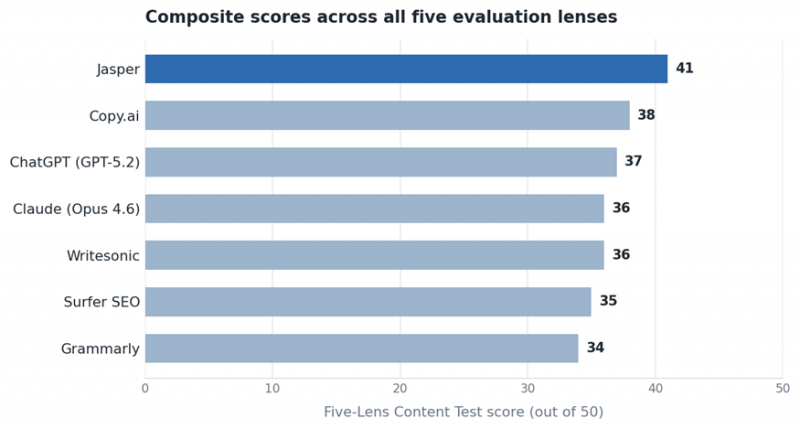
Composite Five-Lens Content Test scores, out of a possible fifty points.
The Seven Tools, Reviewed
ChatGPT (GPT-5.2)
ChatGPT remains the most flexible writing instrument available, and for many creators it quietly absorbed the entire category. The Canvas side-panel editor handles targeted rewrites without losing the surrounding draft, Projects keeps related work organized, and Custom GPTs let a repeatable brief become a reusable tool. For a solo creator producing varied content across blog posts, scripts, and social copy, one subscription covers most of the job.
Pricing: A free tier runs on the lighter model. Go costs 8 dollars per month, Plus is 20 dollars per month and unlocks the stronger reasoning mode most writers want, and Pro sits at 200 dollars per month for the heaviest workloads.
Strengths: Broad capability, a huge surrounding ecosystem of plugins and custom agents, and Canvas for collaborative editing make it the safest single bet for mixed content needs.
Limitations: Consistent, search-ready output depends on careful prompting. Without a structured workflow, quality drifts, and there is no native SEO scoring or brand-voice governance built in.
Best for: Solo creators and small teams that want one adaptable tool rather than a stack of specialized subscriptions.
Claude (Opus 4.6)
Where ChatGPT optimizes for range, Claude optimizes for prose. Output from the Opus 4.6 model, released in February 2026, reads less like generated text and holds voice and structure across long pieces, which matters for anyone shipping ten to fifteen pages at a stretch. Artifacts render drafts in a live preview pane, and Projects holds persistent context so a long brief does not have to be re-fed on every turn.

Pricing: A limited free tier is available. Pro costs 20 dollars per month, or 17 dollars per month billed annually. Max plans run at 100 and 200 dollars per month, and team plans start at 25 dollars per seat per month.
Strengths: The strongest long-form prose quality in the group, a generous working context for big documents, and clean handling of nuanced editorial instructions.
Limitations: A smaller ecosystem than ChatGPT and no built-in SEO tooling. Optimization for search has to happen in a separate platform.
Best for: Long-form writers, content strategists, and editors who value prose quality above speed or template volume.
Jasper
Jasper is less a writing app than a content production platform aimed squarely at marketing teams. Founded in 2015 and since rebuilt around brand governance, it pairs a Canvas editor with trainable Brand Voices, Knowledge assets, and campaign workflows that keep blogs, emails, and ads aligned to a single tone. A Surfer SEO integration layers search guidance on top, and the Business tier adds an app builder, API access, and admin controls for larger operations.
Pricing: Creator runs 49 dollars per month, or 39 dollars billed annually. Pro is 69 dollars per month, or 59 dollars annually. Business pricing is custom and, according to procurement data, commonly lands anywhere from a few hundred to several thousand dollars per month depending on team size.
Strengths: Best-in-class brand voice control, a deep template library, and collaboration features that justify the premium for teams producing daily marketing content. It carries a 4.7 out of 5 rating across more than 1,200 G2 reviews.
Limitations: The most expensive entry point among the writers here, output that still needs meaningful editing, and full SEO or grammar coverage that depends on separate Surfer and Grammarly subscriptions.
Best for: Marketing teams and agencies that need consistent brand voice across many channels and brands.
Copy.ai
Many review of Copy.ai shows it earn its place through volume and automation rather than literary polish. The Pro tier removes word caps entirely, an advantage over credit-metered rivals, and bundles a Brand Voice feature with more than ninety templates and Chat by Copy.ai for conversational drafting. The platform leans hardest into go-to-market workflow automation, chaining steps so a team can generate hundreds of product descriptions or localized ad variants without adding headcount.
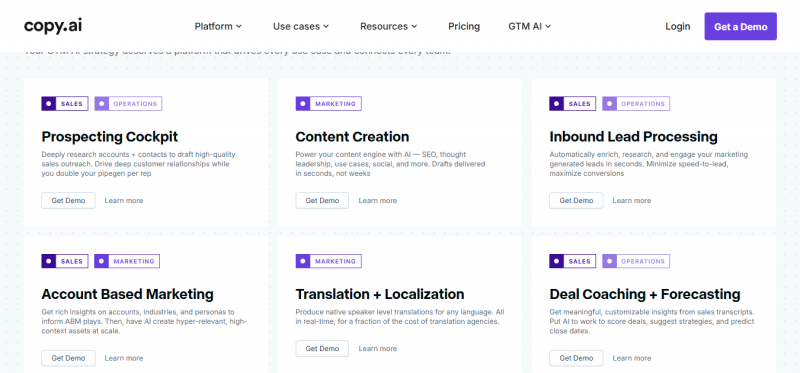
Pricing: A permanent free plan covers 2,000 words per month. Pro is 49 dollars per month, or 36 dollars billed annually, with unlimited words and up to five seats. The Advanced and Team tiers start around 249 dollars per month, and Enterprise is custom.
Strengths: Unlimited generation on paid plans, strong workflow automation, and a genuinely usable free tier. It holds a 4.4 out of 5 rating on Capterra.
Limitations: Long-form quality trails the dedicated language models, and the automation depth that defines the higher tiers carries a learning curve and a steep price jump.
Best for: High-volume short-form output and teams running production-scale content workflows.
Writesonic
Writesonic targets SEO long-form and, increasingly, generative engine optimization, the practice of getting a brand cited inside AI-generated answers. Its article writer produces structured drafts quickly, site audits and SEO agents guide the output, and Standard plans connect to Google Search Console and Analytics for performance visibility. A Surfer integration is available higher up the ladder for teams that want deeper on-page scoring.
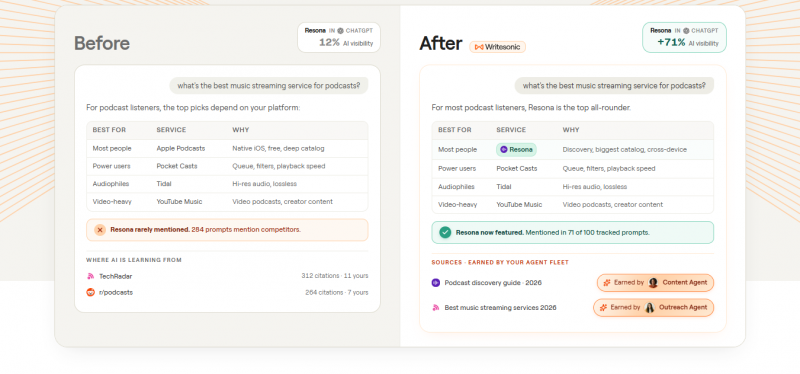
Pricing: A limited free plan exists. Paid tiers commonly run from a Lite plan near 16 dollars per month up through Standard around 39 dollars and Professional near 75 dollars, with Enterprise custom. The tier structure is revised frequently, so current rates warrant a check before subscribing.
Strengths: Fast SEO-oriented drafting, built-in search-console connections, and early tooling for AI-search visibility at a mid-range price.
Limitations: Pricing and plan names change often, the credit system confuses new users, and the tool writes content without publishing it, so a separate scheduler is still needed.
Best for: SEO-focused writers who want long-form drafts plus visibility into how content performs in search.
Surfer SEO
Surfer is not a generator in the usual sense but a content optimization engine, and it pairs with whatever writer a team already uses. It analyzes the pages currently ranking for a target query, then specifies length, structure, and the terms a draft should include to compete. A real-time content score turns optimization into a measurable target, and an optional AI writer can produce a first draft inside the same workflow.
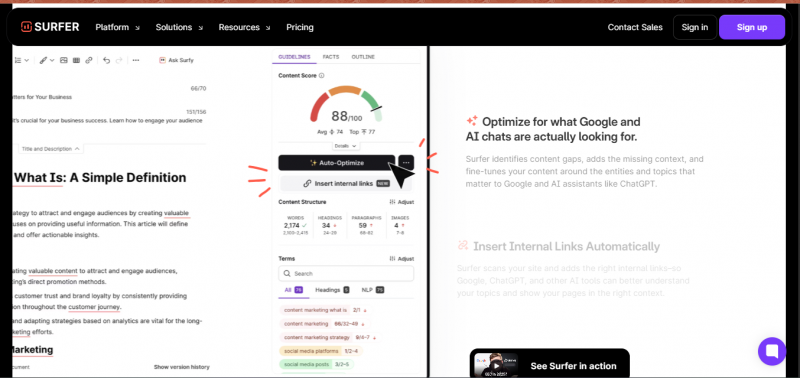
Pricing: The Essential plan starts around 89 dollars per month, with Scale and Enterprise tiers above it. The SERP Analyzer is a roughly 29 dollar add-on on the entry plan, and the AI Tracker costs extra based on usage.
Strengths: The clearest on-page optimization guidance in the group and a content scoring system that removes guesswork from ranking. It carries a 4.8 out of 5 rating across more than 500 G2 reviews, the highest here.
Limitations: It optimizes rather than writes, so it needs a separate drafting tool for voice. Add-on costs stack up, and the entry price is steep for occasional publishers.
Best for: Teams whose primary goal is traditional search ranking and who already have a drafting tool in place.
Grammarly
Grammarly occupies the final stage of the workflow rather than the first. It is an editing layer that catches clarity, tone, conciseness, and correctness issues across nearly any text field in a browser or app, which makes it a complement to a generator rather than a substitute. In 2026 the company renamed Premium to Pro and folded former Business features into it, covering teams of up to 149 users, with brand style guides reserved for that tier.
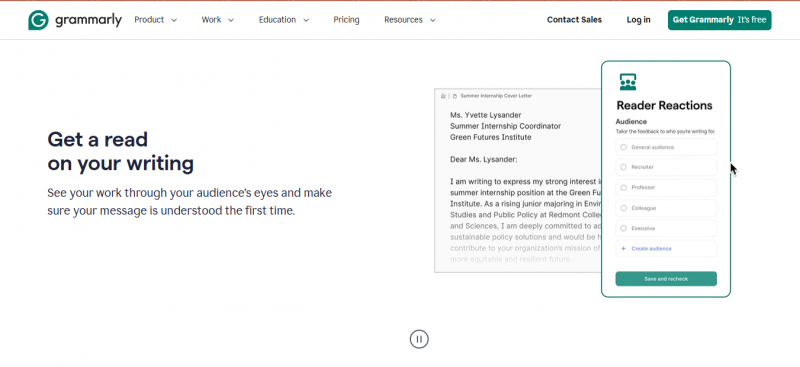
Pricing: A capable free tier handles basic grammar, spelling, and tone. Pro costs 12 dollars per month billed annually, or 30 dollars billed monthly, with a cap on AI prompts. Larger organizations move to a custom Enterprise plan.
Strengths: Excellent editing and tone guidance, near-universal coverage across writing surfaces, and strong value at the annual rate.
Limitations: It refines existing text rather than generating it, AI prompts are capped on Pro, and brand style guides require a team plan.
Best for: Anyone who needs a consistent editing and polishing pass over content produced elsewhere.
Pricing and Ratings at a Glance
Entry pricing spans a wide band, from an editing layer at 12 dollars a month to an optimization platform near 89. The figures below show the lowest published paid tier for each tool alongside its independent user rating, so cost and reputation sit side by side. Free tiers, where they exist, are noted in the table that follows.
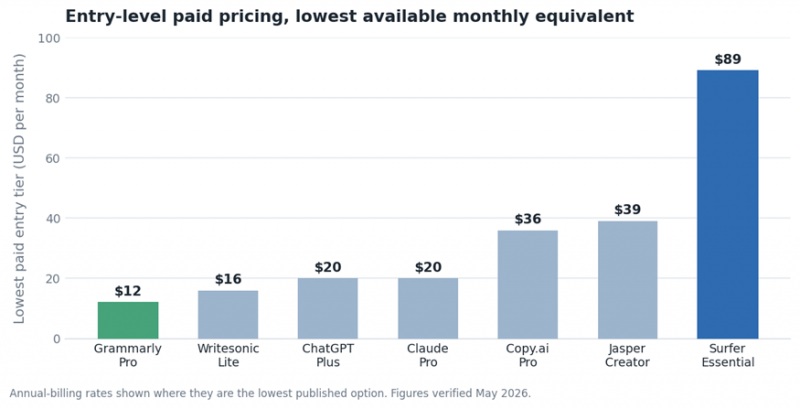
Lowest published paid entry tier for each tool, in US dollars per month.
| Tool | Free tier | Entry paid | Rating | Best suited to |
|---|---|---|---|---|
| ChatGPT (GPT-5.2) | Yes | 20 / mo | n/a | Versatile, mixed content needs |
| Claude (Opus 4.6) | Yes | 17 / mo* | n/a | Long-form prose quality |
| Jasper | Trial | 39 / mo* | 4.7 (G2) | Team brand voice at scale |
| Copy.ai | Yes | 36 / mo* | 4.4 (Capterra) | High-volume, automated output |
| Writesonic | Yes | 16 / mo | varies | SEO long-form and AI visibility |
| Surfer SEO | No | 89 / mo | 4.8 (G2) | On-page search optimization |
| Grammarly | Yes | 12 / mo* | 4.6 (avg) | Editing and polishing layer |
Prices in US dollars. An asterisk marks the annual-billing rate, which is the lowest published option. Ratings are independent user scores; the general language models are not listed on those review platforms in a directly comparable way.
Matching a Tool to the Work
The strongest setups rarely rely on a single product. A common and cost-effective pattern uses a general language model for drafting, an optimization layer for search, and an editing layer for the final pass, which together cost less than one premium marketing platform. The choice narrows quickly once the dominant job is clear.
• Drafting blog posts and long articles solo: Claude for prose quality or ChatGPT for range, often paired with Surfer when ranking is the goal.
• Running brand content across a marketing team: Jasper, for its voice training and campaign workflow, with the premium justified by consistency at volume.
• Producing high-volume short-form copy: Copy.ai, where unlimited generation and workflow automation outweigh raw long-form polish.
• Chasing organic search traffic specifically: Surfer or Writesonic, depending on whether the priority is on-page optimization or fast SEO drafting.
• Polishing content written anywhere: Grammarly, as an inexpensive editing pass that sits on top of any of the above.
Budget shapes the decision as much as capability. The general models and Grammarly cover most individual needs for well under 40 dollars a month combined. Dedicated platforms earn their higher prices only when brand governance, team collaboration, or measurable search performance becomes the central requirement rather than a nice extra.
The Verdict
No single tool wins for everyone, and the composite scores make the reason plain: each platform is built around a different stage of the writing lifecycle. Jasper leads the combined ranking because it covers the most ground for marketing teams, but a long-form writer is better served by Claude, an SEO specialist by Surfer, and a high-volume operation by Copy.ai. The general language models remain the most defensible default for individuals, since they handle the largest share of work for the lowest cost.
The practical takeaway is to stop hunting for one perfect tool and instead match capability to the dominant task, then layer a cheap editing pass on top. That approach produces better content at a lower total cost than committing early to a single premium platform, and it leaves room to swap any one layer as the tools keep shifting.
Post Comment
Share your thoughts about this article.
Be the first to post a comment!