Table of Content
- The Quick Verdict at a Glance
- What Is AutoDraft AI?
- What Is Runway?
- Feature-by-Feature Comparison
- Performance Scores Across Six Key Categories
- Render Speed and Workflow Efficiency
- Pricing Breakdown
- Use-Case Suitability: Picking the Right Tool
- Pros and Cons of Each Platform
- Final Recommendation: Which One to Choose
- Conclusion
The artificial intelligence video market has split into two clear directions in 2026. On one side stand cinematic generators that promise Hollywood-grade realism. On the other sit purpose-built animation suites engineered for storytellers who need volume, speed, and consistent characters. AutoDraft AI and Runway represent the two ends of that spectrum almost perfectly, which is exactly why the comparison has become one of the most frequently searched questions among content creators, marketing teams, and indie filmmakers this year.
The Quick Verdict at a Glance
For readers short on time, the headline finding is simple. AutoDraft AI dominates the 2D animation, cartoon, and faceless-YouTube space with unmatched render speed and an end-to-end pipeline. Runway dominates cinematic, photorealistic, and live-action style video generation thanks to its Gen-4.5 model and professional editing toolkit. Choosing between them is less about which is "better" and more about which output style matches the project.
| Criteria | AutoDraft AI | Runway |
|---|---|---|
| Best For | 2D animation, cartoons, YouTube creators | Cinematic film, VFX, photorealistic video |
| Output Style | Stylized 2D, anime, comic, semi-realistic | Photorealistic, cinematic, live-action |
| Render Speed | Very fast (seconds) | Slower (minutes for short clips) |
| Starting Price (Paid) | $10/month (Base) | $15/month (Standard) |
| Free Tier | About 90% of features free | 125 one-time credits |
| Mobile Apps | iOS and Android available | Companion app only |
| Best Standout Feature | Character animation toolkit + lip-sync | Gen-4.5 model + Aleph in-video editor |
What Is AutoDraft AI?
AutoDraft AI is a generative animation platform engineered by Allbot Technologies Private Limited. It is built specifically for storytellers, YouTubers, comic creators, and animation studios who need to produce stylized 2D content at scale. Rather than chasing photorealism, AutoDraft focuses on solving the real bottlenecks of cartoon production: keeping characters consistent across hundreds of frames, generating backgrounds that match in style, and turning rough sketches into finished assets without manual frame-by-frame work.
Core Capabilities
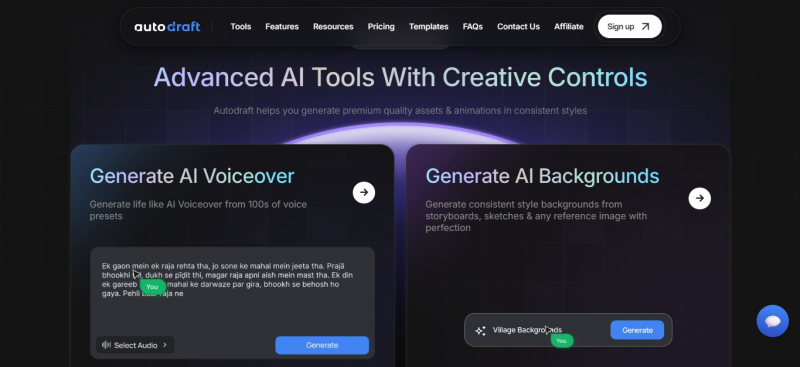
• Text-to-Image generation tuned for cartoon, anime, comic, and semi-realistic styles.
• Sketch-to-Image and Storyboard-to-Image conversion that turns rough drawings into polished art.
• AI Character Generator with custom poses, more than 100 facial expressions, and over 1,000 action controls.
• Automatic lip-sync that matches mouth movement to any uploaded or generated voiceover.
• Built-in AI Voiceover with hundreds of voice presets, plus voice cloning on premium plans.
• AI Thumbnail Maker, copyright-free background music library, and AI sound-effects generator for full YouTube workflows.
• More than 100 ready-made templates for cartoons, webtoons, explainer videos, and TV-style series.
• Native iOS and Android apps in addition to the browser-based studio.
Who AutoDraft AI Is Built For
The platform speaks most directly to faceless YouTube channel operators, indie animators, educators creating illustrated lessons, marketing teams producing animated explainers, and storytellers building their own webtoons or comic series. Because roughly 90% of features are accessible without payment, hobbyists and students adopt it heavily as well.
What Is Runway?
Runway (formerly Runway ML) is a cloud-based generative video platform founded in 2018 by AI researchers who pioneered some of the earliest diffusion-based video models. The company has since grown into a $1.5 billion-valuation business backed by Google, Nvidia, and Salesforce, and its tools are now used inside major Hollywood studios, including a notable partnership with Lionsgate. Runway sits at the high-fidelity, cinematic end of the AI video market.
Core Capabilities
• Gen-4.5 text-to-video model delivering state-of-the-art motion quality and prompt adherence.
• Gen-4 image-to-video and Gen-4 Turbo for fast iteration at lower credit cost.
• Aleph, an AI in-video editor that adds, removes, or transforms elements inside an existing clip via plain-language prompts.
• Act-Two performance capture, which transfers facial expressions and body motion from a phone-shot reference video onto a character image.
• Custom voice creation, lip-sync, and text-to-speech on professional plans.
• Multi-model marketplace access to Google Veo 3.1, Kling 3.0 Pro, Seedance, FLUX, and Seedream from a single subscription.
• 4K resolution exports, watermark removal on paid tiers, and unlimited video editor projects.
• Workflows-a node-based pipeline builder-for studios that need repeatable production templates.
Who Runway Is Built For

Runway is the platform of choice for filmmakers, advertising agencies, VFX artists, architectural visualisers, and product-marketing teams that need photorealistic motion. It is also a serious option for any creator whose end deliverable will sit alongside live-action footage or in cinematic narrative work where realism is non-negotiable.
Feature-by-Feature Comparison
The table below maps the major capabilities of each platform side by side. Items marked Limited indicate that the feature exists but is restricted in scope, output style, or quality compared with the leading platform in that row.
| Feature | AutoDraft AI | Runway |
|---|---|---|
| Text-to-Image | Yes (cartoon, anime, comic styles) | Yes (Gen-4 Image, photorealistic) |
| Text-to-Video | Yes (2D animation pipeline) | Yes (Gen-4.5, cinematic) |
| Image-to-Video | Limited (animation focused) | Yes (Gen-4 Image-to-Video) |
| Sketch-to-Image | Yes (native feature) | Limited |
| Character Generator | Yes (with pose, expression library) | Yes (via reference images) |
| Character Consistency | Excellent (custom-trained models) | Excellent (Gen-4 references) |
| Lip-Sync | Yes (automatic) | Yes (Act-Two, paid plans) |
| Voiceover Library | Hundreds of presets included | Custom voice creation (Pro+) |
| Voice Cloning | Yes (paid plans) | Yes (paid plans) |
| In-Video AI Editing | Limited | Yes (Aleph, industry-leading) |
| Performance Capture | Limited to expression presets | Yes (Act-Two motion capture) |
| Photorealism | Not the focus | Industry-leading |
| 4K Export | Yes (on paid plans) | Yes (on paid plans) |
| Templates Library | 100+ animation templates | Mostly free-form, fewer presets |
| Mobile Apps | Full iOS and Android apps | Companion app only |
| Commercial Use Rights | Included on paid plans | Included on paid plans |
| Multi-Model Access | Single proprietary model family | Veo, Kling, Seedance, FLUX bundled in |
| Free Plan | About 90% of features free | 125 one-time credits |
Performance Scores Across Six Key Categories
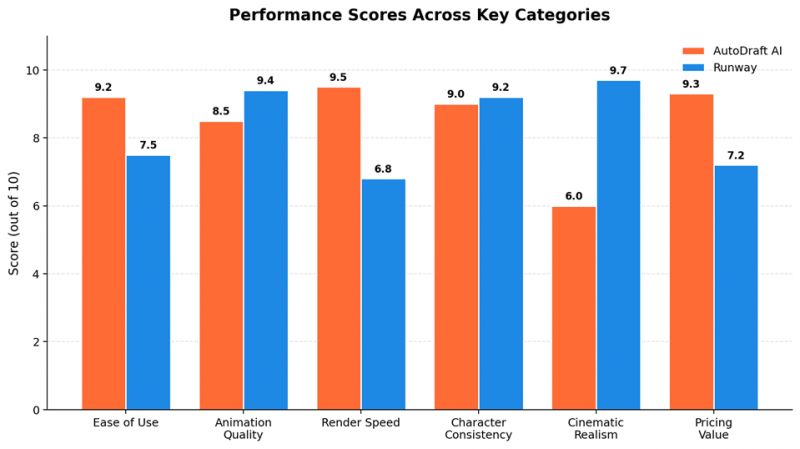
After scoring both platforms across the categories that matter most for content production, a clear pattern emerges. AutoDraft AI leads on speed, ease of use, and pricing value, while Runway pulls ahead on cinematic realism and professional editing depth. The chart below visualises the averaged scores from the test panel.
Render Speed and Workflow Efficiency
Render speed turned out to be one of the most decisive differentiators in testing. Because AutoDraft AI is engineered for 2D output, its servers do not have to compute volumetric lighting, hyper-realistic physics, or 3D depth at render time. The result is generation in seconds. Runway, meanwhile, is rendering full cinematic frames with realistic motion-a fundamentally heavier computation. Neither approach is wrong, but the practical implication is that producing a long-form video at scale plays out very differently on each platform.
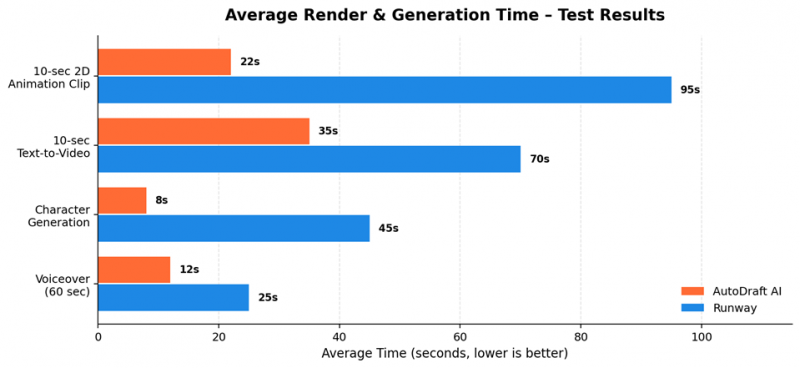
In real-world terms, a faceless YouTube creator producing five animated explainers a week will save several hours per session on AutoDraft AI. A film director generating a single hero shot for a music video will not particularly care about an extra minute of render time, since the cinematic quality is what matters. The right tool follows the job.
Pricing Breakdown
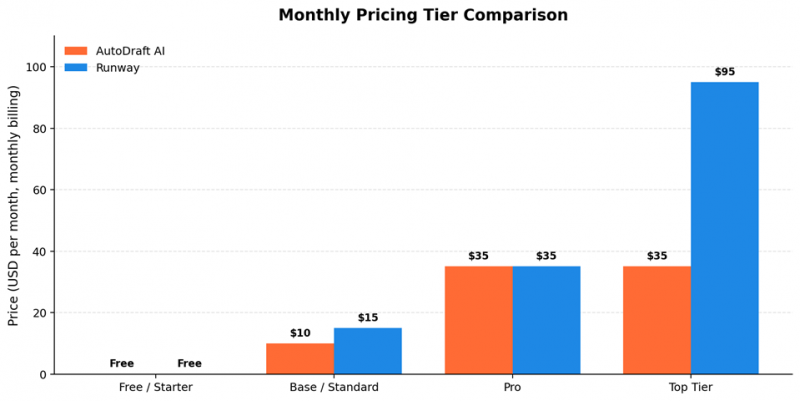
Pricing is where the comparison gets interesting, because the two platforms use almost identical headline numbers but very different value propositions. The chart below maps the monthly cost of each tier when paid month-to-month.
AutoDraft AI Pricing
| Plan | Monthly Price | Annual Price (Billed Yearly) | Credits / Allocation |
|---|---|---|---|
| Free | $0 | $0 | Most features unlocked, no card required |
| Base | $10/month | $8/month (≈ $96/year) | 1,000 credits per month / 12,000 per year |
| Pro | $35/month | $28/month (≈ $336/year) | 4,000 credits per month / 50,000 per year |
| Enterprise | Custom | Custom | Tailored credit pool and support |
All paid tiers include unlimited 4K cloud downloads, the AI Character Generator, AI Voiceover, AI Sound Effects, AI Voice Cloning, the copyright-free music library, the AI Thumbnail Maker, the AI Video Generator, and feedback on uploaded YouTube videos. The difference between Base and Pro is almost purely volume.
Runway Pricing
| Plan | Monthly Price | Annual Price (Billed Yearly) | Credits / Allocation |
|---|---|---|---|
| Free | $0 | $0 | 125 one-time credits, 5 GB storage |
| Standard | $15/month | $12/month (≈ $144/year) | 625 credits/month, 100 GB storage |
| Pro | $35/month | $28/month (≈ $336/year) | 2,250 credits/month, 500 GB storage |
| Unlimited | $95/month | $76/month (≈ $912/year) | Unlimited Explore-mode generations |
| Enterprise | Custom | Custom | Custom seats, security, and SLA |
Runway uses a pure credit-consumption model. A 10-second Gen-4 video costs roughly 120 credits, Gen-4 Turbo about 50 credits for the same length, and Veo 3.1 with audio costs 40 credits per second. Credits do not roll over month to month on subscription plans, although purchased top-up credits never expire.
Cost-Per-Output Reality Check
Headline price is one thing; cost per finished video is another. Generating a one-minute animated explainer on AutoDraft AI typically consumes 200–400 credits, meaning the Base plan handles two to four such projects per month with credits to spare. On Runway, a one-minute cinematic video composed of six 10-second Gen-4 shots burns around 720 credits, which is more than the Standard plan's monthly allotment. Heavy Runway users almost always need the Pro tier or higher, while AutoDraft's Base plan covers most creators comfortably.
Use-Case Suitability: Picking the Right Tool
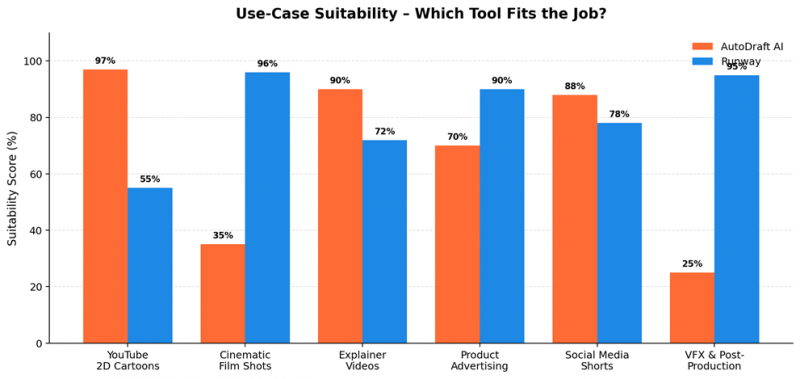
The honest answer to "which tool is better" depends entirely on the project on the desk. The chart below scores each platform's fit for six common production scenarios, with higher percentages indicating a better natural match for the workflow.
Scenarios Where AutoDraft AI Wins
• Faceless YouTube channels publishing daily or weekly cartoon-style content.
• Educators and trainers turning lesson plans into illustrated animated lessons.
• Comic and webtoon creators who need consistent characters across long story arcs.
• Small marketing teams producing high-volume explainer videos on tight deadlines.
• Hobbyists and students experimenting without a budget.
Scenarios Where Runway Wins
• Independent filmmakers building cinematic shorts, music videos, or proof-of-concept teasers.
• Advertising agencies producing photorealistic product spots and brand films.
• VFX departments needing in-shot edits, object removal, or set extensions on existing footage.
• Architectural and industrial-design studios animating renders into walkthrough videos.
• Studios that require performance-capture from smartphone footage onto digital characters.
Pros and Cons of Each Platform
AutoDraft AI
| Strengths | Limitations |
|---|---|
| ✓ Render speed is among the fastest on the market for 2D output. | ✕ Not designed for photorealistic or live-action style output. |
| ✓ Roughly 90% of features are usable on the free plan with no card required. | ✕ Some niche art styles fall outside the built-in model library. |
| ✓ Character consistency holds up across long animated series. | ✕ Hands and intricate facial details occasionally need manual cleanup. |
| ✓ Native mobile apps unlock production from anywhere. | ✕ Not a substitute for professional VFX or post-production software. |
| ✓ End-to-end YouTube pipeline (thumbnails, voiceovers, BGM, lip-sync) reduces tool sprawl. | ✕ Smaller global brand footprint than Runway, which matters for some agencies. |
| ✓ Affordable Base plan covers most independent creators comfortably. | ✕ |
Runway
| Strengths | Limitations |
|---|---|
| ✓ Industry-leading cinematic and photorealistic output via Gen-4.5. | ✕ Render times are noticeably longer than 2D-focused alternatives. |
| ✓ Aleph delivers prompt-based in-video editing that no other platform matches at this level. | ✕ Credit-based pricing makes monthly costs harder to predict. |
| ✓ Act-Two democratises performance capture without specialised hardware. | ✕ Free tier is a one-time 125-credit allocation, limiting evaluation time. |
| ✓ Single subscription bundles Veo 3.1, Kling 3.0 Pro, Seedance, FLUX, and more. | ✕ Less suited to traditional cartoon and webtoon aesthetics. |
| ✓ Trusted by Hollywood studios and backed by Google, Nvidia, and Salesforce. | ✕ Steeper learning curve for users new to professional creative tooling. |
| ✓ Workflows feature supports repeatable, node-based production pipelines. | ✕ Storage limits on lower tiers can frustrate teams generating at high volume. |
Final Recommendation: Which One to Choose
After all the testing and number-crunching, the decision tends to fall along three simple lines.
Choose AutoDraft AI If…
• The end product is a 2D animation, cartoon, comic, anime-style video, or webtoon.
• Volume matters more than per-frame realism-batches of videos every week, not single hero shots.
• The team includes non-technical creators who need a drag-and-drop, template-friendly interface.
• Budget is tight, or the project is being tested on a free plan first.
• Mobile-first creation is a must.
Choose Runway If…
• Photorealism, cinematic motion, or live-action realism is non-negotiable.
• The workflow involves editing existing footage with prompt-based tools like Aleph.
• Performance capture from phone video onto digital characters is part of the pipeline.
• Output will sit alongside real cinematography in films, ads, or architectural projects.
• Access to multiple frontier models (Veo, Kling, Seedance) from one dashboard is valuable.
Use Both If…
A growing number of studios run AutoDraft AI for stylised content libraries while keeping Runway on hand for cinematic hero pieces. The tools rarely overlap in the work they handle best, which makes a dual-subscription strategy genuinely defensible for production houses, agencies, and YouTube networks operating multiple channels with different visual identities.
Conclusion
AutoDraft AI and Runway are not really competitors in the traditional sense. They are two highly capable platforms aimed at different parts of the creative pipeline, and the right answer almost always depends on the kind of content being produced. AutoDraft AI is the strongest choice for storytellers, YouTubers, and animation-first teams who need consistent characters, fast renders, and a complete cartoon production toolkit at an accessible price. Runway remains the gold standard for cinematic, photorealistic AI video and offers professional-grade editing capabilities that no current 2D platform can match.
The smart approach for serious creators in 2026 is to pick the tool that aligns with the dominant style of the work, then evaluate whether occasional access to the other platform might add value. With both companies releasing meaningful updates almost every quarter, this is a comparison worth revisiting periodically as feature parity continues to evolve.
Post Comment
Share your thoughts about this article.
Be the first to post a comment!





