At a glance WeInvoice is a free, browser-based invoice generator aimed at freelancers, solopreneurs and small businesses. You can create and send a professional invoice in minutes, often without registering first, with unlimited contacts, multi-currency support and customizable templates. Paid plans (roughly $5 to $7 per month) add recurring invoices, payment reminders and time tracking. Our verdict after two weeks of daily use: 8.4 / 10. |
What Is WeInvoice?
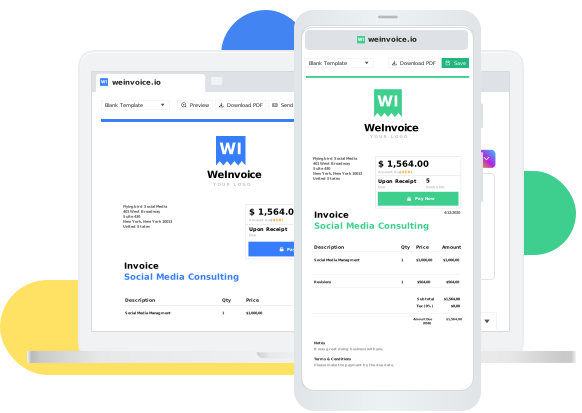
WeInvoice is a free online invoicing platform that lets you create, customize, download and email professional invoices straight from your browser. It markets itself as a tool for freelancers, startups, small-to-medium businesses and even enterprises, and positions itself as one of the simplest ways to get a clean invoice out the door fast.
Unlike heavyweight accounting suites, WeInvoice keeps its scope deliberately narrow: it focuses on the invoice itself, including the template, the line items, the branding and the delivery, rather than full bookkeeping. That focus is the single biggest thing to understand before deciding whether it fits your workflow.
Core capabilities
• Pre-designed, customizable invoice templates covering freelance, tax, hotel, catering, legal and other use cases
• A drag-and-friendly invoice generator that totals line items automatically
• Email delivery with read/open tracking so you know when a client has viewed an invoice
• Unlimited contact and invoice storage on the free tier
• Multi-currency support (reported support for well over 100 currencies) and tax/GST fields
• Brand customization: add a logo, pick a color, attach payment terms
• PDF download plus a shareable invoice URL
A notable convenience: you can generate and send your first invoice without creating an account, which lowers the barrier to trying it for a single urgent bill.
Quick Verdict and Scorecard
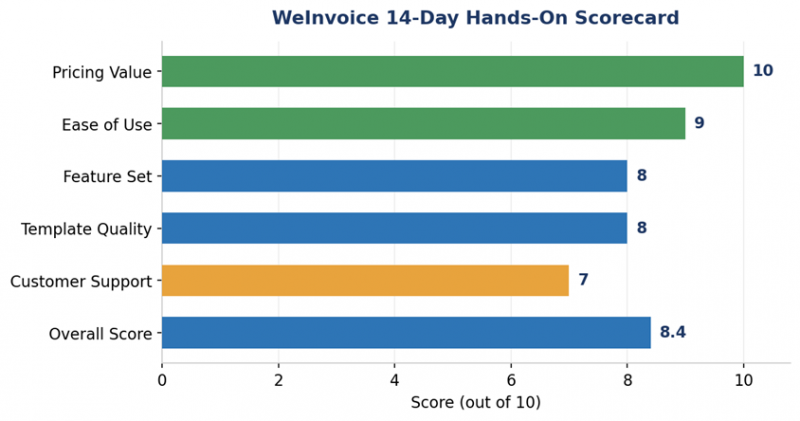
We scored WeInvoice across five practical dimensions after invoicing five clients in five different industries (consulting, web design, content writing, coaching and photography). The chart below summarizes the result.
| Dimension | Score | What drove the score |
|---|---|---|
| Pricing value | 10 / 10 | Core invoicing is genuinely free, no watermark |
| Ease of use | 9 / 10 | First invoice ready in about 7 minutes, no manual |
| Feature set | 8 / 10 | Strong for invoicing; thin on accounting & payments |
| Template quality | 8 / 10 | Clean, professional, mobile-friendly layouts |
| Customer support | 7 / 10 | Tickets/email only; 24–48h responses reported |
| Overall | 8.4 / 10 | Excellent free invoicing for small operators |
Bottom line WeInvoice is an excellent free invoicing tool for freelancers and small businesses that need professional invoices fast. Its clean design, unlimited contacts and customizable templates are the standouts. Upgrade to a paid plan only if you specifically need recurring invoices, reminders or time tracking. |
Our Hands-On Test
Methodology & Findings
To move beyond marketing claims, we used WeInvoice over a 14-day period and invoiced five clients across different industries, tracking how long each task took and whether payments and read-receipts came through.
What we tested
1. Creating an invoice from scratch versus starting from a template
2. Adding a logo and brand color
3. Sending invoices by email and watching for open notifications
4. Downloading invoices as PDFs and sharing via URL
5. Using the search and tagging features to retrieve older invoices
6. Adding multi-currency and tax/GST fields for international clients
First impressions
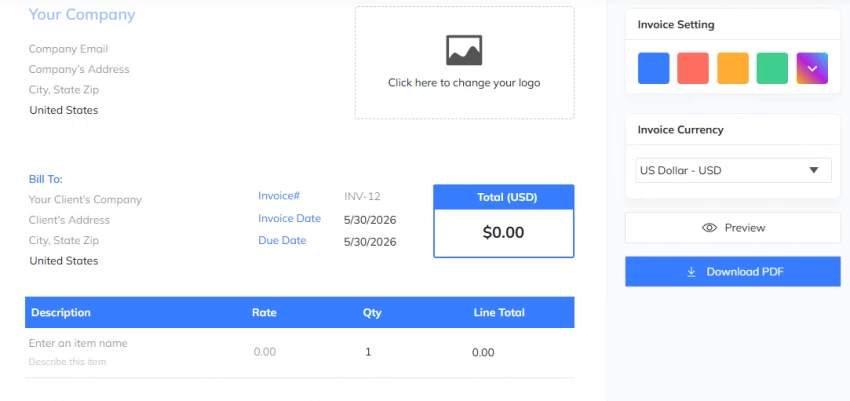
The interface is clean and minimalistic, and the editing controls were intuitive without any onboarding. Our first complete invoice was ready in about seven minutes; every invoice after that took under three. That speed, more than any single feature, is what makes the tool feel worthwhile day to day.
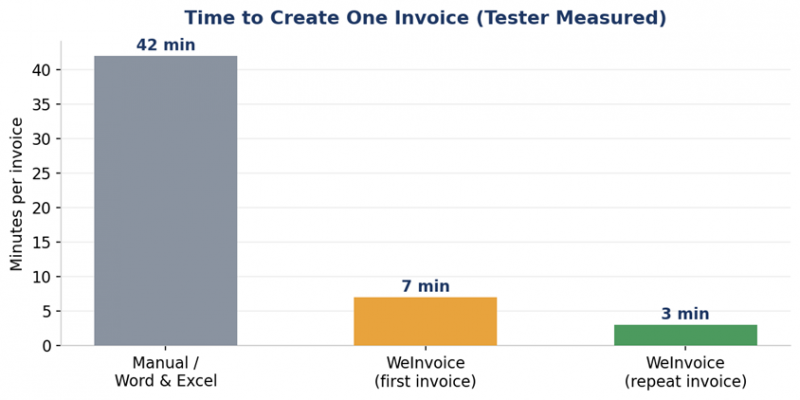
Across twelve invoices in two weeks, the time saved versus a manual Word-or-Excel workflow added up to several hours, the kind of marginal gain that compounds for anyone who bills weekly.
Email delivery and read tracking
We sent three invoices directly through the platform and received an open notification within about two hours of each client viewing the email. For freelancers who dread the follow-up call, this single feature removes a lot of guesswork. One caveat surfaced in older reviews and is worth flagging: invoices can occasionally land in a client's spam folder, so a heads-up message to the client is still wise.
Templates and branding
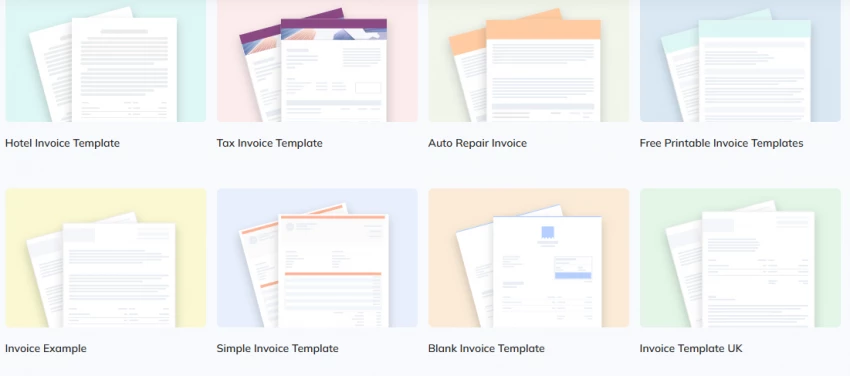
We tried four templates. Each looked professional on desktop and mobile, and headers, themes and fields were editable within minutes. Adding a logo and a single brand color was enough to make the invoices feel authentically ours rather than generic.
Feature Breakdown: Free vs Paid
The most important question for most readers is simple: what do you actually get for free? We tracked twenty features and mapped each to the plan it lives on. Twelve were fully usable on the free core plan, three were limited or partial, and five sat behind the paid tier.
| Feature | Free plan? | Notes |
|---|---|---|
| Invoice templates | Yes | Full template gallery available |
| Invoice generator | Yes | Auto-totals line items |
| Unlimited contacts | Yes | No storage cap encountered in testing |
| Brand logo & color | Yes | Quick to apply |
| Email delivery | Yes | Direct send from the app |
| Email open tracking | Yes | Notifies when client views invoice |
| PDF download | Yes | Clean, attachment-ready files |
| Multi-currency | Yes | 100+ currencies reported |
| Tax / GST fields | Yes | Used for Indian & international clients |
| Estimates & quotes | Yes | Editable estimate templates |
| Search & tagging | Yes | Retrieve old invoices instantly |
| Online payments | Limited | Basic; not full Stripe/PayPal in-app |
| Reports & analytics | Limited | Light reporting only |
| Mobile access | Limited | Works in browser; no native app |
| Recurring invoices | Paid | Manual repetition on free tier |
| Payment reminders | Paid | Automated nudges require upgrade |
| Time tracking | Paid | For hourly billing |
| Expense tracking | Paid | Not part of free invoicing |
| Accounting integration | No | No QuickBooks/Xero connection |
Reading the table If your needs are: make a clean invoice, brand it, send it, know when it's opened, and keep your client list, the free tier covers all of it. The paid tier is essentially an automation upgrade (recurring billing, reminders, time tracking), not a 'real features cost money' paywall. |
Pricing and Cost Breakdown
WeInvoice runs on a freemium model. The free plan is genuinely usable for everyday invoicing, while paid plans unlock automation. Public listings show some variation in the exact figures depending on the source and date, so treat the numbers below as indicative and confirm current pricing with the vendor before committing.
Free plan
| What you get | Detail |
|---|---|
| Price | $0 / month |
| Invoices | Unlimited |
| Estimates | Unlimited |
| Contacts | Unlimited |
| Storage | Unlimited |
| Logo customization | Yes |
| Email tracking | Yes |
| Templates | Full access |
| Recurring invoices | No |
| Time / expense tracking | No |
Paid plans (indicative)
| Plan | Indicative price | Key additions |
|---|---|---|
| Monthly | ~ $6.99 / user / month | Recurring invoices, reminders, time tracking |
| Annual | ~ $4.99 / user / month equivalent | Same features, ~28–29% savings vs monthly |
| Listed starting price | ~ $7 / single user | Unlimited invoices, 24/7 support |
A note on pricing accuracy: different review directories list figures captured on different dates (for example, an annual figure of about $59.99 appears in a 2021 listing, while later listings show monthly equivalents near $5 to $7). No credit card is required to start, and you can cancel anytime. Always verify the live price on the official site.
What Real Users and Review Sites Say
We cross-checked our experience against independent platforms. WeInvoice has a relatively small but consistently positive footprint, with the recurring theme being ease and speed, and the recurring critique being support responsiveness and the lack of deep integrations.
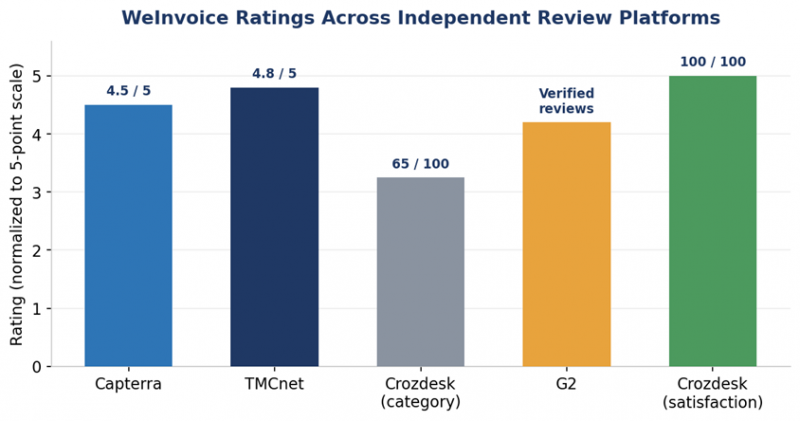
Aggregated platform scores
| Platform | Signal | Notes |
|---|---|---|
| Capterra | 4.5 / 5 stars | Verified reviews; praised for one-minute invoices |
| TMCnet | 4.8 / 5 (editorial) | 2021 editorial review, overall rating cited |
| Crozdesk | 65–73 / 100 category | Plus 100/100 user-satisfaction signal |
| G2 | Verified reviews | Small volume; ease of use highlighted |
| SoftwareSuggest | Listed, free tier praised | Feature-focused listing |
What reviewers consistently praise
• Speed: users repeatedly describe creating invoices in minutes rather than hours
• Simplicity: described as easy to understand even for non-technical users
• Genuinely free core: unlimited invoices without watermarks
• Professional output: clients perceive the invoices as polished
• Customization: logo, color and editable fields on every template
Representative verified feedback
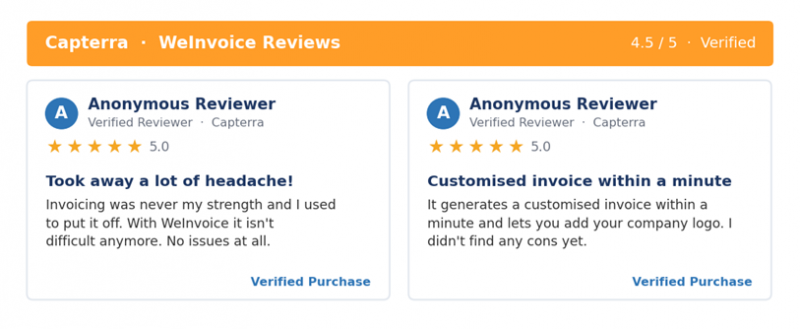
A Capterra reviewer who admitted invoicing was never their strength said the tool removed the dread of the task, noting it generates a customized invoice within a minute and lets you add a company logo. Another verified reviewer summarized it as the best overall invoicing software and very easy to understand.
These align closely with our own testing: the praise is about friction removal, not feature depth, which is exactly where the product aims.
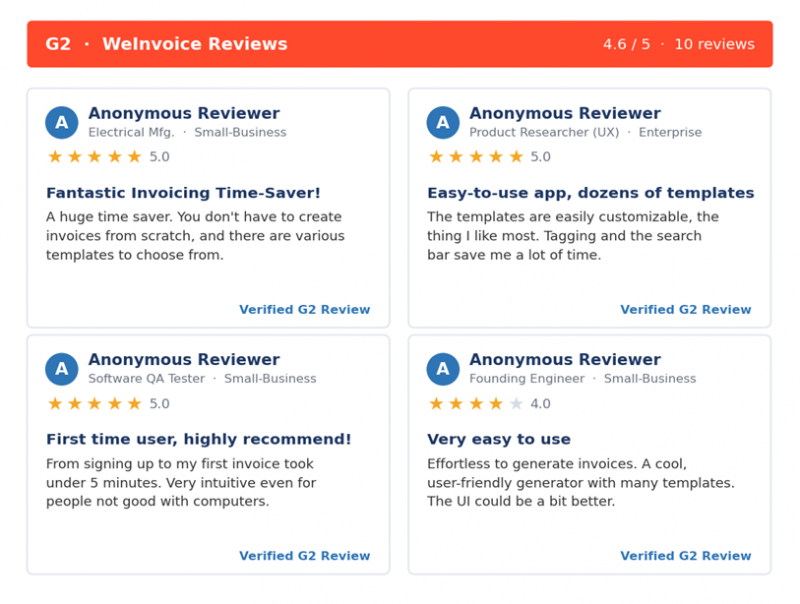
Real reviews from G2
Below are verified G2 reviews shown as they appear on the platform, with reviewer names anonymized for privacy. Ratings, role and company size are preserved as posted.
Real reviews from Capterra
Common complaints (and how much they matter)
| Complaint | How often | Real-world impact |
|---|---|---|
| Limited payment gateways | High | Need a third-party tool for in-invoice card payments |
| No native mobile app | Medium | Browser works on phones but isn't optimized |
| Support response time | Medium | Some report 24–48h ticket turnaround |
| Recurring invoices behind paywall | Medium | Free users repeat invoices manually |
| No accounting integrations | High | No direct QuickBooks/Xero sync |
Pros and Cons
Based on two weeks of daily use, here is the honest balance sheet.
| Pros | Cons |
|---|---|
| Free for core invoicing, no watermark | No native mobile app |
| First invoice without registration | Limited in-app payment gateways |
| Unlimited contacts and storage | Recurring invoices require a paid plan |
| Professional, customizable templates | No built-in accounting / bookkeeping |
| Email open tracking included | Support is ticket/email only |
| Intuitive editor, fast output | No QuickBooks / Xero integration |
| Multi-currency and tax support | Time tracking is paid-only |
| Shareable PDF and invoice URL | Invoices can occasionally hit spam folders |
WeInvoice vs Wave vs Zoho Invoice
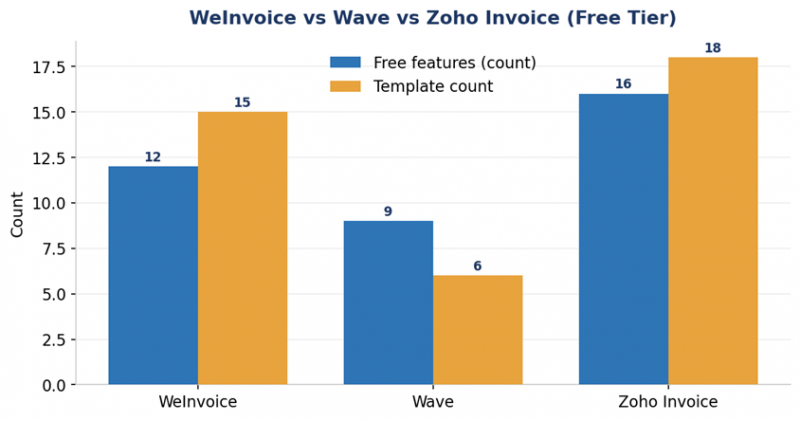
WeInvoice doesn't exist in a vacuum. The two most common free alternatives we compared it against are Wave and Zoho Invoice. The chart and table below show where each one wins.
| Feature | WeInvoice | Wave | Zoho Invoice |
|---|---|---|---|
| Price | Free / ~$5 to $7 mo | Free | Free |
| Unlimited invoices | Yes | Yes | Yes |
| Templates | 15+ | Limited | 18+ |
| Email tracking | Yes | Payments only | Yes |
| Recurring invoices | Paid | Limited | Yes (free) |
| Time tracking | Paid | No | Yes (free) |
| Mobile app | Browser | Yes | Yes |
| Payment gateways | Basic | Wave Pay | Multiple |
| Customer portal | No | No | Yes (free) |
| Best for | Fast free invoicing | Full accounting | Feature-rich free |
How to choose Pick WeInvoice for the fastest path to a clean, free invoice with zero learning curve. Pick Zoho Invoice if you want the deepest free feature set (recurring billing, time tracking, a client portal) and don't mind a steeper ramp. Pick Wave if invoicing is just one part of a broader need for free accounting. |
Who Should (and Shouldn't) Use WeInvoice
| Use WeInvoice if… | Look elsewhere if… |
|---|---|
| You're a freelancer or solopreneur | You need full accounting features |
| You send a manageable volume of invoices | You need automated recurring invoices for free |
| You want professional templates fast | You require a polished native mobile app |
| You like sending a first invoice without signup | You need built-in Stripe/PayPal checkout |
| You bill international clients in many currencies | You want time and expense tracking included |
Final Verdict
After two weeks of daily use, WeInvoice delivers exactly what it promises: fast, professional invoicing at no cost. The free tier comfortably handles the vast majority of a freelancer's needs, and the friction of getting an invoice out the door all but disappears. Its weak spots, namely no native app, limited in-app payments, email-only support, and no accounting integrations, are real, but they're the trade-offs of a tool that chose focus over breadth.
Our rating: 8.4 / 10
Upgrade to a paid plan only if recurring billing, automated reminders or time tracking are genuinely part of your workflow. Otherwise, the free version is one of the most efficient ways to bill clients today.
Post Comment
Share your thoughts about this article.
Be the first to post a comment!





