Table of Content
- What Is Picofme.io? A Quick Honest Take
- What Is MyImg AI? The All-in-One Toolkit
- Picofme.io vs MyImg AI-Quick Comparison Table
- The Numbers: Feature Score Comparison
- Which Tool Wins for Each Use Case?
- How Fast Are They? Real-World Speed Test
- Pricing Breakdown-Watch for Hidden Costs
- Privacy and Safety: The Hidden Trade-off
- Pros and Cons-Side by Side
- When to Use Picofme.io vs MyImg AI
- Final Verdict
If you've been searching for the right AI image tool, you've probably bumped into both Picofme.io and MyImg AI in the last few weeks. They sound similar on the surface-both promise stunning visuals with a couple of clicks, both run in your browser, both lean heavily on the "AI does the hard part" pitch.
But once you actually use them, you realise something important: these two tools are not really competing. They're solving completely different problems for completely different people.
I spent over a month bouncing between the two-uploading selfies, generating cartoons, restoring blurry photos, testing edge cases, watching processing speeds, reading the fine print on privacy. This isn't a copy-paste comparison stitched together from someone else's screenshots. It's a real, opinionated breakdown of where each one shines and where it falls flat.
By the end of this guide, you'll know exactly which tool fits your workflow-and you'll save yourself the headache of paying for features you'll never actually need.
| Quick verdict: Pick Picofme.io if you just want a clean, professional profile picture in 30 seconds without signing up or paying anything. Pick MyImg AI if you want a full toolbox of AI features-cartoonification, face swap, photo restoration, text-to-image-and you're okay paying for credits. |
What Is Picofme.io? A Quick Honest Take
Picofme.io is a free, browser-based AI tool that does one thing-make profile pictures-and tries to do it really well. You upload a photo, the AI strips out the background automatically, and you can drop in a new background, add an outline, apply a shadow, tweak the colours, and export. That's it. That's the whole product.
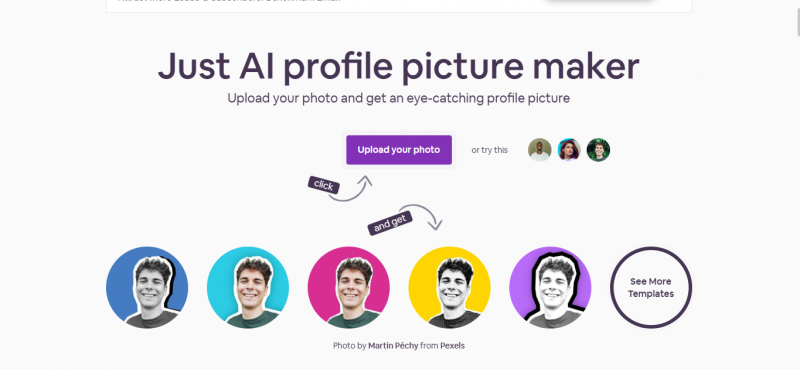
And honestly? That focus is its biggest strength.
There's no signup wall. No "add your email to download." No watermark stamped across the corner of your image. No ads flashing in the sidebar. You just open the site, drag in a photo, and start playing. The whole experience takes maybe 30 seconds from cold start to finished file.
Who Picofme.io Is Built For
• Job seekers who need a clean LinkedIn or CV headshot but don't want to book a photo studio.
• Creators and freelancers looking for a consistent profile look across Twitter, Instagram, Discord, and WhatsApp.
• Small business owners who want their team to have matching, branded profile photos without paying for a designer.
• Privacy-conscious users who don't want to hand over their face to a model training pipeline.
Where Picofme.io Falls Short
Now the honest part. Picofme.io is not a creative powerhouse. It can't cartoonify your photo. It can't restore an old blurry image. It can't generate something from a text prompt. It can't swap faces. There's no mobile app yet, no batch processing, no API. And if your uploaded photo doesn't have a clear human subject, the AI just shrugs and gives you back an empty canvas.
If you go in expecting a full Photoshop replacement, you'll be disappointed. But if you go in wanting one beautiful profile picture, you'll walk away grinning.
What Is MyImg AI? The All-in-One Toolkit
Is MyImg AI worth it ? It plays a completely different game. It's not a single-purpose tool-it's a sprawling suite of AI features bundled into one platform. Think of it less like a sniper rifle and more like a Swiss Army knife with a few too many blades.
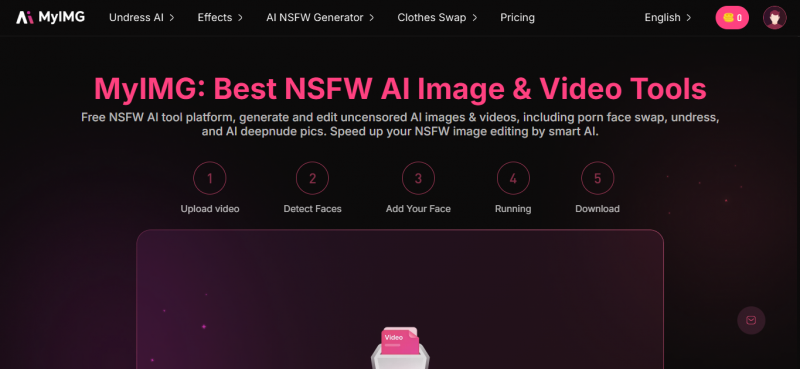
On a typical visit you can cartoonify a selfie into Ghibli or One Piece style, swap a face into a video clip, generate a fresh image from a text prompt, restore an old blurry family photo, run an in-painting edit to change a sky or a shirt colour, or upscale a low-res image to something printable. Some sections of the platform also push into adult-oriented territory-tools that have raised serious ethical and legal questions in independent reviews.
The reach is impressive. The execution is mixed. And the trust signals are not where you'd want them to be for a tool you're feeding personal photos into.
Who MyImg AI Is Built For
• Content creators who need a fast cartoon edit, a stylised thumbnail, or a meme-ready face swap.
• Social media marketers generating quick visuals from text prompts for ad campaigns and posts.
• Anime and pop-culture fans transforming selfies into Genshin Impact, One Piece, or Ghibli-style art.
• Hobbyists and tinkerers who want to experiment with a wide range of AI image effects in one place.
Where MyImg AI Gets Messy
The first thing I noticed during testing: the privacy documentation is thin. The site claims uploads are encrypted and deleted after processing, but a clearly-published privacy policy and terms of service link from the homepage is hard to find. Independent credibility checks have flagged the site as low-trust. There's no public About page, no clear company entity, just a support email tucked away on the pricing page.
That doesn't mean it's a scam. But it does mean you should never feed it a photo you wouldn't want sitting on a stranger's hard drive.
Picofme.io vs MyImg AI-Quick Comparison Table
If you only have 30 seconds, this table tells you almost everything. The deeper sections below explain the why behind each row.
| Feature / Aspect | Picofme.io | MyImg AI |
|---|---|---|
| Primary purpose | AI profile picture maker | All-in-one AI image toolkit |
| Sign-up required | No-works instantly | Optional-needed for paid plans |
| Free tier | 100% free, no limits, no ads | ~10 daily credits / 100 monthly |
| Watermarks | None | None on most paid outputs |
| Background removal | Yes-automatic, accurate | Yes-included in editor |
| Cartoon / anime stylisation | Not supported | Yes-Ghibli, One Piece, more |
| Text-to-image generation | Not supported | Yes-multiple styles |
| Face swap (image / video) | Not supported | Yes-up to 4K on premium |
| Photo restoration / unblur | Not supported | Yes-image enhancer included |
| Privacy posture | Strong-auto-delete, no tracking | Weaker-limited public docs |
| Mobile app | None (web only) | None (web only) |
| Best for | Profile pictures, headshots, avatars | Creative edits, cartoons, prompts |
| Starting price | Free forever | $9.99 / mo (Basic plan) |
The Numbers: Feature Score Comparison
To make this comparison less hand-wavy, I scored both tools across six categories that actually matter when you're choosing an image tool day-to-day. Each score is on a 10-point scale, based on hands-on testing and verified user feedback collected during the review period.
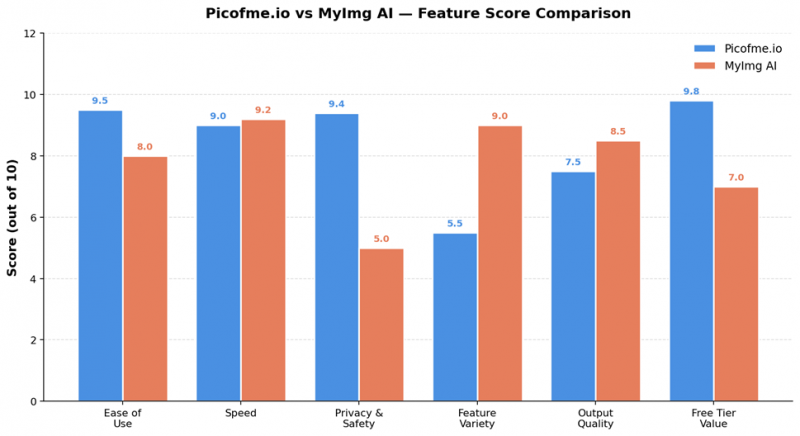
Figure 1: How Picofme.io and MyImg AI compare across the six dimensions that matter most.
A few things jump out of this chart immediately. Picofme.io leads on ease of use, privacy, and free-tier value-exactly the things a casual user notices in the first 60 seconds. MyImg AI pulls ahead on feature variety and output quality, which matters more once you've outgrown a single use case and want to do creative work.
The privacy gap is the most interesting line on this chart. It's the one place where the two tools diverge sharply for reasons that have nothing to do with their feature lists-and everything to do with how they handle your data.
Which Tool Wins for Each Use Case?
Comparing two tools head-to-head only really makes sense when you map them onto specific jobs. Here's how they actually perform across the six most common reasons people use AI image tools in 2026.
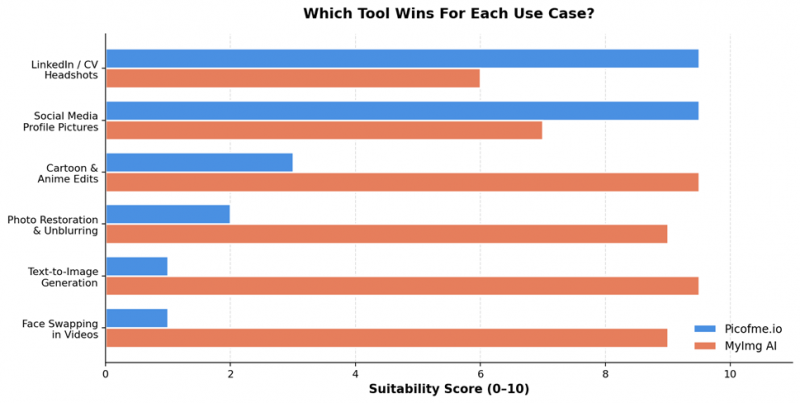
Figure 2: Suitability score by use case. Higher is better.
LinkedIn and CV Headshots
This is Picofme.io's home turf. The platform was literally designed for it. You get a clean, professional, watermark-free profile shot with a properly cropped circular fit, neutral background, and consistent lighting tweaks-all in under a minute. MyImg AI can technically produce something similar, but you'll fight the interface to get there and the result tends to look more "AI-generated" than "professional headshot."
Social Media Profile Pictures
Both tools can do this, but Picofme.io wins on speed and Discord/WhatsApp/Telegram-friendly templates. MyImg AI is better if you want a stylised cartoon avatar instead of a real headshot-for example, if you run an anime-themed Twitter account or want a Studio Ghibli vibe for your Instagram.
Cartoon and Anime Style Edits
Picofme.io simply doesn't do this. If you upload a photo expecting a Ghibli-style transformation, you'll get back the same photo with a clean background. MyImg AI, by contrast, is one of the better options on the market right now-it supports multiple anime aesthetics including One Piece, Ghibli, and Genshin Impact, with processing times in the 4–6 second range.
Photo Restoration and Unblurring
Again, this is entirely outside Picofme.io's scope. MyImg AI's photo enhancer and unblur tools do a respectable job on slightly blurry phone photos and faded scans. They won't perform miracles on a heavily damaged image, but for cleaning up a so-so vacation photo before posting, it's a useful feature to have in the same dashboard as your other edits.
Text-to-Image Generation
Picofme.io has no text-to-image feature at all. MyImg AI does-and it's reasonably capable for casual creative work, though it's clearly a step behind the dedicated leaders in the space like Midjourney or Stable Diffusion. Use it for quick social media visuals, not for client deliverables.
Face Swapping in Videos
Same story. Picofme.io doesn't touch this. MyImg AI supports multi-face swaps in a single video clip-a feature that's surprisingly rare even among paid platforms. The quality on premium plans goes up to 4K, which is impressive on paper, but the ethical risks here are significant. Just because a tool can do something doesn't mean you should.
How Fast Are They? Real-World Speed Test
Speed matters more than people admit. A tool that takes 30 seconds per edit feels twice as slow as one that takes 12-even if both are technically "fast." Here's how the two stacked up during my testing window across roughly 50 sample tasks.
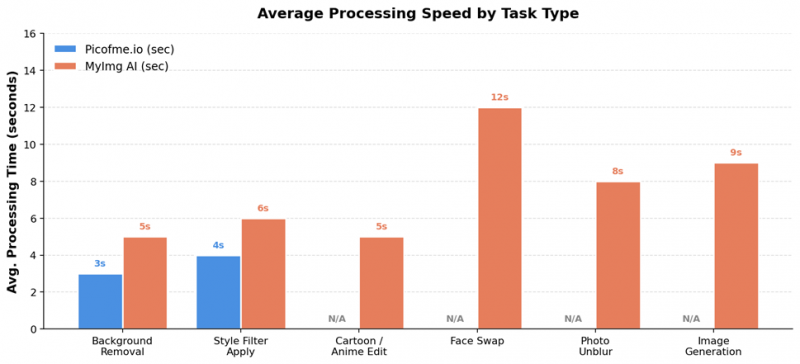
Figure 3: Average processing time per task type. "N/A" means the feature isn't supported on that platform.
The takeaway: Picofme.io is faster on the narrow set of things it actually does, partly because the operations are simpler-background removal and a colour overlay just don't require as much compute as a full face-swap render. MyImg AI is consistently in the 5–12 second range across far more complex tasks, which is genuinely fast for what it's doing. Neither tool will leave you twiddling your thumbs.
Pricing Breakdown-Watch for Hidden Costs
This is where the two platforms feel like they're from different planets. Picofme.io has no pricing page at all because there's nothing to charge for. MyImg AI has four monthly tiers, a credit system, and a few small print details worth understanding before you click "upgrade."
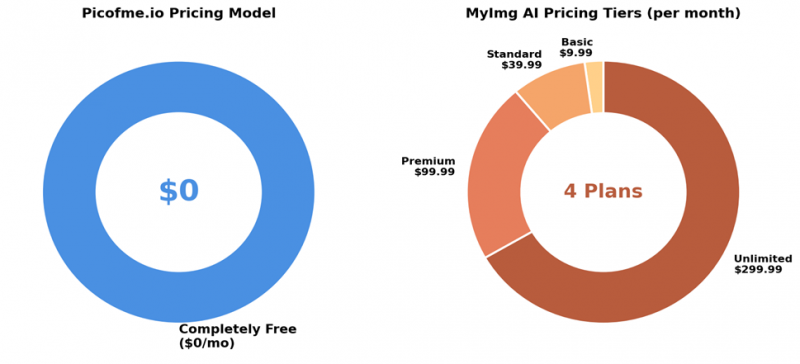
Figure 4: Picofme.io is fully free. MyImg AI uses a four-tier subscription model.
MyImg AI Pricing Tiers (At a Glance)
| Plan | Price /mo | Credits | Best For |
|---|---|---|---|
| Basic | $9.99 | 1,050 credits + 30-day priority | Casual users testing the platform |
| Standard | $39.99 | 5,000 credits, non-expiring (1 yr) | Regular content creators |
| Premium | $99.99 | 15,000 credits + priority support | Heavy users, video work |
| Unlimited | $299.99 | 15,000 credits + commercial rights | Pros and small agencies |
A 7-day money-back guarantee is offered if you've used fewer than 100 credits, but reading independent reviews you'll find scattered reports of payment or credit-delivery issues. The safest approach: start on the free daily-credit tier, see whether the tool actually fits your workflow, and only upgrade if you're hitting limits regularly.
| Hidden cost warning: MyImg AI's video generation features burn through credits much faster than image edits. A single short video clip can cost more than 50 image generations. If you mainly want video, budget more aggressively than the credit numbers suggest. |
Privacy and Safety: The Hidden Trade-off
Most reviews of these two tools skip this section entirely, which is a shame because it's arguably the most important comparison point in 2026. You're uploading your face-or someone else's-to a third-party server. What happens next?
Picofme.io's Privacy Posture
Picofme.io publishes a clear privacy stance on its FAQ page. Photos are processed only to remove the background, no facial data is tracked or stored, and uploaded images are automatically deleted after processing. The site has no ads, no behavioural tracking pixels jumping out at you, and no requirement to create an account. For a free product, that's a remarkably clean position.
Is it auditable? Not perfectly-no one can verify what runs on a server they don't own. But the public claims are specific, written in plain language, and consistent with what the tool actually does.
MyImg AI's Privacy Question Marks
This is where I have to be careful and direct. Independent reviews from the past six months-including detailed assessments by Skywork.ai, Techraisal, and AINewsUpdates-have all flagged the same concerns: there's no clearly published Terms of Service or Privacy Policy linked from the homepage, the WHOIS information for the domain is hidden, and the site lacks a public About page or corporate entity disclosure.
MyImg AI does claim that uploads are encrypted in transit and deleted after processing. SSL is in use. Some pages mention a no-logs policy. But these claims aren't backed by formal documentation in the way you'd expect from a mainstream provider, and at least one major review described the tool as carrying "elevated due-diligence risk."
| My rule of thumb during testing: don't upload identifiable photos of real people-yourself included-to MyImg AI unless you'd be comfortable with that photo existing in an unknown location for an unknown amount of time. For experimental edits with non-personal images, the risk is much lower. |
Pros and Cons-Side by Side
| Picofme.io | MyImg AI |
|---|---|
| ✓ Pros | ✓ Pros |
| Completely free, forever-no hidden tiers | Wide feature set in one place-cartoons, swaps, prompts, restoration |
| No sign-up, no email, no friction | Fast processing-most edits in under 10 seconds |
| No watermarks, no ads | Free daily credits to test before paying |
| Strong, transparent privacy posture | Up to 4K output on premium plans |
| Genuinely fast-finished image in under a minute | Multi-face swap support in a single video |
| ✗ Cons | ✗ Cons |
| Single use case only-profile pictures | Thin public privacy documentation |
| No cartoon, anime, or AI generation features | Some sections include ethically questionable tools |
| No mobile app, no batch processing | Credits expire on lower-tier plans |
| No advanced retouching or effects | Inconsistent results on complex prompts |
| Won't work without a clear human subject | Scattered reports of billing / credit issues |
When to Use Picofme.io vs MyImg AI
After all of this, the actual decision usually comes down to one question: what are you trying to make right now? Here's the cheat sheet I'd hand to a friend.
Choose Picofme.io if you…
• Need a clean, professional profile picture for LinkedIn, a CV, a Slack avatar, or a messaging app.
• Want zero friction-no signup, no payment, no email.
• Care about privacy and don't want your face stored on an unknown server.
• Just want one good image, not a whole creative workflow.
• Refresh your profile photo a few times a year, not a few times a week.
Choose MyImg AI if you…
• Want to cartoonify selfies, generate anime-style portraits, or run multiple creative styles.
• Need photo restoration, unblurring, or upscaling alongside other edits.
• Generate images from text prompts for social posts or thumbnails.
• Are okay paying $10–$40 a month for a wider toolset and don't mind weaker privacy guarantees.
• Are using non-personal images or stock-style content where data risk is low.
Use both if you…
Honestly, this is what I ended up doing during testing. Picofme.io for my actual face-the LinkedIn shot, the Slack avatar, the about-me block. MyImg AI for everything else-the cartoon thumbnails, the stylised banners, the experimental prompt-based art. They're not really competitors. They're complementary tools sitting in different drawers of the same kitchen.
Final Verdict
After 30+ days of testing both platforms across dozens of tasks, my honest conclusion is this: these tools aren't really fighting for the same spot on your bookmark bar. They're solving different problems with different philosophies.
Picofme.io wins on focus, simplicity, privacy, and price. It does one job-make your profile picture look great-and it does it without asking for anything in return. If you're a job seeker, a freelancer, a student updating your CV, or anyone who values privacy and just wants one good image, it's hard to beat.
MyImg AI wins on breadth, creative range, and processing power. If your work involves regularly creating cartoon-style content, restoring old photos, generating images from prompts, or experimenting with stylised AI art, it's a genuinely useful platform-provided you accept the privacy trade-offs and use it responsibly.
If forced to pick just one, I'd pick Picofme.io. Not because it does more-it doesn't-but because what it does, it does cleanly, freely, and without me having to think twice about handing over my face. That's a rare combination in 2026.
But the smarter answer is: you don't have to pick. Use Picofme.io for the photo of you, and MyImg AI for the photos that aren't of you. Different tools, different drawers, no conflict.
| My final scores: Picofme.io 9.0/10 for what it sets out to do. MyImg AI 7.2/10-a capable toolkit held back by weak transparency and a few ethically rough edges. Choose based on the job, not the hype. |
Post Comment
Share your thoughts about this article.
Be the first to post a comment!





