What Is MyImg AI?
MyImg AI is a web-based AI image editing and generation platform. It allows users to upload photos or enter text prompts and then apply AI-powered transformations such as cartoon effects, face swaps, image enhancement, and AI-generated visuals.
From my experience, MyImg AI is designed more for quick, fun, and experimental image edits rather than professional-grade photo editing. It’s browser-based, so there’s no software installation required.
MyImg AI Features
Here’s a breakdown of the main tools I found while using MyImg AI:
AI Image Generation
- ● Converts text prompts into images
- ● Supports different styles like anime, cartoon, artistic, and realistic
- ● Results are fast, though not always consistent in quality
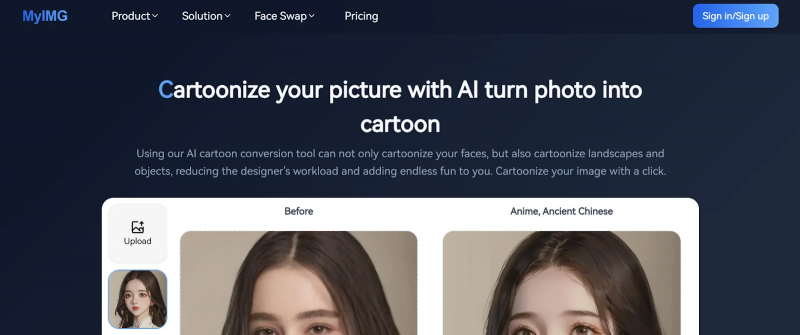
Photo-to-Cartoon / Anime
● Upload a real photo and transform it into:
○ Cartoon-style
○ Anime-style
○ Illustrated portraits
This is one of the most popular and best-performing features
Image Enhancement & Upscaling
- Improves blurry or low-resolution images
- Helpful for basic sharpening and clarity
- Not as advanced as professional AI upscalers, but decent for casual use
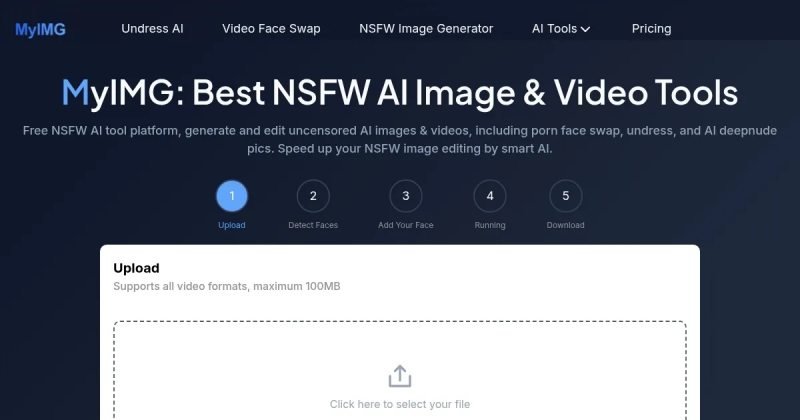
Face Swap & Face Editing
- Allows face replacement in images
- Accuracy varies depending on image quality
- This feature works but requires caution
MyIMG Also Supports AI Video Tools
MyIMG’s current platform extends beyond still-image editing.
Its official Terms describe support for:
- Text-to-image generation
- Image-to-image generation
- Text-to-video generation
- Image-to-video generation
- Photo face swapping
- Video face swapping
The current pricing documentation also lists different maximum AI-video lengths depending on the plan.
MyIMG currently states that:
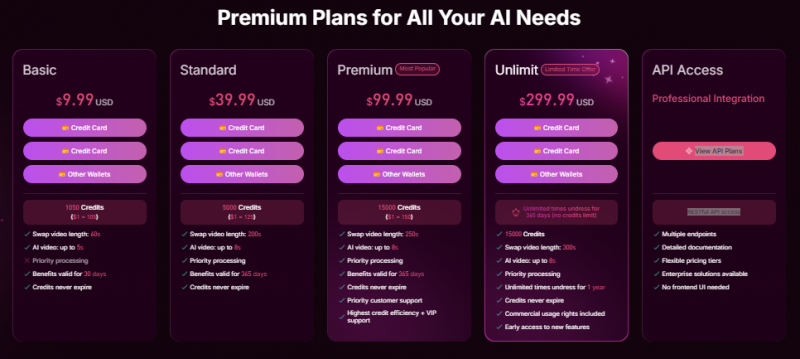
- Free users can generate AI videos up to 3 seconds
- Basic-plan users can generate videos up to 5 seconds
- Premium, Unlimit, and Unlimit Pro users can generate AI videos up to 8 seconds
Video face swapping is treated differently. MyIMG states that some higher plans can process substantially longer source videos, including up to 300 seconds under certain plans.
This is useful to distinguish from AI video generation itself, which has a shorter output-duration limit.
NSFW / Adult Tools (High Risk Area)
- Some sections of the platform include adult-oriented AI tools, such as clothing removal or explicit image generation
- These features raise serious ethical, legal, and consent concerns
- I personally avoided testing these tools
MyIMG now places an age notice directly at the entrance to the website.
The platform states that its adult content is available exclusively to users who are 18 years of age or older.
Its Terms of Use and Content Policy repeat this requirement.
MyIMG also states that content involving minors is prohibited, including material that involves or appears to involve minors whether the subject is real, fictional, cartoon-based, or AI-generated.
The company says suspected violations can lead to account termination and reporting to relevant authorities.
Consent Is Now an Explicit Platform Rule
MyIMG’s current policies also impose specific consent requirements when real people appear in uploaded images.
According to the Terms and Content Policy, a user uploading an image of a real person must either be the person shown in the image or have that person’s explicit, documented consent for AI processing.
The policies specifically prohibit non-consensual face swaps, undressing, sexualized deepfakes, revenge pornography, and other non-consensual intimate imagery.
They also prohibit unauthorized sexualization of celebrities and public figures.
This means the availability of a face-swap or clothing-removal tool should not be interpreted as permission to use someone else’s likeness without consent.
MyImg AI Pricing: What Does It Cost?
Based on tool listings and my usage:
Pricing Model
● Free tier available
○ Limited daily credits
○ Watermarked or lower-quality outputs
● Paid plans / credit bundles
○ One-time purchases (credits-based)
○ Pricing reportedly ranges from low-cost starter packs to high-value bundles
What Do Paid Plans Unlock?
MyIMG’s current pricing page says its paid plans generally provide access to the same core tool set, with differences involving credit allowances and plan-specific limits.
Paid benefits currently advertised include:
- Access to AI tools
- Higher-resolution output
- No watermark
- Priority generation
- Longer video processing
- Commercial-use rights
- Additional credits
The higher Unlimit Pro tier is advertised as providing unlimited use of selected tools, including Undress AI and AI Image-to-Image, for 365 days.
Users considering a purchase should still verify the current checkout screen because plans and pricing can change.
Important note:
Some users across review platforms reported payment or credit delivery issues, so it’s best to start free and avoid large purchases upfront.
MyIMG’s Current Refund Policy
MyIMG currently publishes a dedicated Refund Policy.
The company says users can qualify for a full refund when:
- The request is made within 30 days of purchase, and
- Less than 20% of the purchased credits have been used, meaning at least 80% remain.
The Refund Policy says purchases are not eligible when more than 20% of the credits have been consumed, when the purchase is more than 30 days old, or when an account has been terminated for violating MyIMG’s Terms or Content Policy.
Successfully delivered generations without a technical fault are also listed as non-refundable.
When a generation fails because of a platform error, MyIMG says the credits are normally returned to the account rather than refunded as cash.
Approved refunds are returned to the original payment method, although the actual time taken to appear can depend on the payment processor or bank.
How Are Payments Processed?
MyIMG says payment transactions are handled through third-party PCI-compliant payment providers and that it does not store full card details on its own servers.
The current pricing page lists payment options including:
- Visa
- Mastercard
- American Express
- Apple Pay
- Google Pay
- Selected cryptocurrencies, including Bitcoin, Ethereum, and USDT
This provides more payment-policy detail than simply describing MyIMG as a credit-based service.
User Reviews and Public Sentiment
One of MyImg AI’s most frequently noted strengths is its simplicity and speed. Basic edits like turning a photo into a cartoon or applying a stylized filter take just a few seconds, and most tools are accessible without complicated menus or workflows.
For beginners or casual creators, this low barrier to entry is appealing. The platform doesn’t require installations, plugins, or design expertise, just upload, click, and download.
However, advanced features such as face swap or video editing may still produce mixed results depending on image quality or lighting conditions, and creative control is limited compared with professional software.
Safety, Privacy and Trust Signals You Should Know
This is where MyImg AI becomes much more complicated.
Privacy Transparency Is Limited
Some listings claim that uploaded images are encrypted during processing and deleted afterward, but official privacy documentation, terms of service, and data-handling policies are either hard to find or not clearly published on the main site.
Mixed Trust Assessments from Security Tools
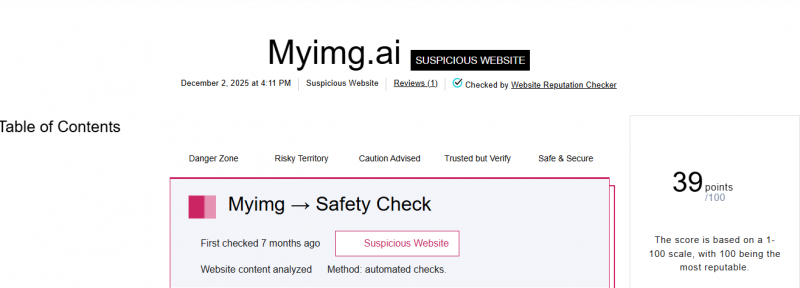
Reputation analysis tools have flagged the domain with a low trust score and “suspicious” indicators, including blacklisting by some security providers, though automated checks are not definitive proof of harm, they do suggest the need for caution before uploading personal or sensitive media.
Reviews Are Mixed
User reviews across platforms vary widely, with some praising creative features and ease-of-use, and others reporting delayed or missing credits, unresponsive support, and unclear billing.
When tools are listed in directories or review aggregators, contrasting opinions on safety, privacy, and performance are common. That divergence likely stems from the tool’s blend of benign creative functions and controversial deepfake capabilities.
What MyIMG Says Happens to Uploaded Images
MyIMG now makes a specific data-retention commitment.
Its Privacy Policy says uploaded material and generated content are automatically and permanently deleted within 24 hours of processing, with no backups retained.
The platform’s homepage and pricing materials repeat this claim.
There is, however, an important exception.
Content flagged by MyIMG’s safety systems or reported by users may be retained when required for investigation, legal compliance, or reporting.
That means “deleted within 24 hours” should not be interpreted as an absolute guarantee that prohibited or reported material can never be preserved.
Does MyIMG Use Uploads for AI Training?
MyIMG’s current pricing FAQ states that uploaded user data is not used to train its AI models.
The company also states that staff members do not have access to uploaded and generated content during normal processing.
These are company-stated privacy commitments rather than the results of an independent technical audit, so privacy-sensitive users should still apply appropriate caution when uploading identifiable material.
How MyIMG Handles Facial Data
Because MyIMG includes face-swapping and other face-based tools, its treatment of facial information is especially relevant.
The current Privacy Policy says the platform temporarily detects facial landmarks while an image is being processed.
According to the policy:
- Facial landmarks are processed in an isolated environment
- The temporary facial data is discarded after processing
- MyIMG says it does not create permanent facial profiles
- It says it does not retain biometric templates
- It states that biometric information is not sold or shared
The Privacy Policy also specifically references biometric privacy requirements including Illinois BIPA and Texas biometric-information law, alongside GDPR requirements where applicable.
This is more detailed information than a general statement that uploaded photos are encrypted.
What I Recommend Personally
- Do NOT upload personal, family, or identifiable photos
- Avoid using real faces if possible
- Use test images or stock photos
- Be cautious with payments
MyImg AI isn’t necessarily a scam, but it doesn’t offer the transparency or trust level of bigger AI brands.
Pros and Cons
Pros
Easy to Use and Web-Based
Most tools are browser-based with a simple upload-and-generate workflow , with no installation needed.
You can usually test basic features without signing up first.
Fun Creative Output
The platform supports cartoon/anime stylization, face swapping, enhancement, and other creative transformations that many users enjoy experimenting with for fun or social posts.
Free Tier Available
A free plan with limited daily credits is often offered, so users can try some features before paying.
Multiple Feature Types in One Place
Combines image generation and editing tools (e.g., stylization, upscaling, video tools in some listings).
This variety makes it useful for different casual image modification needs without multiple platforms.
Cons: Issues & Risks You Should Know
Trust & Safety Concerns
Several independent credibility checks rate the site as low-trust or suspicious, meaning you should be careful about uploading sensitive photos or personal data.
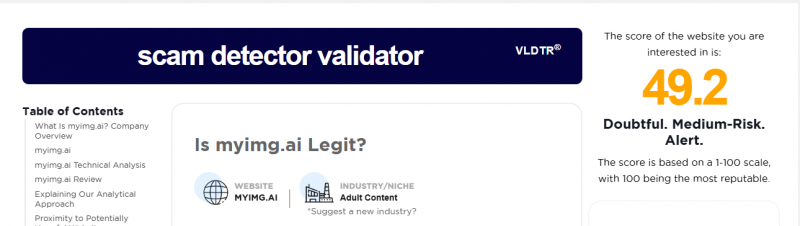
Some security tools flagged unclear ownership and possible risk signals, even suggesting users avoid providing personal information. (Gridinsoft LLC)
Mixed Reputation on Payments
There are user-reported problems on some review sites about credits not being delivered or poor customer support after purchase so paid features may carry risk.
Ethical & Legal Gray Areas
The platform’s promotion of NSFW and deepfake-style features raises serious ethical and legal concerns in many jurisdictions, especially if used without consent.
Quality & Consistency Vary
Output quality can fluctuate depending on the input and tool used; some edits are impressive, others less so.
Privacy & Data Transparency Issues
Although some listings claim encryption and deletion of uploads, there’s no fully clear published privacy policy about what happens to your data long-term. That’s a potential risk if you use personal images.
Cloud-Only & Internet-Dependent
Like most web AI tools, it needs a good internet connection and won’t work offline, which can be frustrating in low-connectivity areas.
Final Verdict: Is MyImg AI Worth Using?
Based on my own hands-on experience and research, MyImg AI feels more like a fun, experimental tool than a serious creative platform.
I found it works best for casual use, trying out creative ideas, experimenting with styles, or transforming non-personal images just for fun. If you’re curious about AI image tools and want something simple without a steep learning curve, MyImg AI can be enjoyable to explore.
However, I personally wouldn’t recommend it for uploading real personal photos or using it for professional design work. The lack of strong transparency around privacy and data handling made me cautious, and that’s a deal-breaker for sensitive or high-value projects.
If the creative features are what drew you here, it is worth knowing that none of them are unique to MyImg AI. Cartoon and anime filters, image upscaling, and text-to-image generation are all available from established platforms with published privacy policies, clear billing, and accountable companies behind them, often with comparable free tiers. Paying a small convenience premium in credits is one thing; paying it in personal photos uploaded to a service with a flagged domain and no clear data policy is another. For anything beyond throwaway experiments with stock images, a mainstream alternative gives you the same output with far less to worry about.
Overall, if you use MyImg AI responsibly and keep your expectations realistic, it can be an entertaining tool. But due to privacy and trust concerns, it’s not something I’d rely on for serious, long-term, or personal use.
Post Comment
Share your thoughts about this article.
Be the first to post a comment!