AI-powered video tools have exploded in 2025, but few aim to combine flexibility, speed, and creative control quite like Reelcraft AI and Hypernatural AI.
Positioned as a no-code video creation platform, Hypernatural claims to transform scripts, audio, blogs, or podcasts into polished, multi-platform videos—with AI-generated B-roll, narration, styles, and more.
In this article, we break down what Hypernatural does well, where it still needs work, and how it compares to better-known tools like Synthesia, Descript, and Lumen5.
What Sets Hypernatural AI Apart?
Unlike platforms built around stock footage, Hypernatural focuses on AI-first content generation. It has a rating of 4.4 on the Google Play Store.
This means users can:
- Generate unique, script-matched B-roll (do not reuse old stock)
- Choose from 200+ creative styles (anime, noir, comic, gothic)
- Build reusable avatars for a consistent brand presence
- Start from text, audio, podcast, or existing video
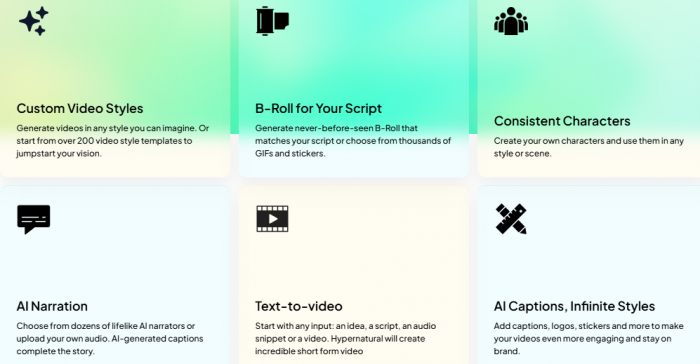
These features position Hypernatural as a flexible solution for marketers, creators, and teams looking to scale content without losing uniqueness.
That flexibility becomes more meaningful when paired with real features, so let’s unpack them.
Core Features
| Feature | Description |
| Text-to-Video | Turns blogs, scripts, or bullet points into full videos |
| AI B-Roll | Creates new visuals to match the tone of the script |
| Custom Styles | Over 200 presets + unlimited user-created looks |
| Voiceovers | 40+ AI narrators with natural pacing and tone |
| Reusable Avatars | Build branded characters for long-term use |
| Multi-Format Export | Vertical + horizontal outputs for TikTok, YouTube, LinkedIn |
| Batch Creation | Generate multiple videos from one session |
| Collaboration & Feedback | Multi-user support for agencies and teams |
| Analytics | Built-in performance insights post-publish |
Hypernatural’s emphasis on reusable characters, script-driven visuals, and style control appeals to creators who care about storytelling, not just fast output.
Supported Input Types: Text, Audio, and More
Hypernatural supports multiple media input formats, including:
- Blog articles and website content
- Podcast episodes and raw voice recordings
- YouTube videos for repurposing
- Bullet-point outlines and AI-generated prompts
This allows creators to turn any form of content—past or new—into consistent, stylized video assets.
Template Styles and Creative Flexibility
Hypernatural’s template engine includes:
- Anime, comic, noir, cinematic, gothic, sci-fi, news-style, infographic, chalkboard, and more
- The ability to customize transitions, color tones, animation speed, and B-roll behaviors
- Save your brand's look by reusing character avatars and layouts
These templates help creators stand out with formats beyond the usual slideshow or whiteboard style.
Use Cases: Creators, Educators, and Brands
Solopreneurs turn blog posts into LinkedIn videos.
- YouTubers repurpose podcast content into 3–5 Shorts per episode.
- Educational creators use comic-style templates to explain complex topics.
- Agencies deploy team-based workflows with style-locking for clients.
Who Gets the Most Out of It (By Group)
• Bloggers: turn your archive into video without writing anything new; one post becomes one LinkedIn video plus two Shorts.
• Podcasters: pull 3 to 5 promo clips per episode; the clip selection is good, just budget time for caption cleanup.
• Educators: the comic and chalkboard styles turn dry explanations into visuals students actually watch.
• Faceless YouTube channels: AI narration plus generated B-roll means a full pipeline with no camera and no voice recording.
• Agencies: style-locking and multi-user access keep client branding consistent across a team.
• Founders: product update posts and changelogs become quick announcement videos without hiring an editor.
Who Should Avoid It
• Editors who need full timeline control; there is no frame-level editing here.
• Anyone chasing realistic, cinematic footage; the output is stylized, not filmic.
• Teams with strict brand guidelines; you can lock styles, but exact font, color, and motion rules are hard to enforce.
• Creators who do not want to think about credits; every regeneration has a cost, and that mental overhead is real.
Common Limitations and Drawbacks
| Limitation | What It Means |
| Short videos on the free plan | Only up to 30 seconds with a watermark |
| Credit system | Heavy usage = faster credit depletion |
| AI mismatches | Visuals may not perfectly match the tone—requires edits |
| No timeline editor | Not ideal for frame-level or nonlinear editing needs |
A few more limitations worth knowing before you commit:
• Long blog posts need trimming first; anything past roughly 1,500 words gets compressed aggressively and loses nuance.
• Podcast inputs need transcript cleanup; filler words and crosstalk flow straight into captions otherwise.
• AI visuals do not always match the topic, especially for abstract or niche subjects.
• First drafts are rarely publish-ready; plan for 5 to 15 minutes of polish per video.
• It is not a replacement for CapCut, Premiere Pro, or Descript. It is a first-draft generator, and those are finishing tools.
Still, Hypernatural addresses many of these through frequent updates.
New Features and Roadmap
Recent improvements include:
- Support for longer video output (10+ mins)
- More expressive, realistic avatars
- Enhanced collaboration features
- Voice cloning under development
- Integrated YouTube + Shorts publishing tools
- Analytics for A/B testing thumbnails and performance
Upcoming plans include social handle checker, improved script writing models, and smart asset suggestions.
A note on roadmap items: treat everything listed as "upcoming" or "under development" as unconfirmed until it ships. AI tools announce features that slip or get cut all the time. Before making a purchase decision based on a promised feature, check Hypernatural's official changelog or announcements for current status.
Comparison: Hypernatural vs Other AI Video Platforms
| Tool | Strengths vs Hypernatural | Weaknesses |
| Lumen5 | Beginner-friendly | Limited visuals, fewer styles |
| Pictory | Strong text-video conversion | Weak avatar/narration tools |
| Descript | Precise editing | Steeper learning curve, audio-centric |
| Synthesia | Realistic avatars | Expensive, template-restricted |
Hypernatural fills the gap between speed and style—it offers more creative freedom than Lumen5, better visuals than Pictory, and a simpler UX than Descript.
Final Verdict: Who Should Use Hypernatural AI?
Hypernatural AI is ideal for:
- Marketers and creators who want to batch video content from existing assets
- Educators and podcasters looking to scale across YouTube, TikTok, and LinkedIn
- Agencies that need brand consistency, fast turnaround, and multi-user access
Avoid if:
- You need advanced cinematic editing or full timeline control
- You want a truly free platform without limits
Bottom Line: For creators who value speed, style, and reuse, Hypernatural AI is one of the most promising video automation tools available in 2025. It balances creativity with automation, and it’s still getting better.
Post Comment
Share your thoughts about this article.
Recent Comments
Rachel Johnson
May 12, 2026The batch creation feature saved me so much time. I generated multiple videos from a single session, which sped up my content creation process significantly. It’s ideal for creating a series of videos with the same theme or style. The only downside is that the process can drain credits faster, so keep an eye on that if you’re working with a large batch.
Login to replyOlivia Harris
May 12, 2026I really like the custom styles in Hypernatural AI. With over 200 presets and the option to create unlimited looks, it gave me a lot of creative freedom. I was able to easily customize the design to fit my brand, and the results were professional. The variety of options makes it suitable for different video types. However, some of the presets didn’t align with my branding, so I had to adjust them.
Login to reply