Quick Verdict
| What it is | An AI animated-story video generator: type a prompt or script, get a full animated video with storyboard, characters, narration and music |
| Verdict in one line | Genuinely fast prompt-to-animation for storytellers; not a replacement for a real short-form editor |
| Pricing | Free signup credits; paid plans from $15/mo (250 credits) to $99/mo (3,000 credits), yearly discount available |
| Standout features | One-click story-to-video pipeline, per-scene character control, voice cloning, 4K and 3D animation styles |
| Biggest weaknesses | Character consistency can drift between scenes, the post-generation editor is bare-bones, occasional server errors, and no refunds on subscriptions |
| Best for | Educators, authors, marketers and founders who need animated explainers or story videos without animation skills |
| Ratings snapshot | G2 5.0, Capterra/GetApp about 4.7, Trustpilot 3.3 (small review counts on all; treat as directional) |
Short-form videos are no longer optional for marketers, creators, or small business owners—they're essential. Many AI video tools have been created, such as Pixverse AI, Invideo AI, etc. ReelCraft AI positions itself as a tool designed to simplify the process.
Built for platforms like TikTok, Instagram Reels, and YouTube Shorts, ReelCraft uses automation to streamline scripting, editing, and visual effects. But does it actually deliver on that promise? Let’s explore the tool in depth.
What Makes ReelCraft AI Different from Other Video Tools?
ReelCraft AI claims to speed up the content creation process without compromising quality. Its main edge lies in automating traditionally time-consuming tasks like scriptwriting, timing edits, and applying visual effects. It has a 5.0-star rating on G2 and a 3.3-star rating on Trustpilot.
While many tools focus on templates or manual editing, ReelCraft addresses the workflow holistically by:
- Automating script generation based on the platform and niche
- Providing trendy visual templates and effects optimized for virality
- Enabling one-click voiceover and background music integration
These features collectively support creators in maintaining consistency and output volume across multiple platforms.
If you find traditional video editing tools too complex or time-consuming, ReelCraft AI could offer a more accessible solution.
Step-by-Step: How ReelCraft AI Works in Practice
Although ReelCraft is no longer available, its original creation workflow generally followed these steps:
1. Start a New Project
Users began by creating a project and entering an idea, story outline, rough draft, or completed script.
ReelCraft could either expand a simple concept or follow a more detailed script supplied by the user.
2. Generate the Script and Story Structure
If the user entered only a short idea, the AI could develop it into a fuller narrative.
This reduced the amount of manual scriptwriting required, although users still needed to review the generated text for accuracy, tone, pacing, and brand suitability.
3. Create Individual Scenes
ReelCraft divided the story into smaller scenes and generated the visuals needed for each section.
Depending on the project, these scenes could include:
- Animated characters
- Generated environments
- Story-specific objects
- Camera changes
- Stylized backgrounds
- Visual transitions
The individual scenes were then combined into a complete video.
4. Add Characters, Voices, and Narration
Users could select from the available character styles, models, and AI voices.
The platform also generated narration and attempted to maintain the same characters throughout the story.
Character consistency was one of ReelCraft’s better-known strengths, although the quality could still vary when a script contained complicated actions or several characters.
5. Review and Regenerate Scenes
Users could review each part of the video and regenerate scenes that did not match the intended result.
They could also adjust:
- Scene prompts
- Spoken dialogue
- Narration
- Character descriptions
- Visual instructions
This gave users more flexibility than a one-click generator, although it did not provide the detailed timeline controls found in professional editing software.
6. Export the Final Video
Depending on the plan and platform version, ReelCraft supported high-resolution animated output, including 4K and 3D video capabilities.
The finished videos could be adapted for social media, educational content, storytelling, business presentations, book trailers, promotional campaigns, and YouTube videos.
The workflow was accessible to beginners, but more complicated scripts often required several generations before the scenes accurately reflected the intended story.
ReelCraft AI Pricing Tiers
As of now, pricing details haven’t been officially disclosed. However, based on industry standards, these are the expected tiers:
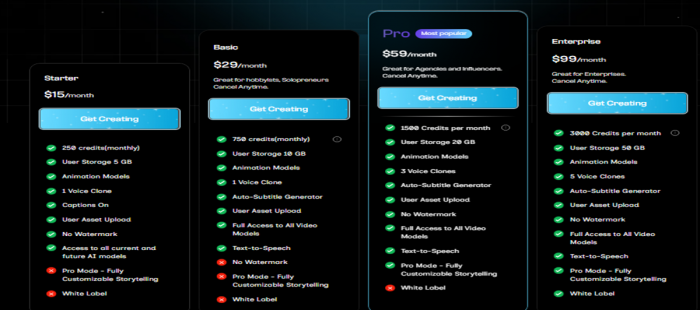
The Pro plan is likely to appeal to influencers and small businesses, while the Business plan suits marketing teams and agencies.
| Plan | Price (monthly) | Credits / storage | Key features |
|---|---|---|---|
| Free | $0 | Signup credits (about 125), 5 GB era limits | Try the pipeline; watermark-free exports are a paid feature |
| Starter | $15/mo | 250 credits/mo, 5 GB | Animation models, 1 voice clone, captions, user asset upload, no watermark |
| Basic | $29/mo | 750 credits/mo, 10 GB | Everything in Starter + auto-subtitle generator, text-to-speech, full access to all video models |
| Pro (most popular) | $59/mo | 1,500 credits/mo, 20 GB | 3 voice clones, all current and future AI models, Pro Mode fully customizable storytelling, white label |
| Enterprise | $99/mo | 3,000 credits/mo, 50 GB | 5 voice clones, all features, highest volume |
• Yearly billing is available at a discount; toggle on the pricing page.
• All paid plans include commercial licensing, so business use starts at $15/mo, not at an agency tier.
• Credits are the constraint: rendering scenes, regenerating shots and premium animation models draw from the monthly pool, so plan for retries when budgeting (Capterra reviewers note failed generations during server issues).
• No refunds: third-party listings report ReelCraft does not offer partial or full refunds on subscriptions, so start monthly, not yearly, until you trust the output.
• Lifetime-deal note: many current users bought via AppSumo tiers; those legacy plans differ from the site's subscription plans.
Choosing the right plan depends on how often you create videos and how important advanced branding is to you.
What Users and Creators Value Most
While user reviews are still emerging, sentiment from similar tools gives us insight into common expectations.
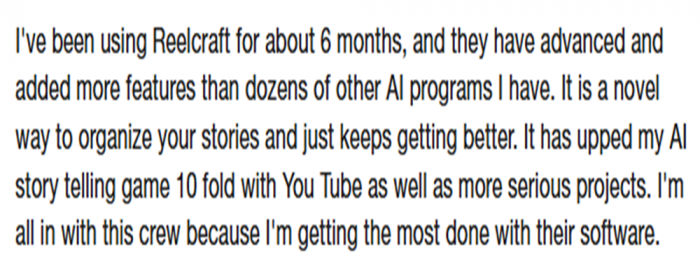
Users typically value:
- Script Automation: Saves creative energy and time
_1751270637.png)
- Drag-and-Drop Editing: Lowers the learning curve
- On-Trend Visuals: Keeps content aligned with social media trends
- Voiceover Integration: Adds polish without extra cost

ReelCraft seems to be aiming for a balance between power and ease-of-use, something many video tools struggle to achieve.
Real-World Comparisons: How ReelCraft AI Stacks Up
| Feature | ReelCraft AI | Runway AI | Canva Magic Studio |
| AI Script Generator | Yes | No | Limited |
| Editing Automation | Yes | Partial | Yes |
| Trend-Based Templates | Yes | Yes | Yes |
| Voiceover Support | Yes | Limited | Yes |
| Platform Focus | Strong | Moderate | General Design Tool |
Compared to older platforms like Runway or multipurpose tools like Canva, ReelCraft’s sole focus on short-form video gives it an edge for creators in this niche.
_1751270523.png)
Those creating content exclusively for Instagram Reels or TikTok may find ReelCraft’s specificity helpful.
Expert Tips to Get the Most Out of ReelCraft
- Batch Your Work: Use the tool to create multiple drafts in one sitting.
- Stay on Trend: Regularly update your effect selections to reflect current viral styles.
- Optimize for Platforms: Use ReelCraft’s export presets to match TikTok, Shorts, or Reels dimensions.
- Test Multiple Voiceovers: Experiment with tone to find what resonates most with your audience.
Creators looking to grow consistently benefit from setting up a repeatable workflow inside ReelCraft.
Limitations to Be Aware Of
No tool is perfect. Based on platform expectations and indirect user sentiment, here are a few limitations:
- Watermarks on the free version
- Advanced editing controls may be limited
- Voice and music selection may feel repetitive over time
These limitations are not deal-breakers, but they may matter depending on how much creative control you want.
Final Thoughts: Is ReelCraft AI Worth Using?
ReelCraft AI presents a promising alternative to more complex editing software. With automation at its core and a strong focus on short-form video, it lowers the entry barrier for creators, marketers, and teams alike.
If your goal is to maintain a high posting frequency while reducing time spent editing, this tool may address those needs directly. For users wanting frame-by-frame control or cinematic quality, traditional editors still have the upper hand.
Frequently Asked Questions
Is ReelCraft AI free to use?
Yes, there’s a free tier with limited features and watermarked exports.
Can I use my own videos and images?
Yes, users can upload personal media to combine with AI-generated elements.
Does ReelCraft support vertical and square formats?
Yes, it offers optimized export formats for TikTok, Reels, Shorts, and more.
Is there a mobile version?
Mobile access has not yet been confirmed; the platform is currently web-first.
What happens when I run out of voiceover options?
Additional voices or unique tones may require a higher plan or manual upload.
Post Comment
Share your thoughts about this article.
Recent Comments
Michael Taylor
May 12, 2026After using ReelCraft AI for a while, I started to feel that the voice and music selection was getting a bit repetitive. There isn’t a huge variety, so if you’re making a lot of content, the same options can start to feel stale.
Login to replyOlivia Clark
May 12, 2026ReelCraft AI is fantastic for keeping my content on-trend. The trend-based templates help me align with the latest social media trends without having to spend hours researching or creating from scratch.
Login to reply