Table of Content
- Full Feature Comparison: Side by Side
- Hotpot AI - The Practical Creator's Toolkit
- Leonardo AI - The Creator's Professional Studio
- Category Ratings: Hotpot AI vs Leonardo AI (Out of 10)
- Real-World Creative Task Performance
- Pricing Breakdown
- What Each Platform Is Missing - No Filter
- Who Should Use Which Platform
- Using Both Tools: Direct Experience Notes
- Final Verdict: Best for Creators?
Two platforms. Two completely different definitions of what it means to be a creator's tool. Hotpot AI and Leonardo AI are both generating serious buzz in 2025–26, but spending time inside each of them reveals a gap so fundamental that calling them competitors almost misses the point. They are solving different creative problems for different kinds of people - and understanding that gap is the whole story.
Hotpot AI launched with a clear mission: make AI-powered visual creation fast, affordable, and usable by anyone who has never opened Photoshop. It bundles an image generator, photo editor, headshot creator, background remover, colorizer, upscaler, and copywriting assistant under a single browser-based interface. The philosophy is 'useful over impressive.' Leonardo AI, backed by Canva and trusted by over 29 million creators, goes the opposite direction. It is a full-scale creative studio with multiple fine-tuned AI models, custom model training, an AI Canvas with inpainting and outpainting, 3D texture generation, character reference tools, and a Motion feature that turns still images into video clips. The philosophy is 'powerful over simple.'
Both were tested extensively across different creative workflows - social media visuals, game asset creation, photo editing, portrait generation, content thumbnails, and concept art. The results exposed genuine strengths and genuine gaps on both sides.
Full Feature Comparison: Side by Side
| Feature / Capability | Hotpot AI | Leonardo AI |
| Primary Positioning | Beginner-friendly all-in-one visual toolkit | Advanced AI creative studio for professionals |
| Image Generation Engine | Stable Diffusion-based, template-guided | Multi-model (Phoenix, Alchemy 2.0, PhotoReal, Lucid) |
| Image Output Quality | Good for marketing & social - not photorealistic | High - photorealistic to stylized with model choice |
| Custom Model Training | Not available | Yes - upload your own images, train private models |
| AI Canvas / Editing Workspace | Basic image editing tools only | Full AI Canvas with inpainting, outpainting, layers |
| Character Reference | Not available | Yes - consistent character across generations |
| 3D Texture Generation | Not available | Yes - unique feature for game developers |
| Video / Motion Generation | Not available | Yes - Motion feature turns images into short clips |
| Photo Editing Tools | Robust - restorer, colorizer, upscaler, eraser | Basic - upscaler included, not a core focus |
| Background Removal | Yes - one of its strongest tools | Not a dedicated feature |
| AI Headshots | Yes - upload selfies, get professional portraits | Not a dedicated feature |
| Photo Restoration / Colorizer | Yes - strong utility for old photo recovery | Not available |
| Writing / Copywriting Tools | Yes - Sparkwriter for captions, bios, copy | Not available |
| Templates Library | Yes - guided templates for non-designers | Community model hub, not traditional templates |
| Community & Discovery | Limited community features | 29M+ creators, Discord 98K+, public gallery |
| Mobile App | Browser-based only (no dedicated app) | Yes - iOS and Android apps available |
| API Access | Yes - developer API available | Yes - full API with programmatic access |
| Real-Time Canvas | Not available | Yes - Realtime Canvas for live image editing |
| Collaboration Features | Solo tool - no team features | Limited - better suited for individual creators |
| Backed By | Google Ventures, Andreessen Horowitz | Canva (acquired / invested) |
| Free Plan | Yes - 75 images/day with watermarks | Yes - 150 daily tokens (no watermark on paid) |
| Paid Plan Entry | ~$10 for 1,000 credits (pay-as-you-go) | $10/month (Apprentice plan) |
| Best For | Marketers, small biz, non-designers, editors | Artists, game devs, content creators, designers |
Hotpot AI - The Practical Creator's Toolkit
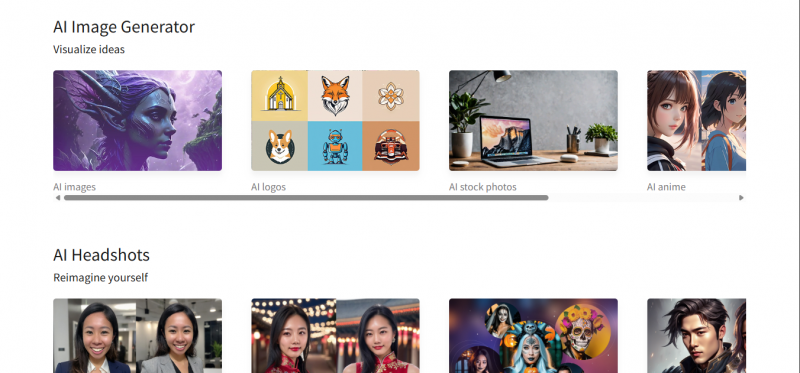
Hotpot AI does not try to compete with the most artistically capable AI image generators on the market. That is a deliberate choice, not a limitation. It positions itself as the platform that delivers useful visuals fast, without requiring prompt engineering expertise, model knowledge, or any design background. When the goal is a product photo with the background removed, a professional headshot from casual selfies, or a batch of social media graphics before a Monday morning post - Hotpot does those things quickly and without drama.
The platform was backed early by Google Ventures and Andreessen Horowitz, which explains the infrastructure quality for a tool that keeps its pricing surprisingly low. The credit-based model means users only pay for what they generate - no monthly subscription required unless that happens to be the better deal at scale. The free tier allows up to 75 images per day, watermarked and limited to personal use, which is generous enough to understand exactly what the platform does before spending a dollar.
Where Hotpot AI Genuinely Leads
The photo utility suite is where Hotpot earns the most loyalty from its user base. The background remover is one-click and clean, particularly on product photography. The photo restorer handles old damaged or faded images with solid accuracy. The colorizer adds realistic color to black-and-white photos - a feature that is genuinely emotional for users applying it to family archives. The upscaler increases resolution without the typical AI hallucination artifacts that make professional use difficult.
The AI Headshot generator is another standout. Upload five to ten selfies with varied angles and expressions, and the tool generates a gallery of professional-looking portraits in styles suited for LinkedIn, corporate use, or creative profiles. For individuals or teams that cannot justify a professional headshot session, this is practical value at a price that is hard to argue against.
Sparkwriter, the built-in copywriting assistant, adds a dimension that Leonardo AI does not have at all. For creators who need both visuals and short-form copy - captions, product descriptions, bios, headlines - having a basic AI writer inside the same dashboard saves a meaningful number of tool-switching minutes per week.
Pros of Hotpot AI
✔ Genuinely beginner-friendly - no prompt expertise or design background needed
✔ Photo restoration, colorizer, and upscaler are among the best in this price range
✔ Background removal is one-click, fast, and clean for product photography
✔ AI Headshot generator produces professional portraits from casual selfies
✔ Sparkwriter adds copywriting capability - unique versus pure image generators
✔ Credit-based (pay-as-you-go) model suits low-to-medium volume users
✔ Template-guided workflows prevent blank-canvas paralysis for non-designers
✔ API available for developers and batch automation workflows
✔ Backed by Google Ventures and Andreessen Horowitz - credible infrastructure
✔ Supports over 70 languages - accessible to global creative teams
Cons of Hotpot AI
✘ Image generation quality plateaus well below Leonardo's ceiling - not photorealistic at professional level
✘ No custom model training - cannot learn or replicate a specific art style or brand aesthetic
✘ Character consistency across generations is impossible - same character cannot be reproduced reliably
✘ No video or motion generation - static image output only
✘ No 3D texture generation - irrelevant for game asset pipelines
✘ No mobile app - browser-only limits creative flexibility on the go
✘ AI outputs can be inconsistent or distorted on complex, detail-heavy prompts
✘ Customer support responsiveness has been flagged in multiple user reviews - refunds are non-trivial
✘ Free plan watermarks make outputs unusable commercially without upgrading
✘ Credits disappear on failed uploads with no automatic refund - frustrating UX for paid users
Leonardo AI - The Creator's Professional Studio
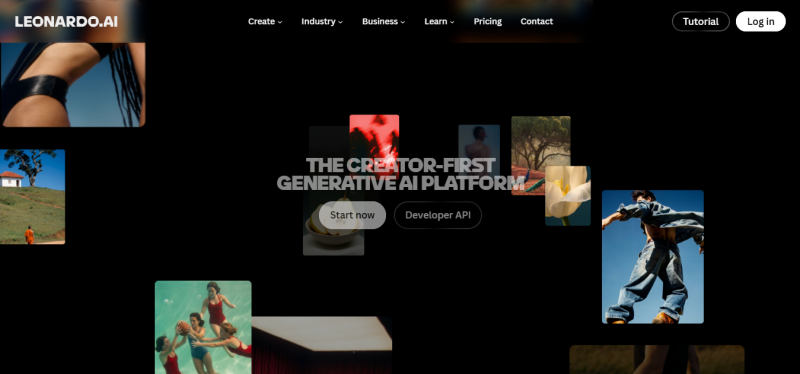
Leonardo AI began with a gaming-industry focus and it shows - in the best possible way. Its understanding of what visual creators actually need to produce repeatable, high-quality, production-ready work is baked into the feature set at every level. The platform now serves over 29 million creators and has been acquired or invested in by Canva, giving it both the technical direction of a specialist AI tool and the resources of one of the world's most widely used design platforms.
The multi-model architecture is the defining technical advantage. Rather than locking users into one AI engine, Leonardo offers Phoenix, Alchemy 2.0, PhotoReal v2, Lucid, and a growing library of community-trained models. Each model has a different aesthetic and technical profile. PhotoReal v2 produces near-photographic realism. Lucid handles stylized art directions with more painterly control. Alchemy 2.0 enhances quality across most other models when toggled on. For creators whose work spans different genres and visual styles, this flexibility is not a nice-to-have - it is essential.
Where Leonardo AI Sets a Different Standard
The AI Canvas is the feature that separates Leonardo most clearly from tools like Hotpot. It is an infinite editing workspace that supports inpainting (changing specific parts of an image without touching the rest), outpainting (extending an image beyond its original frame), and layered adjustments. For a creator refining a piece of concept art or a marketer building a composite product image, this is the difference between a generator and a studio.
Custom model training is another category-defining capability. Paid plan users can upload a set of their own images and train a private model that learns their specific visual style, character aesthetic, or brand look. Every generation from that model produces output consistent with those inputs. For game studios building a world with a unified art direction, or brands that need AI-generated assets to look like they were drawn by the same hand - this is transformative. Hotpot has no equivalent.
The 3D Texture Generation feature is niche but genuinely powerful for the creators it serves. Game developers using Unreal Engine, Unity, or Blender can generate stylistically consistent texture maps from text prompts. This shortcut used to require specialized skill or expensive outsourcing - Leonardo makes it a Tuesday afternoon task.
The community dimension is also meaningfully different. With over 29 million creators on the platform, a public gallery populated by real-world use, and a Discord server with nearly 99,000 active members, Leonardo offers something Hotpot cannot: a creative ecosystem. Clicking on any public image in the gallery reveals the exact prompt, model, and settings used - a learning shortcut that compresses months of experimentation into minutes.
Pros of Leonardo AI
✔ Multi-model system - Phoenix, Alchemy 2.0, PhotoReal v2, Lucid, plus community models
✔ Custom model training - upload your own images and train a private, brand-consistent model
✔ AI Canvas with inpainting, outpainting, and layer-level control for serious editing
✔ Character Reference tool maintains consistent appearance across multiple generations
✔ 3D Texture Generation for game developers - unique in this price category
✔ Motion feature converts static images into short video clips
✔ Realtime Canvas for live, interactive image iteration
✔ 29M+ creator community and 98K+ Discord server - gallery, inspiration, tutorials
✔ iOS and Android mobile apps available for on-the-go creation
✔ Canva-backed - active development roadmap and solid long-term platform stability
✔ 150 daily free tokens with no watermark on the free plan (some limitations apply)
Cons of Leonardo AI
✘ Steeper learning curve - first-session decision paralysis is common among new users
✘ No dedicated photo editing tools - background removal, colorizer, and upscaler are not core features
✘ No AI headshot generator - not designed for portrait-from-selfie workflows
✘ No copywriting or caption tools - purely visual output
✘ Character consistency can still drift between sessions even with Character Reference enabled
✘ Advanced features (Alchemy 2.0, custom training) require paid plans to access
✘ Output quality varies - some prompts produce excellent results, others need multiple regenerations
✘ Training data transparency is limited - users should review licensing carefully for commercial work
✘ UX can feel cluttered for users who want a simple generate-and-download experience
✘ Team collaboration features are minimal - better positioned as an individual creator tool
Category Ratings: Hotpot AI vs Leonardo AI (Out of 10)
Scores reflect direct testing across creator workflows, supplemented by verified reviews on G2, Trustpilot, and community discussions on Discord and Reddit.
| Evaluation Category | Hotpot AI /10 | Leonardo AI /10 | Edge Goes To |
| Ease of Getting Started | 9.5 | 7.5 | Hotpot AI |
| Image Output Quality | 6.5 | 9.5 | Leonardo AI |
| Creative Control & Depth | 5.0 | 9.5 | Leonardo AI |
| Photo Editing & Restoration | 9.0 | 4.5 | Hotpot AI |
| Custom Model Training | 0.0 | 9.0 | Leonardo AI |
| Community & Inspiration | 4.0 | 9.5 | Leonardo AI |
| Mobile Experience | 4.5 | 8.5 | Leonardo AI |
| Video / Motion Features | 0.0 | 7.5 | Leonardo AI |
| 3D Texture / Game Assets | 0.0 | 8.5 | Leonardo AI |
| Pricing Transparency | 7.0 | 8.0 | Leonardo AI |
| Beginner Friendliness | 9.5 | 7.0 | Hotpot AI |
| AI Headshots & Portraits | 9.0 | 4.0 | Hotpot AI |
| Copywriting Assistance | 7.0 | 0.0 | Hotpot AI |
| API & Developer Tools | 7.5 | 8.5 | Leonardo AI |
| Overall Creator Score (Avg) | 6.1 | 7.8 | Leonardo AI |
Real-World Creative Task Performance
This table maps 14 common creator tasks to the platform that handles each best. The verdict on each row comes from direct testing and corroborated user reports, not marketing copy.
| Creative Task | Hotpot AI | Leonardo AI | Best Pick |
| Social media graphics (quick) | Excellent - templates speed it up | Capable but no templates | Hotpot AI |
| Blog post / article headers | Fast, good enough quality | Higher quality, more control | Leonardo AI |
| Professional headshots | Dedicated feature, works well | Not designed for this | Hotpot AI |
| Game concept art & assets | Basic - not built for this | Excellent - was built for gaming | Leonardo AI |
| Old photo restoration / colorizing | Strong dedicated tool | Not available | Hotpot AI |
| Photorealistic product imagery | Moderate - limited model depth | High - PhotoReal v2 model | Leonardo AI |
| Character design (consistent look) | Not possible across sessions | Character reference ensures consistency | Leonardo AI |
| YouTube thumbnails | Fast, template-assisted | High quality, more polish | Leonardo AI |
| Background removal for products | One-click, fast and clean | Not a dedicated feature | Hotpot AI |
| Short video clips from images | Not available | Motion feature - yes | Leonardo AI |
| 3D textures for game engines | Not available | Yes - niche but powerful | Leonardo AI |
| Ad creatives (batch) | Yes - batch API supported | API available, no template batch | Hotpot AI |
| Caption / bio writing | Sparkwriter handles this | Not available | Hotpot AI |
| Custom art style training | Not available | Yes - upload & train custom model | Leonardo AI |
Pricing Breakdown
Both platforms offer free access, but the pricing models differ significantly. Hotpot's credit-based pay-as-you-go approach suits low-volume or experimental users. Leonardo's monthly subscription tiers suit creators who generate images daily or need access to advanced models consistently.
| Tier | Hotpot AI Price | Hotpot AI Includes | Leonardo AI Price | Leonardo AI Includes |
| Free | Free | 75 images/day, watermarked, personal use only | Free | 150 tokens/day, public images, standard models |
| Starter | $10 / 1K cr | No watermark, commercial use, basic styles | $10/mo | Apprentice: more tokens, private images, API access |
| Mid-Tier | $25 / 3K cr | Volume discount, faster queue, all styles | $24/mo | Artisan Unlimited: unlimited relaxed gen, Alchemy 2.0 |
| Pro / Top | $50 / 7K cr | Batch processing, API included, priority queue | $48/mo | Maestro Unlimited: max tokens, all models, priority |
| Enterprise | Custom | API bulk access, white-label options, SLA | Custom | Teams plan - contact Leonardo for volume pricing |
What Each Platform Is Missing - No Filter
Hotpot AI's Real Gaps
The absence of custom model training is the most significant creative ceiling on Hotpot. Every generated image starts from the same general-purpose model. There is no mechanism to teach the platform what a specific character looks like, what an established brand aesthetic demands, or how a particular artist's style should be reproduced. For creators whose work depends on visual consistency across a body of work - game developers, illustrators, brand designers - this makes Hotpot functionally insufficient regardless of how good the individual outputs occasionally look.
No video or motion capability means the platform is entirely static. In a content environment where short clips, looping animations, and motion graphics are the currency of social engagement, an image-only tool already feels like it has one hand tied. The lack of a mobile app compounds this - creators who work on the go, iterate between locations, or use tablet-based creative workflows are simply not catered to.
The customer support experience is a recurring complaint that is hard to ignore in a paid service. Non-refundable credits, unanswered support emails, and unclear resolution pathways for failed generations are documented across multiple independent review platforms. For a tool positioning itself as business-grade, these operational gaps create real trust problems.
Leonardo AI's Real Gaps
Leonardo is a generation and creative editing tool. It is not a photo utility platform. Users who arrive expecting to restore old family photographs, remove backgrounds from product shots, colorize black-and-white images, or upscale low-resolution photos will find that Leonardo does not serve these needs meaningfully. Hotpot handles all of these tasks better and more affordably.
There is no writing assistance anywhere in Leonardo's workflow. Captions, descriptions, marketing copy, metadata - none of it. For creators who need both visual and written content as part of the same production cycle, Leonardo requires a second tool entirely. This is the kind of invisible friction that accumulates over time and pushes some users back to more integrated alternatives.
Character consistency, while improved with the Character Reference feature, remains imperfect across sessions. Users building long-form narratives, comic panels, or recurring characters in game art will encounter drift - the same character looking slightly different between generations despite identical reference inputs. This is an industry-wide challenge for AI image tools, but Leonardo's community has flagged it as a persistent friction point on the platform specifically.
Who Should Use Which Platform
| Creator Type | Best Platform | Why |
| Social media manager (high-volume posts) | Hotpot AI | Templates, speed, background remover, batch API |
| Indie game developer | Leonardo AI | Game assets, 3D textures, character consistency |
| Digital artist / illustrator | Leonardo AI | Model choice, Alchemy 2.0, custom style training |
| Small business owner (marketing visuals) | Hotpot AI | Budget-friendly credits, no design skills needed |
| Content creator / YouTuber | Leonardo AI | High-quality thumbnails, Motion clips, community |
| Startup founder (branding & mockups) | Hotpot AI | Quick turnaround, logo tools, app icon generator |
| Professional photographer | Hotpot AI | Photo restorer, colorizer, upscaler, headshots |
| Marketing agency (concept art & campaigns) | Leonardo AI | Photorealism, brand model training, API depth |
| Developer building AI into a product | Leonardo AI | Richer API, more model options, programmatic access |
| Budget-conscious solo creator | Hotpot AI | Pay-as-you-go credits, generous free tier |
| 3D / VFX artist needing texture assets | Leonardo AI | 3D texture generation - unique to Leonardo |
| E-commerce seller (product photos) | Hotpot AI | Background removal, upscaler, product image polish |
Using Both Tools: Direct Experience Notes
First Session - 'Just Generate Something'
On Hotpot AI, the first session takes about three minutes from opening the browser to downloading a usable image. The template selector removes the need to know anything about prompt engineering. A social media graphic for a product launch was ready - watermarked on the free plan, but compositionally usable - within five minutes of arrival. The interface does not ask for decisions the average user cannot make confidently.
On Leonardo AI, the first session takes considerably longer. The dashboard presents multiple models, settings panels, guidance scale sliders, and advanced controls whose purpose is not immediately obvious. The platform does include tutorials and community examples that accelerate the learning, but the initial experience requires patience and curiosity that Hotpot does not. By session three, the workflow becomes second nature. By session ten, the depth starts to feel like a genuine creative advantage.
Professional Photo Work - Headshots and Restoration
Hotpot's headshot generator was tested with a set of ten casual selfies. The outputs were genuinely professional-looking - clean backgrounds, realistic lighting, and corporate-style framing that would not look out of place on a LinkedIn profile. The photo restorer was applied to a damaged, yellowed scan of a decades-old family photograph. The result was significantly cleaner with wrinkles and scratches substantially reduced. For this specific workflow, Hotpot delivers disproportionate value.
Leonardo was not designed for either of these tasks. There is no portrait-from-selfie feature and no restoration pipeline. Attempting to recreate headshot-style outputs through prompt engineering produced results that were aesthetically interesting but not professionally usable in the same way.
Concept Art and Game Assets
The roles reversed completely here. Generating concept art for a fantasy character in Leonardo - using the Phoenix model with Alchemy 2.0 enabled and a detailed prompt - produced output that required minimal editing before it could function as a design reference. The style was consistent, the character anatomy was coherent, and the detail level was well above what generic image generators typically deliver at this speed. The Character Reference tool was used to generate the same character in multiple poses - the consistency was imperfect but meaningfully better than starting fresh each time.
Hotpot produced serviceable fantasy illustrations from similar prompts, but the ceiling was clearly lower. The images were usable for mood boarding or general concept direction. They were not production-grade game art.
Final Verdict: Best for Creators?
The answer depends entirely on what kind of creator is asking the question.
Hotpot AI is the better tool for creators who need speed, simplicity, and practical utility across multiple visual and written tasks. The photo editing suite - restoration, colorizing, background removal, upscaling - is genuinely competitive at its price point. The AI headshot generator is a practical standout. Sparkwriter adds copywriting capability that no pure image generator provides. The pay-as-you-go credit model makes it accessible without subscription commitment. For marketers, small business owners, social media managers, and non-designer creators who need results without a learning curve, Hotpot is the practical choice.
Leonardo AI is the better tool for creators who need depth, quality, and creative control that scales with their skill. Custom model training, the AI Canvas with inpainting and outpainting, multi-model architecture, 3D texture generation, character reference, and Motion clips are capabilities that Hotpot cannot match. For digital artists, game developers, illustrators, content creators building a distinct visual identity, and anyone who generates images at professional volume and quality - Leonardo's ceiling is significantly higher and worth the learning curve to reach.
The sharpest summary: Hotpot AI saves time. Leonardo AI enables craft. If the work is getting things done, Hotpot is the tool. If the work is making something great, Leonardo is the platform. Both platforms have earned their user base - they just earned it by doing very different things well.
Post Comment
Share your thoughts about this article.
Be the first to post a comment!





