Table of Content
Search "Grubby AI" and you land on a very loud promise: humanize AI text, bypass every detector, and do it with a 100% Turnitin bypass guarantee. That is a big claim, so instead of taking it at face value, I signed up, pasted in real text, ran it through the humanizer, and poked at every feature and paywall along the way.
This is that hands-on test. I will show you what happened at each step with the actual screenshots from my session, then answer the only questions that matter: does it actually work, what does it really cost, what are real users saying, and what are the risks the marketing leaves out. By the end you will know whether Grubby AI is worth it, or whether it is as grubby as the name suggests.
One thing up front. Grubby AI is built largely to help people slip AI-written text past detectors, and a lot of its marketing points straight at students and Turnitin. I will review it honestly, including how well it performs, but I will also be straight with you about the academic-integrity side, because a good review owes you that.
THE BASICS
What is Grubby AI?
Grubby AI is a browser-based AI humanizer. You paste in text written by an AI tool like ChatGPT, click a button, and it rewrites the text so it reads, in theory, more like a human wrote it and less like a machine. The whole pitch is detection evasion: the homepage promises your rewritten text can pass detectors like GPTZero, ZeroGPT, Originality.ai, Copyleaks, and Turnitin.
It is more than a single rewrite box, though. Once you are inside, Grubby is really a small suite of student-focused tools: the humanizer, an "AutoTyper" that types text into a Google Doc for you, a summarizer, a smart-notes feature, plus quiz and flashcard generators. The humanizer is the headline act, and it is what I focused my testing on.
The company behind it is a US-based startup. There is not much public information about it, and as you will see later, its reputation among reviewers is mixed at best.
How I tested it
This is not a desk review. I went through the full new-user flow myself and screenshotted each step: the landing page, pasting in text, the signup wall, the onboarding, the dashboard, running the humanizer, and the result with all its export options. Under each screenshot you will find my honest observation.
For a consistent test I used the same neutral paragraph throughout, a 77-word piece about metadata in digital files:
MY TEST INPUT (77 WORDS) Metadata is often ignored because it is not visible like a photo or video. Yet it can be one of the most important parts of digital documentation. A file may contain creation time, device model, GPS coordinates, resolution, frame rate, duration, and modification history. That information can help confirm whether a record is original, altered, copied, compressed, or exported from another source, which is why understanding how metadata protects digital files has become important in modern documentation. |
Let us walk through what Grubby did with it.
The landing page makes very big promises
The first thing you see when you search Grubby AI is a confident, slightly aggressive sales page. The headline reads "Humanize AI text & bypass AI detectors," with the subtitle calling it "the fastest, most affordable, and least detectable AI humanizer, guaranteed to outperform any competitor." A banner across the very top adds the kicker: "100% Turnitin Bypass Guarantee, or your money back." The layout is a clean two-panel setup, your AI content on the left and the humanized content on the right, with options to paste text, upload a PDF, or try a sample.
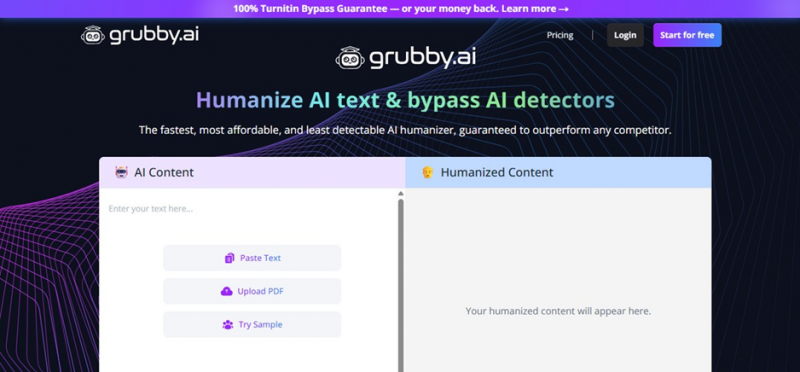
Screenshot 1. The Grubby AI homepage. The marketing leans hard on guarantees.
MY OBSERVATION
The marketing leans hard. "100% guarantee," "least detectable," and "outperform any competitor" are absolute claims, and absolute claims in the detector-bypass space are a red flag, because detection is a moving target. To its credit, the interface is clean and the input options are flexible. But the tone tells you exactly who this is for: people who want a guarantee that their AI text will not get caught.
I pasted my text and picked a target detector
The input panel is straightforward. I pasted my 77-word metadata paragraph, and a counter showed 77 of 300 words used, so the free allowance is small. Next to the Humanize button sits a "Mode" dropdown where you pick which detector you are trying to beat. It was set to GPTZero by default. I left my text in and clicked Humanize.
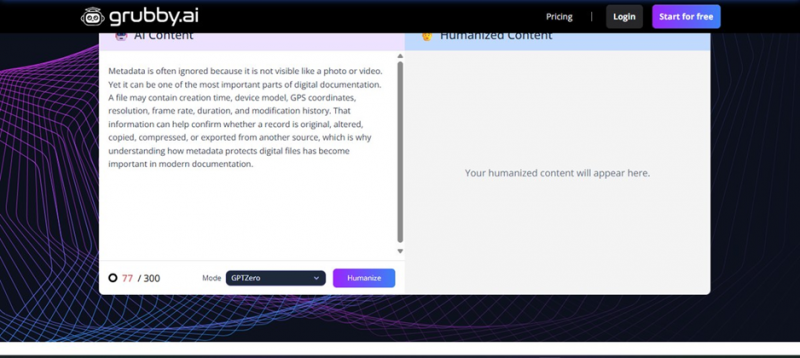
Screenshot 2. My test paragraph pasted in, 77/300 words, with the detector Mode set to GPTZero.
MY OBSERVATION
Two things stood out. First, the free trial is capped at roughly 300 words, barely enough for a couple of short paragraphs. Second, the "Mode" dropdown makes the purpose explicit: you are not just smoothing your writing, you are selecting a specific detector to evade. That framing is everywhere in this product.
I hit Humanize, and hit a signup wall
This is where the free "try it" experience ends. The moment I clicked Humanize, Grubby stopped me and demanded an account. The signup page repeats the pitch: "Try Our Next-Gen Undetectable AI Writer to Bypass AI Detection Effortlessly," with "300 FREE words," "Humanize AI text in 3 seconds or less," "Bypass GPT zero, Turnitin & all AI detectors, guaranteed," and a "Trusted by 100,000+ users" badge.
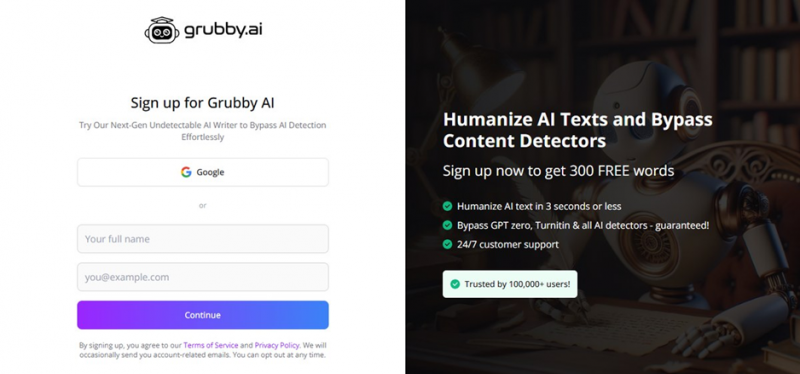
Screenshot 3. The signup wall. No output is shown until you create an account.
MY OBSERVATION
You cannot see a single word of output without creating an account. That is a hard signup wall. It is a common growth tactic, but it means you are committing your email purely on the strength of the marketing, before you have seen any proof the tool works. The signup page is also where the "all AI detectors, guaranteed" language gets even bolder.
The onboarding asks which detector you want to beat
After signing in, a popup appeared that, more than anything else on the site, tells you what this product is for. It is titled "Important Update: Turnitin AI Detector" and notes that "Turnitin released their new AI detector model on October 15th, 2025." Then it asks the question directly: "Which AI detector are you trying to bypass?" The options are Turnitin (tagged "Recommended for academic use"), GPTZero, ZeroGPT, Copyleaks, Just Sound Human, and I Don't Know. I picked ZeroGPT to continue.
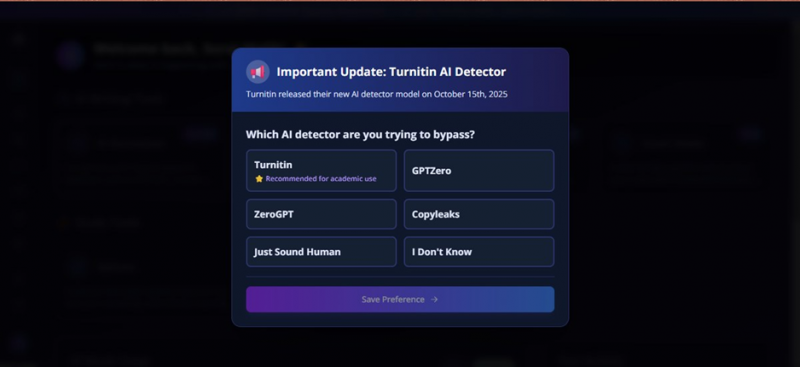
Screenshot 4. The most revealing screen: it asks which detector you are trying to bypass.
MY OBSERVATION
This is the most telling screen in the whole flow, for two reasons. One, it openly frames the tool around beating detectors and literally labels Turnitin as "recommended for academic use," about as clear a signal as you can get that this is built for students trying to get past plagiarism and AI checks. Two, notice the irony: the popup itself admits Turnitin just shipped a brand-new detector model. If the detector keeps changing, a "100% bypass guarantee" cannot mean much, because the thing you are trying to beat updated last month.
The dashboard is a whole student suite
Once past onboarding, the dashboard loaded with a friendly "Welcome back" greeting and a grid of tools. Under "AI Writing Tools" there is the AI Humanizer (tagged Popular), Grubby AutoTyper (New), Summarization, and Smart Notes. Under "Study Tools" there are Quizzes and Flashcards. The left sidebar lists the same set. I clicked into the AI Humanizer, since that is the core of the product.
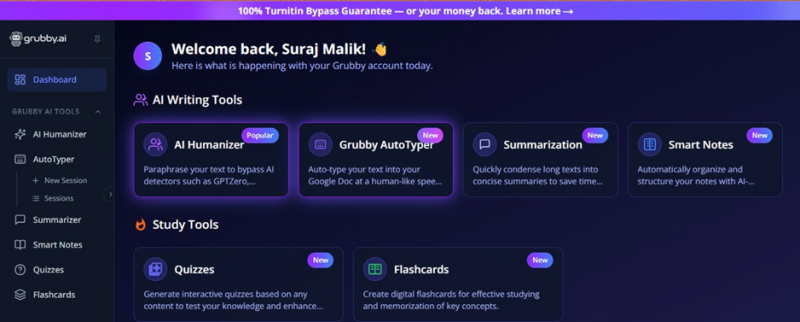
Screenshot 5. The dashboard. Grubby is positioned as an all-in-one student toolkit.
MY OBSERVATION
Grubby is not just a humanizer, it is positioned as an all-in-one student suite. AutoTyper, summarizer, smart notes, quizzes, and flashcards are all squarely aimed at coursework. That is useful context: this is a product designed to sit alongside a student's study and submission workflow, not a general writing tool.
Running the humanizer
Inside the humanizer, a green banner sits across the top: "Turnitin Guarantee: Grubby is the only humanizer that guarantees our text bypasses Turnitin's AI detector." My 77-word input was on the left, and after I ran it, the right panel showed a roughly 15-second countdown with a loading animation and the message "Humanizing your content. Our AI is carefully crafting human-like text patterns." A label confirmed it was "Optimized for ZeroGPT," the detector I had chosen.
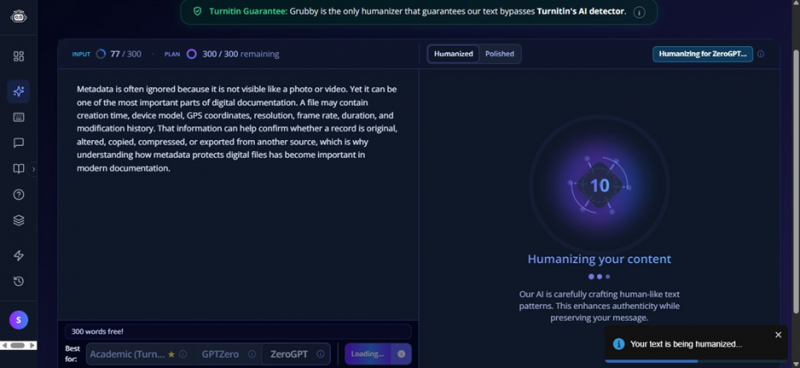
Screenshot 6. The humanizer running a 25-second countdown, optimized for ZeroGPT.
MY OBSERVATION
Processing took around 25 seconds, slower than the "3 seconds or less" the signup page advertises, though not painfully so. The "Turnitin Guarantee" line is repeated here in case you missed it the first three times. The tool does tailor its rewrite to whichever detector you selected, which is the one genuinely clever idea in the product.
The result, and why it is not as "human" as promised
When it finished, the humanized text appeared on the right with some words highlighted to show what changed. Here is what Grubby produced from my paragraph:
GRUBBY'S OUTPUT (91 WORDS)
Metadata is often ignored due to its non-visible nature relative to a photo or video. The metadata within such files can, however, be one of the most important aspects of digital documentation. Digital files contain elements like creation time, device model/GPS coordinates, resolution, frame rate, duration and modification history. This type of information contributes to the ability to determine whether a particular digital record is original, altered, copied, compressed or exported from another source, all reasons why understanding how metadata protects digital files has become important within modern documentation practices.
The interface also gave me Humanized, Polished, and Detection tabs, and a small AutoTyper popup offered to type the result into my Google Doc "at a human pace."
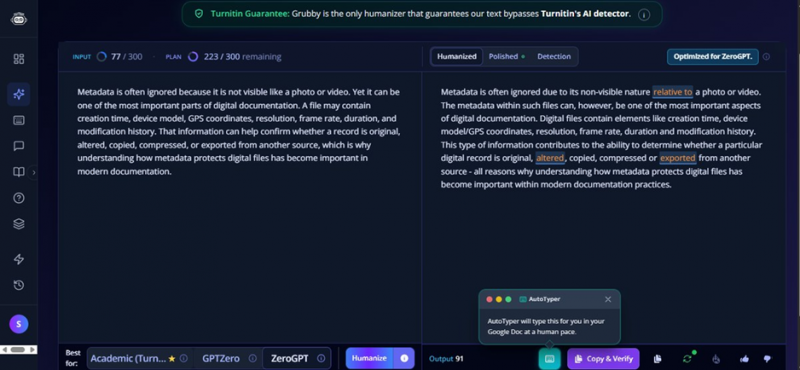
Screenshot 7. The humanized output, with changes highlighted and the AutoTyper popup.
MY OBSERVATION
Here is the honest problem. Compare the two versions. My original said "ignored because it is not visible like a photo or video." Grubby turned that into "ignored due to its non-visible nature relative to a photo or video." It swapped "that information can help confirm" for "this type of information contributes to the ability to determine." My 77 words became 91, and the prose got wordier and more corporate, not more human. To my ear the rewrite actually sounds more like a machine, not less, because it leans on stiff, padded phrasing. That matches what a lot of independent testers report: Grubby tends to do surface-level synonym swapping and sentence reshuffling rather than genuinely natural rewriting.
The output options, including the controversial one
Along the bottom of the result sit the actions: the Output word count (91 in my case), a Copy and Verify button, copy, a regenerate or free-retry button, a download option, thumbs up and down, and the AutoTyper button. The AutoTyper, when triggered, pops up a small window confirming it "will type this for you in your Google Doc at a human pace."
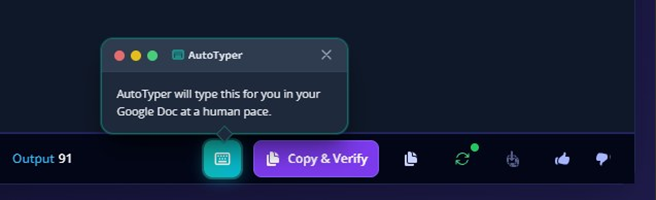
Screenshot 8. The output toolbar, including download, Copy and Verify, free retry, and AutoTyper.
MY OBSERVATION
Most of these are normal and handy: download as a document, copy, and a free retry if you do not like the rewrite. The AutoTyper is the one worth pausing on. Typing text into a Google Doc "at a human pace" is designed to imitate the rhythm of a person actually writing, which defeats the version-history and typing-pattern checks that some teachers now use to spot pasted AI work. I will be plain about it: that feature is built to make AI-assisted work look like it was typed by hand. Whether you are comfortable using it is a question only you can answer, but you should know that is what it does.
Did Grubby AI actually work?
This is the part the marketing does not want you to read closely. Based on my test and a stack of independent results, here is the honest picture. On the easier detectors, Grubby can do something: across multiple third-party tests, its output has slipped past tools like QuillBot, Writer, and sometimes ZeroGPT, occasionally landing near 0% AI. So it is not pure snake oil, it genuinely alters the text enough to confuse some checkers. The trouble starts with the hard detectors, and with consistency.
| AI DETECTOR | GRUBBY'S OUTPUT | AFTER A GRAMMAR PASS |
| QuillBot | 0% AI passed | 0% AI |
| Writer | 0% AI passed | 2% AI |
| ZeroGPT | 19% AI | 50% AI |
| Originality.ai | 1% AI passed | 100% AI |
| GPTZero | 100% AI failed | 78% AI |
One detailed independent test, GPTZero-optimized mode. Results vary by sample and shift every time a detector updates.
Look at that table. Even using the mode tuned to beat GPTZero, GPTZero still flagged the output 100% AI. And the after-a-grammar-pass column is the kicker: cleaning up the writing made several detectors more suspicious, with Originality.ai jumping to 100%. Reddit users testing against GPTZero and Winston reported results still flagged 80 to 90% AI. Most damaging of all, Turnitin has been rolling out detection aimed specifically at humanizer-altered text, and Grubby's own onboarding admits Turnitin keeps updating its model. A 100% Turnitin bypass guarantee against a detector that is actively hunting for exactly this kind of rewriting is a promise I would not bank on.
And the quality cost is real. Independent quality scoring put Grubby's raw output around the low 70s out of 100 on Grammarly, with critical grammar and clarity issues, and several reviewers report the bigger problem: meaning drift, where the rewrite quietly changes what your sentence says. My own test showed the milder version of this, output that was wordier and stiffer than what I put in. The honest takeaway: Grubby can sometimes lower an AI score on weaker detectors, but it is inconsistent, it frequently fails against GPTZero and Turnitin, and it can degrade your writing in the process. It is a coin flip dressed up as a guarantee.
The AutoTyper question
Of all the features, the Grubby AutoTyper is the one I keep coming back to. It opens your Google Doc and types the humanized text into it at a simulated "human pace," complete with the natural rhythm of someone actually writing. The reason that exists is specific: a growing number of teachers check a document's version history and typing patterns to catch work that was pasted in from an AI tool in one big block. A document that appears to have been typed gradually looks more legitimate.
WORTH KNOWING I am not going to dress this up. The AutoTyper is built to make AI-assisted work look like it was typed by hand and to defeat the process-history checks some institutions rely on. That is a meaningfully different thing from making writing sound natural. Whether you are comfortable using it is your call, but you should go in knowing exactly what it is designed to do. |
Grubby AI pricing
Grubby runs on a freemium model, and the pricing has reportedly shifted around a fair bit, so treat these as ballpark figures and check the live page before paying. On price alone, Grubby sits at the cheap end of the humanizer market, which is the single thing its happier reviewers consistently praise.
| PLAN | PRICE (ANNUAL) | WORDS | NOTES |
| Free | $0 | ~300 total | Enough for a test or two; account required |
| Essential | ~$8/mo (~$15 monthly) | a few thousand/mo | Entry tier, basic rewrite modes |
| Pro | higher | ~30,000/mo | Bigger input limit, more modes |
| Unlimited / Enterprise | up to ~$60/mo | large volumes | For heavy or team use |
Several happy reviewers specifically praise it as a budget option, with one noting it costs a fraction of QuillBot. The catch is that several other users report billing headaches, difficulty cancelling, and word counts that drain faster than expected (running the same text through two versions can double-charge your allowance), so if you do subscribe, watch your billing settings closely.
BEYOND MY OWN SESSION
What real Grubby AI users say
I did not want to rely only on my own session, so I went through public feedback on Trustpilot and Reddit. The reality is a lot more mixed than the homepage suggests.
| SOURCE | RATING / SENTIMENT | THE GIST |
| Trustpilot | ~3.0 / 5 (about 57 reviews) | Cheap and fast, but awkward output, flagging, and billing complaints |
| Divided | Some rank it a decent free option; others still get flagged 80 to 90% AI | |
| Independent tests | Inconsistent | Beats weak detectors sometimes; GPTZero and Turnitin often still catch it |
On Trustpilot, Grubby sits at roughly 3.0 out of 5, a genuinely divided reputation rather than a glowing one. The positive reviews focus on price and convenience: it is cheap, it is fast, and for casual essays or discussion posts it saves some time. The negative reviews are blunter and cluster around three themes: the output quality is poor or awkward, the work still gets flagged (several reviewers single out GPTZero catching both the humanizer and the AutoTyper), and there are billing and cancellation complaints. A few reviewers also raise questions about the company's track record and its rapidly changing free plan.
On Reddit, the split is the same. Some testers rank it among the better free humanizers for quick jobs, while others report their rewritten text still getting flagged 80 to 90% AI, or the meaning of their sentences getting mangled. The recurring advice from the community is to never trust the output blindly, to always run it through a real detector yourself, and to expect to hand-edit afterward. Worth flagging: a lot of the "reviews" that rank for Grubby AI are published by rival humanizer companies, so they are sales funnels for a competing product, not neutral assessments. The most reliable signal is the direct user feedback, and that signal is "cheap, inconsistent, and risky."
THE PART MOST REVIEWS SKIP
The risks worth taking seriously
A genuinely useful review has to cover this, because the downside here is not just a bad rewrite. If you are a student, understand that using a tool like this to disguise AI-written coursework is an academic-integrity violation at most schools, full stop, regardless of whether you get caught. And getting caught is a real possibility. Detectors are not static. Turnitin and GPTZero update aggressively, and Turnitin in particular has been building detection that targets humanizer-style rewriting specifically.
BEFORE YOU RELY ON THE GUARANTEE The "guarantee" is a marketing line, not a shield. "The tool promised me it would pass" is not a defense anyone has ever successfully used in front of an academic-integrity board, and the consequences of a flagged submission, from a failed assignment to suspension, are far worse than the cost of just doing the work. |
There is also a quality risk that applies to everyone, students or not. Because the rewrite can subtly change your meaning, blindly pasting Grubby's output into anything important, an essay, client work, a published article, can introduce errors or claims you never intended to make. Where a humanizer like this is genuinely defensible is the narrow case of polishing your own writing for tone, or helping a non-native English speaker smooth out a stiff draft, in contexts where detection is not an integrity issue at all. Even then, honestly, careful manual editing usually beats it.
Grubby AI pros and cons
What is decent + Clean, beginner-friendly interface; you are running it within a minute of signing in. + Accepts both pasted text and PDF uploads. + Genuinely cheap compared to most competitors. + Can lower AI-detection scores on the weaker detectors, at least some of the time. + Bundles extra student tools: summarizer, smart notes, quizzes, and flashcards. | What is not - You cannot see any output without creating an account. - The free plan is tiny, around 300 words. - The 100% Turnitin bypass guarantee does not hold against a detector that targets humanizers. - Output is often wordier, stiffer, or subtly altered in meaning. - Still gets flagged by GPTZero and Turnitin in many tests. - Repeated complaints about billing, cancellation, and a free plan that keeps changing. - Middling 3.0 out of 5 Trustpilot reputation. |
Who Grubby AI is for, and who should skip it
MAYBE, IF You want a cheap rephraser and will edit it You want a cheap way to rephrase your own AI-assisted drafts for tone in low-stakes, non-academic situations, you are happy to verify every output against a real detector yourself, and you will hand-edit the result. As a fast, budget paraphraser for casual content, it can save a little time. | SKIP IT IF You are counting on the guarantee You are counting on it to reliably beat Turnitin or GPTZero (it does not, consistently), you are a student hoping a guarantee will protect you from an integrity violation (it will not), you care about clean, accurate prose (the output often needs fixing), or you are wary of billing friction. For anything that actually matters, the honest move is to write it yourself and edit well. |
Grubby AI alternatives worth knowing
There are plenty of other humanizers, and you will find each one loudly claiming to beat the others. Take those head-to-head reviews with a grain of salt, since they are almost always written by one tool to sell against another. Here is the honest lay of the land.
| TOOL | OFTEN PITCHED FOR | KEEP IN MIND |
| Undetectable.ai | Popular all-rounder humanizer | Pricier; still no real guarantee against Turnitin |
| QuillBot | Paraphrasing + grammar | More a paraphraser than a stealth tool |
| StealthWriter / Phrasly / Ryne | Detector evasion | Same arms-race caveat; their reviews are biased |
| EssayDone | Humanizer + built-in detector | Its "Grubby review" is a sales funnel for itself |
| Just write it yourself | Anything that matters | The only reliable way past an integrity check |
The useful framing is this: no humanizer can promise it will beat a detector that updates every few weeks, and the higher the stakes, the less you should rely on any of them. If your goal is genuinely natural writing, a general AI assistant plus careful human editing will usually get you cleaner results than a dedicated bypass tool. And if your goal is passing an academic integrity check, the only reliable long-term strategy is to actually do the work.
My personal verdict on Grubby AI
After running the whole thing myself, here is where I land. Grubby AI is a cheap, clean-looking humanizer that occasionally does something useful and frequently does not. It can lower AI-detection scores on the weaker checkers some of the time, and as a budget paraphraser it is fast and easy. But the gap between what it promises and what it delivers is wide. The "100% Turnitin bypass guarantee" runs straight into a detector that is actively hunting for humanizer-rewritten text. The output often comes out wordier and stiffer than the input, sometimes with its meaning quietly changed. And its real-world reputation, a 3.0 on Trustpilot with recurring billing and quality complaints, tells the same story my own test did.
MY OVERALL SCORE 4.5 / 10 A cheap, tidy rewrite tool with a guarantee it cannot keep. | |
| Ease of use | 7.5 |
| Output quality | 4.5 |
| Detection bypass | 4.0 |
| Value for money | 5.5 |
| Honesty of marketing | 2.5 |
| Trust & support | 3.5 |
So here is my honest recommendation, speaking as someone who actually used it. If you want to rephrase your own low-stakes writing and you are willing to check and edit every result, Grubby is a cheap option to try on the free tier first. But do not trust the guarantee, do not paste its output anywhere important without reading it carefully, and if you are a student, understand that no tool can make AI-written work both undetectable and honest. The detectors keep getting smarter, the guarantees do not, and the safest path, every time, is to write it yourself.
Post Comment
Share your thoughts about this article.
Be the first to post a comment!