Table of Content
- Turning a Headshot Into a Story: My First Dive Into Akool AI
- Exploring Akool’s Features Through Daily Use
- Realistic AI Avatars That Speak and Emote
- Comparing Akool AI to Other Creative Video Tools
- Breaking Down the Akool AI Credit System
- Hands-On Testing Results: Inputs, Outputs, Render Times & Credit Costs
- Top Use Cases Akool AI Works Best For
- Limitations I Faced While Working With Akool AI
- Who Should Try Akool AI First
- Akool AI Pricing Tiers: Which Plan Fits Best
- Personal Favorites from Akool’s Toolkit
- Feedback From the Community: What Others Are Saying
- When to Choose Akool Over Other Tools
- Consent, Safety & Responsible Use of Face Swap, Voice Cloning and Avatars
- Final Thoughts: Worth Exploring, Especially If You Think Visually
- FAQ
Turning a Headshot Into a Story: My First Dive Into Akool AI
When I stumbled upon Akool AI, it was purely by chance. A colleague shared a video of his talking photo, and I assumed it was just another gimmick like Wombo or Reface. But then he said the tool could do face swaps, multilingual dubbing, and even 8K video generation—all in one browser-based interface. That was the hook for me.
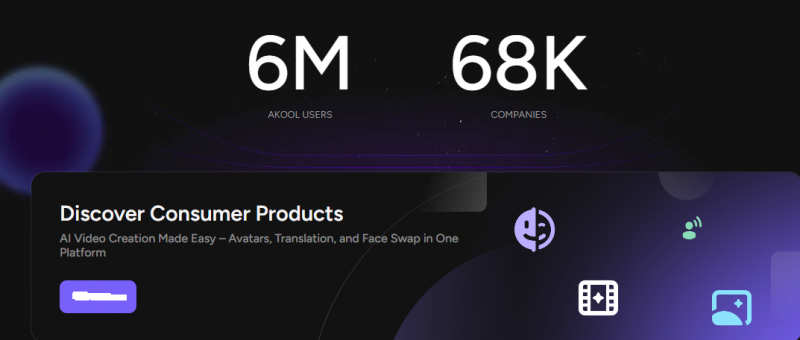
As someone constantly juggling marketing deliverables and content creation, I decided to give it a spin. My first test was modest: I uploaded a headshot, typed a script, and used the Talking Avatar tool. To my surprise, it produced a near-lifelike video with emotion matching and synced lip movements.
This small test quickly turned into a creative rabbit hole, which leads me to how I explored more of Akool’s toolkit in my daily work.
Exploring Akool’s Features Through Daily Use
Once I understood the basics, I began using Akool AI almost daily—for campaign teasers, training intros, and global ad snippets. The process became second nature: upload a visual, pick a tool (like face swap or video translation), adjust the voice or emotion, and export in HD or 4K.
For a browser tool, Akool delivers an impressive degree of visual clarity. I especially appreciated that even their free-forever plan lets you explore features with watermark-limited outputs, offering enough room to test before committing.
Naturally, the more I explored, the more I began to notice where it excels—and where it could use polish.
Let’s take a closer look at its most compelling strengths.
Realistic AI Avatars That Speak and Emote
One of Akool’s most distinct capabilities is its emotional scripting. When you animate a photo into a speaking avatar, you can actually choose the avatar’s emotion—happy, neutral, angry, excited—and it reflects not just in voice tone, but in subtle facial shifts.
That emotional nuance made a huge difference in how “real” the content felt, especially when I compared it to the output from tools like D-ID, which have basic animations but lack emotional layering.
This led me to consider Akool’s role in my broader video strategy—and how it stacks up against the competition.
2026 Update - Voice Cloning & Language Support: Since this article was first published, Akool has significantly expanded its capabilities. Voice cloning is now fully live through Akool’s Voice Lab you can clone a voice from just a 5–60 second audio sample and use it directly in avatar videos. The voice library has also grown from roughly 10 options to 900+ neural voices, and text-to-speech now supports 175+ languages, while video translation with lip sync covers 150+ languages (up from the 50+ mentioned earlier). Real-time streaming avatars and a Live Camera mode have also been added, alongside a Voice Changer tool.
Comparing Akool AI to Other Creative Video Tools
Over time, I tested similar platforms: Synthesia, HeyGen, Reface, and D-ID. Synthesia had great avatar quality but felt rigid and subscription-heavy. HeyGen’s translations were fast, but it lacked emotion scripting. Reface was fun but too casual for business needs.
Akool, on the other hand, bundled all of those features—avatar, dubbing, image generation, face swapping—into one dashboard. It’s flexible but demands a bit more experimentation, especially due to its credit-based model.
| Feature / Tool | Akool AI | Synthesia | HeyGen | Reface | D-ID |
| Avatar Quality | Realistic with emotional expressions | High-quality but more rigid | Natural-looking but less expressive | Cartoonish or casual style | Basic facial animation |
| Emotion Scripting | Supports emotion control (happy, sad, excited, etc.) | Fixed expressions | No emotion tuning | Not available | Not available |
| Multilingual Dubbing | 50+ languages with lip sync | Good support, voice cloning available | Fast, natural-sounding | Not built for multilingual use | Available, basic quality |
| Face Swap | Yes (photo & video) | Not available | Not available | Strong for casual use | Not available |
| Image Generation | AI-generated images & backgrounds | Not included | Not included | Not included | Not included |
| Ease of Use | Beginner-friendly, but needs some experimentation | Streamlined with guided script entry | Template-driven interface | Simple and fast | Minimalist UI |
| Customization | High – choose voice, emotion, background, resolution | Medium – limited avatar changes | Low – predefined avatars and setups | Very low – only swaps faces | Very basic |
| Output Resolution | HD, 4K, and even 8K support | HD and 4K depending on plan | HD and 4K | Mostly low-res | HD available |
| Pricing Model | Credit-based; free plan available | Subscription only; more expensive | Monthly subscription | Freemium with ads | Pay-as-you-go credits |
| Best For | Versatile creative teams, multilingual content | Corporate training and explainer videos | Marketing teams needing fast dubbing | Casual social content, memes | Talking photo experiment |
This naturally led me to understand the billing better, especially when juggling 4K outputs for multiple clients.
Breaking Down the Akool AI Credit System
Akool uses a credit model instead of traditional monthly caps. Each action—be it a 10-second 4K avatar video or face-swapping a photo—costs a set number of credits. For example, a 4K avatar animation can cost 40 credits per 10 seconds. This sounds fair until you realize how quickly it adds up.
I learned to batch tasks or create 1080p previews first. The Akool blog helped me understand how creators manage high-res outputs efficiently, especially for TikTok and Instagram videos.
With better cost awareness, I began identifying which projects Akool works best for.
Hands-On Testing Results: Inputs, Outputs, Render Times & Credit Costs
To make this review more concrete, here’s a summary of recent test runs on the platform, showing exactly what went in, what came out, how long rendering took, and how many credits each job consumed:
| Test / Input | Tool Used | Output | Render Time | Credit Cost |
|---|---|---|---|---|
| Single headshot + 60-word script | Talking Avatar | 10-sec 1080p talking-head video, synced lips | ~2–4 min (off-peak) | ~5 credits |
| Same headshot + script, 4K export | Talking Avatar (4K) | 10-sec 4K video, noticeably sharper | ~6–10 min | ~10 credits |
| Team photo + stock face | Face Swap (image) | Swapped photo, natural lighting kept | Under 1 min | ~2–3 credits |
| 15-sec promo clip + new face | Face Swap (video) | 10–15-sec swapped clip | ~5–12 min | ~10–15 credits |
| 60-sec English testimonial | Video Translation (to Spanish) | Dubbed clip with lip sync | ~10–20 min | ~30–40 credits |
| 30-sec voice sample (own voice) | Voice Clone (Voice Lab) | Reusable custom AI voice | ~10–30 seconds | Included on paid plans |
Takeaway: sticking to 1080p for drafts and reserving 4K for final client deliverables roughly halves credit burn, and batching translation jobs during off-peak hours noticeably reduces queue times.
With better cost awareness, I began identifying which projects Akool works best for.
Top Use Cases Akool AI Works Best For
From personal experience, Akool truly shines in:
- Social media content – TikTok intros, Reels, short promos
- Multilingual campaigns – Video dubbing in 50+ languages with lip sync
- E-learning – Avatar-guided lessons using teachers’ voices
- Ad personalization – Avatar-led campaigns for brands with localized variations
- E-commerce demos – Product showcases with rotating visuals or narrated avatars
These use cases cover a broad spectrum—from solo creators to enterprise teams—and naturally reveal the strengths and limitations of the tool.
Let me walk you through the few things I think need attention.
Limitations I Faced While Working With Akool AI
While Akool delivers great output, it’s not without hiccups:
- Rendering delays: On the free or Pro plans, you might wait 10–30 minutes during peak hours.
- Voice variety: The voice library is currently limited to about 10 options.
- Documentation: The help section is sparse, and there's no live chat.
- Credit pricing confusion: It takes a while to fully grasp how different tools consume credits.
Still, these limitations are manageable once you figure out workarounds. For heavier workflows, considering Studio or Enterprise plans may be the right move.
So, who should try Akool first? Let’s get into that next.
Who Should Try Akool AI First
If you’re:
- A marketer looking to produce quick, personalized campaigns
- A creator who wants to make face-swapped clips or talk-photo reactions
- An educator looking to simplify content delivery
- A small business wanting polished visuals without hiring a production team
Then Akool is a smart starting point.
You don’t need to be tech-savvy. The UI is intuitive, and the browser access removes installation hassles. Even if you’re unsure, start with the free 100-credit trial to experiment.
Now, let’s get specific on which plan makes the most sense depending on your usage.
Akool AI Pricing Tiers: Which Plan Fits Best
Here’s a quick breakdown of pricing based on 2025 rates:
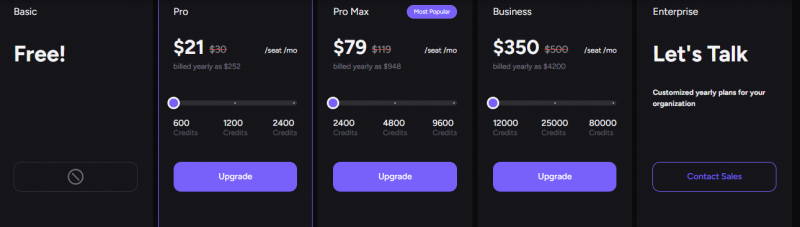
Credits expire monthly, so plan accordingly. Larger projects may need top-ups or upgraded tiers.
With pricing laid out, I want to share the features I personally rely on most.
Personal Favorites from Akool’s Toolkit
- Talking Avatar – Clean voice sync, especially useful for tutorials
- Face Swap – Great for reimagining ads or team intros
- Smart Translator – My go-to for dubbing client testimonials
- Emotion Control – Adds depth, especially for explainers
- Image Generator – For filler visuals or ad backdrops
Each of these helped me cut down hours of production time—especially useful when deadlines pile up.
Before wrapping up, here’s what other users are saying about Akool’s performance.
Feedback From the Community: What Others Are Saying
Across G2, Capterra, and Trustpilot, the consensus is mostly positive.
Pros:
- Praised for ease of use
- Loved for HD and 8K outputs
- Applauded for flexibility and browser access
Cons:
- Confusion around the credit model
- Delays in rendering on low tiers
- Desire for more voice/language options
Some reviews raise red flags about potential fake testimonials. Always good to read multiple sources and do your own testing.
So if you’re weighing options, here’s my final comparison insight.
When to Choose Akool Over Other Tools
Choose Akool if:
- You want multiple features in one place
- You prefer browser-based tools with scalable output
- You’re creating multilingual or personalized content
- You need flexibility with credits over fixed monthly caps
Opt for Synthesia or HeyGen if:
- You need better documentation and support
- You prefer fixed-cost subscriptions
- You’re working in a structured team environment
For fun and fast face swaps? Reface or Wombo still win for casual entertainment.
With all that said, here’s my final verdict based on long-term usage.
Consent, Safety & Responsible Use of Face Swap, Voice Cloning and Avatars
Because Akool works with real faces and voices, responsible use matters — both ethically and legally. Here are the ground rules I follow (and recommend) when using face swap, voice cloning, or avatar tools:
• Get written consent first: Never face-swap or voice-clone a real person — colleague, client, or influencer without their explicit, documented permission. This applies even to internal or “just for fun” content.
• Use only your own likeness or licensed assets: Stick to your own face/voice, stock models with commercial licenses, or Akool’s built-in studio avatars for public campaigns.
• Disclose AI-generated content: Label avatar-led ads or dubbed videos as AI-generated where required. Several regions (including the EU under the AI Act) now mandate disclosure of synthetic media.
• Never impersonate: Do not clone the voice or swap the face of public figures, celebrities, or brands this crosses into deepfake misuse and can trigger serious legal consequences.
• Check platform safeguards: Akool states that uploaded voice and face data is processed only to generate your requested output and handled under its Trust & Safety standards but always review the current privacy policy before uploading client assets.
Following these basics keeps your campaigns compliant and protects the people whose likenesses power them.
Final Thoughts: Worth Exploring, Especially If You Think Visually
Akool AI isn’t just another AI media tool—it’s an evolving ecosystem of face-swap, avatar, and translation features bundled into one accessible platform. I’ve used it to generate talking avatars for campaigns, translated videos for global outreach, and even meme-style animations for brand engagement.
If you’re a creator, educator, or small business wanting to do more with less—Akool is worth your time. Just start with the free plan, test a few videos, and see if it aligns with your workflow. And who knows? That static selfie on your desktop might just become the next face of your brand.
FAQ
Is Akool available for commercial use?
Yes, generated content is safe for commercial use as long as input assets don’t violate copyright.
Do credits roll over month to month?
No, credits expire monthly and are not carried forward.
Can I use my own voice for avatars?
Not yet. Voice cloning is part of the roadmap, but is limited currently.
Does Akool offer a mobile app?
Not currently, but the site works well on mobile browsers.
Are Akool’s face-swaps deepfakes?
They’re not deepfakes in the malicious sense—Akool positions them for creative, ethical use.
Post Comment
Share your thoughts about this article.
Be the first to post a comment!