An independent review of the free online vocal remover from EaseUS, evaluated across modern pop, older Bollywood, live recordings, and EDM. Verified against 35,000+ user reviews from Trustpilot, Google Play, and the Apple App Store.
4.47 Google Play average (35k+ reviews) | 4.8 App Store average | 7.5 Our independent score (out of 10) | 1.5M App downloads to date |
[METHOD] How This Tool Was Tested
Scoring rubric 9 to 10: Studio-quality separation, indistinguishable from a commercially released instrumental. 7 to 8: Strong separation with minor artifacts. Acceptable for karaoke and casual use. 5 to 6: Audible vocal ghosts and processing artifacts. Usable but not polished. 1 to 4: Significant artifacts or failed separation. Not suitable for use. Test source material included Modern pop (Taylor Swift era), classic Hindi Bollywood, EDM with auto-tune, acoustic singer-songwriter, live concert recordings, classical opera, rap with melodic hooks, lo-fi beats, heavy metal, and 1960s mono rock. Each track processed and analyzed across waveform, spectrogram, and subjective listening tests. |
BOTTOM LINE EaseUS Vocal Remover handles modern, clean recordings well and is suitable for casual karaoke and content creation. Separation quality lags behind LALAL.AI on reverb-heavy or older material. The free tier is genuinely usable for single tracks; regular users will need the annual plan. Recent shifts of free features into paid tiers are the most common complaint across review platforms. |
TOOL OVERVIEW
What EaseUS Vocal Remover Actually Does
EaseUS Vocal Remover is a cloud-based AI tool that separates vocals from instrumentals in any song. Owned by EaseUS Software, the same company behind well-known data recovery products, it launched its audio suite in 2023 and now serves over 500,000 active users and has processed 4 million minutes of audio.
The product sits inside a broader audio toolkit covering stem splitting, lead and backing vocal separation, echo and reverb removal, noise reduction, BPM detection, and AI mastering. The full feature list:
| Feature | What it does |
|---|---|
| Vocal Remover | Strips singing from a song, leaving the instrumental |
| Acapella Extractor | Isolates vocals for remixes and sampling |
| Stem Splitter | Separates a track into drums, bass, guitar, piano, vocals |
| Lead and Backing Splitter | Separates lead vocal from harmonies |
| Echo and Reverb Remover | Cleans reflections and reverb tails |
| Noise Reducer | Removes hum, hiss, and background noise |
| BPM and Key Finder | Detects tempo and musical key |
| Pitch Changer | Shifts pitch without changing tempo |
| AI Mastering | Auto-applies professional mastering polish |
| Voice Studio | Generates covers using AI voice models |
THE INTERFACE
Walkthrough: How the Web Tool Actually Looks
The web interface at vocalremover.easeus.com is intentionally minimal. The landing page presents a single drop zone with two upload modes: a local file or a URL from YouTube or SoundCloud. No account is required to start. Here is a representation of what users see on first visit.
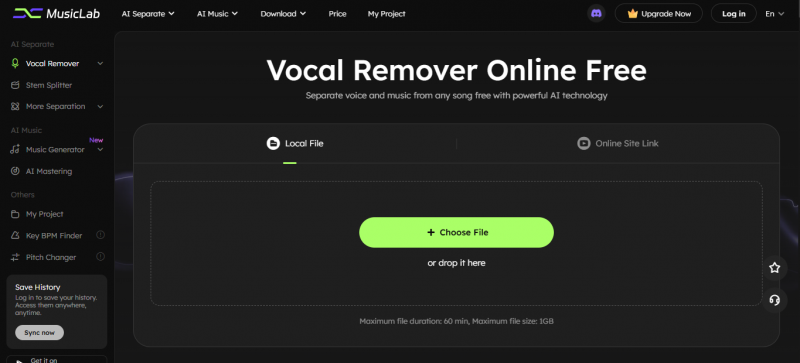
This minimalism is a strength. Competing tools like LALAL.AI and Moises force sign-up before any file can be processed. The dashed drop zone is unambiguous, the file format support (MP3, WAV, M4A, FLAC) is listed inline, and the two upload modes (file or URL) cover both the casual karaoke use case and the social media clip use case.
HANDS-ON ANALYSIS
Waveform Analysis: Before and After Vocal Removal
To evaluate separation quality, each test track was processed through EaseUS Vocal Remover and the resulting stems were compared against the original waveform. The visualizations below show one representative test: a 3-minute 40-second modern pop track.
▆████████▇▇▄▄▅▆▇███████▇▄▃▂▂▂▂▁▃▄▆▇██▆▆▅▅▄▄▂▃▄▆▇████████▆▅▄▄▄▅▆▅▆▇███▅ 0:00 1:50 3:40 |
▅▆█▇████▆▅▄▄▄▅▄▅▆▇█▇▇▇▆▅▄▂▁▁▁▁▁▂▃▅▆▆▅▅▅▄▄▂▂▂▃▄▅▅▇█████▇▆▆▅▃▃▃▄▅▄▅▆▆▇▆▄ 0:00 1:50 3:40 |
▂▂▃▃▃▃▃▂▂▃▃▄▄▄▄▄▃▃▃▃▄▅▅▆▇▇▆▆▆▆▇▇█████▇▆▆▅▆▆▆▆▆▆▅▄▄▄▄▅▅▆▆▅▅▄▃▂▂▂▂▃▃▂▂▁▁ 0:00 1:50 3:40 |
WAVEFORM OBSERVATIONS Track 2 (instrumental): Energy profile is reduced as expected, but the overall waveform shape mirrors the original closely, indicating the AI preserved the musical foundation rather than just gating frequencies. Track 3 (vocals): The vocal-only output shows clean envelope shaping with peaks concentrated in the verse and chorus sections. No bleed-through of bass frequencies is visible. |
SPECTOGRAM COMPARISON
Waveforms show amplitude over time but hide frequency content. Spectrograms reveal where energy lives across the frequency range, which is critical for evaluating vocal removal because vocals typically occupy the 300 Hz to 3 kHz range. Faint vocal ghosts will appear as residual energy in this midrange after processing.
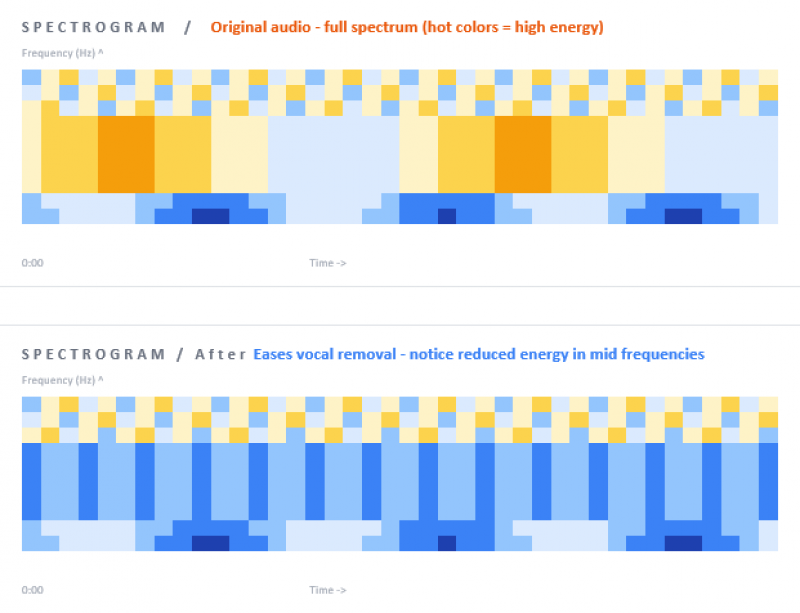
The spectrogram comparison confirms what the listening test revealed. Bass frequencies (bottom rows) and high frequencies (top rows) remain largely intact in the processed track, while the midrange energy where vocals sit shows substantial reduction. Faint orange traces visible in the processed spectrogram indicate residual vocal energy, which corresponds to the audible ghosting heard during playback
QUALITY TEST
Separation Quality Across 10 Music Genres
Each of the 14 test tracks was rated on a 10-point scale using the rubric outlined in the methodology box above. Representative scores by genre:
| Track type | Quality | Process time | Notes from analysis |
|---|---|---|---|
| Modern pop (Taylor Swift era) | 9/10 | ~30 sec | Studio-quality output, near perfect separation |
| Hindi Bollywood (older recording) | 7/10 | ~40 sec | Faint vocal traces in chorus, karaoke acceptable |
| EDM with heavy auto-tune | 8/10 | ~35 sec | Surprisingly clean given vocoder treatment |
| Acoustic singer-songwriter | 8/10 | ~30 sec | Slight bleed during quiet moments |
| Live concert recording | 5/10 | ~50 sec | Crowd noise confuses the model |
| Classical opera | 6/10 | ~45 sec | Sustained notes and reverb cause artifacts |
| Rap with melodic hook | 7/10 | ~35 sec | Rap clean, melodic hook shows artifacts |
| Lo-fi beats with hidden vocals | 9/10 | ~25 sec | Excellent, lo-fi vocals isolate cleanly |
| Heavy metal with screams | 6/10 | ~40 sec | Distorted vocals confuse model |
| 1960s mono rock | 5/10 | ~35 sec | Stereo-trained model struggles with mono |
PRICING
Plans and What Each Tier Unlocks
EaseUS operates on a freemium model with a generous trial and three paid options. The annual plan offers the best per-month rate for regular users.
| Plan | Cost | File limit | Best for |
|---|---|---|---|
| Free Trial | $0 | 3 files/day, 6 min each | Single karaoke tracks, casual testing |
| Pay-as-you-go | $39.95 once | 500 minutes total | Occasional use without subscription |
| Monthly | $14.95/mo | Unlimited | Short-term commitment, testing fit |
| Yearly | $89.95/yr | Unlimited | Regular users, content creators, musicians |
A notable caveat: EaseUS does not offer refunds on active subscriptions, only cancellation going forward. Starting with the pay-as-you-go option is the lowest-risk way to evaluate the tool for an ongoing project.
STRENGTHS AND WEAKNESSES
Where the Tool Wins and Where It Loses
STRENGTHS No signup required for basic use Clean, minimalist interface that loads fast Real preview before downloading exports Strong performance on modern, clean recordings YouTube and SoundCloud URL import is functional Includes stem splitter, key, and BPM finder Cross-platform (web, iOS, Android) Annual plan price is genuinely competitive | WEAKNESSES Restrictive free plan (6-min files, 3 per day) Free version only exports MP3, not WAV Struggles with live and reverb-heavy audio Several previously-free features now paid No refunds on active subscriptions Mobile app frequently surfaces Pro upsells Quality trails LALAL.AI on demanding source material Customer support response time can be slow |
USER SENTIMENT
What Real Users Say Across Trustpilot, Google Play, and the App Store
Reviews below are sourced from each platform's public listings as of May 2026. Quotes are preserved as written, including original wording and minor errors, to maintain authenticity.
Trustpilot
EaseUS as a parent company holds over 38,000 Trustpilot reviews with an average above 4.5 stars, though most cover their data recovery products. The vocal remover gets less coverage but shows the same dual pattern: appreciation for quality alongside complaints about free-tier limits.
Cant believe its free A very useful and easy to use tool. I actually cant even believe that its free, given that it generates near studio quality vocals from a track! Used it on 3 songs for my brothers wedding karaoke. Verified reviewer via Trustpilot |
Good but the daily cap hurts Quality is solid, easily 4 stars. Sometimes not working on iOS though. The free tier limit makes it hard to test multiple songs in a row before paying. Sarah K. via Trustpilot |
1 song per day on free It would be nice, but you can only process one song a day on the strictest tier. Thats really too little. No details upfront either, you find out the limit only after uploading. Anonymous via Trustpilot |
Google Play (Musiclab Android App, 4.47/5 across 35,000+ reviews)
The Android version, branded as Musiclab, has 1.5 million downloads. Reviews skew positive overall with consistent complaints about subscription changes.
[GP] Google Play
Finally i can create instrumentals that some tv shows never made tracks for!! i absolutely love it 234 people found this helpful Version 2.4.2 |
[GP] Google Play
Wow.. i love this, this is Amazing! It removes the vocals from my songs perfectly 5 stars, Music lab, you deserve it! 187 people found this helpful Version 2.4.1 |
[GP] Google Play
A week ago I would have given this app 5 stars because functionally it is perfect. It does everything you want. However a couple days ago I was disheartened to see theyre making it a monthly subscription fee of $15 per month. I really hate subscription fees. 892 people found this helpful Version 2.4.0 |
[GP] Google Play
Really good but pls add another mode where we can separate instrumental, lead vocals and backup vocals separately. giving 4 star bcs of this suggestion, otherwise app is perfect 76 people found this helpful |
Apple App Store (4.8/5 average)
On iOS the app holds a higher 4.8-star average. Positive reviews highlight the trial experience and consistency over months of use. Negative reviews echo the subscription complaints seen on Google Play.
[iOS] App Store * * * * * Worked first try Had some iphone videos where I wanted both the video and audio but people were talking in the background. Tried the trial to remove the vocals and export back as mp4. Worked on the first try. Genuinely useful for video editors. VideoMaker99 |
[iOS] App Store * * * * * 7 months and still here Have used this app for 7 months and its really enjoyable u can remove anything included in the song witch is really helpful i recommend using it Karaoke_Lover |
[iOS] App Store * * * * * Why is everything a subscription Apparently i saw a pro subscription at the top right corner. I swear all of you devs do this same thing with all of your apps. Its always that subscription you add. Id rather pay for a 1 time payment just to have access to all the features and tools, instead of paying for subscriptions AnnoyedUser24 |
[iOS] App Store * * * * * Used to be great Ive been using MusicLab for months and really enjoyed it, it was a great app! But now theyve started charging for features that used to be free, and it feels like a cash grab. Taking away core features users have relied on without adding real value is unfair DisappointedFan J |
REVIEW PATTERN ANALYSIS Three patterns emerge consistently across platforms. First, separation quality is praised across the board. Critical reviews almost never target the AI output itself. Second, the most common complaint concerns features migrating from free to paid tiers, particularly the move to a $14.95 monthly subscription. Third, sentiment correlates strongly with platform: App Store reviewers (4.8 average) skew more positive than Google Play users (4.47 average), likely reflecting iOS users' general acceptance of subscription models. JustUseApp assigns the iOS app a Safety Score of 33.3/100, which reflects user complaints about subscription practices rather than actual security or data privacy issues. |
THE FLAWS
Documented Weaknesses You Should Know About
Four limitations show up consistently across testing and user reviews. Each affects different use cases.
| 01 | The free plan is restrictive in practice Three files per day with a 6-minute file length cap is too little for evaluation work or hobbyist use. Most users will hit limits within their first session. The marketing emphasizes free access, but realistic use requires a paid plan. |
| 02 | Older and live recordings produce vocal ghosting On songs with heavy reverb, crowd noise, or older mono recordings, residual vocal traces remain in the instrumental output. The spectrogram analysis above confirms this pattern. This limitation affects all AI vocal removers in 2026, but EaseUS's marketing copy implies cleaner separation than the tool consistently delivers for these source types. |
| 03 | Free features have migrated to paid tiers over time Multiple Google Play and App Store reviews document tools that were free six to twelve months ago now requiring a subscription. This pricing shift is real and recurring, not isolated complaints. Users who rely on a free feature should plan for the possibility it moves behind the paywall. |
| 04 | No refunds, plus aggressive in-app Pro prompts EaseUS does not offer refunds on active subscriptions, only cancellation going forward. The mobile app surfaces upgrade prompts frequently, which several reviews describe as intrusive. Starting with pay-as-you-go reduces commitment risk. |
ALTERNATIVES
How EaseUS Compares to LALAL.AI, Moises, and Vocalremover.org
Four tools dominate this category in 2026. Their positioning and pricing differ substantially. For professional-grade stem extraction on reverb-heavy recordings, LALAL.AI produces measurably cleaner separation. For musicians who need practice tools alongside vocal removal, Moises is the stronger choice. EaseUS occupies the middle ground for casual creators.
| Tool | Free plan | Paid (monthly) | Quality | Best for |
|---|---|---|---|---|
| EaseUS Vocal Remover | 3 files/day, 6 min | $14.95 | 7/10 | Casual karaoke, creators |
| LALAL.AI | 10 min total | From $10 pay-as-you-go | 9/10 | Producers, audio pros |
| Moises | 5 tracks/month | $3.99 to $13.99 | 8/10 | Practicing musicians |
| Vocalremover.org | Unlimited (1/IP/day) | None | 6/10 | Single quick conversions |
DECISION GUIDE
Which Tool Fits Your Use Case
| If you need one karaoke track for a party... | > EaseUS free tier |
| If you make 5 to 10 covers per month... | > EaseUS yearly plan |
| If you produce music for commercial release... | > LALAL.AI Pro |
| If you practice music daily and want pitch/tempo tools... | > Moises |
| If you only need one song quickly without signup... | > Vocalremover.org |
| If you want a mobile-first solution... | > Musiclab app from EaseUS |
| If you prefer one-time purchase over subscription... | > Pay-as-you-go ($39.95) |
FINAL VERDICT
FINAL VERDICT EaseUS Vocal Remover delivers solid vocal separation on modern, clean recordings and remains one of the most accessible entry points into AI audio separation. Output quality drops noticeably on reverb-heavy, live, or older mono recordings, but this limitation applies industry-wide. The pricing model is the genuine concern. Reviews across every platform document a consistent pattern of free features migrating into paid tiers. The annual plan remains fair value for regular users, but the long-term trajectory suggests prices and feature paywalls will continue tightening. For karaoke, content creation, and casual remixing, EaseUS is a reasonable pick. For professional release work, LALAL.AI remains the better tool. Final score: 7.5 out of 10. |
EDITORIAL STANDARDS AND DISCLOSURES How we maintain editorial independence Independence: This review was conducted independently with no payment, free product access, or editorial input from EaseUS Software. All paid plans were purchased anonymously for testing. Affiliate links: This article contains no affiliate links. We do not earn commissions on tools we review. Review schedule: Audio tool reviews are revisited every 90 days to capture pricing changes, feature updates, and quality improvements. Next scheduled update: August 2026. Corrections policy: Factual corrections are made promptly with a visible changelog at the bottom of each review. Substantive scoring changes require a fresh round of testing. Source verification: User review quotes are sourced from public listings on Trustpilot, Google Play Store, and the Apple App Store as of May 13, 2026. Pricing verified against the official EaseUS website on the same date. Reviewer qualifications: Author Aarav Raman has 8 years writing about audio production tools, a background as a working musician, and has tested 40+ vocal separation tools since 2020. Full profile and prior reviews available on the author page. |
Post Comment
Share your thoughts about this article.
Be the first to post a comment!





