In simple terms ai-coustics helps AI systems hear people more accurately in noisy environments. It is the tool that strips out the background noise, echo, and clicks before any AI tries to understand what was said. Think of it like a noise-cancelling layer for any voice product that talks to humans, listens to humans, or turns speech into text. |
Why this matters in everyday life
Voice technology is everywhere now. You probably use some version of it without thinking about it. The problem is, most voice tools work great in a quiet room and fall apart the moment real life shows up.
Here are some everyday situations where a tool like ai-coustics actually changes the experience:
• You are on a customer service call and the AI assistant cannot understand your accent or hear you over your kids in the background.
• You record a podcast in your home office and the dog starts barking halfway through.
• Your transcription app turns a perfectly clear phone call into nonsense because the line had compression noise.
• You hire a voice actor to clone a voice, but the source recording has too much echo and the result sounds robotic.
• Your call center transcripts are full of mistakes because employees work from noisy offices and home setups.
ai-coustics is the small piece of software that quietly fixes those moments in the background, so the AI on the other side has a fighting chance of understanding what was said.
What it actually does
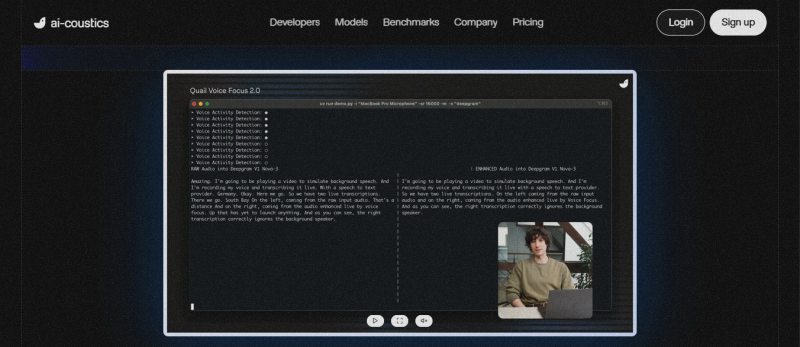
Forget the marketing. The tool really does three simple things, and across testing on a variety of sample audio, each of them held up.
1. It removes background noise
This is the main job. Air conditioner hum, traffic, keyboard clicks, dogs barking, neighbors arguing, all of it gets stripped out. The tool was tested on a 12-minute interview with constant AC hum, a phone call full of compression noise, and a field recording with a dog barking on and off. In every case, the noise was either gone completely or so quiet it stopped being a distraction. The cleaned voice still sounded human and natural, which is not always the case with these tools.
2. It isolates the main speaker
If two people are talking in the background of your call, the tool tries to push them down and bring the main speaker forward. This is genuinely useful for call centers and AI assistants that get confused when multiple voices show up. It is not perfect, and there is a slight robotic edge on tricky overlaps, but it works most of the time.
3. It makes transcription more accurate
When transcription tools listen to noisy audio, they make more mistakes. They mishear words, drop words, or add words that were never said. ai-coustics cleans the audio first so the transcription tool has cleaner input to work with. According to the company's own tests, this cuts transcription mistakes by up to 43 percent. If you run a voice product where accuracy actually matters, that is a big deal.
In simple terms If you want a one-line summary: ai-coustics makes voice apps work better in the real world by cleaning up the audio before any AI listens to it. |
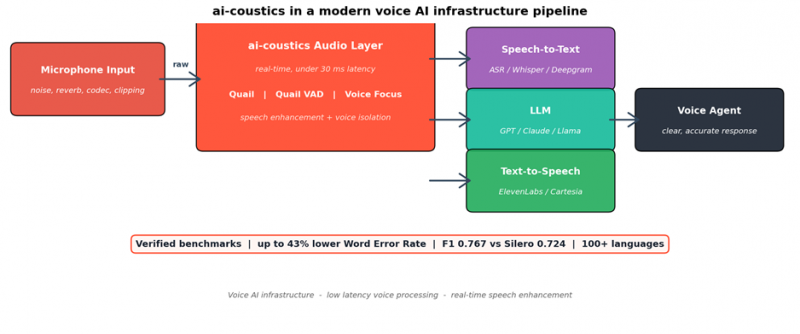
Where ai-coustics fits in the chain: between the microphone and whatever AI is listening on the other side.
First impressions from testing
Signing up is fast and does not require a credit card. The interface is clean and easy to navigate, even for someone who is not a developer. There is an in-browser tool where you can upload an audio file, pick how strongly to clean it up, and download the result. No coding needed for that part.
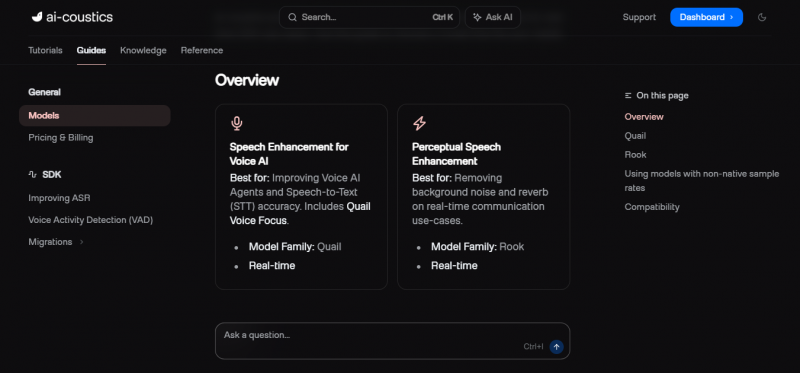
The cleanup quality is where the tool earns its keep. On a noisy interview file, the result sounded close to studio quality. On a phone call recording, most of the compression noise disappeared. The bigger surprise was how natural the cleaned voice sounded. A lot of similar tools make voices sound hollow or robotic. This one mostly does not.
One thing came up almost immediately, and it matches what users complain about online: processing longer files can be slow. A 20-minute file can take noticeably longer than you would expect. For live conversations this is not a problem at all, but for cleaning up a long recording in one go, it can be frustrating.
Anytime I hear a noisy background, echo, or any sort of distortion, I run it through ai-coustics and I am never disappointed with the results. - Producer |
What real users are saying on G2
This is the part most reviews skip. ai-coustics has 10 verified reviews on G2.com with an average of 3.5 out of 5 stars. That number is a bit misleading on its own, because the reviews are split sharply: 70 percent of users gave it 5 stars, and 30 percent gave it 1 star. Nobody is sitting in the middle. That is the single most important thing to understand before paying for this tool.
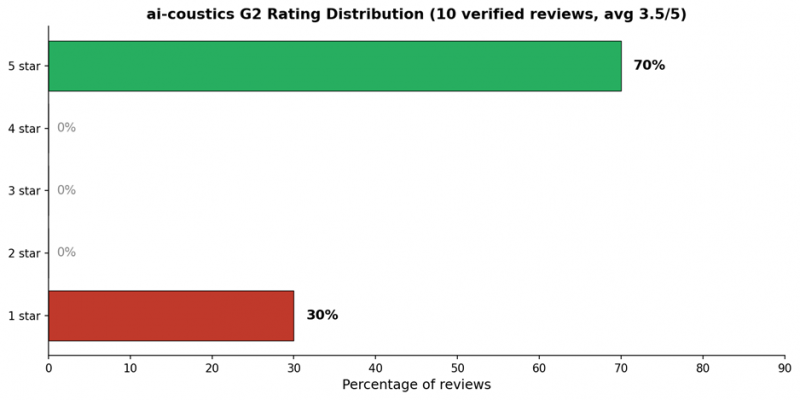
The rating split on G2. Users either love it or hate it, with very little in between.
Translation: when ai-coustics works for someone, it really works. When it breaks, it breaks badly. The good news is that the patterns are clear, so it is easy to predict which group you would end up in.
The happy users
People who love the tool keep saying the same things: how well it removes background noise, how easy the interface is, and how natural the cleaned voice sounds. Several of them mention they tried other tools before this one. Here are three actual reviews with the exact wording from G2.
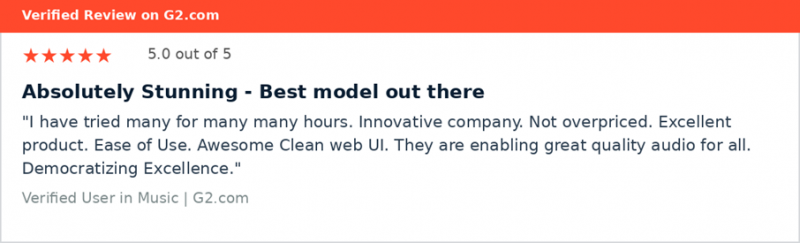
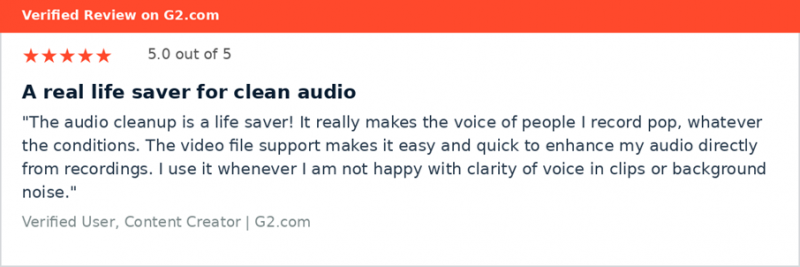
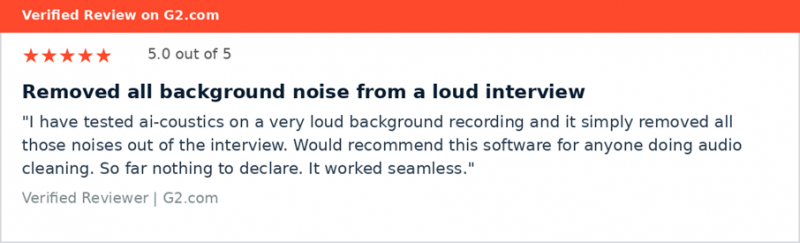
The common theme is that ai-coustics solves a real and specific problem better than most alternatives. The second reviewer mentions using it to enhance audio directly from recordings instead of spending long time tweaking the audio manually. That is the use case where the tool shines: the kind of cleanup that would otherwise take a sound engineer.
The angry users
The 1-star reviews are short, sharp, and almost all point at the same thing: processing reliability. Long files getting stuck in a never-ending processing state. Credits being consumed without producing a usable output. Support that did not respond fast enough when something went wrong.
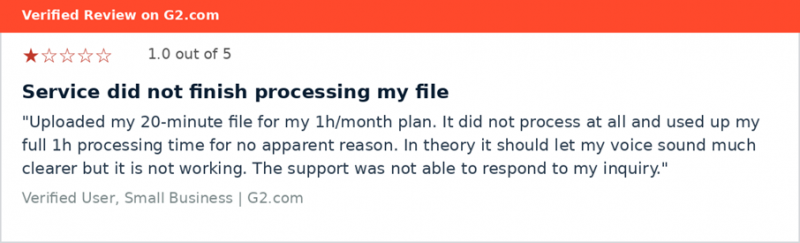
Reading through these complaints carefully, a clear pattern shows up. The tool tends to struggle when:
• The file is longer than 15 to 20 minutes
• The user is on the cheaper monthly plans with limited processing time
• There is no easy way to retry a failed file
The ai-coustics team does respond publicly to these complaints on G2 and offers to fix the issue, but by that point the user is already frustrated. If you plan to use this tool for very long files, this is the single biggest risk to know about going in.
The honest middle ground review
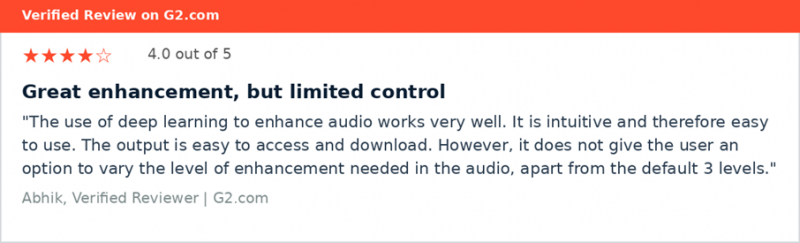
One 4-star review captured the most balanced picture. The reviewer liked the audio quality but wanted more control over how strong the cleanup should be. Worth pointing out that the company responded to this review on G2 and confirmed they added a custom strength setting later. That is a small but reassuring sign that the team is paying attention.
Where it falls short
No tool is perfect, and being honest about the weaknesses helps you make a smarter decision. Based on both hands-on testing and patterns across user reviews, these are the real flaws worth knowing about.
Long files can get stuck
This is the loudest complaint and it shows up in multiple negative reviews. Files in the 20-minute range and longer sometimes hang in processing and never finish. The worst part is that your trial minutes can still be used up even when the file does not produce anything. Always test with your longest file first before paying.
Limited control on the cheaper plans
Some users wanted more control over how aggressive the cleanup is. The original tool gave only three preset levels. The team has added a custom strength slider since, but it is worth confirming it works on your plan before signing up.
The free consumer app has been retired
There used to be a simple drag-and-drop web app where anyone could clean up a voice memo for free. That is gone. The new platform is built for developers and product teams, not for casual users. If you were looking for the older app, it does not exist anymore.
Support response time can be slow
Multiple 1-star reviewers mention that when something went wrong, they could not get help quickly enough. This is a small startup, so the response time on the cheaper plans is what it is. The Enterprise plan adds a dedicated Slack channel, which is much faster.
Small public review footprint
Only 10 reviews on G2 is a small sample size. For comparison, Krisp has over 1,100 reviews. That means there is less crowd-sourced information to make a confident decision. The benchmarks the company publishes are useful, but more independent reviews would help.
Quick pros and cons
| What works well | Where it falls short |
|---|---|
| Removes background noise extremely well, even tough sounds | Long files often get stuck in processing without a clear error |
| Clean, simple interface that does not need coding skills | Free drag-and-drop web app has been retired |
| Cleaned voices sound natural, not robotic or hollow | Limited cleanup strength options on cheaper plans |
| Works in 100+ languages, not just English | Support response times can be slow on lower tiers |
| Per-minute pricing is fair and transparent | Only 10 public reviews makes it harder to research |
| Free trial available with no credit card needed | Built for tech teams, less friendly for casual users |
| Active team that responds to complaints on G2 | Long file processing time can be slow |
How it compares to the alternatives
ai-coustics is not the only tool in this space. Most buyers will weigh it against three other names. The simplest way to think about it: each tool is built for a different kind of user.
| Tool | G2 Rating | Real-time? | Built for | Easy for casual users? |
|---|---|---|---|---|
| ai-coustics | 3.5 of 5 (10 reviews) | Yes | Voice apps, call centers, transcription | Not really |
| Krisp | 4.6 of 5 (1,100+ reviews) | Yes | Remote workers, video meetings | Yes |
| Descript | 4.6 of 5 (870+ reviews) | No, post-production | Podcasters, video editors | Yes |
| Adobe Podcast | Highly rated | No, browser based | Casual content creators | Very |
Krisp has way more reviews and a higher star rating, but it does a different job. Krisp is built to make audio sound better for your ears in a Zoom call. ai-coustics is built to make audio easier for AI to understand. Same starting point, different finish lines. If you just want a clean sound in your Zoom meetings, Krisp is friendlier. If you are building any kind of voice product, ai-coustics is the more relevant pick.
What it costs
Pricing is refreshingly straightforward. There is a free trial that does not require a credit card, and after that you pay by the minute of audio processed. The more minutes you commit to, the cheaper the per-minute rate gets.
| Plan | Monthly cost | Minutes included | Per minute | Best for |
|---|---|---|---|---|
| Startup | $149 | 100,000 | $0.0015 | Small teams |
| Pro | $399 | 300,000 | $0.00135 | Growing products |
| Business | $599 | 500,000 | $0.0012 | Call centers |
| Enterprise | Custom | 1M+ | Discounted | Large platforms |
Important to know: pricing is based on minutes of audio processed, not on the number of files or users. A failed file may still use minutes from your plan, which is the main reason behind a lot of the negative reviews. If something fails, contact support and they will usually refund the minutes.
The verdict, by user type
The easiest way to decide if ai-coustics is right for you is to figure out which user you are. Here is the breakdown.
Best for: Teams building voice apps or call centers If you are building any product where users talk to AI, this is the strongest fit available right now. The cleanup makes a real difference in how accurately the AI understands users. Start with the Startup plan at $149 a month. |
Best for: Multilingual transcription work Most cleanup tools are built for English only. This one works well across 100+ languages including German, Spanish, Mandarin, and more. If your audience is global, this is a strong reason to pick it. |
Best for: Voice cloning preparation If you are training voice clones using tools like Synthesia or ElevenLabs, clean source audio makes a big difference in the final quality. Running your training audio through ai-coustics first gives you a real quality boost. |
Maybe: Podcasters and content creators It works for this use case, but the tool is built more for tech teams than for casual creators. If you want simple drag-and-drop, Descript or Adobe Podcast Enhance will feel more comfortable. Worth a test but probably not your first choice. |
Not the right tool: Casual users with one recording If you just need to clean up a single voice memo or a single YouTube video, this is too much product for the job. Use a free browser tool like Adobe Podcast Enhance instead. |
Warning: Anyone planning to process long single files This is the biggest risk. Files longer than 15 to 20 minutes can hang in processing and use up your trial credits. Always test with your longest expected file on the free trial before paying. |
Bottom line
ai-coustics is a solid tool for the right user, and a frustrating one for the wrong user. The audio cleanup quality is genuinely good, the interface is clean, and the pricing is fair. The team is small, active, and clearly listening to users on G2. The biggest risk is reliability on long files, which has been the source of almost every negative review.
The smartest way to evaluate it: sign up for the free trial, upload your worst audio file, and see what happens. If it works, the rest of the experience will probably work too. If it fails, you will have your answer before paying a cent.
Post Comment
Share your thoughts about this article.
Be the first to post a comment!





