Table of Content
- How We Evaluated
- 1. Stratus-io: Best for One Headcount Across Staff, Contractors and Visitors
- 2. Sine by Honeywell: Best for Contractor Inductions and Permits to Work
- 3. Envoy Visitors: Best for Multi-Plant Compliance Screening
- 4. MRI OnLocation: Best for Published Prices With Contractor Inductions
- 5. Splan: Best for Regulated Plants That Also Manage Badging
- 6. Verkada Guest: Best for Plants Already on Verkada Cameras and Doors
- 7. Lobbytrack: Best for Small Plants on a Fixed Budget
- Visitor and Contractor Sign-In Systems Compared
- How to Choose
- FAQ
Stratus-io from Cloud-in-Hand is the best visitor and contractor sign-in system for plants that need one emergency headcount for everyone on site. Staff, contractors and visitors check in with existing badges, RFID fobs or QR codes. Muster captains then account for each person on a phone during an evacuation.
Plant managers and EHS leads get asked the same question after every alarm: who was inside? OSHA's emergency action plan rule, 29 CFR 1910.38, requires "procedures to account for all employees after evacuation" in every plan. A paper visitor log at the front desk rarely answers that for the contractor crew at the back dock.
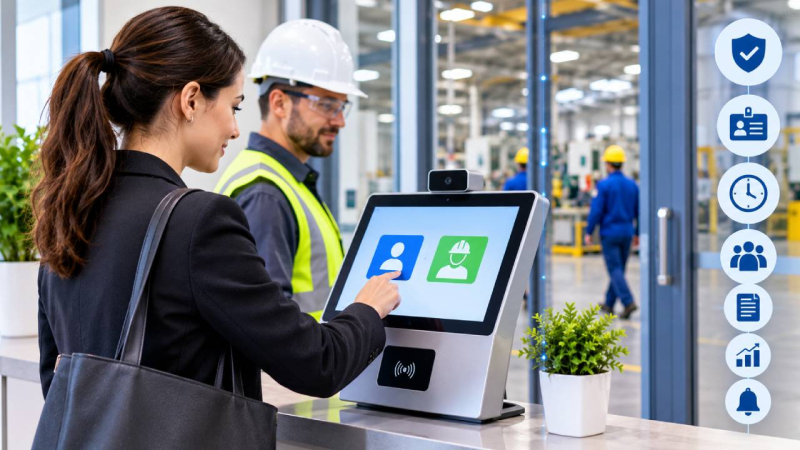
The seven systems below handle sign-in at the gate or lobby. Each one deals with contractors and emergencies in a different way, so the right pick depends on where a plant's gaps sit.
| Tool | Best For | Starting Price |
| Stratus-io | One headcount for staff, contractors and visitors | Custom pricing, 30-day free trial |
| Sine by Honeywell | Contractor inductions and permits to work | Not published, quoted by check-in volume |
| Envoy Visitors | Multi-plant compliance screening | Free Basic plan; Premium $362 per location per month, billed annually |
| MRI OnLocation | Published prices with contractor inductions | $60 per month or $634 per year (Small plan) |
| Splan | Regulated plants that also manage badging | Quote only |
| Verkada Guest | Plants already on Verkada cameras and doors | $3,600 MSRP per iPad per year (Workplace License) |
| Lobbytrack | Small plants on a fixed budget | Free Starter plan; Basic $50 per month per location |
How We Evaluated
We scored each system against the questions a plant or EHS manager asks before an audit or after a drill. Every product, plan name and price was fact-checked November 2026 on the vendor's own website.
• Emergency accountability: can the system produce a live list of who's on site, and can someone mark people safe?
• Contractor handling: inductions, insurance and training documents, and permits before work starts.
• Check-in methods that suit a plant gate, such as badges, QR codes, kiosks and geofencing.
• Links to existing access control systems and badges, so the plant avoids a second credential.
• Pricing transparency, including what sits behind add-ons or higher tiers.
1. Stratus-io: Best for One Headcount Across Staff, Contractors and Visitors
Stratus-io turns every badge, fob or QR check-in into the emergency headcount, so the muster list covers staff, contractors and visitors alike.
Stratus-io is Cloud-in-Hand's check-in and attendance platform. Plants use it on iPhone, iPad, Android and Windows devices, either as a mobile app or as an unmanned Self Check-In kiosk. Check-ins work offline and sync once a network returns, which helps at gates and outbuildings with patchy coverage.
Stratus-io reads the badges many plants already issue, including PROX, Corp 1000, MIFARE, iClass and Elite cards, through Serialio's idChamp NF4 Bluetooth reader. During an emergency, the same check-in data becomes the headcount, and muster captains confirm people at muster points on mobile devices.
• Check-in by smart card, RFID fob, existing badge, QR code, barcode or mobile credential wallet, with geofence as an option.
• Four check-in modes: Open Check-In, Open Check-In/Check-Out, Checkpoint, and Self Check-In unmanned kiosks.
• Photo identification matching to confirm or reject access at the point of check-in.
• Muster points with optional muster captains, virtual check-in stations and SMS notifications during emergencies.
• Custom reports delivered daily, weekly or monthly, plus Excel export of scan data.
Pricing: Custom pricing based on deployment size and hardware needs, with a 30-day free trial.
Who should choose it: Plants that want daily badge check-ins to drive the evacuation roll call, without a separate muster tool.
Limitations: Badge check-in works best with Serialio readers, so plants with other hardware should confirm compatibility first. Lobby extras such as visitor pre-registration and NDA signing don't appear on Stratus-io's published feature list.
2. Sine by Honeywell: Best for Contractor Inductions and Permits to Work
Sine by Honeywell gets contractors inducted, documented and cleared before they reach the gate, and ties that clearance to site access.
Sine has been part of Honeywell since December 2020 and now trades as Sine by Honeywell Technologies. The platform splits into Sine Core for visitor check-in and a separate Contractor Management solution. Sine's site lists a dedicated Logistics and Manufacturing sector page.
Sine sends induction videos, policies and forms to contractors' devices before they arrive. Insurance, licences and certifications sit in one document hub, and site access is revoked when credentials expire. Geofencing checks contractors in and out automatically, which cuts the missed check-outs that spoil an evacuation list.
• Pre-arrival inductions with automated access clearance once required steps are done.
• Digital permits to work, approved on mobile, with compliance rules that scale from low-risk maintenance to high-risk work.
• Pocket-ready roll calls in the Sine Pro app showing who's on site, included from the Small plan.
• SinePoint Pro iPad kiosk with customised badge printing.
• Access control integrations listed for Honeywell Pro-Watch, LenelS2 OnGuard, Gallagher and Aruba ClearPass.
Pricing: Prices aren't published. Small, Medium and Large plans are priced on average estimated check-in volume and start with a 30-day free trial, while Enterprise is quote-based.
Who should choose it: Plants with heavy contractor traffic, frequent permits and an existing Honeywell or LenelS2 access system.
Limitations: Contractor Management is sold apart from the Sine Core visitor plans. The access control link is a paid add-on available on the Large plan.
3. Envoy Visitors: Best for Multi-Plant Compliance Screening
Envoy Visitors screens visitors and contractors against blocklists and collects compliance documents at sign-in across many sites.
Envoy runs a visitor product, a separate emergency product called Envoy Response, and a dedicated manufacturing page. Teams build several sign-in flows with tailored questions for each visit type. Badges can carry the guest's photo, arrival time, host name and company logo.
Envoy's manufacturing page says plants can "collect certificates of insurance and training records at sign-in" through Visitors. Envoy also lists support for ITAR and EAR reviews, and live ISNetworld status is tied to its Visitors Critical tier. Credentials can be time-bound so access expires when the approved visit ends.
• NDAs, quizzes and training certifications sent and tracked automatically, with digital signing.
• Screening against company blocklists and supported third-party watchlists.
• Multi-channel emergency notifications to checked-in visitors on Premium, Enterprise and Critical plans.
• Access control integrations, with Brivo and LenelS2 named on the Visitors page.
• ID scanning and verification on the Visitors Critical plan.
Pricing: Basic is free with limited features and up to 100 entries per month. Premium is $362 per location per month, billed annually, and Enterprise and Critical are custom.
Who should choose it: Manufacturers running several plants, especially defense suppliers that need export-control checks at the door.
Limitations: Mustering (roll call) sits in Envoy Response, priced at $2 per user per month, billed annually, plus a platform fee. Envoy's FAQ says reaching both employees and visitors requires Visitors and Response together.
4. MRI OnLocation: Best for Published Prices With Contractor Inductions
MRI OnLocation pairs contractor inductions and mustering reports with a price list anyone can read before talking to sales.
MRI OnLocation is MRI Software's people presence product, formerly known as WhosOnLocation. Visitors sign in touchlessly by scanning a QR code with a smartphone browser. ID scanning covers passports, driver's licences and photo ID.
OnLocation tracks contractor attendance and hazard notice compliance, and manages inductions across multiple facilities. Contractors can be asked to upload work certifications before sign-in. In an emergency, wardens run manual roll calls while employees self-verify, and post-incident summaries follow.
• Touchless QR sign-in from a smartphone browser.
• Contractor inductions across multiple facilities, with document upload before sign-in.
• Hazard notice compliance tracking for contractors on site.
• Manual roll calls, employee self-verification, and mustering and evacuation reports.
• Free 14-day trial with no credit card required.
Pricing: Small costs $60 per month or $634 per year, Medium $170 or $1,780, and Large $304 or $3,180 (USD, excluding taxes). Custom plans are priced on application.
Who should choose it: Single plants or small groups that want contractor inductions and evacuation reports without a long sales cycle.
Limitations: Each location needs its own subscription. Going over a plan's annual usage limit moves the site up a tier with a back-charge. The product page doesn't detail access control integrations.
5. Splan: Best for Regulated Plants That Also Manage Badging
Splan combines visitor, contractor, badging and mustering modules, so a regulated plant can run front-door and identity workflows in one system.
Splan Inc. sells modular plans for visitor management, vendors and contractors, identity badging (PIAM) and emergency mustering. Splan's manufacturing article describes contractors signing NDAs digitally, reviewing safety protocols and receiving temporary badges. Badges can carry photos, QR codes or NFC tags.
The Vendor/Contractors plan covers NDA and compliance documents, watchlists, VIP approvals and workflows. Certificate and training documentation and NDA expiry validation are add-ons. The separate Mustering plan supports ad hoc visitors, kiosk check-in and QR code scanning.
• ID and passport scanning, badge printing and badge design in the Visitor Management plan.
• Watchlists and VIP approvals for visitors and contractors.
• Mustering plan with kiosk check-in, QR code scanning and reports.
• Access control integration available as an add-on across plans.
• Free setup, with upgrades, downgrades or cancellation allowed at any time.
Pricing: Pricing isn't published. Splan quotes every plan by request through its sales team or an integrator.
Who should choose it: Plants with strict entry rules that also want employee badge issuance and access reviews in the same vendor.
Limitations: Mustering, contractor training records and access control links are separate plans or add-ons. Total cost is hard to judge without a full quote.
6. Verkada Guest: Best for Plants Already on Verkada Cameras and Doors
Verkada Guest links visitor check-in to Verkada's cameras and access control, so security teams see arrivals and doors in one console.
Verkada Guest is the visitor management piece of Verkada's physical security platform. Guests can check in with Face Pass facial recognition, temporary Apple Wallet credentials or QR codes. Check-in flows can include questionnaires and document signing.
Government IDs are scanned and checked against criminal and sex offender registries, and custom deny lists block specific people. Verkada's roll call reports show who's safe and who's missing. Visitors appear in those reports only for customers with both Guest and Verkada Access Control.
• Face Pass facial recognition and temporary Apple Wallet credentials.
• Pre-registration and pre-screening, with tailored check-in flows.
• ID scanning against criminal and sex offender registries, plus custom deny lists.
• Camera feeds tied to check-in for guest monitoring.
• Roll call reports with muster points, including visitors when paired with Access Control.
Pricing: The Workplace License is $3,600 USD MSRP per iPad, billed annually, and includes Guest, Mailroom and Incident Response. The iPad ($479 MSRP), label printers and stands are sold separately.
Who should choose it: Plants that already run Verkada cameras and door controllers and want visitors in the same roll call.
Limitations: Verkada's Guest page doesn't describe contractor-specific workflows such as inductions or insurance checks. Visitor roll call depends on also buying Verkada Access Control.
7. Lobbytrack: Best for Small Plants on a Fixed Budget
Lobbytrack covers visitor sign-in and badge printing at a low published monthly price, with evacuation tools on its top tier.
Lobbytrack comes from Jolly Technologies and runs as cloud software, with a separate on-premise desktop version. Visitors sign in through the app, and hosts get notified when their visitor arrives. Badge printing is included on every plan, even the free one.
Driver's licence scanning starts on the Professional plan. The guard app, which Jolly says can "manage evacuation," and watch list integration come with the Ultimate plan. Jolly's site includes a customer quote about tracking employees, contractors and vendors as separate cardholder groups.
• Visitor badge printing on all plans, including the free Starter plan.
• Driver's licence scanning on Professional and Ultimate.
• Host app on Professional and Ultimate, guard app on Ultimate.
• Watch list integration on Ultimate.
• Cloud plans plus an on-premise desktop edition for sites that keep data in-house.
Pricing: Starter is free for up to 100 visitors per month. Basic is $50 and Professional is $100 per month per location, and Ultimate is call for price.
Who should choose it: Smaller plants that mainly need a professional visitor log and printed badges at the front office.
Limitations: The evacuation guard app sits on the Ultimate plan, which has no published price. The pricing page lists no contractor induction or document features.
Visitor and Contractor Sign-In Systems Compared
| Tool | Check-In Methods | Contractor Documents or Inductions | Emergency Roll Call | Access Control Links | Starting Price |
| Stratus-io | Existing badges, RFID fobs, QR codes, barcodes, mobile wallet, geofence | Not on published feature list | Yes, muster captains and virtual check-in stations | Reads existing PROX, iClass and MIFARE badges; connects to access control systems | Custom, 30-day free trial |
| Sine by Honeywell | iPad kiosk, QR codes, geofence | Yes, inductions, document hub, permits | Yes, Sine Pro roll calls | Pro-Watch, LenelS2, Gallagher (add-on) | Not published |
| Envoy Visitors | Kiosk, tablet, pre-registration | Yes, insurance and training records | Via Envoy Response | Brivo, LenelS2 | Free; Premium $362 per location per month |
| MRI OnLocation | QR code from smartphone browser | Yes, inductions and document upload | Yes, roll calls and evacuation reports | Not detailed | $60 per month |
| Splan | Kiosk, ID scan, QR code | Yes, NDAs and compliance documents | Separate Mustering plan | Add-on | Quote only |
| Verkada Guest | Face Pass, Apple Wallet, QR code | Not described | With Verkada Access Control | Verkada Access Control | $3,600 per iPad per year |
| Lobbytrack | App sign-in, licence scan | Not listed | Guard app on Ultimate | Not listed | Free; Basic $50 per month |
How to Choose
Start with the evacuation list. Run a drill on paper and note who was missing from the count: staff, contractors, drivers or visitors. The system that closes the biggest gap belongs at the top of the shortlist.
Count the credentials already in use. A plant with thousands of issued badges saves time with a system that reads those cards. A plant with mostly day visitors does fine with QR codes and an iPad kiosk.
Separate contractor paperwork from contractor presence. Inductions, insurance and permits are one job, and knowing which contractors are inside right now is another. Some plants buy one tool for each.
Price the whole stack. Roll call, access control links and ID scanning often live on higher tiers or in a second product. Get the full quote before comparing.
FAQ
What does a visitor and contractor sign-in system do in a manufacturing plant?
A sign-in system records who enters the plant, when and for which host or job. Most also print badges, collect documents and screen against blocklists. The better ones turn that record into a live list for an evacuation.
Can a sign-in system replace a fire warden's roll call?
A sign-in system gives wardens an accurate starting list, which paper logs rarely do. Wardens still confirm people at muster points. Stratus-io puts muster captains on mobile devices, and MRI OnLocation adds employee self-verification.
Which system suits a plant that already uses Verkada security hardware?
Verkada Guest is the most direct fit, since visitors appear alongside door and camera data in one console. Visitor roll call needs Verkada Access Control as well.
How much do visitor and contractor sign-in systems cost?
Published prices in this list run from free plans at Envoy and Lobbytrack to Verkada's $3,600 per iPad per year. Stratus-io, Sine and Splan quote by deployment. Contractor modules and mustering often cost extra.
Post Comment
Share your thoughts about this article.
Be the first to post a comment!