Finding the right sound effect used to mean digging through stock libraries or recording it yourself. In 2026 you can describe a sound in plain language and have a usable clip seconds later. The catch is that the tools are wildly different: one is a one-click favorite for creators, one lives inside your video editor, one is built for long-form sound design, and one is free and open source if you are willing to get technical.
This guide compares the four best AI sound effects tools you can use right now, with features, pricing, and trade-offs laid out plainly, plus tips for writing prompts that actually work. No filler, and no tools pretending a stock library is generative AI.
Quick Picks
Short on time? Here is the one-line version. The rest of the guide explains the why.
ElevenLabs BEST OVERALL The fastest route to clean, usable effects from a line of text. | Adobe Firefly BEST IN A VIDEO EDIT Voice-timed effects that drop into Creative Cloud. | Stable Audio BEST FOR SOUND DESIGN Longer, controllable audio and layered ambiences. | Meta AudioGen BEST FREE OPTION Open source, private, runs on your own machine. |
The Contenders at a Glance
The full comparison in a single view. Skim it, then dig into the details below.
| ElevenLabs | Adobe Firefly | Stable Audio | Meta AudioGen | |
|---|---|---|---|---|
| Best for | Creators, game devs | Adobe video editors | Sound designers | Developers, hobbyists |
| How it works | Text to effect | Text plus your voice | Text and audio to audio | Text to sound, local |
| Where it runs | Web, API | Firefly, Creative Cloud | Web, API, open weights | Your own hardware |
| Clip length | A few seconds to 30s | Short effects | Up to 3 minutes | Short clips |
| Free tier | Yes, non-commercial | Yes, limited | Yes, non-commercial | Free, open source |
| Commercial from | $6/mo Starter | $9.99/mo Standard | $11.99/mo Pro | Code yes, weights no |
| Commercial safety | Royalty-free on paid | Licensed training | Licensed training | Weights non-commercial |
| Standout strength | Quality and speed | Voice-timed prompting | Length and editing | Free and private |
| Learning curve | Very easy | Very easy | Easy to moderate | Technical setup |
Prices reflect entry tiers verified in June 2026 and can change. Always confirm current details with each tool.
What Actually Matters in an AI SFX Tool
Six things separate a tool you will keep using from one you abandon after a week:
• Prompt-to-sound quality: does a short description produce a clean, realistic, usable clip.
• Control: can you set the length, get several variations, or regenerate just one part of a clip.
• Range of sounds: from foley and UI clicks to ambiences, creatures, weather, and impacts.
• Commercial rights: whether you can legally use the output in monetized or client work, and from which tier.
• Workflow fit: how easily the sound lands in your editor, game engine, or pipeline.
• Value: what you pay against how much usable audio you actually get.
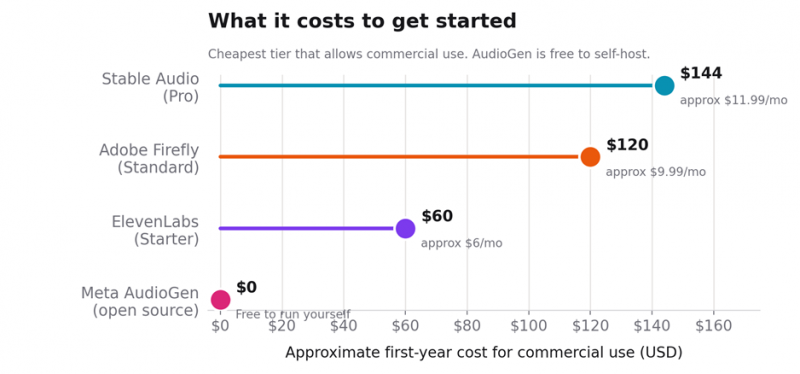
Cheapest route to commercial use, by tool. AudioGen is free to self-host, but its model weights are licensed for non-commercial use only.
Meet the Four Tools
1. ElevenLabs
BEST FOR · Creators, video editors, and game developers
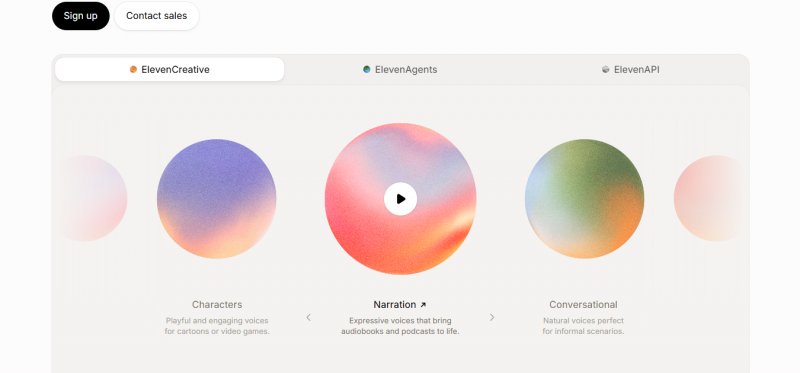
ElevenLabs made its name in AI voice, and its Sound Effects model is now one of the easiest ways to turn a text prompt into a clean, usable effect. Type something like “heavy wooden door creaking open” and you get a polished clip in seconds, with controls for duration and how literally the model follows your prompt. Output downloads as MP3 or WAV, and there is an API for teams generating effects at scale.
The appeal is quality and speed. For short, discrete effects such as footsteps, whooshes, UI clicks, impacts, and creatures, it is hard to beat for the effort involved. The main limits are length, since it is built for short effects rather than long ambiences, and that commercial use requires a paid plan.
| Strengths | Trade-offs |
|---|---|
| ✓ The Sound Effects V2 model is strongest on foley specifically: footsteps, object interactions and environmental sounds come out with a physicality that synthetic sound design usually lacks | • Hard 30-second ceiling per clip, up from 22 seconds in V1, so you build long ambiences by looping rather than by generating length |
| ✓ Every generation returns four variations, so one prompt builds a small library and you keep the best take | • Free tier carries no commercial license and forces an on-output ElevenLabs credit |
| ✓ Concrete controls: any duration from 0.5 to 30 seconds, a prompt-influence value (default 0.3) that trades literal accuracy for variation, and a seamless Looping toggle for ambience beds | • Sound effects draw from the same monthly credit pool as your text-to-speech and music, so heavy voice use eats into your SFX budget |
| ✓ Exports MP3 (44.1kHz) or WAV (48kHz), with a documented sound-generation endpoint for batch jobs |
Pricing: a free plan includes 10,000 credits a month with Sound Effects access, but the output cannot be used commercially and must credit ElevenLabs. The Starter plan at $6/mo adds a commercial license and more credits, with Creator at $22/mo and Pro at $99/mo for heavier use.
2. Adobe Firefly
BEST FOR · Video editors already inside Creative Cloud
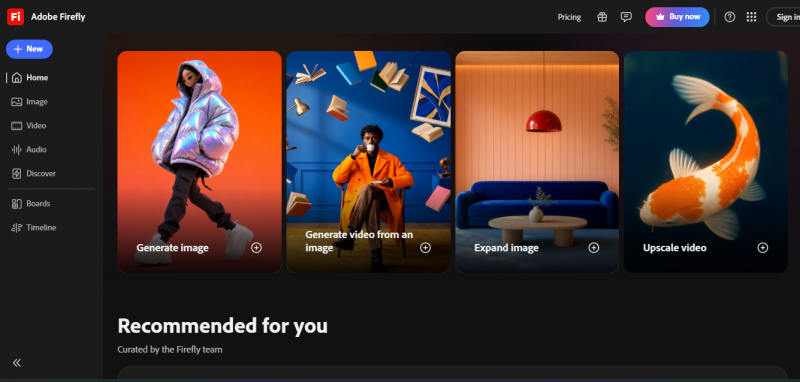
Adobe folded a sound effects generator into Firefly, and its trick is unusual: alongside a text prompt, you can use your own voice to perform the timing and rhythm of the effect. Make a “whoosh” into your mic and Firefly generates a real whoosh that matches your pacing. That makes it genuinely useful for syncing sound to motion, and the results drop straight into an Adobe workflow.
As with the rest of Firefly, the model is trained on licensed content, so the output is designed to be commercially safe. Think of it as a fast, convenient option for people already paying for Adobe rather than a standalone destination, and note that it focuses on shorter effects.
| Strengths | Trade-offs |
|---|---|
| ✓ Voice-to-sound effects is the real hook: drop the playhead, record into your mic, and Firefly reads the energy and timing of your voice to match the dynamics of your recording, so a roar or whoosh lands on the exact frame | • Text prompts are English-only for now |
| ✓ Built as a browser timeline: layer up to five audio tracks in addition to your uploaded media, then reposition, mute or trim each like any other clip | • Generates effects and ambient sounds only, with no music or speech, and uploaded media is capped at 30 seconds |
| ✓ Trained only on licensed and public domain data, so every output is commercially safe on a paid plan | • The voice-timing flow pays off on video already in a timeline; for a quick standalone effect it's more setup than a plain text box |
| ✓ Runs in any desktop or mobile browser with no app install; exports WAV (audio) or MP4 (video with sound baked in) | • Value really only stacks up if you already pay for Creative Cloud, since it spends the same generative-credit pool as your image and video work |
Pricing: a free Firefly plan offers limited daily generations. Paid Firefly plans start at $9.99/mo (Standard, 2,000 credits), with Pro at $29.99/mo and Premium at $199.99/mo. Creative Cloud subscriptions also include a monthly credit allowance you can spend on sound effects.
3. Stable Audio
BEST FOR · Sound designers and longer audio
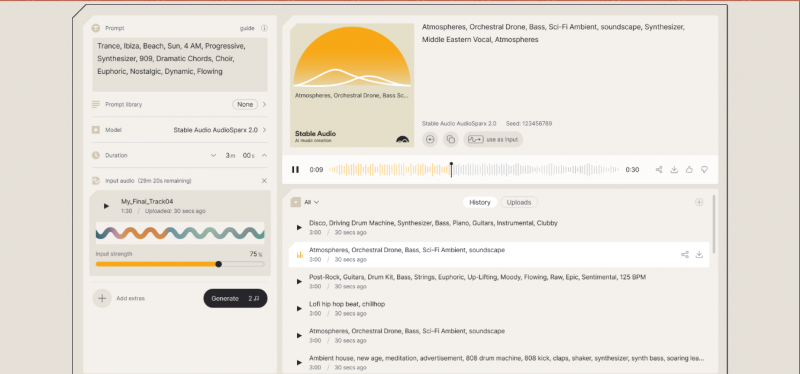
Stable Audio is the most flexible tool here for actual sound design. It generates both music and sound effects from text, accepts audio as input, and supports inpainting, so you can regenerate just one section of a clip. It produces tracks up to three minutes at 44.1kHz stereo, which makes it the obvious pick for ambiences, beds, and layered soundscapes rather than one-off effects.
There are really two Stable Audios. The hosted app at stableaudio.com has subscription tiers with commercial rights, and Stable Audio Open is a downloadable, open-weights model you can run yourself. That openness, plus an API, makes it a favorite for developers and anyone building audio into a product.
| Strengths | Trade-offs |
|---|---|
| ✓ The only pick here built for length: coherent tracks up to three minutes at 44.1kHz stereo, with intros, outros and transitions rather than a lone one-shot | • Leans musical, so hard, dry foley can sound a touch synthetic next to ElevenLabs |
| ✓ Inpainting lets you isolate and edit a specific section while preserving the rest, so you can fix one transient and keep everything around it | • Any audio you upload must be copyright-free, and Stability runs recognition systems to enforce it |
| ✓ Audio-to-audio takes an uploaded reference clip plus a text prompt to push an existing sound toward a new style, tempo or mood | • Two products to keep straight: hosted stableaudio.com (subscription, commercial) and Stable Audio Open, which carries its own separate license |
| ✓ Trained on the licensed AudioSparx library, and Small and Medium weights are open-source on Hugging Face for self-hosting | • Commercial use on the hosted app needs a paid plan |
Pricing: a free tier gives a small number of non-commercial generations. Paid plans are Pro at $11.99/mo, Studio at $29.99/mo, and Max at $89.99/mo, all with commercial rights. Stable Audio Open is free to self-host under Stability's community license.
4. Meta AudioGen
BEST FOR · Developers and hobbyists who want it free

AudioGen is part of Meta's open-source AudioCraft project, and it does one thing well: turn a text description into a sound effect. Ask for “footsteps on a wooden floor” or “wind howling through trees” and it generates the audio locally on your machine. Because it runs on your own hardware, it is completely free to use and keeps your prompts private.
The trade-offs are real. You need Python and ideally an NVIDIA graphics card for reasonable speed, quality sits below the polished commercial tools, and the model weights are released under a non-commercial license, so it is meant for research, learning, and personal projects rather than client work.
| Strengths | Trade-offs |
|---|---|
| ✓ Free and fully local: the single audiogen-medium 1.5B model runs on your own machine, so there's no per-generation cost and prompts never leave your computer | • Output is 16kHz, audibly lower-fidelity than the 44.1/48kHz commercial tools, fine for prototyping but weak for delivery |
| ✓ Lives in Meta's AudioCraft repo alongside MusicGen and EnCodec, with MIT-licensed code you can read, modify and fine-tune on your own sounds | • Needs an NVIDIA GPU with at least 16GB of memory for the medium model, plus a working Python/PyTorch setup |
| ✓ No UI to fight: drive it from a few lines of Python or the bundled Jupyter/Gradio demo, which suits scripted batch generation | • Pretrained weights are non-commercial (CC-BY-NC), so it's for research and personal projects, not client work |
| • Text-to-sound only, with no looping, no inpainting, no audio-to-audio, and clips are short |
Pricing: free. The AudioCraft code is MIT licensed and the models are downloadable, so your only real cost is the hardware or cloud compute you run it on. Just remember that the pretrained weights carry a non-commercial license.
How They Compare
Two views of the same four tools. The scorecard rates each across the things that matter, and the map plots sound quality against how easy each one is to use, with bubble size showing value for money.
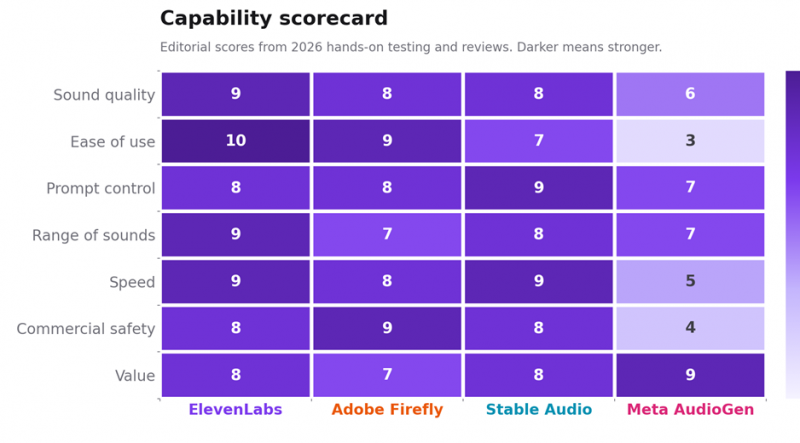
Capability scorecard. Darker cells are stronger; scores are editorial, from 2026 testing.
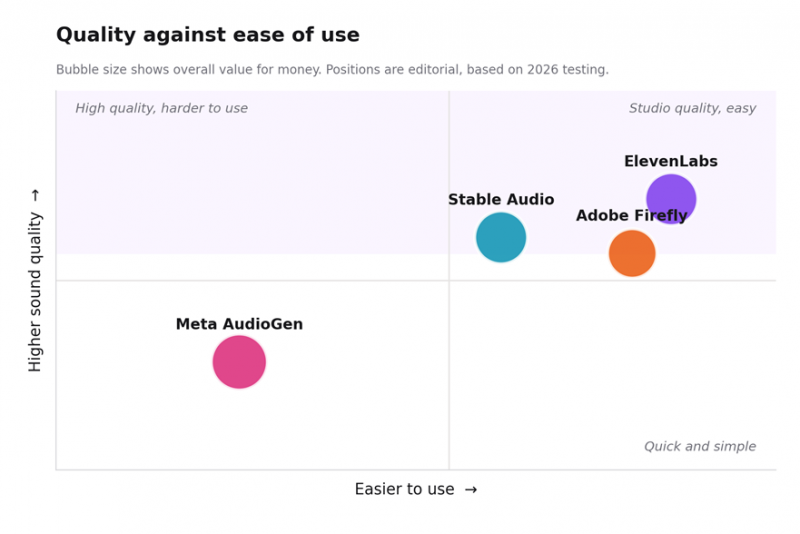
Sound quality against ease of use. Bubble size reflects overall value for money.
Which One Should You Use?
Find the row that matches your goal.
| If you want to | Use |
| Get the best quality with the least effort | ElevenLabs |
| Edit video and live inside Creative Cloud | Adobe Firefly |
| Create long ambiences or layered sound design | Stable Audio |
| Time a sound precisely to on-screen motion | Adobe Firefly |
| Build audio into an app or pipeline | Stable Audio or ElevenLabs API |
| Keep it free and you are comfortable with code | Meta AudioGen |
| Publish commercially on a tight budget | ElevenLabs Starter |
How to Get Great Sound Effects from a Prompt
A vague prompt gives a vague sound. These habits get far better results from any of these tools:
• Be specific about the source. “Old metal gate creaking shut” beats “creak.” Name the material, the object, and the action.
• Describe the space. Add the environment, like “in a small tiled bathroom” or “in a large empty hall,” to shape the reverb and tone.
• Set the length and pacing. Ask for a “short” or “single” sound for clicks and stings, and a longer one for ambiences and loops.
• Generate several takes. The first result is rarely the best. Most tools let you regenerate, so make a handful and keep the strongest.
• Say what you do not want. Adding “no music, no voices, dry signal” keeps an effect clean when a model tries to add extras.
• Layer simple sounds. Combine a couple of clean clips in your editor instead of asking for one complex sound. It is easier to control and mix.
A Quick Word on Rights and Honesty
AI audio is easy to make and easy to misuse. A little care keeps your work both legal and trustworthy.
Before you publish Commercial rights depend on your plan and the tool. ElevenLabs, Adobe, and Stable Audio grant commercial use on paid tiers, while AudioGen's pretrained weights are non-commercial. Check your tier before using a sound in client or monetized work, label AI-generated audio where your platform expects it, and do not clone a real person's voice or recreate a trademarked sound without permission. |
Also Worth Knowing
A few tools sit just outside this comparison. If you mainly make short-form video, CapCut and Kling now generate sound effects right inside the editor, which is convenient even if the quality is a step below a dedicated tool. For full songs rather than effects, look at Suno or Udio instead. And for projects that need guaranteed, human-made audio, a licensed library like Epidemic Sound or Artlist is still worth keeping alongside any AI tool.
The Bottom Line
The right AI sound effects tool depends on what you are making. Pick ElevenLabs for the best mix of quality and ease, Adobe Firefly if you edit video inside Creative Cloud, Stable Audio for longer and more controllable sound design, and Meta AudioGen if you want a free, private, open-source option and do not mind the setup. All four can turn a sentence into sound, which a few years ago was barely possible at all.
Start with the free tier that fits your work, write specific prompts, and let your ears pick the winner.
Post Comment
Share your thoughts about this article.
Be the first to post a comment!





