There are hundreds of AI productivity apps and most just add another tab to your day. I picked six that pull their weight, one for each job you really do, and ranked them.
If you keep only one: a general assistant
WHY MOST AI TOOL LISTS ARE USELESS
More tools is not more done
The trap with AI productivity tools is collecting them. You read a list, sign up for nine trials, and spend more time managing the stack than doing the work. The people who get real leverage do the opposite. They pick two or three tools that kill their biggest time sinks and go deep.
So this is not every tool that exists. It is six that own a specific job: one assistant, one researcher, one note taker, one connector, one workspace, and one scheduler. Each earned its place by saving real hours, not by demoing well. I scored them all on the same five things.
WHAT I SCORED
| 01 | Power | How much heavy lifting it actually takes off your plate. |
| 02 | Ease | How fast you get value without reading a manual. |
| 03 | Value | What you get for the money once you are past the free tier. |
| 04 | Free tier | How far the no-cost version really gets you. |
| 05 | Fit | How well it slots into the apps and habits you already have. |
THE SIX, RANKED
One tool per job, ranked for most people
The number is my overall pick for a typical knowledge worker. Each tool still wins outright for its own job, which is what the verdict sorts out. Do not read number six as weak. Read it as specialized.
ChatGPT - BEST ALL-PURPOSE
OVERALL // General AI assistant // OpenAI

ChatGPT is the one tool here that touches almost every job. Draft an email, untangle a messy spreadsheet, rewrite a paragraph, talk through a plan out loud with voice, or point your camera at a broken thing and ask what it is. It does all of that without making you switch apps, which is exactly why it became the default.
The flip side of being good at everything is being great at nothing. For careful writing and reasoning a lot of people prefer Claude, and if you live in Google's apps, Gemini sits closer to your inbox and docs. On the free plan in the US you now see ads, and on Plus your chats can train the model unless you switch that off in settings.
STRENGTHS + Handles more jobs than anything else here + Voice and vision make it useful away from the keyboard | WATCH-OUTS - Jack of all trades, so specialists beat it on their turf - Ads on free, and Plus chats train the model unless you opt out |
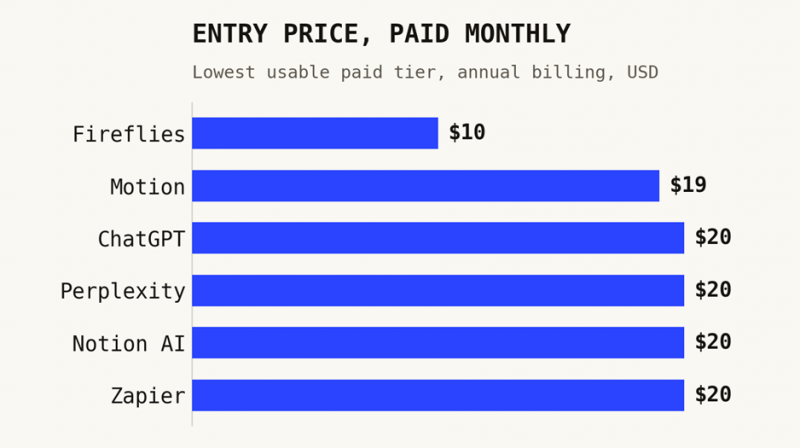
PRICING Free with ads. Go $8/mo. Plus $20/mo is the sweet spot. Pro at $100 or $200/mo for heavy users. Business about $20 to $25 per seat.
BEST FOR Anyone who wants one flexible assistant for the random work that fills a day.
| OVERALL | POWER | EASE | VALUE | FREE | FIT |
|---|---|---|---|---|---|
| 8.4 | 9.0 | 9.5 | 8.5 | 7.0 | 8.0 |
Perplexity - BEST FOR RESEARCH
RESEARCH // AI answers with sources // Perplexity
Perplexity replaced about ten open browser tabs for me. Ask it something and it answers in plain language with citations sitting right next to each claim, so you can check the source instead of trusting a confident guess. For market checks, fact checking, and current-state questions, it is faster and more trustworthy than an open chatbot.
It is built to find and synthesize, not to write long original drafts, so think of it as a research front end rather than a writing tool. It can still get things wrong, which is the whole reason the citations matter, so use them. The free tier is genuinely useful, and Pro mostly buys you stronger models and higher limits.
STRENGTHS + Citations next to every claim, so you verify fast + Strong free tier and a calm, no-clutter interface | WATCH-OUTS - Built for research, not long-form generation - Still fallible, so you have to actually click the sources |
PRICING Free is usable for daily questions. Pro $20/mo for stronger models, higher limits, and file analysis.
BEST FOR Research, fact checking, and any question where you need to trust the answer.
| OVERALL | POWER | EASE | VALUE | FREE | FIT |
|---|---|---|---|---|---|
| 8.0 | 8.0 | 9.0 | 8.5 | 8.0 | 6.5 |
Fireflies.ai - BEST MEETING NOTES
MEETINGS // AI note taker // Fireflies
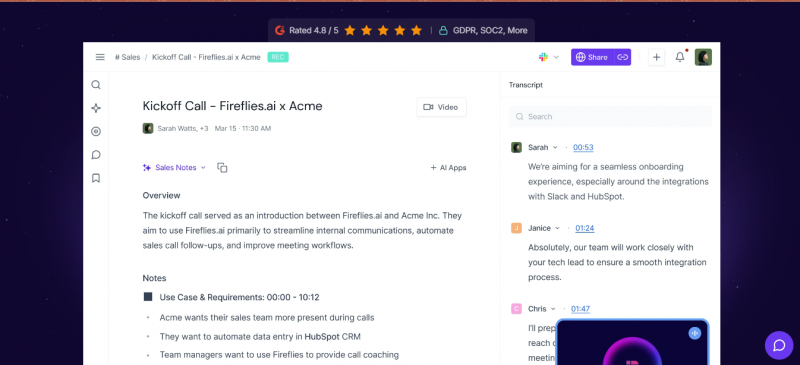
Fireflies joins your calls, records them, and hands back a transcript, a summary, and a list of action items you can search later. If your week is back to back meetings, that is hours you stop spending on notes and recaps. It plugs into Slack, your CRM, and Zapier, supports more than 100 languages, and its in-call assistant can look things up while you are still talking.
A couple of honest catches. The bot is visible in the call, which some companies block and which has drawn privacy complaints, and the fancier AI features run on credits that run out. Storage caps on the cheaper plan fill up if you record all day, and video recording only shows up on the Business tier.
STRENGTHS + Automatic transcripts, summaries, and searchable action items + Wide integrations and 100-plus language support | WATCH-OUTS - A visible bot joins the call, which some orgs block - AI features burn credits and storage caps fill fast |
PRICING Free for light use. Pro $10/mo annual ($18 monthly). Business $19/mo annual ($29 monthly) adds video and unlimited storage. Enterprise $39.
BEST FOR Anyone who spends the week in calls and wants notes handled for them.
| OVERALL | POWER | EASE | VALUE | FREE | FIT |
|---|---|---|---|---|---|
| 7.3 | 7.5 | 8.0 | 7.5 | 5.0 | 8.5 |
Zapier - BEST FOR AUTOMATION
AUTOMATION // Workflow automation // Zapier

Zapier is the glue. When a form gets filled in, it can drop the lead in your CRM, ping Slack, and start a doc, all without you touching anything. It connects more apps than anyone else, around 8,000 of them, and its AI Copilot now builds the workflow from a plain description, so you do not need to be technical to set one up.
The cost model is the thing to watch. You pay per task, and a task is every single step that runs, so a busy four-step automation eats through your allowance faster than the sticker price suggests. For high volume, cheaper tools like Make do the same job for less. For low volume, high value automation, it is worth every cent.
STRENGTHS + Connects roughly 8,000 apps, more than any rival + AI Copilot builds automations from a sentence | WATCH-OUTS - Per-task pricing climbs fast as workflows run more - Cheaper options exist for heavy automation volume |
PRICING Free for 100 tasks and simple 2-step flows. Professional $19.99/mo annual ($29.99 monthly) for multi-step. Team $69/mo annual. Enterprise custom.
BEST FOR Killing the repetitive copy-paste busywork between apps you already use.
| OVERALL | POWER | EASE | VALUE | FREE | FIT |
|---|---|---|---|---|---|
| 7.3 | 9.0 | 7.5 | 6.5 | 3.5 | 10 |
Notion AI - BEST AI WORKSPACE
WORKSPACE // Connected docs and notes // Notion
Notion is where a lot of people keep their docs, wikis, and project plans, and its AI is wired into all of it. Because it can see your workspace, it answers from your own notes and meetings instead of guessing, and you can pick the model, GPT, Claude, or Gemini, per task or let it choose. Its agents will run multi-step jobs across your pages with that same full context.
The catch is the gate. For new accounts the real AI lives only on the Business tier at $20 per seat, so a solo user who just wants AI pays the same as a small team and loses the cheaper Plus path. The autonomous agents also run on credits on top of that. If you already live in Notion it is a clear win. If you do not, it is a big move.
STRENGTHS + AI that actually knows your own docs and projects + Pick GPT, Claude, or Gemini per task in one place | WATCH-OUTS - Real AI is gated to the $20 Business tier for new users - Per-seat pricing and agent credits add up |
PRICING Free for personal use. Plus $10/mo (no AI for new accounts). Business $20/mo per seat for full AI, multi-model, agents, and meeting notes. Enterprise custom.
BEST FOR Teams that already run on Notion and want AI with full context.
| OVERALL | POWER | EASE | VALUE | FREE | FIT |
|---|---|---|---|---|---|
| 7.2 | 8.0 | 7.5 | 7.0 | 5.0 | 8.5 |
Motion - BEST AI SCHEDULER
SCHEDULING // Calendar and task auto-planning // Motion
Motion takes your tasks, deadlines, and meetings and builds your actual day for you, slotting work into the gaps in priority order. When a meeting runs long or you miss a block, it quietly reschedules the rest so the plan stays real. It has grown into a calendar, task manager, and meeting recorder in one, and the assistant has context on all of it.
Two things hold it back from the top. It is the priciest pick here, and there is no free tier, only a short trial, so you commit before you know it fits. It also only pays off if you go all in and let it run your whole schedule. Use it halfway and it just feels like a busy calendar.
STRENGTHS + Auto-builds and reshuffles your day around priorities + Calendar, tasks, and meeting notes in one place | WATCH-OUTS - Most expensive here, with no real free tier - Only worth it if you commit to it fully |
PRICING Pro AI $19/mo per seat (annual). Business AI $29/mo per seat (annual). 7-day trial, no free plan.
BEST FOR People buried in tasks and meetings who want AI to plan the day.
| OVERALL | POWER | EASE | VALUE | FREE | FIT |
|---|---|---|---|---|---|
| 6.1 | 8.5 | 6.5 | 6.5 | 2.0 | 7.0 |
THE NUMBERS, SIDE BY SIDE
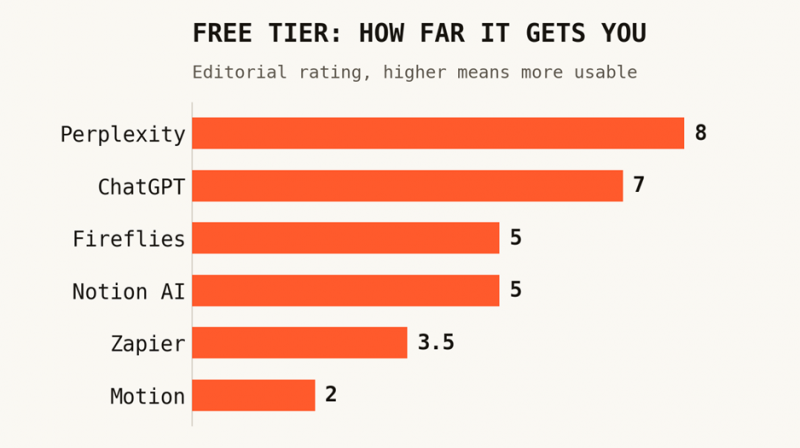
Price clusters, free tiers do not
Two charts that settle most of the buying decision. Almost everything lands near $20 a month once you pay, so the real difference is how much you get before you have to.
| TOOL | JOB | FREE TIER | ENTRY | BEST FOR | SCORE |
|---|---|---|---|---|---|
| ChatGPT | Assistant | Good (ads) | $20/mo | Everyday flexible help | 8.4 |
| Perplexity | Research | Strong | $20/mo | Cited answers | 8.0 |
| Fireflies | Meetings | Limited | $10/mo | Auto meeting notes | 7.3 |
| Zapier | Automation | Demo only | $20/mo | App-to-app busywork | 7.3 |
| Notion AI | Workspace | 20 replies | $20/seat | Context-aware docs | 7.2 |
| Motion | Scheduling | Trial only | $19/seat | Planning your day | 6.1 |
MY VERDICT
Buy one, then add exactly one more
I judged these the way a real day works: limited budget, limited attention, and a few jobs that eat most of the week. The trick is not picking the best tool. It is picking the fewest tools.
KEEP ONLY ONE A general assistant, and ChatGPT is the safe default If you can run just one subscription, make it a general assistant. It overlaps the most jobs: writing, analysis, quick research, and thinking out loud. ChatGPT is the easiest first pick for most people. If your work leans on careful writing and reasoning, Claude is worth a look, and if you live in Google's apps, Gemini sits closest to your inbox and docs. |
BEST FOR RESEARCH Perplexity | BEST FOR MEETINGS Fireflies.ai | BEST FOR AUTOMATION Zapier |
BEST TEAM WORKSPACE Notion AI | BEST FOR SCHEDULING Motion | BEST ALL-ROUNDER ChatGPT |
My honest advice: start with a general assistant, then add exactly one specialist that attacks where your time actually leaks. Drowning in calls, add Fireflies. Buried in tasks, add Motion. Doing the same copy-paste every day, add Zapier. Living in shared docs, add Notion. Buying all six is how you end up productive at managing tools instead of doing the work.
BUILD YOUR STACK Two tools beat six Pick a general assistant, then one specialist for your biggest time sink. Test the free tier first, give it two weeks, and only add a third tool when a clear new friction point shows up. The stack is supposed to disappear into your work, not become the work. |
Prices and plans change fast in AI, so check each tool's own site before you buy. Scores are my own editorial estimates, not lab benchmarks. Full disclosure: this was written by Claude, an AI assistant. I left my own maker out of the ranking and mentioned it only as an alternative, to keep things fair.
Post Comment
Share your thoughts about this article.
Be the first to post a comment!