AI chatbots have moved from novelty to core infrastructure. Today they answer customer questions around the clock, draft content, write code, qualify leads, and power entire support teams. But the phrase “best AI tool for chatbots” means different things depending on what you want to do, whether that is chatting with a smart assistant or building your own bot for a website or WhatsApp.
This guide splits the landscape into two clear categories so you can find the right fit fast: ready-to-use AI chatbot assistants, and no-code platforms for building your own chatbot. Each pick includes who it is best for, key strengths, and honest trade-offs.

Figure 1: The chatbot market is growing fast, with demand projected to keep climbing through 2030
What to Look for in an AI Chatbot Tool
Before comparing tools, decide what matters most for your situation. The strongest options score well on:
• Reasoning quality: how accurate, nuanced, and reliable the answers are.
• Ease of use: clean interface, fast setup, and a minimal learning curve.
• Integrations: connects to the apps and channels you already use.
• Multilingual support: essential if you serve a global audience.
• Privacy and compliance: data handling, opt-outs, and security controls.
• Pricing and scalability: fair cost as your usage grows.
Tip: There is no single best chatbot for everyone. The smartest approach is to pick by the job you need done.
Best AI Chatbot Assistants (Ready to Use)
These are conversational AI assistants you can start using immediately, with no building required.
1. ChatGPT: Best Overall All-Rounder
The default choice when you are not sure what you need.
ChatGPT remains the most versatile and widely adopted AI assistant, and for most people it is the easiest single recommendation. It performs strongly across writing, coding, research, data analysis, and image understanding inside one interface, which means you rarely have to leave it to finish a task. That breadth is its defining feature: it is rarely the absolute best at any one thing, but it is reliably good at almost everything, and that combination is what makes it the safe default for general daily use.
Beyond raw chat, the surrounding ecosystem is a large part of the value. Custom assistants, file uploads, data analysis on spreadsheets, image generation, voice conversation, and a deep library of third-party connectors mean a single subscription covers a wide spread of work. For teams, shared workspaces and admin controls make it straightforward to roll out across a department without each person reinventing their own setup.
The trade-off is that a tool optimized to be safe and broadly useful can feel generic on highly specialized work. On narrow, expert tasks it sometimes defaults to cautious or slightly repetitive answers, and you may get sharper results from a tool tuned for that exact niche. For the vast majority of mixed daily workloads, though, it is the most dependable starting point.
| Best for | Mixed daily tasks and all-in-one productivity for individuals and teams |
| Standout strength | Balanced speed, reasoning, and the broadest single-tool capability |
| Watch-out | Can default to safe or repetitive answers on highly specialized work |
| Access | Free tier available; paid plans add faster models, higher limits, and team features |
2. Claude: Best for Writing, Reasoning, and Coding
A thinking and writing partner that holds a long train of thought.
Claude is a strong choice for writing-heavy and analytical work. It is known for natural, fluent conversation, structured step-by-step reasoning, and an ability to hold a great deal of context at once, which makes it well suited to long documents, dense research material, and multi-file codebases. Where some assistants produce serviceable prose, Claude tends to produce output that needs less editing, with a tone that reads as considered rather than templated.
On analytical tasks it is comfortable working through a problem out loud, laying out assumptions, and flagging where it is uncertain rather than bluffing. That makes it a good fit for drafting, editing, summarizing long reports, and reasoning through decisions where you want the chain of thought visible. For developers, it handles real coding work, including reading existing code, explaining it, and proposing changes that fit the surrounding style.
The honest caveat for small teams is to treat it as a capable assistant rather than expecting it to autonomously ship finished software end to end. Used as a collaborator that drafts, reviews, and accelerates, it is one of the strongest options available; used as a hands-off builder with no human in the loop, expectations should be tempered.

| Best for | Long-form writing, deep reasoning, document analysis, and coding |
| Standout strength | Nuanced, structured, natural-sounding output and strong long-context handling |
| Watch-out | Small teams should use it as an assistant, not expect fully autonomous software builds |
| Access | Free tier available; paid plans raise usage limits and unlock the most capable models |
3. Google Gemini: Best for the Google Ecosystem
The natural pick if your work already lives in Google's tools.
Gemini's biggest advantage is not a single benchmark score but where it lives. It integrates directly into Gmail, Docs, Sheets, and Search, and works with a standard Google account, which means it can act on the documents and messages you already have rather than asking you to copy and paste them into a separate window. For anyone whose day runs through Google Workspace, that native presence removes a lot of friction.
In practice this looks like drafting a reply inside Gmail with the thread already in context, summarizing a long Doc without leaving it, or pulling a quick answer from Search with AI assistance built in. The free tier is generous, and because it is tied to an account most people already have, the barrier to trying it is essentially zero.
The flip side of deep integration is that the experience is at its best inside Google's world and less compelling outside it. If your stack is built around other productivity suites, much of the convenience advantage disappears, and you would be choosing it on model quality alone rather than on the seamless workflow that is its real selling point.

| Best for | Google Workspace users who want AI inside the tools they already use |
| Standout strength | Deep, native integration with Gmail, Docs, and Search plus a generous free tier |
| Watch-out | The advantage shrinks if your daily work lives outside Google's ecosystem |
| Access | Free with a Google account; paid tiers add advanced models and higher limits |
4. Perplexity: Best for Research
An answer engine that shows its work.
Perplexity is built specifically for research, and its defining feature is that it cites its sources. Rather than producing a confident paragraph you have to take on faith, it returns an answer with linked references so you can verify where each claim came from. For fact-finding, competitive research, and any situation where being wrong has a cost, that transparency is the whole point.
It is particularly well suited to students, analysts, journalists, and anyone who needs to trace a claim back to its origin quickly. Follow-up questions stay grounded in the same search context, so you can drill into a topic conversationally while keeping the citations attached. This makes it feel less like a chatbot and more like a fast, well-organized research assistant.
Because its strength is synthesis of current, sourced information, it is less oriented toward open-ended creative writing or long autonomous coding sessions than the general-purpose assistants. Used for what it is designed to do, retrieving and citing real information, it is hard to beat; pushed toward tasks outside that lane, other tools will serve you better.
| Best for | Students, researchers, analysts, and anyone needing source-backed answers |
| Standout strength | Transparent, cited responses that make verification fast |
| Watch-out | Less suited to open-ended creative writing or long autonomous coding work |
| Access | Free tier available; paid plan adds more powerful models and higher usage |
5. Mistral (Le Chat): Best Privacy-Focused Alternative
Fast, multilingual, and built on open foundations.
From a fast-growing European AI company, Le Chat is a lightweight assistant known for speed, strong multilingual ability, and a privacy-conscious approach built around open-weight models. For users who care where their data goes, or who want the option of self-hosting open models rather than being locked into a single closed provider, it represents a genuinely different philosophy from the mainstream assistants.
Its responsiveness is a practical draw: it tends to feel quick and direct, which suits rapid back-and-forth and short tasks. The multilingual coverage makes it a sensible default for teams operating across several European languages, where it often handles nuance well rather than producing stilted translations.
It is a younger product than the largest assistants, so the surrounding ecosystem of integrations and polish is still maturing, and on the most demanding reasoning tasks the very largest models may still edge ahead. But for privacy-minded and multilingual users who value openness and speed, it is a compelling and increasingly credible alternative.
| Best for | Privacy-conscious and multilingual users who value open models |
| Standout strength | Speed, openness, and strong language coverage |
| Watch-out | Younger ecosystem; the largest closed models may still lead on the hardest reasoning |
| Access | Free tier available; open-weight models also allow self-hosting options |
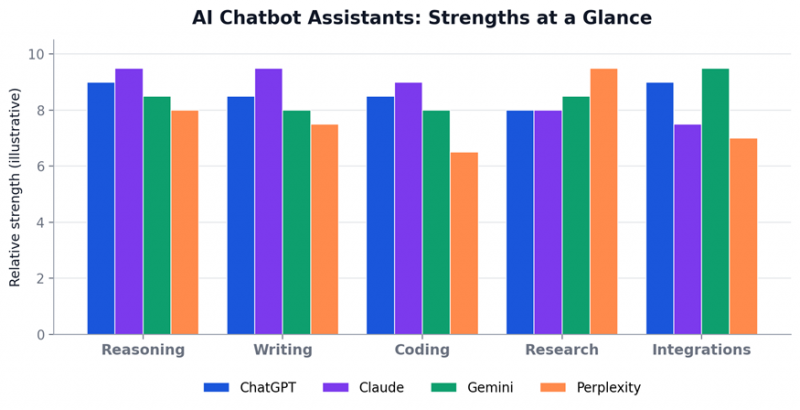
Figure 2: How the leading assistants compare across common tasks (illustrative).
Quick Comparison: Chatbot Assistants
| Tool | Best For | Standout Strength |
| ChatGPT | All-round daily use | Versatility |
| Claude | Writing & reasoning | Depth and nuance |
| Gemini | Google users | Native integration |
| Perplexity | Research | Cited sources |
| Mistral / Le Chat | Privacy & languages | Speed and openness |
Best No-Code Tools to Build Your Own Chatbot
If you want a chatbot for your website, WhatsApp, or customer support without hiring developers, these no-code builders let you launch quickly with drag-and-drop design and ready-made templates.
1. Tidio: Best for Small Business and E-commerce
Tidio combines live chat, AI chatbots, and a help desk in one place, with a no-code builder and a free version to test. It connects to channels like Facebook Messenger, Instagram, and WhatsApp.
2. ManyChat: Best for WhatsApp and Social
ManyChat offers native WhatsApp Business API integration alongside Instagram and Facebook Messenger from one platform, making it ideal for social commerce and customer engagement.
3. Botpress: Best for Flexible, Developer-Friendly Bots
Botpress is a powerful platform for building customizable AI agents, with a free message tier to start, suited to teams that want more control over conversation logic.
4. SiteGPT: Best for Website Knowledge Bots
SiteGPT trains a bot on your own content with broad data-source integrations, automatic content syncing, and multilingual support across many chat channels.
5. Yellow.ai: Best for Enterprise and Multilingual Support
Yellow.ai is an enterprise-grade, no-code/low-code platform specializing in customer service across retail, finance, and healthcare, supporting conversations in over 100 languages with prebuilt templates.
Quick Comparison: Chatbot Builders
| Builder | Best For | Standout Strength |
| Tidio | Small business & e-commerce | All-in-one live chat + AI |
| ManyChat | WhatsApp & social | Native messaging APIs |
| Botpress | Flexible custom bots | Control and customization |
| SiteGPT | Website knowledge bots | Trains on your content |
| Yellow.ai | Enterprise support | 100+ languages, scale |
How to Choose the Right Tool
Use this simple path to narrow your options in seconds.
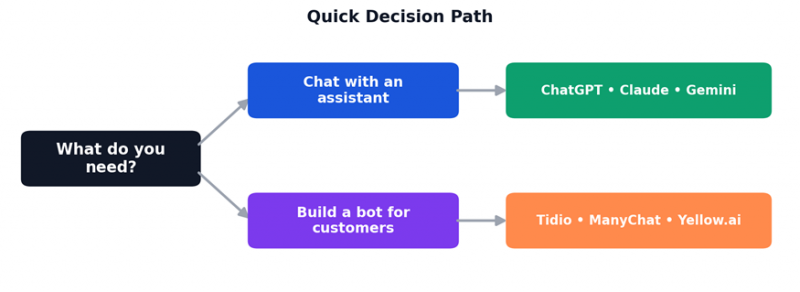
Figure 3: A quick decision path from need to recommended tool.
1. Define the job. Do you need an assistant to chat with, or a bot to deploy for others?
2. Match the channel. Pick a tool that supports where your users actually are, such as your website, WhatsApp, or social.
3. Test the free tier. Most tools offer free plans, so trial two or three before committing.
4. Check integrations and privacy. Confirm it connects to your stack and meets your data requirements.
5. Scale carefully. Review pricing at your expected volume, not just the entry price.
Final Thoughts
The best AI tool for chatbots is the one that fits your goal. If you simply want a smart assistant, start with ChatGPT or Claude. If you want to build a bot for customers, try a no-code builder like Tidio, ManyChat, or Yellow.ai. Define the job, test a couple of free plans, and scale the option that fits your workflow and budget.
Key takeaway: There is no universal best. Choose by the job to be done, then test before you commit.
Post Comment
Share your thoughts about this article.
Be the first to post a comment!