Both AKOOL and VEED let you type a script and walk away with a talking video. Only one of them was built to manufacture synthetic humans. The other is a video editor that learned to do avatars along the way. Knowing which is which will save you from paying for a subscription you do not need.
This guide compares the two on avatars, video creation, languages, real-time features, ease of use, and price, then matches each tool to the kind of person who should actually be paying for it.
The Short answer
AKOOL is a generation engine. VEED is an editing studio with AI features attached.
AKOOL exists for the synthetic spokesperson. Avatars, face swap, voice cloning, and real-time digital humans are the main event, and the editor just comes along for the ride. VEED exists to help you cut, caption, and polish video in a browser. Its avatar feature is genuinely useful, but it sits beside dozens of editing tools rather than at the center.
One quick test: if your raw input is a camera recording, lean VEED. If your raw input is a script and a face, lean AKOOL.
ROUND 01 AVATARS
The avatar face-off
Avatars are the reason most people line these two up, and it is where the gap shows the most.
AKOOL. A stock library of more than 1,000 talking avatars, plus four custom tiers that trade training time for fidelity: Photo (about ten minutes), Instant (minutes, 4K), Studio (about a day), and Ultra (human-in-the-loop tuning for gesture and emotion). Lip-sync runs in more than 150 languages, paired with a cloned voice or one of more than 500 character voices.
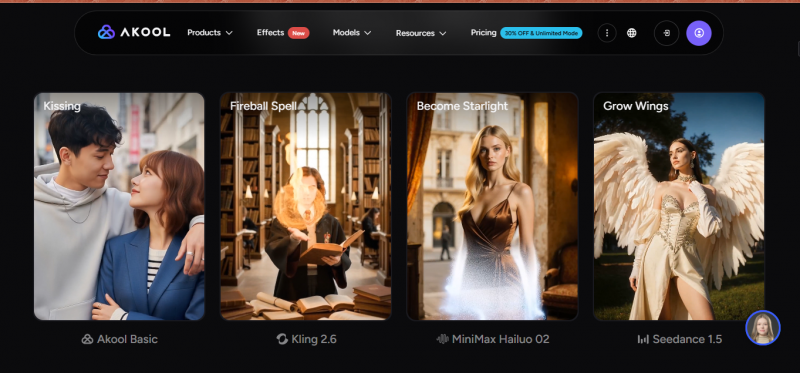
VEED. Around 60 stock avatars across industries and demographics, plus a custom digital clone of yourself made from one short recorded script and ready in a few hours. Reviewers find the avatars speak naturally and lip-sync well, which is strong for an editor-first tool, though the library and customization depth are modest next to dedicated platforms.

Edge this round: AKOOL, clearly.
If avatars are the product you are buying, AKOOL gives you far more to work with. If they are an occasional add-on to footage you already edit, VEED's smaller set is often enough.
ROUND 02 GENERATE OR EDIT
What you are actually buying
AKOOL generates. Hand it text, an image, or a short reference clip and it produces new footage: an avatar delivering a script, a face swapped across a video, a still photo animated into speech, or a clip dubbed with matching mouth movement. Diffusion-based models push output to 4K on the mid tier and up to 8K and 16K higher up.
VEED edits. Its strongest work starts with footage you already have: trim it, caption it, clean the audio, drop the background, resize for each platform. VEED does include text-to-video, but that leans on stock clips and AI B-roll rather than producing a consistent, realistic spokesperson across multiple takes.
The honest read: these are different tools for different jobs. AKOOL makes the video; VEED shapes it.
Head to head, at a glance
Highlighted cells mark the clear winner for that row.
| Category | AKOOL | VEED |
|---|---|---|
| Core purpose | AI video and avatar generation suite | Browser video editor with AI tools |
| Stock avatars | 1,000+ in the library | About 60 |
| Custom avatars | Four tiers (Photo, Instant, Studio, Ultra) | Digital clone from one short recording |
| Max output | Up to 4K, 8K, 16K by tier | Up to 4K on the top tier |
| Avatar languages | 150+ | 120+ |
| Translation and dubbing | 150+ languages | 50+ languages |
| Real-time live avatars | Yes, via Live Camera | No |
| Face swap | Yes, up to 8K to 16K | No |
| Editing depth | Basic built-in editor | Full-featured, its core strength |
| Auto subtitles | Limited | Best-in-class, its flagship |
| API | REST API on higher tiers | Fabric 1.0 avatar API |
| Free plan | Yes, watermark plus limits | Yes, watermark plus limits |
| Best fit | Avatar video at scale | Editing, captions, social |
BY THE NUMBERS
The data, plotted
Where the two diverge most, and where they are closer than you would guess.
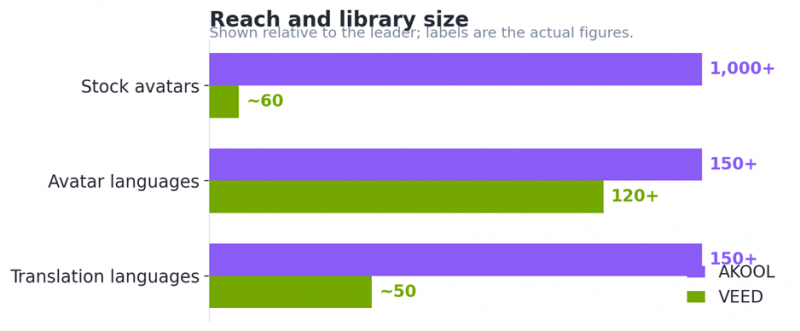
Reach and library size, shown relative to the leader with actual figures labeled.
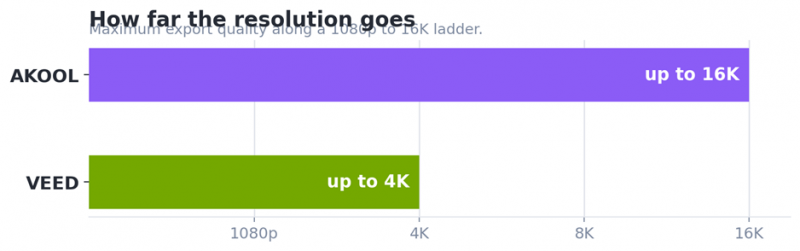
How far the resolution goes. For most social and web video, 4K is already more than enough; the 8K and 16K range matters mainly for broadcast or heavy post-production.
ROUND 03 TWO DECIDING FACTORS
Where each one pulls ahead
Real-time is AKOOL's alone. Live Camera applies an AI face or avatar during calls, streams, and recordings, mirroring your expressions and showing up as a normal camera input in Zoom, Meet, and Teams. It also runs interactive streaming avatars, and the tech was shown as a live interactive avatar at CES 2026. VEED has no equivalent: its avatar work, including the Fabric 1.0 API, is pre-rendered.
Ease of use favors VEED. VEED is built for non-professionals: drag and drop, clean layout, no install, fast to learn. The common gripes are performance, with reports of buffering and lag on longer projects, and key tools landing on higher tiers. AKOOL is also no-code but a wider surface to learn, since generation, face swap, translation, streaming, and voice all live in one suite.
PRICING REALITY
What it actually costs
Both restructure plans often and reviewers disagree on figures, so confirm current rates before you buy. Numbers below are approximate and in US dollars.
| AKOOL | metered by resolution and length | |
|---|---|---|
| Basic | 720p, short clips, watermark, a few instant avatars | Free |
| Pro | 4K, watermark removed, avatars included | ~$30/mo |
| Pro Max | 8K, API access, studio voice | ~$119/mo |
| Business | 16K, fine-tuned Studio Avatar | ~$500/mo |
| Enterprise | Custom volume and support | Custom |
| VEED | tiers plus AI credit and hour caps | |
|---|---|---|
| Free | 720p, watermark, limited exports | $0 |
| Creator | 1080p, no watermark, no avatars | ~$10 to 12/mo |
| Pro | Avatars unlock here, more AI tools | ~$24 to 30/mo |
| Studio | 4K, higher limits, team features | Higher |
| Enterprise | Custom avatars, SSO, custom limits | Custom |
Read it this way: VEED's entry price is friendlier for light editing, but the AI features you may be shopping for live on pricier tiers with usage ceilings. AKOOL costs more once past the free tier, but you are paying for generation as the core product, not as a metered add-on. Annual billing cuts roughly 25 to 30 percent off both platforms.
Do you actually have to choose?
Their strengths are close to complementary. A realistic pipeline uses each for the job it was built for.
Step 1. Generate in AKOOL
Create the avatar, face swap, or dubbed clip where the generation engine is strongest.
Step 2. Refine in VEED
Caption it, clean the audio, add B-roll and branding, and cut platform-specific versions.
Step 3. Publish anywhere
Export the finished cut for YouTube, TikTok, ads, training, or your site.
THE VERDICT
So, which one wins?
Both put AI video within reach without a camera crew or a software install, but they answer different questions. AKOOL is the stronger pick for AI avatars and synthetic video specifically, thanks to a far larger avatar library, multiple custom tiers, higher resolutions, face swap, broader language support, and a real-time Live Camera that VEED does not match. VEED is the stronger all-around browser editor, with class-leading auto-subtitles, a friendlier learning curve, a lower entry price, and a capable set of avatars for lighter needs.
Decide by what your raw material is and what your output needs to be. Generating talking, multilingual, or live avatar video as the main deliverable points to AKOOL. Editing footage with solid AI assists, and avatars as a nice extra, points to VEED. And if you can swing both, let AKOOL create and let VEED refine.
Post Comment
Share your thoughts about this article.
Be the first to post a comment!