Table of Content
- What Made Phishing Emails “Obvious” - and Why That’s Gone
- What Has Actually Changed With AI-Powered Phishing?
- Why “Just Train Your Employees Better” Is No Longer Enough
- What Actually Stops Phishing at the Infrastructure Level
- Building a Layered Defence: Tools + Training
- How to Spot a Phishing Email: FAQs
For years, the gold standard for how to spot a phishing email was simple: look for the typos. If a message from HR was riddled with spelling errors or awkward syntax, it was almost certainly a scam.
That rule no longer holds. With the rise of sophisticated AI writing tools, AI phishing emails are now grammatically flawless, professionally formatted, and contextually convincing. In 2025, relying on common sense and employee intuition is not a security strategy; it is a liability.
What Made Phishing Emails “Obvious” - and Why That’s Gone
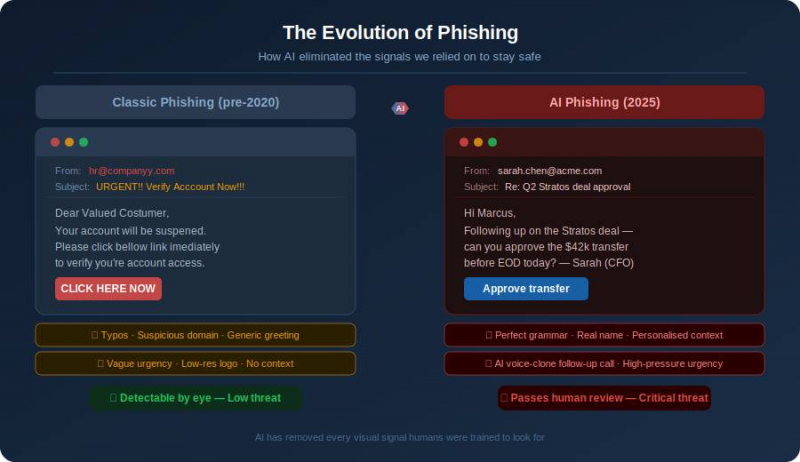
The classic phishing email was easy to dismiss. It typically featured:
› Broken English: Poor grammar and awkward phrasing that signalled non-native authorship.
› Visual red flags: Low-resolution logos and mismatched fonts.
› Generic greetings: “Dear Valued Customer” instead of your name.
Today, Large Language Models (LLMs) have eliminated these signals. A threat actor anywhere in the world can generate a perfectly phrased, high-stakes email in seconds. When the prose is indistinguishable from a legitimate corporate memo, the human eye fails as a filter.
What Has Actually Changed With AI-Powered Phishing?
Modern social engineering attacks, which involve manipulating people into divulging confidential information or transferring funds, have shifted from “spray and pray” to sniper precision.
Spear phishing at scale
A traditional spear phishing attack (a highly targeted approach) required hours of manual research per target. Today, AI tools can scrape LinkedIn profiles and company websites to generate thousands of personalised emails in minutes. They can reference a recent promotion, an active project, or even mimic a CEO’s specific writing style.
The rise of multi-channel attacks
Attackers increasingly combine polished email with voice phishing, or “vishing,” for maximum effect.
The scenario: An employee receives a flawless email from their CFO about an urgent wire transfer. Moments later, a brief phone call confirms it; the voice sounds exactly like the CFO, thanks to an AI voice clone. This layering makes it nearly impossible to stay sceptical under pressure. |
Why “Just Train Your Employees Better” Is No Longer Enough
Many organisations assume that more training is the answer. While education remains valuable, it has hard limits:
› Cognitive load: Even the most diligent employee cannot maintain 100% vigilance during a 10-hour workday. One moment of fatigue is all an attacker needs.
› Exploiting trust: Social engineering does not target a lack of knowledge; it exploits helpfulness and the instinct to respond to authority.
› Asymmetric risk: Defenders must be right every time; attackers only need to succeed once.
What Actually Stops Phishing at the Infrastructure Level
To protect your organisation effectively, you must move beyond human judgment and implement protocol-level defences. This is where AI phishing detection becomes automated and invisible to the end user.
DMARC: the authentication gatekeeper
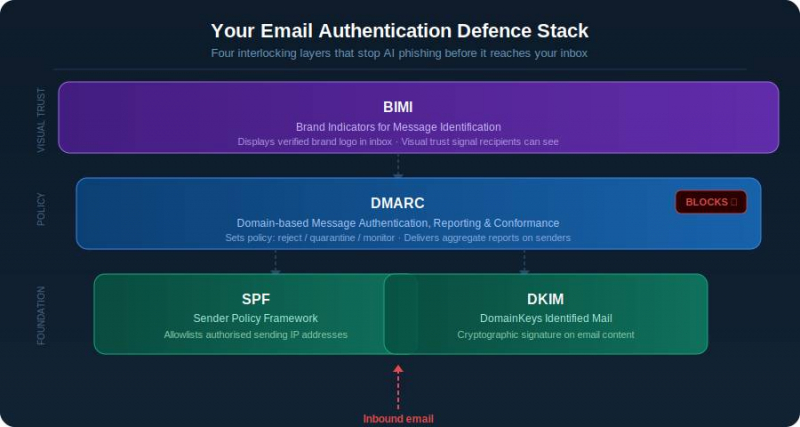
Domain-based Message Authentication, Reporting, and Conformance (DMARC) is an email authentication protocol that gives domain owners the power to protect their domain from unauthorised use. DMARC instructs receiving servers to block or quarantine emails that claim to come from your domain but have not been cryptographically verified.
SPF and DKIM: the foundations
DMARC relies on two supporting protocols:
› Sender Policy Framework (SPF): A DNS record that lists the IP addresses and sending domains authorised to send email on your behalf.
› DomainKeys Identified Mail (DKIM): Adds a digital signature to outbound emails, ensuring the content has not been tampered with in transit.
You can learn all about SPF, DKIM, and DMARC to see how these three protocols work in tandem.
BIMI: visual verification in the inbox
Brand Indicators for Message Identification (BIMI) allows companies to display their verified brand logo next to authenticated emails. This provides a clear, visual trust signal that is far harder for attackers to spoof than a simple “From” name.
Building a Layered Defence: Tools + Training
No single control stops AI phishing emails on its own. The right approach treats protocol-level authentication as the foundation, employee training as a complementary second layer, and phishing simulation as the ongoing validation that both are working. Effective phishing email detection means making all three layers work together.
Protocol-level authentication as the foundation
DMARC, SPF, and DKIM form the non-negotiable baseline. Before any email claiming to be from your domain reaches an inbox, these protocols verify its authenticity at the server level, silently, automatically, and without relying on any employee to make the right call. Use a DMARC record checker to confirm your policy is active, then use a DNS PTR record lookup to map sending IP addresses to domain names and identify any suspicious senders impersonating your brand.
Employee training as the second layer
Training is not the solution, but it is still an essential layer. Employees who understand how social engineering attacks exploit urgency and authority are more likely to pause before acting on a suspicious request, even when the email itself looks flawless. The goal is not to turn every employee into a security analyst; it is to raise the threshold for automatic compliance with high-pressure requests.
Phishing simulation tools
Generic phishing simulations no longer reflect what real attacks look like. The most effective tools now send AI-generated, contextually personalised test emails that mimic the tactics described in this article: realistic sender names, references to live projects, and appropriate urgency. Employees who click are immediately redirected to a short, non-punitive training module. Over time, click rates drop and reporting rates rise, giving security teams a measurable signal that both layers are working.
How do you protect your organisation from AI phishing in 2025? The era of the “obvious” scam is over. As AI phishing emails become the new baseline, organisations must transition from “common sense” to protocol-level defence. By automating trust through DMARC, SPF, and DKIM, you create a safety net that protects your team even when an attack looks and sounds completely legitimate. Staying informed about modern phishing techniques can help security teams strengthen their email authentication strategy against increasingly sophisticated attacks. Don’t let hidden configuration gaps put your domain at risk. Check your DMARC record now with PowerDMARC’s free tool and see exactly who is sending email on your behalf. |
How to Spot a Phishing Email: FAQs
Can phishing emails still get through if we have DMARC?
DMARC stops direct domain spoofing - someone impersonating yourcompany.com. It does not prevent lookalike domain attacks (e.g. your-company-support.com). This is why a layered defence is essential.
What is the difference between spoofing and phishing?
Spoofing is a tactic: disguising an email address to appear trusted. Phishing is the goal: stealing credentials, money, or data. Spoofing is a common enabler of phishing attacks.
How do I know if someone is sending phishing emails using my domain?
Without DMARC reporting, you likely will not know until your domain is blocklisted. DMARC aggregate reports show exactly who is sending mail under your brand, allowing you to identify and block unauthorised senders immediately.
Post Comment
Share your thoughts about this article.
Be the first to post a comment!