1. Introduction :
XFi Complete is an add-on package for Xfinity Internet customers that bundles (a) an Xfinity WiFi Gateway rental, (b) unlimited data, and (c) Xfinity’s app-based WiFi management and security features, with a WiFi coverage assessment that can make some homes eligible for xFi Pods (mesh extenders) at no extra charge.
It’s primarily for:
● Heavy data households (4K streaming, cloud backups, lots of smart devices, gaming) who want to remove usage anxiety by switching to unlimited.
● People who rent the Xfinity gateway and want a simpler “one bill, one support path” setup.
● Homes with weak WiFi areas where the WiFi assessment may qualify them for up to two Pods for improved coverage.

2. Features :
Here’s a complete list of features included in XFi Complete and clear explanations of what each one does:
01. Unlimited Data-
What it is: Removes the typical 1.2 TB monthly data cap on most Xfinity internet plans.
Why useful: No overage fees or worries about exceeding data limits — especially helpful for heavy streamers, remote work, gaming, and large families.
02. XFi Gateway Device-
What it is: A combination modem and router provided by Xfinity that supports modern Wi-Fi standards (often Wi-Fi 6).
Why useful: Offers strong and stable wireless performance and eliminates the need for customers to buy separate equipment.
03. Whole-Home Coverage & Mesh Pods-
What it is: A Wi-Fi assessment identifies weak spots; if needed, Xfinity provides xFi Pods (mesh extenders) at no extra cost.
Why useful: Helps eliminate dead zones and ensures consistent signal strength across larger homes.
04. Advanced Security Features-
What it is: Built-in features that help protect all connected devices from malware, unauthorized access, and other threats.
Why useful: Adds a layer of network security without needing separate subscriptions to third-party security software.
05. xFi App Control-
What it is: A mobile app (iOS/Android) that lets users manage network settings, view connected devices, create profiles, and run diagnostics.
Why useful: Puts network management directly in the user’s hands, from parental controls to device monitoring.
06. Automatic Gateway Upgrades-
What it is: Xfinity may replace the gateway with newer hardware every few years at no extra charge.
Why useful: Helps keep the network technology up-to-date without manual hardware purchases.
3. Technical Specifications :
01. Supported Platforms & Devices-
1. Devices supported via network: PCs, smartphones, tablets, smart TVs, game consoles, IoT devices — any Wi-Fi-enabled device.
2. Mobile control: xFi app available on iOS and Android.
02. System Requirements-
1. Xfinity internet subscription required to add XFi Complete.
2. The service requires use of the Xfinity xFi Gateway device; personal routers cannot fully access all features like unlimited data or pods.
03. Integration Requirements-
● Seamless network control works with the xFi app.
● No separate installation of security software needed — advanced protection integrated at the network level.
4. Accurate Reviews :
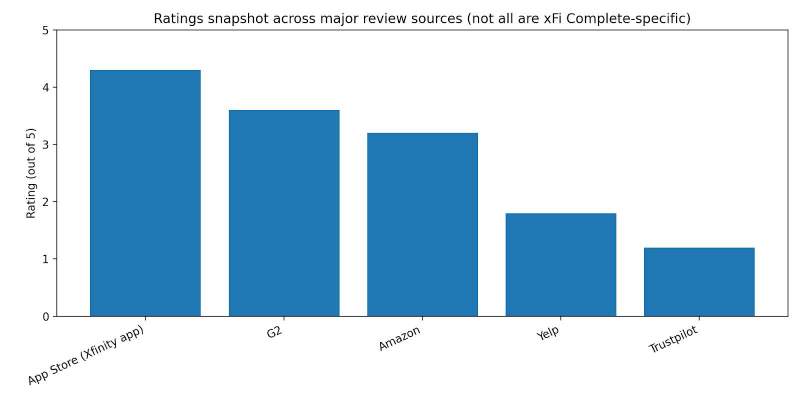
| Source | What’s being reviewed | Rating / Volume | What it suggests |
| Apple App Store | Xfinity app | 4.3/5 from 1.3M ratings | Strong app satisfaction overall (not xFi Complete-only) |
| G2 | Xfinity (ISP listing) | 3.6/5 from 17 reviews (G2) | Mixed provider-level feedback, smaller sample. |
| Trustpilot | xfinity.com | 1.2/5 from 1,790 reviews (Trustpilot) | Many complaints (billing/support) on this platform. |
| Yelp | Xfinity brand page | 1.8/5 from ~22.6k reviews | Store/support experience often criticized |
Common positive themes-
● App convenience: Many users rate the Xfinity app highly overall on iOS, suggesting account/WiFi management works for a large audience.
● Provider “works fine for streaming” (some users): G2 reviews include positive “dependable service for streaming and daily use” style feedback (example review shown in G2 listing).
Common negative themes-
● Pods expectation confusion: Multiple official forum responses clarify that Pods are not automatically free for everyone; they’re tied to an assessment and eligibility, and users often complain they upgraded expecting Pods immediately.
● Customer service frustrations: Complaints about long resolution times and support loops appear in community posts and brand review platforms (example: Xfinity forum complaint thread about support experience).
● Pricing/billing concerns on review platforms: Trustpilot’s low rating indicates many dissatisfied customers on that platform, commonly around billing and service issues
5. Comparison Chart :
| Option | Unlimited data approach | Equipment/ coverage | Typical add-on cost |
| Xfinity xFi Complete | Unlimited data included in add-on | Gateway rental included; Pods may be provided if eligible via assessment | $25/mo mentioned in community discussions and third-party explainers |
| AT&T unlimited data add-on | Unlimited data via add-on (or included with certain tiers) | Depends on plan/equipment | $30/mo for unlimited add-on (per AT&T support) |
| Verizon Fios | “No data caps” for Fios residential (commonly stated) | Router may be included depending on plan | $0 “unlimited add-on” concept (no cap stated) |
| T-Mobile Home Internet | Marketed as “no caps on data usage” | Router included; mesh extender included in some plans | $0 “unlimited add-on” concept (built into plan) |
The comparison that matters most, though, is not against other ISPs but against owning your own equipment on the same Xfinity connection. Xfinity typically lets customers with a compatible personal modem and router add unlimited data on its own for less than the full xFi Complete price, and a decent modem and router combo pays for itself within the first year or two of avoided rental fees. What you give up by going that route is the free gateway upgrades, the Pods eligibility, and the app-based security and parental controls, since those are tied to Xfinity hardware. In short, xFi Complete is priced for convenience: if you are comfortable setting up your own equipment, the math usually favors ownership, and if you are not, the bundle buys you a single support path and zero hardware decisions.
6. Use Cases :
Individuals (single user, heavy streaming/gaming)-
1. Why xFi Complete helps: Unlimited data helps if you regularly download large games/updates or stream in 4K across multiple services.
2. What you’d use most: App speed tests, device management, security features.
Families (many devices, parental controls)-
1. Why it helps: Parental controls, device profiles, and pause-WiFi tools are built into the Xfinity app experience for gateway renters.
2. Pods angle: Larger homes may benefit if they qualify through the WiFi assessment.
Small businesses (home office or small storefront using residential service)-
1. Why it helps: Unlimited data is useful for cloud backups, large file transfers, and stable day-to-day operations (though business-grade needs often require business plans).
2. Important reality check: xFi Complete discussions and benefits described here are in the residential Xfinity context.
7. Common Issues & Solutions :
| Issue | Likely cause | Practical fix |
| “I upgraded to xFi Complete but didn’t get Pods.” | Pods aren’t automatically shipped; they’re tied to a WiFi assessment and eligibility, sometimes requiring redemption via email link. | Check for assessment emails (including spam), wait for the assessment window, and follow the redemption steps; if no email appears, contact support through official channels. |
| “I expected a new gateway shipment but nothing arrived.” | xFi Complete doesn’t always trigger a new gateway shipment, per official employee response. | Confirm what gateway model is on your account and whether an upgrade is required; request a swap only if needed. |
| “Weak WiFi in parts of the house even after upgrading.” | Gateway placement limits; home layout interference; Pods only provided if eligible. | Run app troubleshooting and speed tests, reposition gateway if possible, and use the assessment outcome to determine if Pods are available or consider purchasing extenders. |
| “Support experience feels slow or repetitive.” | High-volume support workflows (common complaint in community/brand reviews). | Use in-app tools first (speed test, device checks), then escalate with timestamps/errors ready; if needed, use official community support channels. |
8. Conclusion :
XFi Complete stands out as a premium internet solution that brings together strong Wi-Fi performance, unlimited data, enhanced security, whole-home coverage, and centralized management — all in a single subscription. It’s especially valuable for heavy internet users, multi-device households, remote workers, and families.
However, it is not a one-size-fits-all product. For light users or smaller households where data caps aren’t a concern, the added cost may not deliver proportionate value. Additionally, reliance on Xfinity-provided hardware and variable support experiences are points worth weighing in decision-making.
Recommendation: If your household regularly uses large amounts of data, struggles with Wi-Fi coverage, or values built-in security, XFi Complete is a compelling choice. For more basic connectivity needs, consider standard Xfinity plans or alternate ISP packages.
Post Comment
Share your thoughts about this article.
Be the first to post a comment!