Table of Content
- The plain definition (and the one most articles get half-wrong)
- Who actually benefits from a content audit
- What an audit actually costs (in time, not dollars)
- What you're actually deciding for each page
- How to run a content audit, step by step
- What the audit spreadsheet actually looks like
- The 80/20 of content audits
- Common failure modes (what kills audits before they ship)
- Bottom line
- FAQ
Short answer: A content audit is a structured review of every published piece of content on your website to decide what to keep, update, consolidate, or delete. It's an inventory crossed with a performance analysis, held together by editorial judgment. Done well, it can recover real traffic and revenue from content you've already paid for. Done badly, which is most of the time, it produces a 2,000-row spreadsheet, an exhausted marketing team, and zero changes to the site. This guide explains what an audit actually is, when it's worth doing, when you should skip it, and the 80/20 that captures most of the value with a fraction of the work.
The plain definition (and the one most articles get half-wrong)
A content audit examines every published piece of content on your site and assigns each one a decision: keep as-is, update, consolidate with another piece, redirect, or delete.
There's a related term that often gets used interchangeably and shouldn't. A content inventory is a list of what exists. A content audit is a judgment about whether what exists is any good. The Nielsen Norman Group draws this distinction clearly: the inventory answers "what's there?" and the audit answers "is it working?" Most teams skip straight to the audit without the inventory and end up auditing whatever they happen to remember publishing, which is usually the most recent 20% of their content and almost never the part that actually needs work.
The pieces typically reviewed in an audit are blog posts and articles, landing pages, product or service pages, resource pages (guides, ebooks, whitepapers), help center or knowledge base content, and category, tag, and pillar pages. Pages typically excluded: legal pages, the homepage, contact pages, and anything dynamically generated. These need their own kind of review, but the standard audit process doesn't apply to them cleanly.
Who actually benefits from a content audit
This is the part most articles skip, and it's the most important question to answer before you start.
Audits are not universally valuable. Three groups get real ROI from them, and three groups mostly waste their time.
You probably need one if:
- You have 100+ published URLs and haven't done a formal audit in 18+ months
- Your organic traffic has been flat or declining for two consecutive quarters
- You're planning a website redesign, migration, or rebrand
- You've had multiple content managers over the years and the site shows it (inconsistent voice, duplicate topics, abandoned series)
- You're producing new content weekly but can't tell which existing pieces are still pulling weight
You probably don't need one if:
- Your site has under 50 pages. At that size, you can do the equivalent work in an afternoon without calling it an audit
- You did a thorough audit in the last 12 months and have been maintaining since
- Your traffic and conversions are growing healthily, so there's no problem the audit is solving
- You're using "doing an audit" as a reason to avoid making the harder decisions you already know you need to make
That last one is the most common failure mode and nobody writes about it. Content audits become procrastination dressed up as productivity. If you already know you have 30 outdated blog posts that need updating, you don't need a 60-hour audit to confirm it. You need a calendar block to update them.
What an audit actually costs (in time, not dollars)
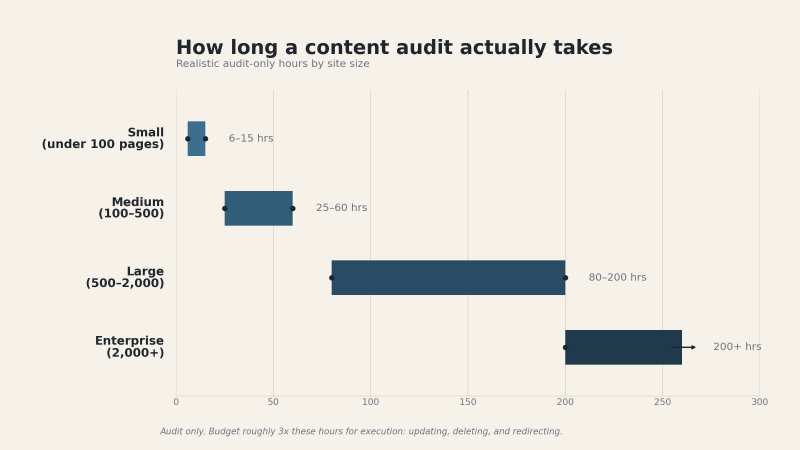
Most articles tell you a content audit "depends on the size of your site," which is true and useless. Here's a more honest range based on actual project hours:
| Site size | Pages to audit | Realistic time investment | Team size needed |
| Small | Under 100 | 6–15 hours | 1 person |
| Medium | 100–500 | 25–60 hours | 1–2 people |
| Large | 500–2,000 | 80–200 hours | 2–3 people |
| Enterprise | 2,000+ | 200+ hours | Usually outsourced |
These ranges assume you're doing a real audit, not just exporting a list from Google Analytics. The lower end is achievable when the auditor is the same person who knows the content well. The upper end shows up when multiple stakeholders need to weigh in, or when content is spread across systems and every decision requires a meeting.
A practical observation from doing this work: the audit itself is rarely the expensive part. The expensive part is what comes after. Updating 40 posts, consolidating 12 thin pages into 3 good ones, then writing 301 redirects for 60 deleted URLs. Budget 3x the audit time for execution, or you'll end up with a great spreadsheet and an unchanged website.
If the execution phase involves multiple writers and developers, it's worth tracking it like any other project our team management software and time tracking software categories cover tools that keep multi-week content cleanups from stalling.
What you're actually deciding for each page
For every URL in the audit, you're making one of five decisions:
- Keep. The page is performing well, accurate, and on-strategy. Don't touch it. (This is usually 15–25% of pages.)
- Update. The topic is still relevant, the page has some authority signals (traffic, backlinks, rankings), but the content is outdated, thin, or could be improved. This is where most of the upside lives. (Usually 20–40% of pages.)
- Consolidate. Two or more pages cover overlapping topics and are cannibalizing each other. Merge them into one stronger page, redirect the rest. (Usually 5–15% of pages.)
- Redirect. The topic is covered better elsewhere on your site, or the page is dead weight but has backlinks worth preserving. 301 it to the most relevant alternative. (Usually 10–20% of pages.)
- Delete. No traffic, no backlinks, no strategic value, and no realistic path to recovery. Cut it. (Usually 20–40% of pages, and this number surprises people.)
The percentages above are not benchmarks. They're rough patterns from sites I've audited. Yours will vary. What's reliably true: most teams over-keep and under-cut. The instinct to preserve content you spent money producing is strong, and it's usually wrong. Content that isn't earning its keep is actively hurting your site's overall topical authority.
How to run a content audit, step by step
If you've decided a full audit is worth the time, here's the process in six steps. Each step feeds the next, so resist the urge to skip ahead.
Step 1: Define the goal and the decision criteria. Before pulling a single URL, write down what the audit is for (recover organic traffic, prep for a redesign, fix keyword cannibalization) and the 4–6 metrics you'll use to make keep/update/cut calls. This is what prevents the infinite spreadsheet.
Step 2: Build the inventory. Crawl the site with Screaming Frog (free under 500 URLs) and export every indexable URL with its title, meta description, word count, and publish date. This is the inventory layer the “what exists” list the audit sits on top of.
Step 3: Layer in performance data. Pull organic sessions and conversions from Google Analytics, impressions and average position from Search Console, and backlink counts if you have access to a premium tool. Match everything to the URL list. If you're comparing crawlers or rank trackers for this step, our SEO software category breaks down the main options.
Step 4: Assign a decision to every URL. Using the five decisions covered above keep, update, consolidate, redirect, delete go row by row. Batch similar pages together (all the 2019 listicles, all the thin tag pages) so you're making one judgment call per pattern instead of hundreds of individual ones.
Step 5: Attach an owner and a date to every non-“keep” row. A decision without an owner is a suggestion. This is where most audits die, so do it inside the spreadsheet, not in a separate deck.
Step 6: Execute in phases and measure. Ship updates and deletions in monthly batches, watch rankings and traffic on the surviving pages, and 301-redirect anything with backlinks. Re-check the numbers at 90 days.
What the audit spreadsheet actually looks like
You don't need 40 columns. Here's a sample of the working sheet with the columns that actually drive decisions:
| URL | Publish date | Monthly organic sessions | Backlinks (ref. domains) | Avg. position (top query) | Decision | Owner | Due |
|---|---|---|---|---|---|---|---|
| /blog/email-marketing-guide | Mar 2022 | 1,840 | 34 | 4 | Keep | — | — |
| /blog/email-tips-2021 | Jan 2021 | 210 | 12 | 18 | Consolidate → /email-marketing-guide | Priya | Aug 15 |
| /blog/best-crm-tools-2020 | Feb 2020 | 95 | 8 | 27 | Update (refresh for 2026) | Dan | Aug 30 |
| /blog/why-we-rebranded | Jun 2019 | 3 | 0 | — | Delete | Dan | Sep 5 |
| /blog/webinar-recap-q3 | Oct 2021 | 0 | 2 | — | Redirect → /resources/webinars | Priya | Sep 5 |
Five example rows, eight columns, and every row ends in an action with a name attached. That's the whole template. Copy the structure into Google Sheets and you're done.
The 80/20 of content audits
Here's the contrarian take this article exists to make. A full content audit is overkill for most sites. The 80/20 version captures roughly 80% of the value in roughly 20% of the time.
The 80/20 audit, in four steps:
- Identify your top 20% of pages by traffic and revenue. These are the ones you cannot afford to let decay. Schedule each one for a refresh review every 6 months. This is the entirety of your "keep healthy" workflow.
- Identify your bottom 20% of pages by traffic. Filter for anything with under 10 monthly visitors that hasn't been published in the last 12 months. For each one, ask: does it have backlinks worth preserving (redirect), is it on a topic worth covering well (rewrite), or is it dead weight (delete)? Most will be delete.
- Identify duplicate or cannibalizing pages. Search your own site for your top 20 target keywords. If you have multiple pages targeting the same intent, consolidate.
- Ignore the middle 60%. For most sites, the middle of the content distribution isn't where the gains are. Pages with moderate traffic doing moderately well don't usually move the needle when you optimize them, and the audit work to evaluate them costs more than the lift they generate.
This approach takes a small site 4–6 hours instead of 15. It takes a medium site 10–20 hours instead of 60. The remaining 20% of upside from a full audit is real, but it's usually not worth the marginal time unless you're at enterprise scale or working on a redesign.
Common failure modes (what kills audits before they ship)
Watching audits fail is what taught me the 80/20 version. The pattern is consistent.
The infinite spreadsheet. Someone exports every URL on the site, adds 40 columns of metrics, and the spreadsheet becomes the project instead of the means to the project. After a month, nobody opens it. Fix: define the 4–6 metrics that will actually drive your keep/update/cut decisions before you start pulling data.
For most sites those metrics are: organic sessions over the last 12 months, number of referring domains, primary keyword ranking, conversions or assisted conversions, publish or last-updated date, and funnel stage. Everything else is decoration you can add later if a specific decision demands it.
Audit without authority. The person doing the audit doesn't have the authority to delete content, and the people who do have authority haven't agreed to follow the recommendations. Fix: get sign-off on the decision criteria before you start, not after.
No execution plan. The audit finishes, the recommendations land in a 30-slide deck, and nothing happens because the people who would do the work (writers, developers, the SEO team) weren't part of the planning. Fix: have execution owners attached to every recommendation before the audit is "done."
Auditing without business goals. The audit tells you what content is performing, but performance is measured against what? Without a goal, whether that's more organic leads or a faster sales cycle or higher email signups, you're optimizing for a metric that may not matter. Wikipedia's content audit entry quotes practitioners describing the work as "tedious," "boring," and "intimidating, time-consuming, and chaotic." All of those are symptoms of doing the work without a clear reason for doing it.
Tools you actually need
You can do a content audit with three tools, and more than that is usually overkill. A crawler (Screaming Frog is the standard, free under 500 URLs) pulls every URL on your site with metadata. Google Analytics and Search Console give you traffic, queries, and engagement data. A spreadsheet in Google Sheets or Excel brings it all together and holds your editorial decisions.
The premium tier adds tools like Ahrefs, Semrush, or Clearscope for backlink data and topic depth scoring. Useful for larger sites, not strictly necessary for a 200-page blog. Be skeptical of "AI content audit" tools that promise to make the decisions for you. They're decent at identifying outdated pages but poor at the strategic judgment calls the audit is supposed to make: which topics matter, whether the voice is on-brand, how each page fits the funnel.
When to schedule your next one
For most sites, the right cadence is a full audit every 12–18 months, a top-20% review every 6 months, a bottom-20% cleanup quarterly, and triggered audits before any redesign, migration, or major brand shift. Mark these on a calendar. The audit you don't schedule is the audit that doesn't happen.
Bottom line
A content audit is the most valuable thing a content team can do that no one wants to do. Mike King put it well at a search marketing conference: "No one became a marketer so they could do content audits." But the alternative, letting underperforming content quietly drag down your site's authority while you publish new pieces on top, is more expensive in the long run, just less visible.
If you have a small, healthy site, skip the formal audit; run the 80/20 version once a year and move on. If you have a medium site with declining traffic, do the audit, because the diagnosis is worth the cost. If you have a large site or are facing a redesign, budget for it properly and get execution owners signed up before you start, and accept that the work after the audit is 3x the work of the audit itself.
Stop calling the spreadsheet the deliverable. The deliverable is the changed website.
FAQ
How long does a content audit take?
For a site under 100 pages, 6–15 hours. For 100–500 pages, 25–60 hours. For sites over 500 pages, 80+ hours and usually a small team. These are audit-only estimates. Execution, the actual updating and deleting and redirecting, typically takes 2–3x that time.
Can I do a content audit with AI tools?
AI tools are good at the inventory layer (crawling URLs, pulling metadata, flagging outdated pages) and weak at the judgment layer (which pages match your brand voice, whether a piece serves a given funnel stage, what topics matter strategically). Use them to compress the data-gathering work. Make the editorial decisions yourself.
What's the difference between a content audit and an SEO audit?
A content audit evaluates the content itself: relevance, accuracy, performance, alignment with goals. An SEO audit evaluates technical and on-page SEO factors: crawlability, internal linking, schema, page speed, keyword targeting. They overlap, but they're not the same review and shouldn't be combined into one project for most sites.
How often should I do a content audit?
Full audit every 12–18 months. Top-page reviews every 6 months. Quarterly cleanup of bottom-performing pages. Triggered audits before any major site change.
Is it okay to delete old content?
Yes, and most sites delete too little, not too much. Pages with no traffic, no backlinks, and no strategic value are net-negative. They dilute your site's topical authority. Delete or redirect them. The fear of "losing content you paid to create" is a sunk-cost fallacy.
What if my content audit finds I need to delete half my blog?
Don't panic, and don't do it all in one weekend. Phase the deletions over 2–3 months. Monitor traffic and rankings for the remaining content, and 301-redirect anything with backlinks to the most relevant surviving page. Most sites that aggressively prune underperforming content see organic traffic improve over the following 3–6 months.
Do I need to hire someone to do a content audit?
For sites under 200 pages, no. A competent in-house marketer can do it. For 200–1,000 pages, consider it if your team is stretched. For 1,000+ pages or pre-redesign audits, outsourcing usually pays off because experienced auditors move faster and bring decision frameworks that take in-house teams years to develop.
Post Comment
Share your thoughts about this article.
Be the first to post a comment!