Table of Content
- Why 2026 will see a shift away from office-first software among electrical contractors
- What field-first tools fix for electrical contractors
- Office-first vs field-first tools: the real jobsite difference
- Why field-first tools matter more during the 2026 labor squeeze
- How electrical contractors are replacing office-first software without disrupting crews
- Field-first electrical contractor software buying checklist
- What can go wrong when replacing office-first tools
- Field-first tools are becoming the operating system for electrical contractors
Electrical contractors are moving away from office-first systems since the work is no longer waiting on the office. When the crews are still on-site, they require schedules, job notes, service history, photos, customer updates and invoices. In 2026, electrical contractor software is less about storing records at a desk and more about helping field teams finish the job, document the work, and keep the office updated without extra calls.
Why 2026 will see a shift away from office-first software among electrical contractors
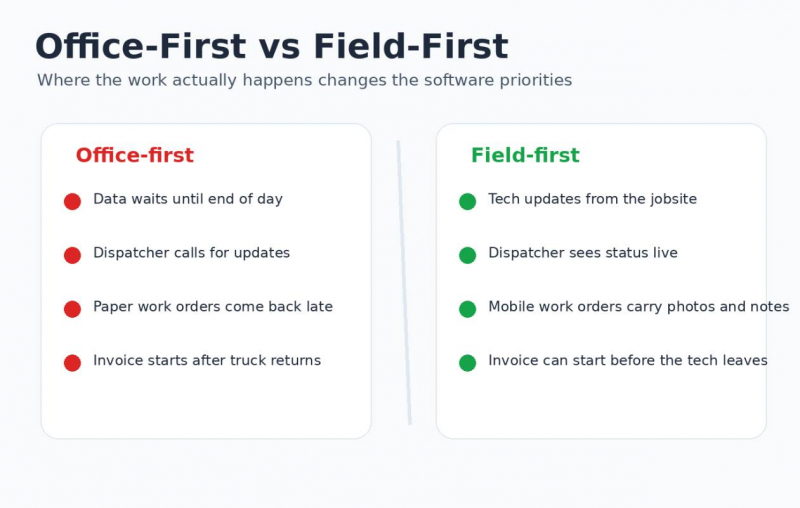
Office-first software was built around the assumption that the office is the control center. That worked when the main goal was recordkeeping. It breaks down when a dispatcher needs live status, a technician needs the latest notes, and a customer expects an arrival update.
In many electrical shops, the old process looks like this:
1. The office books the job.
2. The dispatcher assigns the technician.
3. The technician gets partial details by phone, text, or printed work order.
4. The technician completes the work.
5. Paperwork returns later.
6. The office rebuilds the job record after the fact.
That process creates delay at every handoff. The issue is not that office teams are slow. The issue is that the system asks them to clean up field data after the fieldwork is already done.
Modern electrical contractor software needs to start where the work starts: in the truck, at the panel, in the building, or at the customer’s site.
Deloitte’s 2026 engineering and construction outlook points to rising material pressure, labor shortages, shifting project demand, and wider use of digital tools to improve capacity and cost control. For electrical contractors, that means the software stack has to protect time in the field, not add more admin work to it.
What field-first tools fix for electrical contractors
Field-first tools connect the technician, dispatcher, manager, and customer around the same job record. Instead of waiting for updates, the office sees what is happening as the work moves forward.
Common field-first features include:
● Mobile work orders.
● Technician scheduling.
● Technician dispatch.
● Jobsite communication.
● Customer history.
● Photo documentation.
● Digital signatures.
● Estimate updates.
● Invoice creation.
● Payment capture.
| Workflow area | Office-first software | Field-first tools |
| Scheduling | Updated mainly by office staff | Updated live by dispatch and field teams |
| Work orders | Printed, emailed, or recreated later | Opened, edited, and closed on mobile |
| Job notes | Often delayed or incomplete | Captured with photos, forms, and timestamps |
| Invoicing | Starts after paperwork returns | Can begin from field data before the truck leaves |
Office-first vs field-first tools: the real jobsite difference
Imagine a commercial service call. A technician comes to trouble shoot a tripping breaker. Another contractor was involved on the panel last week, something the customer forgot to mention. The technician discovers circuits mislabeled, photographs are taken, notes are added, and an extra work must be approved.
With office-first software, the technician can call the office, send photos by text message and hope the final invoice reflects the additional work.
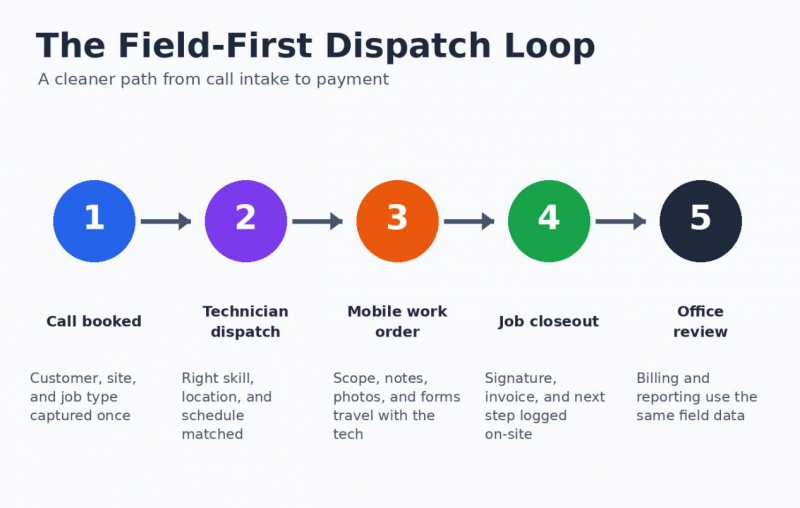
The field-first software allows the technician to add photos to the job, update the scope, send an option to the customer, collect approval, and close the work order onsite.
Why field-first tools matter more during the 2026 labor squeeze
Labor pressure changes the value of every hour. If an experienced electrician spends 20 minutes waiting for job details, searching for a previous service note, or calling the office for approval, that lost time is expensive.
BLS data shows electricians held about 818,700 jobs in 2024, and 65% worked for electrical contractors and other wiring installation contractors. ABC also notes that construction worker demand in 2026 is tied heavily to retirements, regional demand, and specialized work such as AI data centers and semiconductor facilities.
A simple field-time calculation shows why software decisions now affect margin:
| Lost time pattern | If it happens 5 times per week | Monthly effect |
| 15-minute dispatcher follow-up | 75 minutes | 5+ hours |
| 30-minute paperwork delay | 150 minutes | 10+ hours |
| 45-minute material clarification | 225 minutes | 15+ hours |
Those numbers are conservative. They do not count customer frustration, delayed invoices, callbacks, or missed add-on work. The real cost is often the work that never gets billed cleanly.
How electrical contractors are replacing office-first software without disrupting crews
The safest migration path is not a sudden software flip. It is a workflow replacement. Contractors should start with the daily jobs that create the most friction: emergency calls, service work, multi-tech jobs, and jobs with photos, signatures, or change orders.
A practical rollout can look like this:
1. Map the current job flow from booking to payment.
2. Mark every point where the field calls the office for missing information.
3. Pick one crew or service line for a pilot.
4. Move work orders, photos, and closeout notes into the mobile workflow.
5. Review the first two weeks of errors.
6. Fix forms, templates, permissions, and dispatch rules.
7. Train the next crew using real jobs from the pilot.
The goal is not to make technicians “use software.” The goal is to remove avoidable calls, repeated typing, and missing closeout details.
Field-first electrical contractor software buying checklist
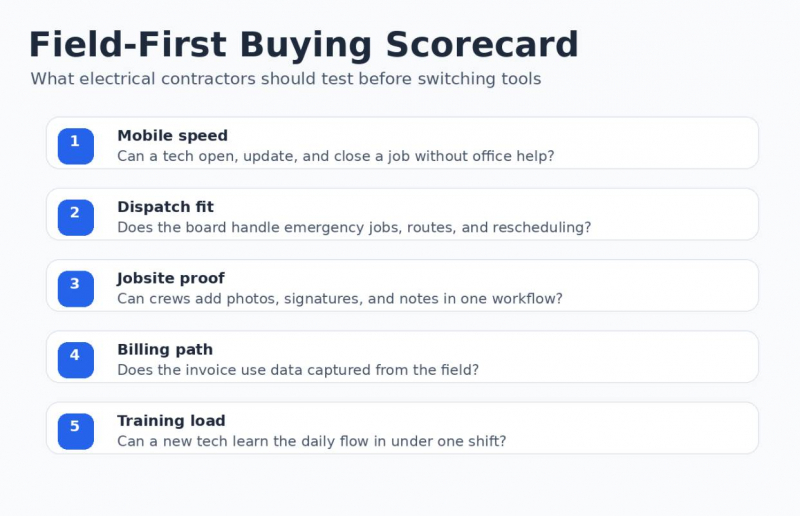
Before choosing electrical contractor software, test it against field behavior. A polished dashboard does not matter if technicians avoid the mobile app.
Use this checklist during demos:
● Can a technician open the full work order on a phone?
● Can dispatch change a job without calling the whole crew?
● Can the app handle photos, notes, forms, and signatures?
● Can the technician see customer history and prior work?
● Can mobile work orders feed estimates, invoices, and reporting?
● Can the system support emergency scheduling?
● Can it work in low-connectivity areas?
● Can managers see job status without interrupting technicians?
● Can new users learn the daily workflow quickly?
● Can the office still control approvals, pricing, and billing rules?
What can go wrong when replacing office-first tools
The most common failure is buying a system for managers and expecting crews to adapt. If the mobile workflow adds taps, hides job details, or creates more admin work, technicians will work around it.
Three problems show up fast:
| Problem | What it looks like | How to prevent it |
| Weak field adoption | Techs keep texting photos and notes | Pilot with field users before rollout |
| Dirty data | Job types, forms, and pricebooks are inconsistent | Clean templates before launch |
| Slow invoicing remains | Closeout data still needs office repair | Tie mobile work orders to billing steps |
A good test is simple: can a technician finish a normal service job with less effort than before? If the answer is no, the system is still office-first with a mobile wrapper.
Field-first tools are becoming the operating system for electrical contractors
Electrical contractors are replacing office-first software because 2026 rewards speed, clean field data, and better crew coordination. Labor is tight, electrical demand is growing, and customers expect faster updates. Office-first systems can still store records, but they rarely solve the daily friction between dispatch, the truck, the jobsite, and billing.
The contractors getting more value from electrical business software are the ones treating the field as the source of truth. When technician scheduling, technician dispatch, field crew management, jobsite communication, and invoicing all connect around the same job record, the business runs with fewer delays and fewer blind spots.
Post Comment
Share your thoughts about this article.
Be the first to post a comment!