Nobody plans for a broken phone. It just happens, usually at the worst moment, like when you're carrying shopping in one hand, and the phone slides out of your jacket pocket onto the pavement. Crack. Now you're staring at a screen that looks like a frozen lake, and you're wondering if the whole thing is a lost cause.
Mostly, it isn't. A cracked screen, a battery that dies by lunchtime, a charging port that only works if you wiggle the cable just so, these are all things you can fix at home if you're patient and don't mind some fiddly work for an hour or two. Is it as easy as changing a lightbulb? No. Is it as hard as the repair shops make it sound? Also no.
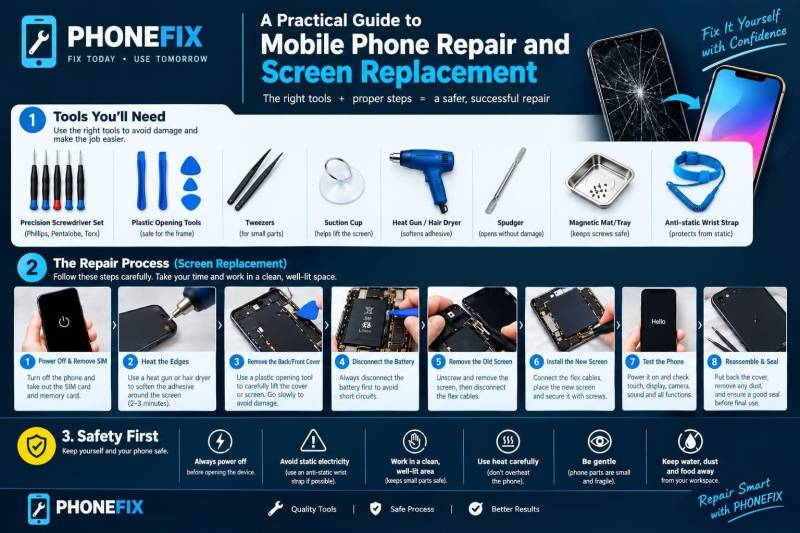
The tools you actually need
Start with screwdrivers, because that's where most people go wrong. Phone screws are about the size of a grain of rice, and the heads aren't the usual cross shape. iPhones use a five-pointed star called Pentalobe, plenty of Androids use Torx, and the little ones inside are usually Phillips. A precision set covers all of it.
Then the odds and ends. Plastic picks, so you don't scratch anything. A suction cup, which lifts the screen just enough to slide a pick underneath. Tweezers for the tiny stuff. A spudger (a flat plastic stick, terrible name, very useful). A hair dryer for the glue, kept on low, because glue that's gently warm lets go like it was never stuck, while a phone that gets too hot can ruin its own battery.
And somewhere to put the screws. A magnetic mat works, and so does an egg carton, honestly.
You could buy all this piece by piece. Most people do, and end up with a drawer of random bits and still no decent tweezers. A proper set of Phone Repair Tool Kits saves that hassle, since everything sits sorted in one case. Skip the bargain bin battery or screen too. They look tempting, and they often disappoint.
Getting ready (the boring bit that saves you)
Back up your photos. Always watch the tutorial video of the model before open it because it can cause damage the parts, because a phone from three years ago opens differently than a new one, and "I'll just figure it out" is how ribbon cables get torn.
Then clear a table, grab a lamp, and use another phone to snap a picture every time you remove something. You'll thank yourself at screw number fourteen.
Doing the repair
Warm the edge of the screen for a minute, set the suction cup near the bottom and pull up a touch, just enough to slip a pick into the gap. Now work along the edge, patiently, because the ribbon cables sit right by the frame and they're about as thick as a strip of tape.
Unplug the battery connector before anything else. Then take out only the screws you need and drop them in labelled spots, since one long screw in a short screw's hole can press into the board and damage it. Swap the part, plug everything back in, and, this is the bit everybody wants to skip, test it before you seal anything. Touch, camera, speaker, buttons, charging. It takes two minutes. Finding the problem later takes an hour.
Replacing a cracked screen
It's the repair most people have in mind when they open a phone, and a Phone Screen Replacement is less scary than it looks. Same steps as above, plus a few habits.
Plug the new screen's cables in before you press it into the frame; otherwise, you can't reach the connector. Peel off every bit of protective film, front and back. Tap each corner of the display. And on certain Android phones, the battery sits glued right under the screen, so don't pry near it.
Staying safe
A phone battery is a lithium battery. Handle the battery carefully because if it gets punctured, bent, or its metal parts touch each other, it can catch fire. Keep sharp metal tools away from it.
Cracked glass gets into your fingers sooner than you'd think. Firstly, wear safety gloves and then cover the cracked screen with tape. Keep alcohol far from anything hot. And never charge a phone that's open with the battery half connected.
Where people slip up
Lost screws. Old glue reused, so the screen rattles. A connector shoved in crooked until the pins bend. No test before closing it up. Most people hit at least one of these, so don't panic when it happens to you.
One more thing worth knowing. Many phones, when we open it once it loses it's water resistance and it becomes weaker than before, because the factory seals don't go back exactly as they were. Keep a repaired phone away from pools and sinks.
When to call someone
When water enters your mobile and causes corrosion and motherboard damage, fingerprint or Face ID repairs, or swollen batteries, it needs special techniques to repair these. Those jobs need special tools or skills, and there is no problem in handling them.
That's why you should go to an expert and let them check your phone.
Everything else, like a battery, a port or a screen, you can try to fix. Do it with ease and when you're relaxed. If you've got an old phone sitting in a drawer, practise on that first. The first repair is clumsy. By the third one, you'll be wondering why you ever worried.
Post Comment
Share your thoughts about this article.
Be the first to post a comment!