Company Description
Joyland AI Chatbot is a platform that offers personalized and lifelike conversations with AI characters. It focuses on creativity, engagement, and connection, allowing users to interact with characters from genres like anime, RPGs, and companionship. With features like easy customization and emotional interactions.
Features
- Custom AI Characters: Design unique companions with tailored personalities, backstories, and preferences.
- Immersive Roleplay: Dive into interactive storytelling and dynamic adventures.
- Multimedia Support: Enjoy voice, image, and text-based interactions.
- Diverse Genres: Choose from categories like anime, games, movies, and more.
- Community Engagement: Share creations and connect with other users in an active community.
- Multilingual Support: Converse in multiple languages for a personalized experience.
Pricing
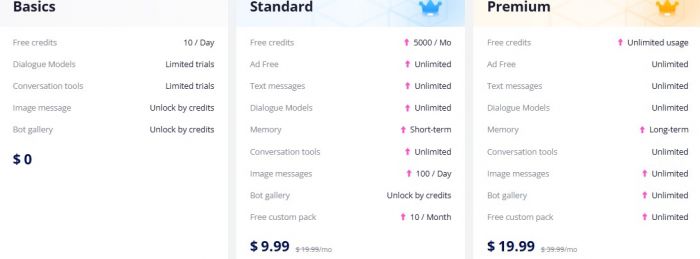
| Free | $0 | $0 | 10 daily credits, limited model trials, 3 personas and credit-based images |
| Standard | $19.99 list price or $9.99 early-bird price | $107.99, equivalent to $8.99 monthly | 5,000 monthly credits, unlimited text chats, short-term memory, 20 personas and 20 image messages daily |
| Premium | $39.99 list price or $19.99 early-bird price | $191.99, equivalent to $15.99 monthly | Unlimited credits, long-term memory, 50 personas, unlimited image messages and full bot-gallery access |
Joyland describes the lower monthly prices as early-bird rates, not the standard permanent prices. The article should therefore avoid presenting $9.99 and $19.99 as the only monthly amounts. Confirm the rate shown during checkout because eligibility, region, taxes and promotional availability may affect the final charge.
The most important free-plan change is the reduction from 50 credits per day to 10 credits per day. Free users can still try ordinary conversations, but image generation, gallery items and premium-model trials can use that allowance quickly.
Joyland AI Has Five Different Chat Models
Placement: Add this immediately after the existing “Features” section and before “Pricing.”
One feature that deserves more attention in 2026 is that Joyland AI does not rely on a single conversational model for every type of interaction.
Joyland's current documentation describes five different chat models, each tuned for a different conversational style. (help.joyland.ai)
| Model | Best Suited For |
|---|---|
| Free Model | Casual chat and basic roleplay |
| Roleplay | Focused scenarios and staying in character |
| StoryStream | Longer narratives and evolving plots |
| Lifelike | More natural, realistic conversations |
| Vividtale | Detailed and cinematic storytelling |
Free Model
The Free Model is designed for ordinary conversations and basic roleplay.
It is the easiest option for users who simply want to test different characters before deciding whether Joyland's more specialized models are worth paying for.
Roleplay
The Roleplay model focuses on defined scenarios.
Joyland describes it as particularly suitable when the user has a clear scene, setting, or character dynamic in mind and wants the AI to remain committed to that scenario.
StoryStream
StoryStream is designed for longer-running narratives.
Rather than focusing only on an individual scene, it aims to maintain characters, plot developments, and previous events across an extended storyline. Joyland specifically positions this model for adventures that may continue for days or weeks.
Lifelike
Lifelike focuses more heavily on natural conversation.
Instead of producing highly dramatic prose, Joyland says it is tuned toward believable conversational flow and more subtle responses, making it more relevant to AI-companion use cases.
Vividtale
Vividtale takes the opposite approach.
It emphasizes descriptive, expressive, cinematic writing with more detail around environments, emotions, and character actions.
Users can switch between supported models through the Change Model option inside Joyland's chat interface.
This is useful because the “best” model depends heavily on whether someone wants casual companionship, focused roleplay, or long-form storytelling.
Memory, Personas, and Saved Conversations
Placement: Add this immediately after “What Credits Cover” and before “How to Create Bots on Joyland AI.”
Memory is one of the biggest differences between Joyland's free and paid experiences.
Joyland currently divides memory into three broad levels:
- Free: context-based memory within the current conversation
- Standard: short-term memory that can persist across chat sessions
- Premium: long-term memory designed to retain information over extended periods
This makes the Premium plan particularly relevant to people who use the same AI character repeatedly rather than starting disposable conversations.
Users Can Manually Control Memories
Joyland's newer memory system also gives users more direct control.
Its Customized Memory feature allows someone to explicitly tell a character what information should remain important.
For example, a user could save:
- Their character's backstory
- Relationship information
- Important events
- World-building rules
- Locations
- Fictional terminology
- Preferences
- Story objectives
Joyland says these memories can then be referenced during later interactions.
That is more useful than simply hoping the model identifies the right information automatically.
Personas Tell the AI Who You Are
Joyland also separates the AI character from the identity of the person interacting with it.
Its Persona system lets users define who they are supposed to be within a conversation.
This can be useful when someone wants to play different identities across separate scenarios rather than having every character treat them as the same person.
Current limits are:
- Free: up to 3 Personas
- Standard: up to 20 Personas
- Premium: up to 50 Personas
You Can Save Different Conversation Branches
Joyland also provides Saved Conversations.
Users can save a conversation at an important point, start a fresh chat, and later return to an earlier saved conversation.
This effectively works like save slots in a game.
It is particularly useful for roleplay because one conversation can branch in several directions without permanently sacrificing the earlier storyline.
One caveat is that Joyland itself warns that very long conversations can become slightly slower as the available context grows. Its documentation recommends periodically using Save and Start New Chat to maintain responsiveness. (
What Credits Cover
Credits are not limited to text conversations. They can be required for image messages, character-gallery access, avatar creation and custom media packs.
Joyland currently gives web users ten free avatar-generation attempts, with four images produced during each attempt. After the free allowance is exhausted, an additional successful generation costs 25 credits. The mobile application advertises free avatar generation, although limits and availability can change between app versions.
Standard members receive 20 image messages per day and 10 free custom packs per month. Premium members receive unlimited image messages and custom packs according to the official membership guide.
The article should not describe Premium as offering unlimited “multimedia interactions” without qualification. Joyland specifically documents unlimited image messages, credits and custom packs, but that does not guarantee that every future media feature will remain unrestricted.
How to Create Bots on Joyland AI
Step 1: Register on Joyland AI: Sign up with your email to access the platform.
Step 2: Choose a Category: Browse genres like anime, RPGs, or companionship.
Step 3: Customize Your Character: Adjust attributes like personality, appearance, and voice.
Step 4: Start Interaction: Engage in conversations or storytelling with your bot.
Step 5: Refine and Share: Edit bot responses or share your creation with the Joyland community.
How Joyland AI Image Generation Actually Works
Placement: Add this immediately after the new Memory section and before “How to Create Bots on Joyland AI.”
The existing article correctly notes that Joyland supports image interactions, but the current visual system is more sophisticated than simply generating random character pictures.
Characters Can Maintain a More Consistent Appearance
Some Joyland characters display a pink photo icon indicating support for consistent image generation.
Joyland says this consistency can come from either a trained Image Package based on reference material or its Intelligent Generation system.
The objective is to make the same AI character look more consistent across several images rather than producing a completely different face every time.
There Are Two Main Ways to Request an Image
For supported characters, users can generate visuals in two ways.
The first is a quick photo button that generates an image without requiring a detailed prompt.
The second is intent-aware generation, where the user asks for a specific picture naturally during the conversation. For example, a request could specify an outfit, location, pose, or scenario.
This makes image generation part of the roleplay itself rather than a completely separate image-generator interface.
Avatar Generation and Chat Images Have Different Costs
There is an important pricing distinction here.
Joyland's documentation currently says web users receive 10 free avatar-generation attempts, with four candidate images produced per attempt. Additional successful avatar generations cost 25 credits after that allowance.
Regular image features inside conversations are documented separately at 30 credits per image for credit-based use. This includes on-demand chat pictures, quick-click generations, certain unlockable images, and individual gallery images.
Joyland also advertises a 500-credit one-time unlock for unlimited image-generation access with a specific compatible companion. Premium subscribers receive image generation with compatible companions without spending additional credits under the current membership structure.
Those distinctions are useful because “image generation costs credits” does not correspond to one single price across every visual feature.
How to Purchase Joyland AI Subscription Plan
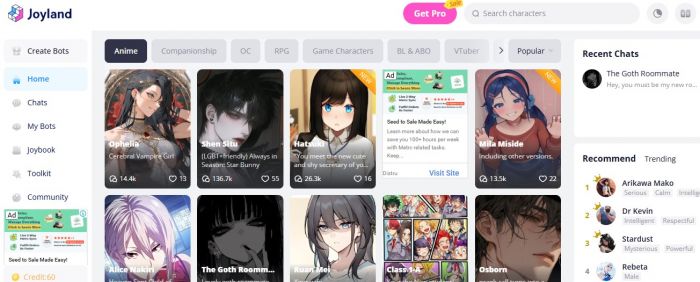
Visit the Official Website: Go to the Joyland AI website and log in to your account. If you don’t have an account, sign up by providing your email address and creating a password.
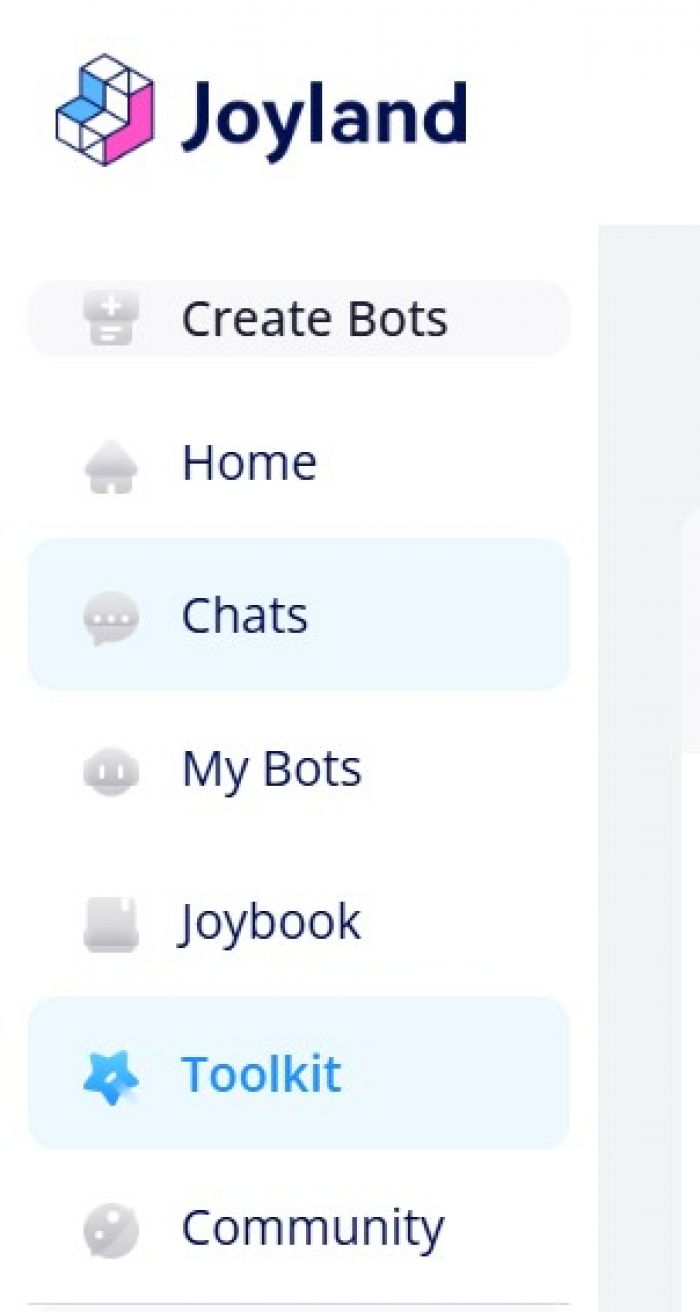
Navigate to Toolkit: Click on the "Toolkit" tab in the main menu to view available plans.
Choose a Plan: Select the plan that suits your needs—Free, Standard ($9.99/month), or Premium ($19.99/month). Each plan offers different features and benefits.
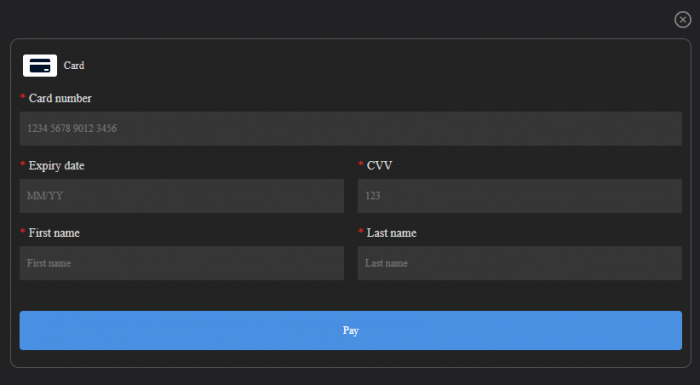
Add Payment Details: Enter your payment information, such as credit/debit card details or other available payment options.
Confirm Subscription: Review your selected plan and payment details, then click "Subscribe" or "Purchase" to complete the process.
Pros and Cons
Pros:
- Extensive library of customizable characters.
- Engaging storytelling and immersive roleplay features.
- Supports multimedia communication.
- The free plan is available for basic access.
- A vibrant community for shared experiences.
Cons:
- Occasional inconsistency in AI responses.
- Limited memory for long conversations, requiring context refresh.
Age Requirements Conflict
Joyland’s terms and privacy policy allow registration from age 13, or age 16 for people in the European Union. Google Play gives the Android application a Mature 17+ rating because of sexual themes and user interaction.
The article should not present Joyland as a general children’s entertainment service. Parents should review the platform carefully before allowing a teenager to use it, particularly because community-created characters can contain romantic or mature themes.
Top 5 Alternatives and Competitors of JOYLAND.AI
- Replika: A popular AI chatbot designed for companionship and emotional support.
- Character.AI: Allows users to create and interact with custom AI characters for storytelling and conversations.
- Cleverbot: A well-known conversational AI chatbot for casual and engaging dialogues.

- ChatGPT (OpenAI): A versatile AI tool capable of natural language conversations and creative storytelling.
- Chai App: Focuses on AI-powered role-play and conversation, enabling users to chat with custom characters.
Customer Reviews
- “Joyland turned my downtime into a world of creativity. Designing characters and engaging in unique interactions has been an absolute delight.”
- “The roleplay features and variety of genres are fantastic, though the AI occasionally loses track of the conversation, which can be a bit frustrating.”
- “As someone who loves storytelling, Joyland’s interactive features have opened up endless possibilities for exploring exciting narratives.”
- "The platform is excellent overall, but I’d love to see the free plan include more multimedia capabilities for a better experience."
Post Comment
Share your thoughts about this article.
Recent Comments
Daisy
May 12, 2026In Joyland AI Conversations are often inconsistent and the AI struggles to maintain continuity, especially in complex storylines.
Login to replyIsabella Brown
May 12, 2026This app has completely revolutionized how i unwind after a long day. Designing characters and seeing them come to life has been such a fun experience for me. The Premium plan’s long-term memory feature is also Great. Give it a shot once if you can...
Login to replyMia Hall
May 12, 2026The AI constantly forgets key details in the middle of conversations. It ruins the flow of storytelling and for a paid subscription, this is unacceptable.
Login to reply