I Spotted a New Feature in My WhatsApp Beta
While checking my WhatsApp beta on Android version 2.25.18.18, I noticed something new—an option labeled “Summarize with Meta AI” above one of my unread chats. Curious, I tapped it. In seconds, WhatsApp gave me a neat summary of a long message thread I hadn’t touched in days.
This feature is part of a new AI rollout quietly hitting beta testers.

2026 UPDATE
A lot has changed since we first tested this feature in the June 2025 beta:
• Official launch: Meta officially launched Message Summaries in June 2025, starting in the US in English, and has been expanding it to more countries and languages since then.
• Scale: WhatsApp Message Summaries are now reported to be used by over 150 million people every week to catch up on unread chats.
• Off by default: unlike our early beta experience, the feature is now optional and off by default. You control it from Settings > Chats > Private Processing, and Advanced Chat Privacy lets you exclude specific chats.
• New in 2026: WhatsApp is testing a “Get a summary” button in the Unread filter of the Chats tab, which recaps everything you missed across multiple conversations at once.
• Writing Help: the Meta AI writing assistance we previewed below has since rolled out, with reply suggestions reported in more than 30 languages.
Here’s How It Works
Every time I leave chats unread for a while, especially in busy groups, WhatsApp now gives me a summary button right at the top. Once I tap it, the AI condenses the message thread into a short recap.
It’s surprisingly useful for catching up without scrolling endlessly.
Meta Says It’s Private And I Checked
Naturally, I had privacy concerns. But WhatsApp claims all AI summaries are processed processed through a confidential computing system called Private Processing. To be precise, and this is a correction to our original wording, summaries are not generated fully on-device. Requests are sent, encrypted, to a secure cloud environment (a Trusted Execution Environment, similar in concept to Apple’s Private Cloud Compute) where the AI runs without Meta, WhatsApp, or any third party being able to read your messages or the resulting summaries. According to Meta’s official whitepaper, neither Meta nor WhatsApp can access, view, or store the content, and the summary is visible only to you.
In my testing, I noticed summaries never appeared in disappearing chats or end-to-end encrypted groups with Advanced Privacy enabled, so it seems Meta is honoring that boundary, for now.
Meta’s AI Is Also Writing Messages
While exploring further, I found that WhatsApp is developing a “Writing Help” tool. Though it’s not active for me yet, early testers report that it uses Meta AI to help draft replies—think smart suggestions, not full messages.
It looks like Meta wants to turn WhatsApp into a productivity assistant, not just a messaging app. Digital Information World covered this development in more detail.
But Should We Trust This?
That’s the big question. Yes, Meta says it doesn’t see our data—but I haven’t forgotten the company’s history with Cambridge Analytica and other privacy mishaps. And according to Wired, even on-device AI models can leak metadata or become vulnerable to side-channel attacks.
So while the tech looks clean on paper, I’m still watching this with some skepticism.
What I Liked
- It saved me time in noisy group chats.
- Summaries were accurate and didn’t feel generic.
- I didn’t have to scroll through 100+ messages to know what was going on.
What Gave Me Pause?
- I couldn’t fully disable the feature just ignore it. (2026 note: this has changed. The feature is now off by default and fully controllable in settings.)
- There’s no transparency yet about how summaries are generated.
- I worry about the next update silently expanding its permissions.
Even TechRadar reported backlash to Meta forcing AI features into the UI without consent.
How to Use WhatsApp Message Summaries (Meta AI)
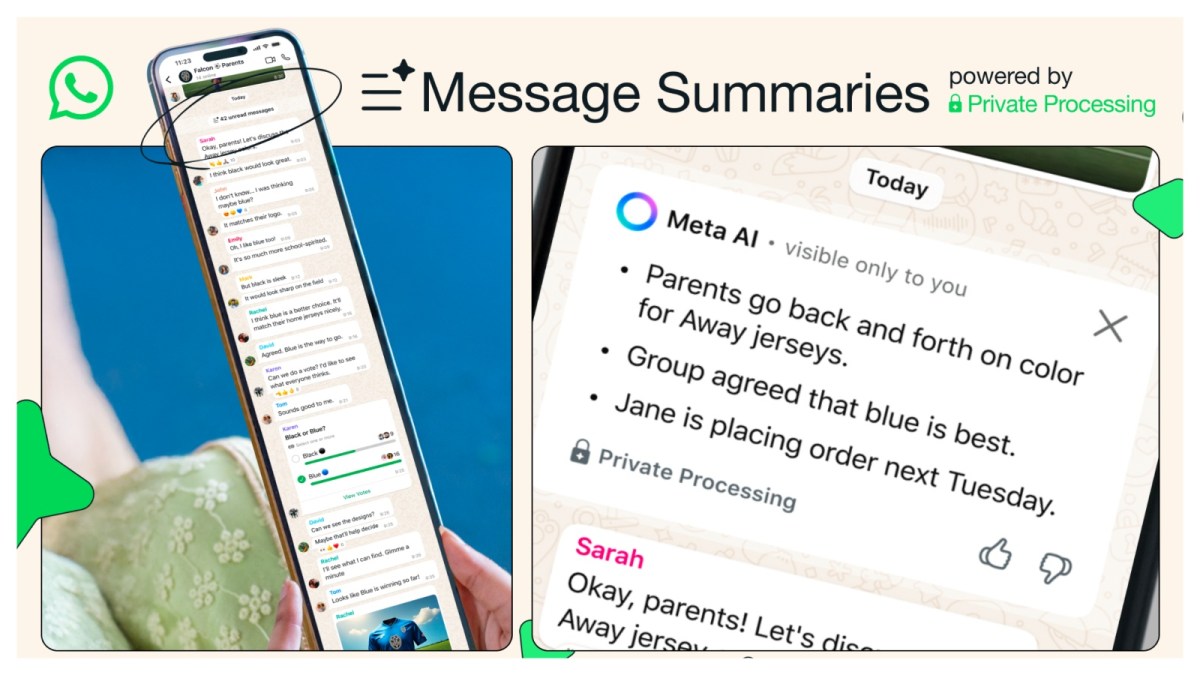
If the feature is available in your country, here is how to turn it on and use it:
1. Update WhatsApp to the latest version on Android or iPhone.
2. Open Settings > Chats > Private Processing and turn on Private Processing features. Message Summaries are off by default.
3. Open any chat with several unread messages.
4. Tap the unread messages divider or the “Summarize with Meta AI” option at the top of the chat.
5. Read the private, bullet-point recap. No one else in the chat can see that you generated a summary.
My Verdict: Use With Caution
If you’re like me and get flooded with group messages, this tool is genuinely helpful. But if you’re privacy-focused, keep your guard up. Meta’s framing of “on-device AI” sounds good, but history tells us to read the fine print.
I’ll keep using it for now but with one eye on the settings panel and the other on what Meta does next.
2026 closing note: with the feature now opt-in, off by default, and controllable per chat, most of my original concerns about forced AI have been addressed. The privacy model still relies on trusting Meta’s Private Processing claims, so my “use with caution” verdict stands, just with a little less caution than before.
Post Comment
Share your thoughts about this article.
Be the first to post a comment!