A single photo can carry a moment, but a story usually needs more than one frame to actually land. Most social platforms reward movement over static posts, which puts creators who rely on photography at a disadvantage even when their images are strong. Image to video tools close that gap, letting a photo or small set of photos become a short, moving story instead of a static post scrolled past in half a second. Dreamina, running on its most advanced video generation model, Seedance 2.5, gives creators a way to turn a handful of stills into something that actually holds a feed's attention.
Why static posts struggle in a video-first feed
Social platforms have trained audiences to expect motion, and a still photo competing against video after video in the same scroll starts at a disadvantage no matter how good the composition is. Even a small amount of movement signals to a viewer that something is happening, which buys a creator a few extra seconds of attention before a thumb keeps swiping.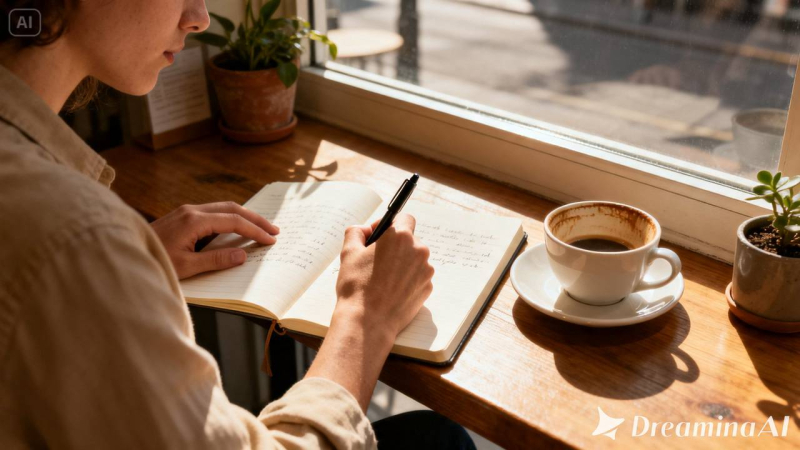
What makes a photo-based story actually work
A few things tend to separate a storytelling clip that lands from one that feels like a photo with random motion added. The movement should support whatever feeling the photo already carries, rather than contradicting it. Pacing matters too, since a story needs room to breathe instead of rushing every beat. And if more than one photo is used, the transitions must have some connection to each other rather than being a set of separate video clips.
Creating a story out of your photos with Dreamina
Step 1: Import your photo and give description of the story
Go to Dreamina and then navigate to "AI Video," select "Add reference image" and import your photo. Then provide description of your scene like this: "Create a 30 second video based on this photo of café. The scene must contain gentle rising steam from the cup, slow motion of the pen writing something on the page, subtle changing light through the window, and slow push in."
Step 2: Generate with Seedance 2.5
Pick the Seedance 2.5 model, choose your video length, then select an aspect ratio — 9:16 for Reels, Stories, and TikTok. Tap Dreamina's generate icon and let the story take shape.
Step 3: Refine and export your finished story
Run it through Dreamina's editing tools first — Upscale sharpens fine detail, Generate Soundtrack lays down music or ambient sound that matches the mood — then export and post it wherever your audience is watching.
What Seedance 2.5 brings to storytelling motion
Seedance 2.5, Dreamina's most advanced video generation model, is well suited to the mood-driven, character-forward motion social storytelling depends on.
Subtle motion that stays true to the feeling
Style-aware creative transfer picks up on the emotional tone of the original photo, so the motion added feels like a continuation of that mood rather than something layered on top of it.
A cleaner, more natural finish
Reduced "AI look" keeps skin, texture, and lighting believable, which matters a great deal for lifestyle and personal content where anything artificial-looking tends to stand out immediately.
Enough room for a full narrative beat
Extended duration up to 180 seconds in Ultra-long mode gives a longer story room to develop, useful for content meant to hold attention beyond a quick six-second loop.
Adjustments without a full redo
Local editing lets one distracting background element be removed without regenerating the whole clip, useful when a shot is otherwise strong but one detail is off.
Thinking in terms of a series, not a single post
A single photo-based video rarely builds an audience on its own, but a consistent series does. Creators who animate photos from the same ongoing project, a home renovation, a personal routine, a small business, tend to build more momentum than those posting one-off clips, since viewers start to follow the story across multiple posts rather than judging each one in isolation.
Consider the frame that people will see first
In most cases, as soon as the video pops up in the feed, playback automatically begins, so the very first frame is also used as a thumbnail. An awkward-looking photograph at the very beginning of the video can damage your entire video even before you give it a chance to start moving. It may be worth checking out the very first frame on its own and away from the rest of the video to make sure that it stands out.
Writing prompts that match platform expectations
A prompt built for a slow, atmospheric feed post reads very differently from one meant for a fast-paced trend format, so it helps to think about where the clip will actually be posted before deciding how much motion or energy to ask for.
Matching length and pace to the platform
A tight ten to fifteen second clip suits fast-scrolling feeds, while a slightly longer version gives more room for a story with an actual beginning, middle, and end.
A few habits that weaken a storytelling clip
Some choices tend to undercut the final result:
- Choosing a photo with too much happening for a single short clip to carry
- Adding motion that contradicts the photo's actual mood
- Overloading the prompt with unrelated actions
- Skipping sound, which can leave an otherwise strong story feeling flat
Where these storytelling videos tend to perform best
Personal brand content, small business marketing, lifestyle accounts, and creators building an audience around a recurring theme are where this format shows up most, since a photo that moves gently tends to hold attention and build connection far better than a static post alone.
A photo was always the start of a story, never the whole thing. Seedance 2.5, running through Dreamina, is what finally lets that story keep going for a few more seconds, long enough for someone scrolling past to actually stop.
Post Comment
Share your thoughts about this article.
Be the first to post a comment!