Old retweets can stay connected to an account long after their purpose is forgotten. X now calls them Reposts, although many users still use the older term. A complete cleanup requires more than scrolling through recent activity. The best method depends on account age, volume, and search accuracy.
_1784291815.jpg)
Know What Counts as a Retweet
A repost shares another account’s post and carries the Repost icon plus the reposter’s name. A quote post adds commentary, so it is a separate post created by the account owner. An ordinary post contains original text or media. Undoing a repost removes the share but does not delete the original post. Before using a service to remove retweets in bulk, decide whether quote posts and original posts should stay.
1. Undo Recent Reposts From the Profile
Open the profile, find a repost, select the highlighted Repost icon, and choose Undo Repost. X says this removes the repost from the timeline without deleting the original post. This method suits a small recent batch.
Manual removal gives direct control over every choice. It requires no search rule or archive upload. Repetition becomes the problem when years of activity are involved. Use it for visible exceptions rather than a large history.
2. Search Your Account for RT and Key Phrases
A basic X search can narrow results to one account. Add the account handle, RT, and a distinctive word. TweetEraser also instructs users to enter RT in its phrase field when selecting retweets. This method works for one campaign, person, or topic. Broad searches may mix both types.
Run several short searches instead of one huge query. Check different spellings, hashtags, and former account names. Keep notes to avoid duplicate work.
Every result should be checked for the Repost marker. A repeated phrase can also appear inside an original post. Remove only confirmed reposts when your own writing should remain. This method becomes slow across many years.
3. Use Advanced Search for Date Based Cleanup
X Advanced Search is available to signed in users on X.com. It can refine results by exact words, accounts, and dates. This works for a former job, event, or campaign. Each matching repost still needs separate removal.
Start with the account field and one short date range. Add a phrase only when the results remain broad. Smaller searches are easier to verify. They reduce confusion between post types.
Advanced Search can cover dates reaching back to the first public post. Divide large histories into overlapping periods. Save the final queries before moving forward. This record helps reveal gaps.
This method fits a known time window. It becomes inefficient when every repost must go. Archive based work is stronger for a full cleanup.
4. Download the X Archive
X says its archive provides account information beginning with the first post. Request it through account settings, confirm identity, and download the ZIP file after notification. Keep one untouched copy in a private folder. The archive helps identify content that browsing may miss. It also preserves dates and text for filtering. The file itself does not remove anything from X. A deletion service is still needed. X notes that preparation may take several days.
5. Use TweetEraser for a Large Batch
TweetEraser describes a process that connects an X account, opens the Tweets section, selects an age range, and enters RT as the phrase. The service applies those conditions to a larger group. It also advises checking the connected handle before confirmation. This reduces repeated manual actions.
Follow this checklist:
Save the archive. Keep the original ZIP file. Use a copy for review.
Confirm the handle. Match the connected account with the profile. Check again before a large task.
Test one range. Choose a short period first. Expand only after checking the matches.
Review the result. Refresh the profile and search for remembered reposts. Repeat when older groups remain.
A narrow test matters because RT can appear in ordinary text. Age filters may also include content near a boundary. Review the selected items before approving the larger batch. TweetEraser works best with specific conditions.
6. Combine Methods and Verify Everything
A complete cleanup often needs several passes. Use bulk removal for the main history, Advanced Search for known periods, and manual removal for exceptions. This balances speed and control.
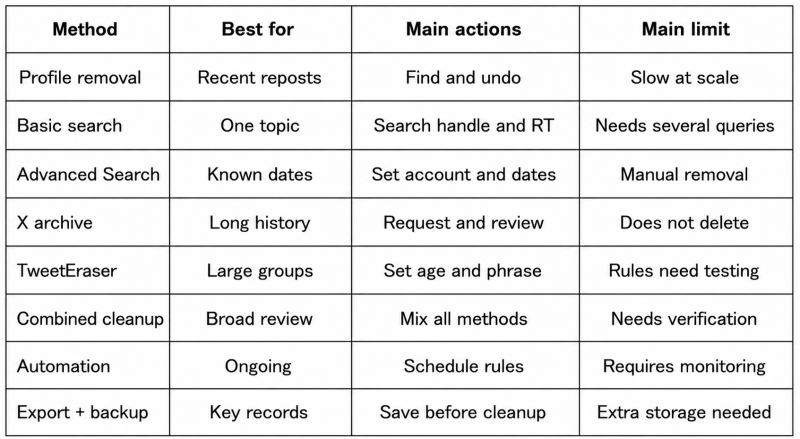
After removal, inspect the profile on desktop and mobile. Search old phrases, dates, and names. Open saved direct links when available. X confirms that undoing a repost does not affect the original author’s post. The original remains available.
Check linked accesses only when the work is done. X provides a way to see the allowed apps and revoke them within the section called Apps and sessions. Get rid of unnecessary accesses.
Short Conclusions
Clearing every retweet starts with separating reposts from quote posts and original posts. Each type requires a different action. That distinction prevents accidental deletion.
Manual removal fits a few recent items. Search handles known topics and periods. Archive based removal is more efficient for a long history. TweetEraser can reduce repeated work through age and phrase conditions.
No single screen proves that every repost is gone. A reliable check uses profile review, several searches, and saved links. Verification belongs inside the cleanup. Keep the archive after the public account is reduced. It remains a private record of dates and wording.
Post Comment
Share your thoughts about this article.
Be the first to post a comment!