Popular: CRM, Project Management, Analytics

Home > Software Directory > Visual Studio
Visual Studio

Visual Studio

Build any app, game, or extension using any language of your choice

Visual Studio Overview

Visual Studio is a comprehensive integrated development environment (IDE) that enables writing, editing, debugging, and building code across multiple languages and platforms. The tool provides a unified workspace for developing desktop applications, web apps, mobile applications, cloud services, games, and extensions. Core functionality includes a code editor with IntelliSense for code completion, an integrated debugger for source and machine-level debugging, code profiling, and visual designers for GUI and database development. Recent updates emphasize AI-assisted development through Copilot integration, offering context-aware code suggestions, AI chat assistance, and automated debugging and testing capabilities. The product supports .NET, C#, C++, Python, JavaScript, TypeScript, and other languages with cross-platform deployment options.

More About Visual Studio

Key Aspects:

  • Code editor with IntelliSense for syntax highlighting and code completion
  • Integrated debugger supporting source-level and machine-level debugging
  • Code profiler and performance diagnostic tools
  • Class designer for UML modeling and code generation
  • Data designer for graphical database schema editing
  • GUI designer for Windows Forms and WPF applications
  • Web designer for modern web app development
  • Git and GitHub integration for version control and collaboration
  • AI-assisted development with Copilot for code suggestions and natural language prompts
  • Solution Explorer for organizing and managing code files and projects
  • Real-time error detection with squiggles and quick action suggestions
  • Reference highlighting for symbol tracking across code
  • Multithreaded build engine (MSBuild) for parallel compilation
  • Customizable tool windows and multi-monitor support
  • Extension support for adding functionality and domain-specific tools

Pros & Cons

Pros:

Great Git and Azure integration built‑in

Handles huge enterprise solutions reliably

Rich extensions marketplace for any tech stack

Strong IntelliSense and refactoring support

Cons:

Overkill and cluttered for small projects

Steep learning curve for beginners
Software Trial

0 Days

Free Version

No

Licensing Type

Proprietary

Visual Studio Starting Price

Free

Vendor Pricing Page

See Pricing

Visual Studio Software Features

Code Completion Multi-Language Refactoring Syntax Highlighting UI Monitoring Access Controls Code Refactoring Collaboration Tools Compatibility Testing Debugging Deployment Management Mobile App Development No-Code Development Reporting & Analysis Software Development Source Control Web App Development

Visual Studio Specification

Starting Price

Free

Price Type

Flat Rate

Currency

USD ($)

Subscription

Annually

Deployment Type

  • Cloud Hosted

Supported Platforms

  • Web-Based
  • Windows
  • Mac
  • Linux

Technical Support

  • Email

Training Resources

  • Documentation
  • Blogs
  • Help Guides

Software Demo & Screenshots

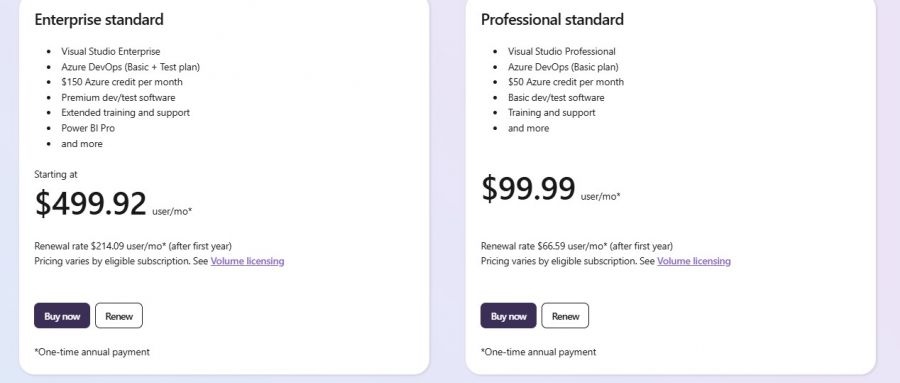
Visual Studio Pricing

Visual Studio Pricing Screenshot

*The price might have been changed, check the current pricing on the vendor's website.

Visual Studio Customers

Clients yet to be updated!

Top Competitors of Visual Studio

Logo Software Name Rating Reviews Starting Price Trial
OutSystems Logo OutSystems 4.3 12 0 USD ($) 1-7 Days
Scriptcase Logo Scriptcase 4.1 41 0 USD ($) 1-7 Days
Caspio Logo Caspio 4.1 28 0 USD ($) 15 Days
Firebase Logo Firebase 3.9 38 0 USD ($) 1-7 Days
Claris FileMaker Logo Claris FileMaker 3.9 48 0 USD ($) 0 Days

Visual Studio Reviews

Login to see more reviews of Visual Studio.

Software Category

Explore Other Top App Development Software