Popular: CRM, Project Management, Analytics

Home > Software Directory > VideoProc Converter
VideoProc Converter

VideoProc Converter

Video Enhancer, Converter, Downloader

VideoProc Converter Overview

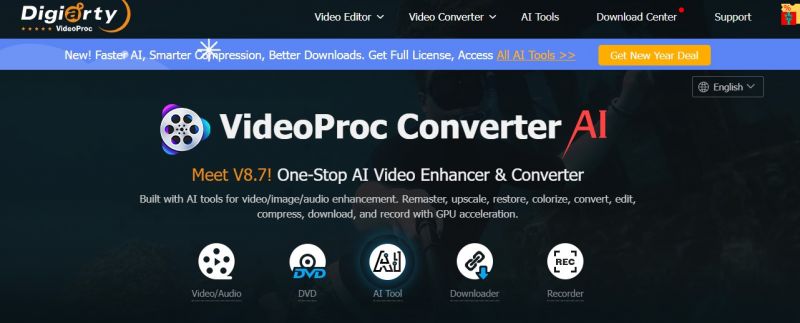
VideoProc Converter AI processes videos, DVDs, audio, and images through conversion, enhancement, downloading, and editing. It handles 370+ codecs and 420+ formats without third-party packs, supporting 4K, HDR, and 10-bit footage. GPU acceleration from Intel, NVIDIA, AMD, and Apple M-series enables up to 47x faster speeds. AI tools upscale videos to 4K, interpolate frames to 480fps, stabilize footage, denoise, and enhance details with models like Gen Detail, Real Smooth, Anime, and Zyxt. Additional functions include DVD digitization, screen recording, compression, and online video downloads from 1000+ sites.

More About VideoProc Converter

Primary Use Cases:

  • Super Resolution upscales videos by 2X-4X to 4K with AI models for detail, smoothness, anime, and realistic footage
  • Frame Interpolation boosts FPS from 30/60 to 120/240/480 with 2x-5x new frames
  • Stabilization fixes shaky GoPro, drone, or camera footage with adjustable cropping
  • Video conversion supports 370+ inputs and 420+ outputs with Level-3 hardware acceleration
  • DVD ripping copies main or full titles
  • Video downloader from 1000+ sites with batch, playlist, and channel support
  • Image AI enhances, upscales, restores faces, and colorizes black-and-white photos
  • Audio AI removes vocals, music, and noise
  • Toolbox for compression, rotation, GIF creation, snapshots, and speed changes

Pros & Cons

Pros:

High-speed conversion up to 47x faster with GPU acceleration

Supports 4K/HDR processing across conversion, AI enhancement, and editing

AI Super Resolution delivers natural 4K upscales without over-smoothing

Low CPU usage at 2% average during processing

Handles 370+ codecs without external packs

Cons:

Free version limits videos to under 5 minutes and adds watermarks

Lifetime license activates on one computer only

Processing speeds vary by hardware and settings

Stabilization available only on Windows
Software Trial

30 Days

Free Version

Yes

Licensing Type

Proprietary

VideoProc Converter Starting Price

Free

Vendor Pricing Page

See Pricing

VideoProc Converter Software Features

3D Editing Audio Tools HDR Support Speed Adjustment Split/Merge Video Capture Video Stabilization

VideoProc Converter Specification

Starting Price

Free

Price Type

Flat Rate

Currency

USD ($)

Subscription

Annually , One-Time

Deployment Type

  • On Premises

Supported Platforms

  • Web-Based
  • Windows
  • Mac

Technical Support

  • Email

Training Resources

  • Documentation
  • Help Guides
  • Videos

Software Demo & Screenshots

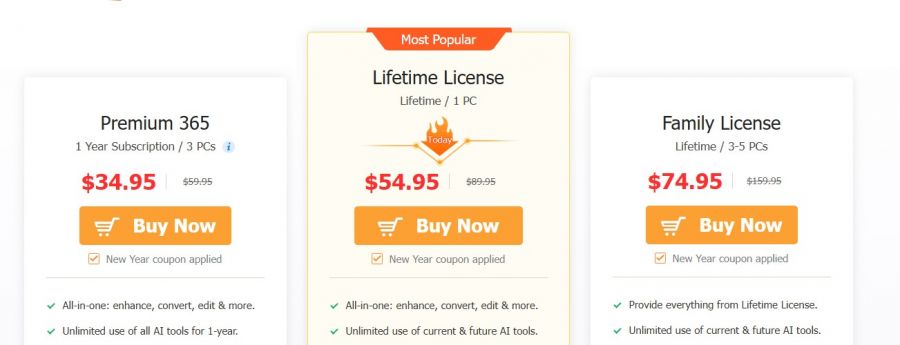
VideoProc Converter Pricing

VideoProc Converter Pricing Screenshot

*The price might have been changed, check the current pricing on the vendor's website.

VideoProc Converter Customers

Clients yet to be updated!

Top Competitors of VideoProc Converter

Logo Software Name Rating Reviews Starting Price Trial
Blender Logo Blender 3.9 94 0 USD ($) 1-7 Days
GoPlay Logo GoPlay 3.9 47 1 USD ($) 1-7 Days
Clideo Logo Clideo 3.9 36 9 USD ($) No
Filmora Logo Filmora 3.8 86 0 USD ($) 0 Days
Kdenlive Logo Kdenlive 3.8 73 0 USD ($) 1-7 Days

VideoProc Converter Reviews

Login to see more reviews of VideoProc Converter.

Software Category

Explore Other Top Video Editing Software