Table of Content
- The Social Video Landscape
- What Is Wava AI?
- What Is Pictory?
- Side-by-Side Feature Comparison
- Detailed Feature-by-Feature Breakdown
- Pricing Comparison: What Each Platform Actually Costs
- Use Case Suitability: Where Each Platform Wins
- Output Quality: Which Videos Actually Perform Better?
- Pros and Cons at a Glance
- How to Choose
- Final Verdict
Short-form video drives more reach on social media than any other content format in 2026. The challenge for creators and marketing teams has moved from "should videos be made?" to "how can videos be produced fast enough to keep up with the algorithm?" That pressure has fueled a new wave of AI video tools, and two names show up repeatedly in the buyer conversation: Wava AI and Pictory.
Both platforms promise to turn an idea or a piece of writing into a polished video without a traditional editing timeline. They take very different approaches, however, and the right choice depends almost entirely on what kind of social video the team is trying to ship. This guide compares them across features, output quality, pricing, and use cases - with charts and tables - so the decision becomes obvious within the first few minutes.
Quick Verdict Wava AI is the stronger pick for faceless, viral short-form videos built from scripts or story prompts - TikTok-style clips, Reddit story videos, and split-screen content. Pictory is the stronger pick for content repurposing - turning blog posts, webinars, and long-form videos into branded social clips. Creators producing both formats often run them side by side. |
The Social Video Landscape
Before comparing tools, it helps to recognize that "social video" actually splits into two very different production workflows. Confusing them is the single most common reason teams pick the wrong tool.
Workflow A - Native short-form creation
A creator opens a tool, types a script or picks a story prompt, and a 30–60 second faceless video is generated complete with voiceover, captions, and background visuals. This is the workflow behind most viral TikTok and Instagram Reels accounts producing daily content. Wava AI was designed specifically for this pattern.
Workflow B - Content repurposing
A marketing team has an existing blog post, podcast episode, or webinar recording and wants to turn that long-form asset into multiple social clips. Editing happens through transcripts and AI summarization rather than raw video timelines. Pictory was designed specifically for this pattern.
Both tools can technically produce "a social video," but the underlying engines are tuned for different starting points. The simplest test: does the workflow start with a fresh script, or with existing content that needs repackaging? That single question almost always points to the right platform.
| Dimension | Wava AI | Pictory |
|---|---|---|
| Built for | Faceless viral short-form videos | Repurposing existing written or video content |
| Starting point | Script, story prompt, or template | Blog URL, video file, podcast, or script |
| Typical output length | 15–90 seconds | 30 seconds to 20+ minutes |
| Primary user | Solo creators, faceless channel operators | Marketers, content teams, agencies, educators |
| Best platform fit | TikTok, Reels, YouTube Shorts | LinkedIn, YouTube, Facebook, multi-platform repurposing |
What Is Wava AI?
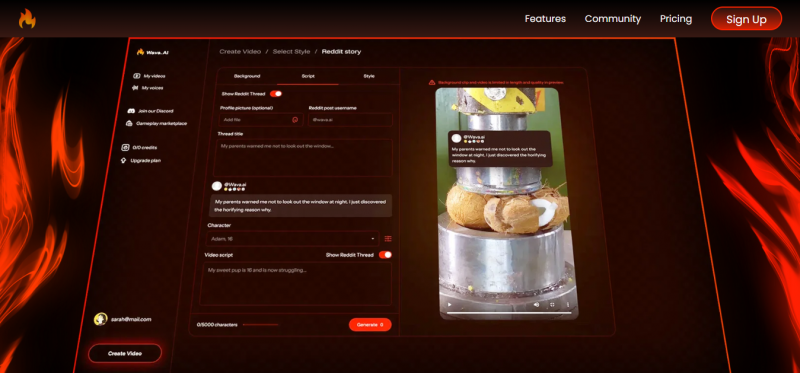
Wava AI is a web-based video generator focused on viral short-form content for social platforms. The tool produces faceless videos - no on-camera presenter required - by combining AI voiceover, auto-generated captions, background video clips, and animated text into ready-to-publish vertical videos. The product is aimed squarely at creators and small businesses pushing daily content to TikTok, Instagram Reels, and YouTube Shorts.
Core capabilities
• AI-narrated story videos: Generates videos from typed scripts, with the AI handling pacing, voiceover, and visual matching.
• Story generation mode: Takes a prompt and builds an entire narrative video from scratch - useful for creators in fiction, stoic, or motivational niches.
• Split-screen clips: Produces the popular split-screen format pairing narration with gameplay or stock B-roll on the bottom half.
• ElevenLabs voiceover integration: High-quality neural voices through one of the most respected text-to-speech providers; voices feel natural rather than robotic.
• Custom voice import: Users can upload their own recorded voice or a cloned voice for a consistent audio identity across a faceless channel.
• Auto-captions with styling: Captions sync to the voiceover automatically; font, color, size, and position can all be customized to match a channel's look.
• Free background video library: Built-in stock footage covers the most common faceless niches (gaming, satisfying clips, scenic visuals) without licensing extras.
Where it shines
Speed. A complete faceless video can move from idea to export in roughly 5–10 minutes, which is exactly the cadence most viral creators need to maintain. The custom voice clone feature is unusual at this price point and gives creators a way to keep audio identity consistent across hundreds of videos.
Where it falls short
Wava AI is not built for long-form content, transcript-based editing, or marketing teams that need brand kits, analytics, and team workspaces. Voice mispronunciations on unusual names or niche terminology occasionally appear and require manual review. Several reviews also flag inconsistent community moderation in the official Discord, where users go for support and feedback.
What Is Pictory?
Pictory is a cloud-based AI video creation platform built for content repurposing. The headline workflows - Script-to-Video, Article-to-Video, Edit-Videos-Using-Text, and Visuals-to-Video - turn existing assets into branded social videos with minimal manual editing. The platform is widely used by marketers, agencies, educators, and content teams that already produce written or long-form video content and want to multiply its reach.

Core capabilities
• Article-to-Video: Paste a blog URL and Pictory builds a video storyboard from the content automatically - useful for repurposing SEO articles.
• Script-to-Video: Generates videos from typed scripts, similar to Wava AI but with a heavier emphasis on stock-footage matching.
• Text-based video editing: Uploads a video, transcribes it, and lets users edit the actual footage by deleting words from the transcript - eliminates timeline scrubbing.
• Highlight reel generation: Scans long videos, identifies the most engaging segments, and auto-cuts them into short clips for Reels and Shorts.
• Massive stock library: Roughly 3 million video clips and 15,000 music tracks included, with no per-asset licensing fees.
• Brand Kits: Logos, fonts, color palettes, and styles applied consistently across all videos for brand-consistent output at scale.
• Multiple aspect ratios: Single-click export for 16:9 (YouTube), 9:16 (Reels/Shorts), and 1:1 (feed) formats.
• Team collaboration: Shared projects, brand assets, and workspaces for agencies and marketing teams.
Where it shines
Pictory's biggest strength is turning a webinar, podcast, or 2,000-word blog into a week's worth of social clips with almost no manual editing. The text-based editor that lets users cut footage by deleting transcript words is genuinely faster than traditional timelines, especially for long-form recordings.
Where it falls short
Pictory does not generate AI presenter or avatar videos, which limits its use for talking-head explainer content. Some reviewers note that template variety feels limited and that audio-to-video conversion can produce less polished results than the article-to-video workflow. Pricing is structured around video minutes rather than video count, which can confuse buyers comparing it to flat-rate alternatives.
Side-by-Side Feature Comparison
The chart below scores both platforms across the six capability areas creators evaluate most often when picking a social video tool. Scores reflect publicly available product documentation, third-party reviews, and aggregated user feedback through May 2026 - they are directional rather than absolute.
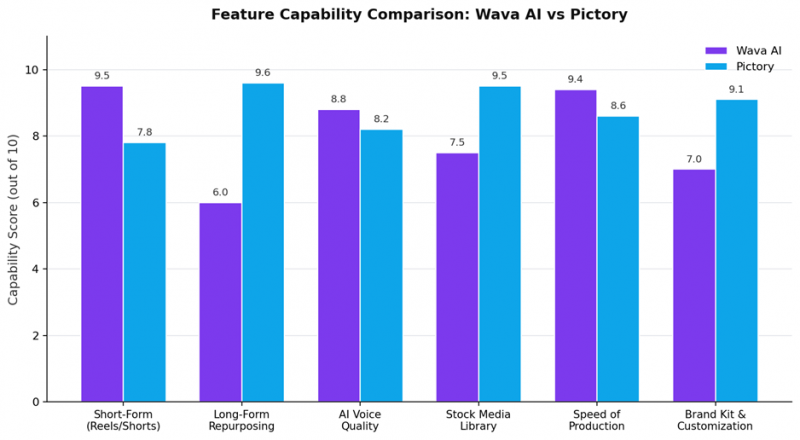
The pattern is clear. Wava AI leads on short-form production, AI voice quality, and pure speed. Pictory leads on long-form repurposing, stock media depth, and brand customization. Each platform built its strongest features around a specific creator workflow rather than trying to be everything to everyone.
Detailed Feature-by-Feature Breakdown
| Feature | Wava AI | Pictory |
|---|---|---|
| Faceless short-form videos | Built for this use case | Possible but not the primary workflow |
| Long-form repurposing | Limited | Core feature - blog, podcast, webinar to video |
| Story / prompt-to-video mode | Native story generation mode | Script-to-video, but no narrative prompt mode |
| AI voiceover | ElevenLabs integration, neural quality | Built-in AI voices, multiple accents |
| Custom voice cloning / import | Yes - upload or clone | Limited - no native voice cloning |
| Auto-captions | Auto-synced, style-customizable | Auto-synced, style-customizable |
| Stock video library | Free background clips, narrower selection | ~3M clips and ~15K music tracks |
| Text-based video editing | Not supported | Core feature - edit by editing the transcript |
| Highlight reel from long videos | Not supported | Core feature for Reels and Shorts |
| Brand Kit (logo, fonts, colors) | Limited | Multiple brand kits depending on tier |
| Aspect ratios | Vertical-first (9:16) | 9:16, 16:9, 1:1 with one-click switch |
| Team collaboration | Single-user oriented | Team plan with shared workspaces |
| API access | Not advertised at standard tiers | Available on Professional and higher |
Pricing Comparison: What Each Platform Actually Costs
Pricing is one of the most common decision points, and the two tools structure their plans differently. Wava AI bills by video count per month. Pictory bills by total video minutes. The chart below maps the closest comparable tiers, and the table that follows breaks down what is included at each level.
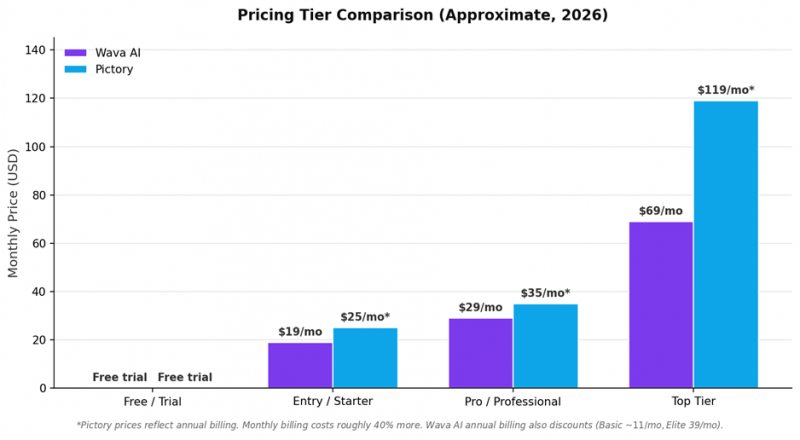
On headline price, Wava AI is generally more affordable for creators who need 30–150 short videos per month. Pictory tends to deliver more value for teams producing fewer but longer or more polished videos, particularly when the workflow involves repurposing existing content with brand consistency.
| Tier | Wava AI | Pictory |
|---|---|---|
| Free / Trial | Free version with limited features and basic generation. | Free trial covering up to 3 short videos to evaluate quality. |
| Entry tier | Basic - $19/month: 30 videos/month, ElevenLabs voiceover, custom voice import, free background clips, standard generation speed. | Starter - ~$25/month (annual): 200 video minutes, 5 GB storage, 1 brand kit, 720p export, video summarization on higher tiers. |
| Mid tier | Pro - $29/month: 60 videos/month, priority support, max generation speed, all Basic features. | Professional - ~$35/month (annual): 600 video minutes, 20 GB storage, 5 brand kits, 1080p export, larger stock library, API access. |
| Top tier | Elite - $69/month: 150 videos/month, premium support, ultra generation speed, all Pro features. | Team - ~$119/month (annual): 1,800 video minutes, multi-user collaboration, advanced branding controls, priority support. |
| Annual savings | Annual billing reduces Basic to ~$11/mo and Elite to ~$39/mo - roughly 40–45% off. | Annual billing reduces all tiers by approximately 34–40% versus monthly pricing. |
Pricing watch-outs
Pictory's monthly billing costs roughly 40% more than annual, so buyers committing month-to-month should mentally adjust the headline numbers upward. Wava AI's per-video model rewards short content but a single 90-second video and a 30-second video cost the same - heavier creators may overpay versus minute-based competitors. Always confirm current pricing on each vendor's official page before purchasing.
Use Case Suitability: Where Each Platform Wins
Feature parity rarely decides a purchase - fit-for-purpose does. The chart below maps eight common social video use cases against how well each platform handles them based on documented features and review consensus.
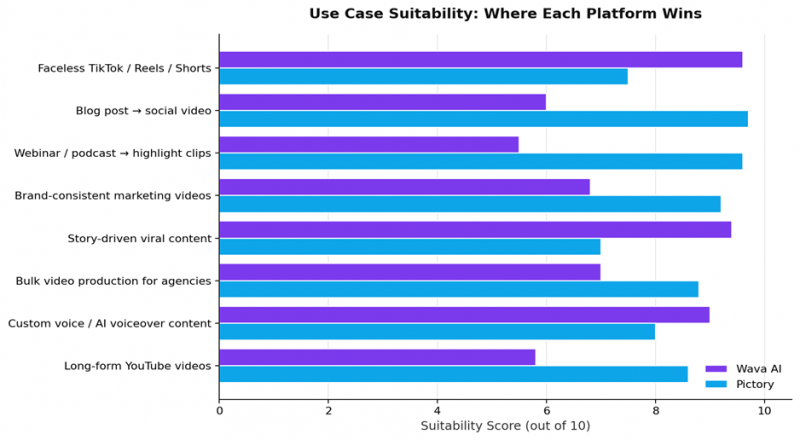
Wava AI is the better fit for
• Faceless TikTok, Instagram Reels, and YouTube Shorts channels
• Story-driven viral content (Reddit stories, motivational, stoic, fiction)
• Creators who post daily and need fast turnaround per video
• Solo creators who want a custom voice clone across all uploads
• Anyone learning short-form video without a video-editing background
Pictory is the better fit for
• Content marketers turning blog posts and articles into social videos
• Teams repurposing webinars and podcasts into short highlight clips
• Agencies producing brand-consistent videos for multiple clients
• Educators converting long lectures or training material into bite-size clips
• Marketing teams that need 1080p output, brand kits, and team workspaces
Output Quality: Which Videos Actually Perform Better?
Headline features matter less than what actually shows up on the timeline. Both tools produce export-ready videos, but the look, feel, and platform-fit of those outputs differ in ways worth understanding before buying.
Wava AI output characteristics
• Vertical-first (9:16) with clean, punchy captions optimized for mobile thumbing
• Voiceover quality is strong thanks to the ElevenLabs integration
• Pacing leans fast - designed to hold attention in the first three seconds
• Background visuals tend to repeat across niches because the library is curated, not exhaustive
• Branding is intentionally minimal - most viral faceless niches discourage heavy logos
Pictory output characteristics
• Polished, brand-friendly look that suits LinkedIn, Facebook, and YouTube as much as TikTok
• Stock footage is more varied thanks to the much larger asset library
• AI voice quality is solid but generally one notch below ElevenLabs-class output
• Captions and lower-thirds are highly customizable and feel professional out of the box
• Better suited to videos that should look produced rather than scrappy
On TikTok, scrappy and fast often outperforms polished. On LinkedIn or YouTube, the opposite is true. The platform a video is built for matters as much as the tool used to build it, and that single choice should drive the Wava-or-Pictory decision more than feature lists.
Pros and Cons at a Glance
Wava AI
| Pros | Cons |
|---|---|
| Purpose-built for faceless viral short-form videos | Limited long-form and content repurposing workflows |
| Custom voice cloning unusual at this price point | Stock library narrower than larger competitors |
| ElevenLabs voiceover delivers natural narration | Occasional pronunciation errors on unusual terms |
| Generally fastest production cycle of any tool in its class | Brand kits, team workspaces, and analytics are minimal |
| Affordable entry tier with strong annual discount | Per-video pricing penalizes longer content |
Pictory
| Pros | Cons |
|---|---|
| Best-in-class content repurposing workflows | No native AI presenter or avatar videos |
| Massive stock media library at no extra cost | Template variety can feel limited compared to design-first tools |
| Text-based editing is genuinely faster than timelines | Audio-to-video conversion less polished than article-to-video |
| Brand kits and team plans built for marketing teams | Video-minute pricing harder to compare to per-video tools |
| Solid 1080p export and multiple aspect ratios | Monthly billing carries a steep premium over annual |
How to Choose
The right tool depends less on which platform is objectively better and more on which problem dominates the content roadmap right now. The matrix below maps common situations to the recommended choice.
| If the dominant goal is… | Recommended platform |
|---|---|
| Posting daily faceless TikTok or Reels videos | Wava AI |
| Repurposing long blog articles into short videos | Pictory |
| Cutting webinars and podcasts into highlight clips | Pictory |
| Building a faceless channel with a consistent voice clone | Wava AI |
| Producing brand-consistent videos across an agency client base | Pictory |
| Story-driven viral niches (Reddit stories, motivational, stoic) | Wava AI |
| Both - fresh viral shorts plus content repurposing | Wava AI + Pictory together |
The combined-stack pattern
Many full-time creators run both. Wava AI handles daily faceless uploads to TikTok and Shorts. Pictory handles weekly long-form repurposing - turning a podcast into Reels or a blog into a YouTube video. Each tool does what it does best, and the combined cost is still well below hiring even a part-time editor.
Final Verdict
Wava AI and Pictory are not really fighting for the same buyer. They share a category - AI video generation - but they solve genuinely different problems. Treating them as direct alternatives muddles the decision; treating them as workflow tools makes it obvious.
Creators chasing daily reach on TikTok, Instagram Reels, and YouTube Shorts with faceless content should start with Wava AI. Marketing teams, agencies, and educators with existing blogs, webinars, or podcasts that deserve a second life on social should start with Pictory. The strongest content engines in 2026 increasingly use both, with each tool owning a clear lane.
The deeper truth behind the comparison: AI video tools have stopped competing on "can the AI make a video?" and started competing on "can the AI fit my workflow?" That is good news for creators, because it means the right tool for a specific job actually exists - once the job is correctly identified.
Bottom line For viral, faceless, short-form social videos, Wava AI is the more direct fit and the friendlier entry price. For repurposing existing written or video content into branded social clips, Pictory delivers more depth and polish. Pick based on the workflow, not the feature list - and consider running both if the content roadmap genuinely needs both. |
Post Comment
Share your thoughts about this article.
Be the first to post a comment!