In the last decade, VidMate has evolved from a simple video-downloader app into one of the most downloaded, debated, and misunderstood APKs in the Android ecosystem. As more users search for ways to download YouTube videos, Instagram reels, WhatsApp statuses, and HD movies directly to their phones, VidMate continues to trend, but so do the questions about its safety, legality, data collection, and malware risk.
Yet, the internet is filled with contradictory information:
- Some blogs praise VidMate as the most powerful downloader
- Some users warn that “VidMate stole my data”
- Some websites call it “safe but ad-heavy”
- Others report fake versions spreading malware
- Authorities clarify that downloading certain content is illegal
- Most users are confused because the truth is not black-and-white.
By the end of this guide, you will understand exactly what VidMate is, what it does, how it behaves, and how to use it without compromising your device or your privacy.
What VidMate Actually Is: A Modern, Multi-Purpose Downloader
Many people still think VidMate is “just a YouTube downloader.”
That was true in 2013. It is not true anymore.
As of 2025, VidMate is a multi-feature media toolkit with:
Multi-platform video downloading
Supports 1,000+ platforms, including:
YouTube, Facebook, Instagram, TikTok, WhatsApp, Dailymotion, Vimeo, Twitter, Likee, MX Takatak, Vimeo, etc.
HD / Full HD / 4K downloads
Video formats: MP4, M4V, 3GP, WebM
Audio formats: MP3, M4A, AAC
Built-in 4K video player
With background play, playlists, and offline folders.
WhatsApp Status Saver
One of the most-used features in India.
Music Downloader
Fetches audio from music videos instantly.
Live TV / regional channels
Offered in certain builds & regions.
Smart Link Detection
Automatically detects copied URLs.
Fast multi-threaded downloads
Uses parallel downloading for speed boosts.
VidMate is not a simple app — it’s a full media ecosystem.
And powerful apps always come with bigger risks.
Why VidMate Is Not on the Google Play Store
Many blogs wrongly claim VidMate was “banned.”
That is false.
VidMate cannot be hosted on Google Play because:
It violates YouTube’s Terms of Service.
Google owns YouTube.
Google also owns the Play Store.
A downloader that captures YouTube videos cannot legally exist on Play Store.
It downloads copyrighted content.
Play Store policies prohibit apps that infringe content rights.
It uses third-party libraries Google does not approve.
It offers features disallowed by Android policies.
None of these mean VidMate is malware — they mean it operates outside Google's policy framework, which shifts responsibility to the user.
VidMate’s APK Ecosystem
Since VidMate cannot be on the Play Store, users must download it manually.
This leads to the #1 danger:
Fake VidMate websites hosting cloned malware APKs.
There are more than 60+ unofficial VidMate sites, including:
- vidmate-app.com.in
- vidmatedownloadapk.net
- vidmatepro.net
- vidmate2025version.com
These clones often contain:
- adware
- spyware
- auto-click bots
- cryptocurrency miners
- notification spam
- redirect malware
Because VidMate is popular, cybercriminals exploit its demand.
FACT: Most VidMate “horror stories” come from FAKE versions, not the official app.
Safety Risk Analysis of VidMate
Below are the main risk areas, expanded with deeper explanations:
Fake APKs & Malware Injection
Fake VidMate apps found online may include:
- Hidden ad-click engines that run 24/7
- Background services consuming data & battery
- Malware that shows full-screen ads
- Trojan modules downloading MORE apps without consent
- Keyloggers monitoring your activity
These threats are not part of the official VidMate, but they are part of the ecosystem because users cannot tell the difference.
Permission Abuse
Some unofficial clones ask for:
- Contacts
- Location
- SMS
- Phone identity
- Microphone access
- Camera access
These are major red flags.
The official VidMate requires ONLY:
Storage
Notifications
Anything more should trigger immediate uninstallation.
High Ad Density (Annoying but Also Dangerous)
VidMate relies heavily on ads for revenue.
In some builds:
- Pop-ups appear frequently
- Ads redirect to gambling/betting pages
- Users accidentally click malicious banners
High ad frequency ≠ malware
But it increases:
- accidental infection risk
- exposure to risky ad networks
- unwanted downloads
Background Data Consumption
Some older VidMate builds were caught using:
- background data for ad-click operations
- analytics pings to unknown servers
This is one reason security researchers raised concerns.
Newer versions appear more stable — but the history matters.
Legal Liability
VidMate does NOT protect you from piracy laws.
Downloading:
- Movies
- Songs
- Paid content
- OTT content
- Premium posts
…can be illegal based on your region.
VidMate will never warn you about legal boundaries.
You must know them yourself.
Privacy Risk Breakdown
VidMate interacts with several layers of your device:
Device Storage
Required to save videos.
Not dangerous unless cloned APK misuses it.
Network Access
Needed for streaming and downloading.
Clones may use it for fraud.
App Usage Analytics
Official builds may collect basic performance data.
Third-Party Ad Networks
This is the biggest privacy variable.
Different versions use different ad systems, some of which may not be transparent.
User Behavior Tracking (Possible in clones)
Malicious clones may track:
- what you download
- when you open the app
- your browsing patterns
- device model and OS
This is why APK source matters more than the app itself.
Is VidMate Legal?
Using VidMate: LEGAL
Downloading copyrighted content: ILLEGAL
Here’s the breakdown:
Legal:
- Downloading your own content
- Downloading copyright-free videos
- Saving royalty-free content
- Downloading Creative Commons content
Illegal:
- Downloading movies
- Downloading music without license
- Downloading OTT content
- Saving private videos without permission
- Sharing downloaded content publicly
VidMate does not protect you legally.
The user holds full responsibility.
Who Should NEVER Install VidMate
Avoid VidMate if:
- you use your phone for banking
- you store sensitive data
- you are not tech-savvy
- you cannot identify fake websites
- you expect zero-risk apps
- you rely heavily on Play Store safety
VidMate is not dangerous by default — but it's dangerous if misused.
Expert Guidelines to Use VidMate Safely
Install only from official sites
VidMate.com
VidMate-Official.com
VidMateApp.com
Scan APK with VirusTotal before installation
Takes 10 seconds, prevents disasters.
Install on a secondary phone
Keeps your main device safe.
Use a VPN while downloading
Protects your IP.
Turn off auto-updates
You should manually update only from official sites.
Deny unnecessary permissions
Never allow location, contacts, microphone, SMS.
Monitor battery and data usage
Sudden spikes = unsafe version.
Clear the ad cache weekly
Prevents heavy ad buildup.
When VidMate Is Extremely Useful
VidMate shines in scenarios like:
Offline learning
Students download lectures and tutorials.
Airplane or travel mode
Users save videos before flights.
Content archiving
Influencers save reels for inspiration.
Family preserving memories
Users download old WhatsApp statuses before they disappear.
Poor internet connectivity regions
VidMate becomes a life saver in unstable network zones.
Final Expert Verdict: Is VidMate Safe ?
VidMate CAN be safe — if downloaded from official sources and used with security practices.
VidMate CAN be dangerous — if downloaded from fake mirror sites or misused for piracy.
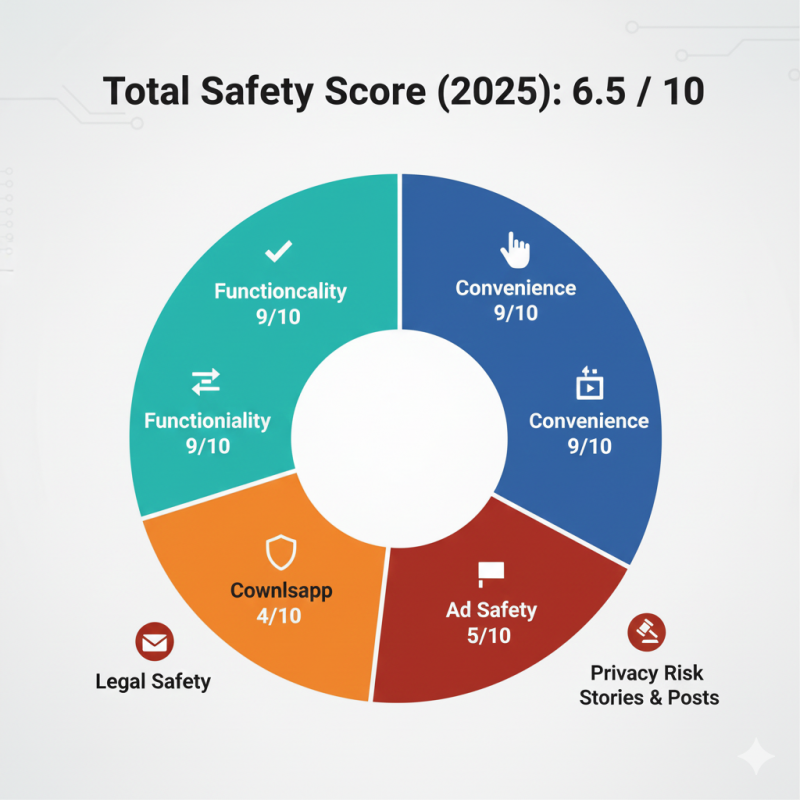
Total Safety Score (2025): 6.5 / 10
Breakdown:
Functionality: 9/10
Convenience: 9/10
Privacy Risk: 4/10
Ad Safety: 5/10
Legal Safety: 3/10
VidMate is a power tool, safe in expert hands, risky in careless hands.
Post Comment
Be the first to post comment!