Table of Content
- How each tool imagines its ideal user
- What “quality” really looks like in both tools
- Cost and credits without sugar‑coating it
- A single table that focuses on pain, not features
- How it feels when you are actually building a piece
- The learning curve nobody puts in the marketing pages
- Where each one fits cleanly in a real content pipeline
- Ending without a slogan
Runway and Pika sit under the same label in most roundups: “AI video generators.” In reality, they encourage completely different habits. One wants to be part of a film or commercial pipeline. The other wants to sit right next to TikTok drafts, Notion pages, and Twitter drafts.
The easiest way to make sense of them is to look at how they behave when you are actually trying to get work out the door.
How each tool imagines its ideal user
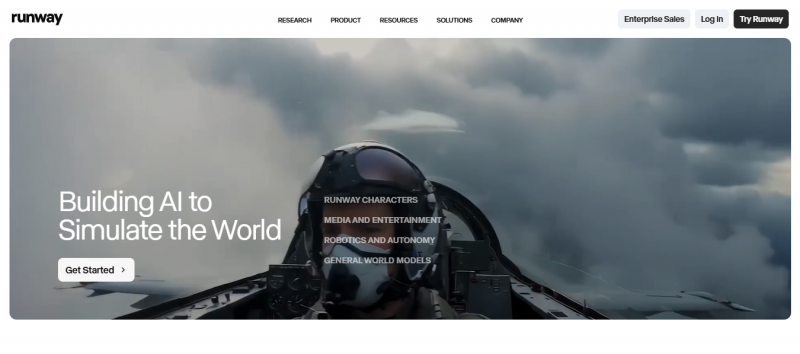
Runway has been around since 2018. It comes from the “tools for filmmakers and artists” world, not the “viral clips” world. Its Gen‑4 model and editing system are built for people who think in shots, scenes, storyboards, and post‑production. The promise is: cinema‑grade, 4K‑ready AI footage that can sit inside a professional edit without looking like the odd one out.
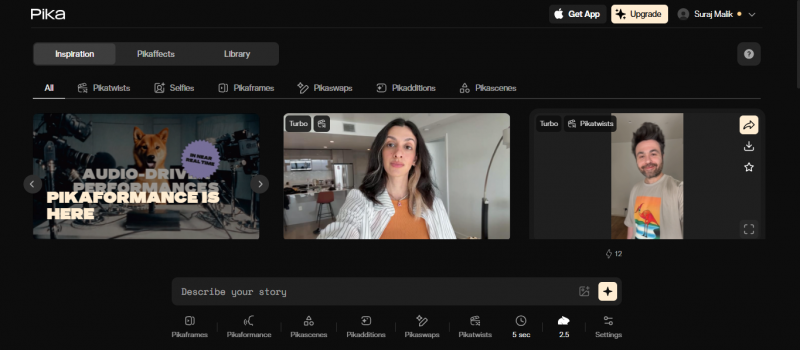
Pika is much younger. It arrived in 2023 and immediately felt like it belonged to the short‑form crowd. The updates that matter most are all about play and speed: Scene Ingredients, Pikaffects, Pikaframes. It is aimed at the person who needs something surprising on screen in the next minute, not the next week.
So before anything else, the split is simple: Runway speaks to director brains, Pika speaks to feed brains.
What “quality” really looks like in both tools
On a large monitor, Runway Gen‑4 footage holds up in a way most other AI video still does not. Textures, motion blur, depth of field and lighting combine into something that feels like it could have come off a camera, especially when you export in 4K ProRes and treat it like any other clip in an edit. Character consistency is the big leap: a face, outfit, and body stay recognisable across different angles and shots instead of mutating every few seconds.
Pika’s best work does not try to mimic a real camera as closely. It leans into a polished, stylised look that still reads immediately as AI to anyone who pays attention, but that looks great on phones and in feeds. Motion feels fluid in the 2.x models, expressive moments are handled well, and 1080p is more than enough for how most social platforms compress and display video anyway.
There is a difference here that matters:
- clients in product, film, or serious brand work will notice Runway’s extra realism, especially on bigger screens
- most followers scrolling TikTok or Reels will not care, and Pika’s look is “good enough plus fun” for that environment
The right kind of “quality” depends on who the viewer is and where they are watching.
Cost and credits without sugar‑coating it
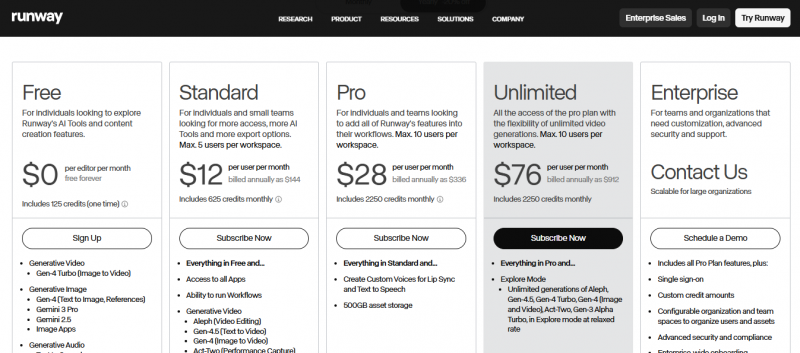
Runway slices value by credits and minutes. On a typical Pro‑level subscription, you are given a fixed bucket of credits each month. Gen‑4 eats those credits quickly: every second of standard‑quality Gen‑4 video costs a noticeable chunk. A ten‑second clip feels surprisingly expensive once you do the math. The so‑called “unlimited” tier does exist, but unlimited really just means “you can send as many jobs as you like into a slower queue.”
Pika’s prices and credit burn behave differently. The entry point is cheaper, the cost per short clip is lower, and you can get a lot more five‑second experiments out of a month’s budget. For creators who measure output in dozens or hundreds of clips rather than a handful of carefully polished shots, that matters far more than having the most advanced model available.

In practice, the contrast looks like this:
- Runway forces you to choose which ideas are worth rendering at high quality.
- Pika encourages you to throw a lot at the wall, then keep the best pieces.
That is also why many people run Pika on lower tiers for daily work and reserve Runway for specific “hero” sequences.
A single table that focuses on pain, not features
Instead of another feature checklist, it is more useful to look at where each tool is likely to get in your way.
| Where Runway tends to hurt the wrong user | Where Pika tends to hurt the wrong user |
| Credits run out halfway through a big idea sprint, and you start second‑guessing every iteration because each extra second costs more. | Videos look great on a phone, but fall apart when a client wants to cut them into a 4K commercial or large‑screen presentation. |
| The 2–4 minute generation time becomes friction when you are testing dozens of variations for social content or ads. | Stylised physics and effects break the illusion when the brief requires near‑photorealistic footage that blends with real camera work. |
| The interface feels like a stripped‑down editing suite; team members who are not used to timelines and keyframes avoid it. | Non‑technical stakeholders underestimate how many variations you need to generate to get one “clean” take and get impatient. |
| People expect “unlimited” to mean “instant”, then get frustrated by relaxed‑mode queues. | You discover late in the process that 1080p is a hard ceiling and the project now looks soft inside a 4K master. |
Any time a team is about to adopt one of these tools, these are the points that tend to show up during the third or fourth week of use rather than in the trial.
How it feels when you are actually building a piece
Working inside Runway feels like working in a simplified pro editor that happens to have an AI engine attached. There is a mental model: storyboards, shots, camera moves, keyframes, masks. Motion Brush lets you pick which parts of a frame obey your instructions. Director Mode simulates pans, tilts, and dollies. Inpainting and object manipulation let you swap or remove elements like a compositor would. It rewards people who already think like editors, directors, or VFX artists.
Working inside Pika feels more like using a creative toy that got serious. You type an idea, wait under a minute, and something surprising appears. Scene Ingredients are sliders, not scripts: snow here, flare there, heavier grain, softer light. Pikaffects are big swings that bend or melt or squash things in ways that would take hours to animate manually. Pikaframes and PikaScenes give you just enough structure to steer a scene without turning the interface into a full editor.
Runway is the tool you open when you have storyboard panels sketched and you know what you want the camera to do. Pika is the one you open when you have half a line in your notes app that just says “coffee cup explodes into birds” and you want to see three versions of it before lunch.
The learning curve nobody puts in the marketing pages
Runway does not hide the fact that it expects you to climb a hill. A few days in, you start to see why the knobs exist and how far you can push them. Before that, it is easy to feel like the model is smarter than you are. Teams without any editing background regularly bounce off it on the first try, then come back later once someone with video experience champions it internally.
Pika has almost the opposite problem. It is so easy to get something fun out of it in five minutes that some teams stop there and never look at the more advanced tools. The danger is not that beginners give up; it is that power users take longer to realise how much control is hidden behind seemingly simple controls like Scene Ingredients and Pikaframes.
Put differently: Runway has a higher “activation energy” but pays off for people willing to learn it. Pika has almost no barrier to entry, but it still rewards creators who stick around long enough to move past the default presets.
Where each one fits cleanly in a real content pipeline
There are certain jobs where Runway simply fits better:
- story‑driven pieces where a character has to look like the same person across multiple shots
- product or brand work that will live in 4K edits, on big screens, or in client decks
- music videos and conceptual films where camera moves and shot composition matter as much as style
- pre‑vis for live shoots where AI footage stands in for expensive test days
And there are jobs where Pika is a far more sensible default:
- short‑form campaigns that need dozens of variations per week
- creator accounts that mix talking‑head, surreal visuals, and quick gags
- e‑commerce and DTC brands constantly trying new hooks on social
- experiments where the whole point is to see how far a visual idea can bend before it breaks
The overlap is real. A lot of people generate wild ideas in Pika and build polished, on‑brief final shots in Runway. Others do the reverse: Runway for key hero shots, Pika for the fun, messy surrounding pieces that keep channels active between major releases.
Ending without a slogan
Runway behaves like a piece of film software that accidentally learned to hallucinate footage. Pika behaves like a social video playground that accidentally grew enough features to matter to professionals.
Teams usually know, deep down, which world they actually live in. The problems start when a brand with TV spots on its roadmap buys the fast, fun toy because it is cheaper, or when a solo creator with three vertical channels decides to wrestle a cinematic tool because it sounds more “pro”.
The safest way to avoid that is not to ask which model is smarter, but to look at a normal content week and ask a simpler question: which of these two tools already moves at the same speed as the people who will be using it?
Post Comment
Be the first to post comment!