Popular: CRM, Project Management, Analytics

Home > Software Directory > SketchUp
SketchUp

SketchUp

3D Design Software Bring Your Vision to Life

SketchUp Overview

SketchUp enables 3D design from concept to construction using intuitive tools. It supports modeling in desktop, web, and iPad versions with options for environments, photoreal materials, and file imports like IFC and DWG. Differentiation includes web-based access requiring only a browser, generative AI for creating PBR textures, and integrations such as Extension Warehouse for over 600 extensions. LayOut provides 2D documentation from 3D models, with export formats including PDF, DWG, and STL across plans.

More About SketchUp

How SketchUp Works

SketchUp uses push/pull modeling to turn simple sketches into 3D forms. It offers design tools for geometry creation, plugins to extend functionality, and cloud services to store and share projects. Both web‑based and desktop experiences are available depending on the plan.

Unique Strengths

  • Environments panel for 360° images, sky dome, and dynamic lighting
  • Photoreal Materials with PBR textures that react to light
  • Generate Textures tool using generative AI for material editing
  • Zoom Window tool to zoom into selected areas
  • IFC import with geometry optimization and class tagging
  • Styles and Materials with presets in SketchUp for Web
  • Trimble Connect integration for import, save out, and reload
  • Extension Warehouse with 600+ extensions
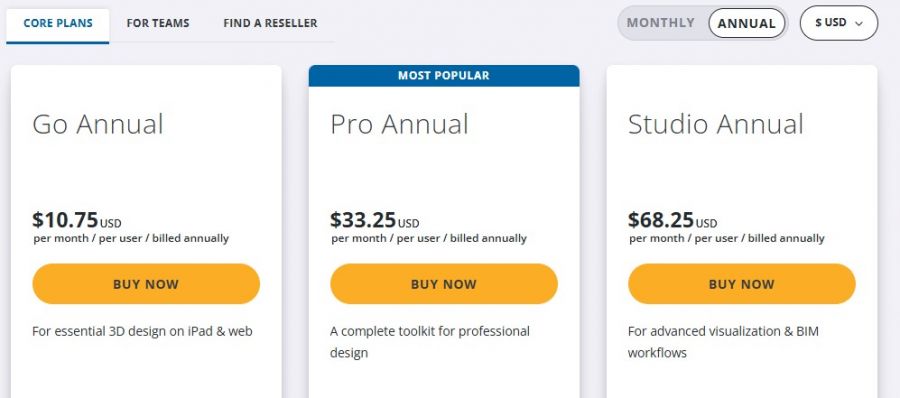
PlanKey OfferingApprox. Price (Annual)
FreeBasic web‑based 3D modeling (non‑commercial use) Free
GoWeb + iPad modeling + cloud storage ~$129
ProDesktop tools + LayOut + advanced import/export ~$399
StudioPro + Scan Essentials + advanced workflows ~$819

Pros & Cons

Pros:

Intuitive tools speed up 3D modeling from concept to construction

Web version runs in browser without installation

Generative AI creates PBR textures for materials

Extension Warehouse expands functionality with 600+ extensions

Cons:

Dynamic Components unavailable in SketchUp for Web

Go plan lacks desktop modeler and extension support
Software Trial

1-7 Days

Free Version

Yes

Licensing Type

Proprietary

SketchUp Starting Price

Free

Vendor Pricing Page

See Pricing

SketchUp Software Features

2D Models Animation Collaboration Tools Component Library Design Automation Direct Modeling Flexible Modeling Graphic Design Procedural Workflows 2D Drawing 3D Modeling Drafting Presentation Tools Panoramas Construction Estimate Facility Management Field Layouts 2D Floor Plans 3D Floor Plans Annotating Diagram Templates Object Library Rendering 3D Digital Asset Management

SketchUp Specification

Starting Price

Free

Price Type

Free

Currency

USD ($)

Subscription

Annually

Deployment Type

  • Cloud Hosted

Supported Platforms

  • Web-Based
  • Windows
  • Mac

Technical Support

  • Email

Training Resources

  • Documentation
  • Blogs
  • Help Guides

Software Demo & Screenshots

SketchUp Pricing

SketchUp Pricing Screenshot

*The price might have been changed, check the current pricing on the vendor's website.

SketchUp Customers

Clients yet to be updated!

Top Competitors of SketchUp

Logo Software Name Rating Reviews Starting Price Trial
DesignSpark Mechanical Logo DesignSpark Mechanical 3.9 48 0 USD ($) 0 Days
FreeCAD Logo FreeCAD 3.9 63 0 USD ($) 1-7 Days
Tekla Structures Logo Tekla Structures 3.9 64 0 USD ($) 0 Days
SelfCAD Logo SelfCAD 3.8 64 0 USD ($) 7 Days
Solid Edge Logo Solid Edge 3.8 63 0 USD ($) More than 30 days

SketchUp Reviews

Login to see more reviews of SketchUp.

Software Category

Explore Other Top 3D CAD Software