
Hypersay Slides uploads PowerPoint, PDF, or Google Slides presentations to share with participants via QR code or phonetic codes. Participants access slides on their devices for real-time interaction through quizzes, polls, opinion scales, open questions, and interactive images. Presenters control the session from one screen, freezing answers, moderating chat and Q&A, and monitoring participation. Post-session analytics provide a digital pulse on engagement, with options for follow-up emails to registered participants. The platform supports multiple languages and anonymity for joiners.
• Upload PPT, PDF, or Google Slides for live sharing.
• Real-time audience polls and interactive quizzes.
• Live open questions and audience Q&A wall.
• Interactive images and audience reactions (claps).
• Participant access via QR code.
• Private notes and feedback gathering.
• Session analytics and engagement reporting.
• Multilingual interface.
• Educators and teachers making lessons interactive.
• Conference speakers engaging large audiences.
• Corporate training sessions and presentations.
• Hybrid and remote events with distributed audiences.
• Workshops and interactive webinars.
Fast, user friendly and effective for teacher training with sustained engagement[2]
Re-establishes contact in distant learning and gives everyone a voice[2]
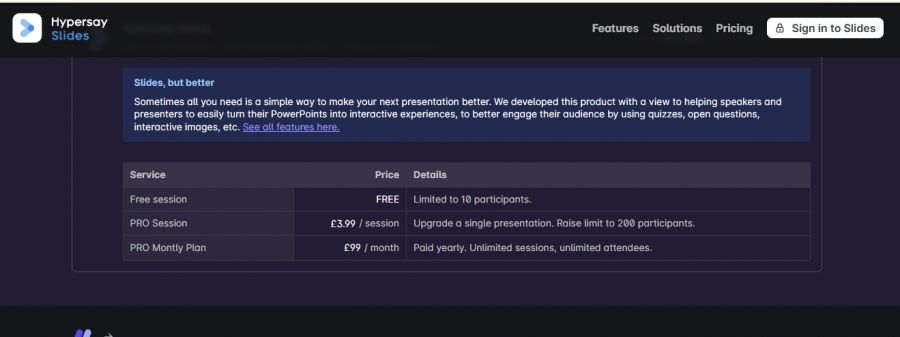
*The price might have been changed, check the current pricing on the vendor's website.
Clients yet to be updated!
| Logo | Software Name | Rating | Reviews | Starting Price | Trial |
|---|---|---|---|---|---|
 |
Visme | 3.9 | 12 | 12 USD ($) | 1-7 Days |
 |
Glance Screen Share | 3.9 | 99 | 0 USD ($) | 7 Days |
 |
Webex | 3.8 | 49 | 0 USD ($) | 30 Days |
 |
Slidebean | 3.8 | 96 | 0 USD ($) | 7 Days |
 |
Focusky | 3.8 | 96 | 0 USD ($) | 1-7 Days |
Video Conferencing and Webinar solutions
Speak Loudly. Speak Visually.
AI Pitch Deck Creator + Pitch Deck Design Agency
HTML5 Presentation Software | Video Presentation Maker

AI presentations that engage your audience in minutes

Easy to presentation maker