Popular: CRM, Project Management, Analytics

Home > Software Directory > CrossBrowserTesting
CrossBrowserTesting

CrossBrowserTesting

Test websites and mobile apps across 2050+ real desktop and mobile browsers.

CrossBrowserTesting Overview

CrossBrowserTesting by SmartBear is a cloud-based platform that allows developers and testers to perform manual, visual, and automated testing across a vast range of real desktop and mobile browsers. It supports parallel testing and integrates with popular CI/CD pipelines to accelerate bug detection and ensure consistent user experience across browsers.

More About CrossBrowserTesting

Key Features:

  • Cross-browser testing on real desktop and mobile browsers
  • Access to real physical devices (iOS and Android) and virtual machines
  • Manual live testing with interactive browser sessions
  • Automated testing using Selenium-based scripts
  • Visual testing with screenshots and UI comparison tools
  • Parallel test execution to speed up QA workflows
  • Cloud-based testing environment (no local setup required)
  • Debugging tools with console logs, network logs, and video recordings
  • Local testing support for staging and private environments
  • Integration with CI/CD tools and automation frameworks

Key Use Cases:

  • Cross-browser compatibility testing
  • Responsive UI testing across devices
  • Regression testing for web applications
  • Selenium-based automated testing
  • Debugging UI issues across browsers
  • Mobile web testing on real devices
  • Pre-release QA validation

Competitive Advantages:

  • Real device testing instead of only emulators
  • Large browser and OS coverage
  • Supports both manual and automated testing workflows
  • Parallel execution reduces testing time significantly
  • Built-in debugging tools (logs, video, screenshots)
  • Easy integration with Selenium and CI/CD pipelines
  • Cloud infrastructure eliminates local setup complexity

Pros & Cons

Pros:

Tests apps on real iOS and Android devices remotely

Captures browser screenshots quickly across multiple device environments

Parallel testing speeds up QA cycles and release timelines

Supports Selenium integration for automated browser testing workflows

Enables live debugging directly on remote browsers and devices

Removes need for maintaining expensive physical device testing labs

Side-by-side comparisons help identify browser UI inconsistencies faster

Cons:

Not suitable for precise pixel-perfect interface validation workflows

Real-time responsiveness feels weaker compared to local testing environments
Software Trial

7 Days

Free Version

No

Licensing Type

Proprietary

CrossBrowserTesting Starting Price

Free

Vendor Pricing Page

See Pricing

CrossBrowserTesting Software Features

Code-less Testing Continuous Testing Parallel Execution Project Templates Test Authoring Test Reports Test Recording

CrossBrowserTesting Specification

Starting Price

Free

Price Type

Flat Rate

Currency

USD ($)

Subscription

Monthly , Annually

Deployment Type

  • Cloud Hosted

Supported Platforms

  • Web-Based
  • iPhone/iPad
  • Android
  • Windows
  • Mac
  • Linux

Technical Support

  • Email
  • Chat
  • Phone

Training Resources

  • Documentation
  • Blogs
  • Help Guides
  • Webinars

Software Demo & Screenshots

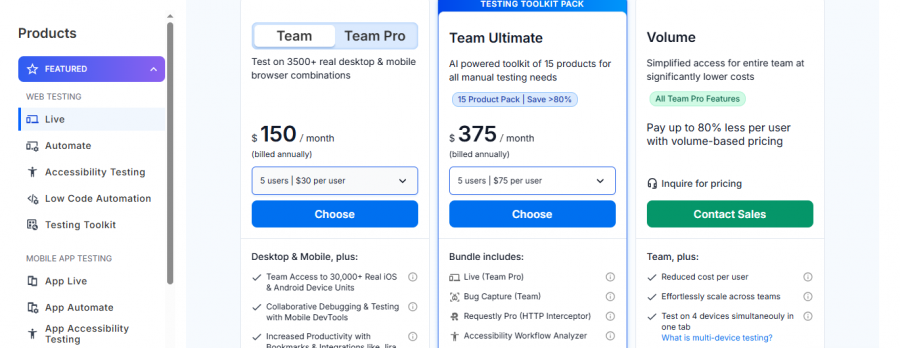
CrossBrowserTesting Pricing

CrossBrowserTesting Pricing Screenshot

*The price might have been changed, check the current pricing on the vendor's website.

CrossBrowserTesting Customers

Clients yet to be updated!

Top Competitors of CrossBrowserTesting

Logo Software Name Rating Reviews Starting Price Trial
Sauce Labs Logo Sauce Labs 4.4 29 39 USD ($) 0 Days
Tricentis Tosca Logo Tricentis Tosca 4 22 0 USD ($) 7 Days
TestRail Logo TestRail 3.9 87 0 USD ($) 30 Days
Subject7 Logo Subject7 3.9 27 0 USD ($) 0 Days
Sahi Pro Logo Sahi Pro 3.9 46 0 USD ($) 30 Days

CrossBrowserTesting Reviews

Login to see more reviews of CrossBrowserTesting.

Software Category

Explore Other Top Automated Testing Software