1. Introduction :
XFi Complete is an add-on package for Xfinity Internet customers that bundles (a) an Xfinity WiFi Gateway rental, (b) unlimited data, and (c) Xfinity’s app-based WiFi management and security features, with a WiFi coverage assessment that can make some homes eligible for xFi Pods (mesh extenders) at no extra charge.
It’s primarily for:
● Heavy data households (4K streaming, cloud backups, lots of smart devices, gaming) who want to remove usage anxiety by switching to unlimited.
● People who rent the Xfinity gateway and want a simpler “one bill, one support path” setup.
● Homes with weak WiFi areas where the WiFi assessment may qualify them for up to two Pods for improved coverage.

2. Features :
Here’s a complete list of features included in XFi Complete and clear explanations of what each one does:
01. Unlimited Data-
What it is: Removes the typical 1.2 TB monthly data cap on most Xfinity internet plans.
Why useful: No overage fees or worries about exceeding data limits — especially helpful for heavy streamers, remote work, gaming, and large families.
02. XFi Gateway Device-
What it is: A combination modem and router provided by Xfinity that supports modern Wi-Fi standards (often Wi-Fi 6).
Why useful: Offers strong and stable wireless performance and eliminates the need for customers to buy separate equipment.
03. Whole-Home Coverage & Mesh Pods-
What it is: A Wi-Fi assessment identifies weak spots; if needed, Xfinity provides xFi Pods (mesh extenders) at no extra cost.
Why useful: Helps eliminate dead zones and ensures consistent signal strength across larger homes.
04. Advanced Security Features-
What it is: Built-in features that help protect all connected devices from malware, unauthorized access, and other threats.
Why useful: Adds a layer of network security without needing separate subscriptions to third-party security software.
05. xFi App Control-
What it is: A mobile app (iOS/Android) that lets users manage network settings, view connected devices, create profiles, and run diagnostics.
Why useful: Puts network management directly in the user’s hands, from parental controls to device monitoring.
06. Automatic Gateway Upgrades-
What it is: Xfinity may replace the gateway with newer hardware every few years at no extra charge.
Why useful: Helps keep the network technology up-to-date without manual hardware purchases.
3. Technical Specifications :
01. Supported Platforms & Devices-
1. Devices supported via network: PCs, smartphones, tablets, smart TVs, game consoles, IoT devices — any Wi-Fi-enabled device.
2. Mobile control: xFi app available on iOS and Android.
02. System Requirements-
1. Xfinity internet subscription required to add XFi Complete.
2. The service requires use of the Xfinity xFi Gateway device; personal routers cannot fully access all features like unlimited data or pods.
03. Integration Requirements-
● Seamless network control works with the xFi app.
● No separate installation of security software needed — advanced protection integrated at the network level.
4. Accurate Reviews :
| Source | What’s being reviewed | Rating / Volume | What it suggests |
| Apple App Store | Xfinity app | 4.3/5 from 1.3M ratings | Strong app satisfaction overall (not xFi Complete-only) |
| G2 | Xfinity (ISP listing) | 3.6/5 from 17 reviews (G2) | Mixed provider-level feedback, smaller sample. |
| Trustpilot | xfinity.com | 1.2/5 from 1,790 reviews (Trustpilot) | Many complaints (billing/support) on this platform. |
| Yelp | Xfinity brand page | 1.8/5 from ~22.6k reviews | Store/support experience often criticized |
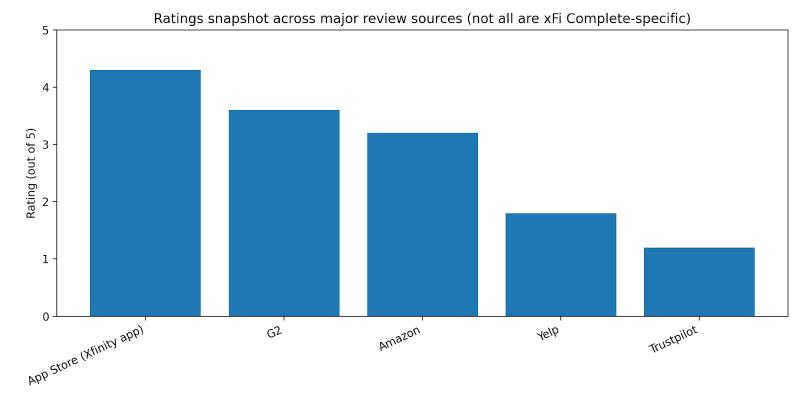
Common positive themes-
● App convenience: Many users rate the Xfinity app highly overall on iOS, suggesting account/WiFi management works for a large audience.
● Provider “works fine for streaming” (some users): G2 reviews include positive “dependable service for streaming and daily use” style feedback (example review shown in G2 listing).
Common negative themes-
● Pods expectation confusion: Multiple official forum responses clarify that Pods are not automatically free for everyone; they’re tied to an assessment and eligibility, and users often complain they upgraded expecting Pods immediately.
● Customer service frustrations: Complaints about long resolution times and support loops appear in community posts and brand review platforms (example: Xfinity forum complaint thread about support experience).
● Pricing/billing concerns on review platforms: Trustpilot’s low rating indicates many dissatisfied customers on that platform, commonly around billing and service issues
5. Comparison Chart :
| Option | Unlimited data approach | Equipment/ coverage | Typical add-on cost |
| Xfinity xFi Complete | Unlimited data included in add-on | Gateway rental included; Pods may be provided if eligible via assessment | $25/mo mentioned in community discussions and third-party explainers |
| AT&T unlimited data add-on | Unlimited data via add-on (or included with certain tiers) | Depends on plan/equipment | $30/mo for unlimited add-on (per AT&T support) |
| Verizon Fios | “No data caps” for Fios residential (commonly stated) | Router may be included depending on plan | $0 “unlimited add-on” concept (no cap stated) |
| T-Mobile Home Internet | Marketed as “no caps on data usage” | Router included; mesh extender included in some plans | $0 “unlimited add-on” concept (built into plan) |
6. Use Cases :
Individuals (single user, heavy streaming/gaming)-
1. Why xFi Complete helps: Unlimited data helps if you regularly download large games/updates or stream in 4K across multiple services.
2. What you’d use most: App speed tests, device management, security features.
Families (many devices, parental controls)-
1. Why it helps: Parental controls, device profiles, and pause-WiFi tools are built into the Xfinity app experience for gateway renters.
2. Pods angle: Larger homes may benefit if they qualify through the WiFi assessment.
Small businesses (home office or small storefront using residential service)-
1. Why it helps: Unlimited data is useful for cloud backups, large file transfers, and stable day-to-day operations (though business-grade needs often require business plans).
2. Important reality check: xFi Complete discussions and benefits described here are in the residential Xfinity context.
7. Common Issues & Solutions :
| Issue | Likely cause | Practical fix |
| “I upgraded to xFi Complete but didn’t get Pods.” | Pods aren’t automatically shipped; they’re tied to a WiFi assessment and eligibility, sometimes requiring redemption via email link. | Check for assessment emails (including spam), wait for the assessment window, and follow the redemption steps; if no email appears, contact support through official channels. |
| “I expected a new gateway shipment but nothing arrived.” | xFi Complete doesn’t always trigger a new gateway shipment, per official employee response. | Confirm what gateway model is on your account and whether an upgrade is required; request a swap only if needed. |
| “Weak WiFi in parts of the house even after upgrading.” | Gateway placement limits; home layout interference; Pods only provided if eligible. | Run app troubleshooting and speed tests, reposition gateway if possible, and use the assessment outcome to determine if Pods are available or consider purchasing extenders. |
| “Support experience feels slow or repetitive.” | High-volume support workflows (common complaint in community/brand reviews). | Use in-app tools first (speed test, device checks), then escalate with timestamps/errors ready; if needed, use official community support channels. |
8. Conclusion :
XFi Complete stands out as a premium internet solution that brings together strong Wi-Fi performance, unlimited data, enhanced security, whole-home coverage, and centralized management — all in a single subscription. It’s especially valuable for heavy internet users, multi-device households, remote workers, and families.
However, it is not a one-size-fits-all product. For light users or smaller households where data caps aren’t a concern, the added cost may not deliver proportionate value. Additionally, reliance on Xfinity-provided hardware and variable support experiences are points worth weighing in decision-making.
Recommendation: If your household regularly uses large amounts of data, struggles with Wi-Fi coverage, or values built-in security, XFi Complete is a compelling choice. For more basic connectivity needs, consider standard Xfinity plans or alternate ISP packages.
Post Comment
Be the first to post comment!