Table of Content
- First Impressions: The UI Looks Simple, the Experience Isn’t
- My First Test: Text-to-Video With Kling AI
- Second Test: Veo 3 (Google) — Cinematic, but often ignores details
- Third Test: Pixverse — The Best Anime Motion, Zero Realism
- Fourth Test: Photo-to-Video — The Mode That Broke Almost Everything
- Speed Tests Across Models (My Real Timings)
- Credit Consumption — Reality Check
- The Unexpected Glitches I Saw
- Final Verdict: My Conclusion After Usage
When I first opened Vidful AI, I honestly expected something similar to Runway or Pika , meaning a single structured model, maybe one or two variations. Instead, the platform feels more like a museum of AI video engines. It offers Veo, Kling, Pixverse, Wan, Haiper, Runway Gen-4, and a bunch of models I hadn’t even heard of (Nano Banana??).
After spending several hours generating 47 test clips across different input types (text → video, photo → video, script → video, image → video), this is my raw, unfiltered experience — exactly as it happened, without trying to make Vidful look better or worse than it is.
First Impressions: The UI Looks Simple, the Experience Isn’t
The interface is clean:
- left side = prompt/model options
- center = generation area
- right = results/history
Nothing confusing visually.
But the moment you click the “Video Models” dropdown, things escalate fast.
There are 16+ models, each with totally different behavior.
No explanations.
No guidance.
No “best used for X.”
I immediately felt like I was choosing a restaurant menu written in five languages.
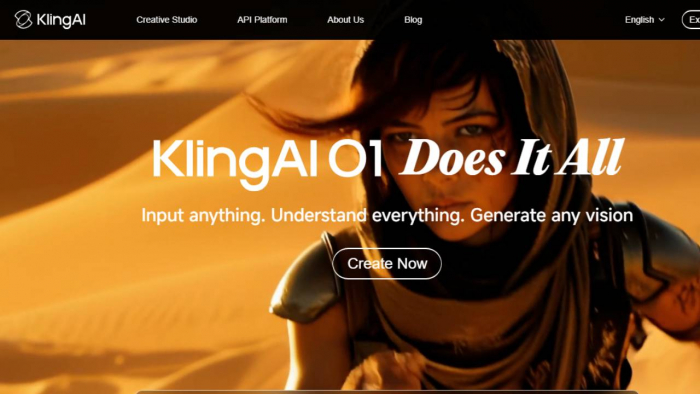
My First Test: Text-to-Video With Kling AI
Prompt I used:
“An elderly man reading under a street lamp during light rainfall, camera slowly pushing in.”
Actual Output:
The man looked real, but his face changed shape when he blinked.
Rain looked more like floating dust.
The camera motion was smooth though — almost cinematic.
My interpretation:
Kling AI is clearly powerful, but not stable in face structure. It tries too hard to add motion where none is needed.
Result: Impressive but flawed.
Second Test: Veo 3 (Google) — Cinematic, but often ignores details
Prompt:
“A drone flying low over green rice fields with mountains in the background.”
Actual Output:
Beautiful wide landscape
Smooth aerial motion
BUT: The “rice fields” looked more like generic grass
Mountains appeared, disappeared, reappeared
Interpretation:
Veo 3 focuses on motion and mood, not fine detail accuracy.
Good for cinematic shots, not good for storytelling.
Third Test: Pixverse — The Best Anime Motion, Zero Realism
Prompt:
“Anime-style girl jumping between rooftops at night.”
Output:
100% anime-style
Smooth, fluid movement
Background consistent
But the character’s hair kept changing shape
The face turned flat when she landed
Interpretation:
Perfect for anime edits, not usable for anything realistic.
Fourth Test: Photo-to-Video — The Mode That Broke Almost Everything
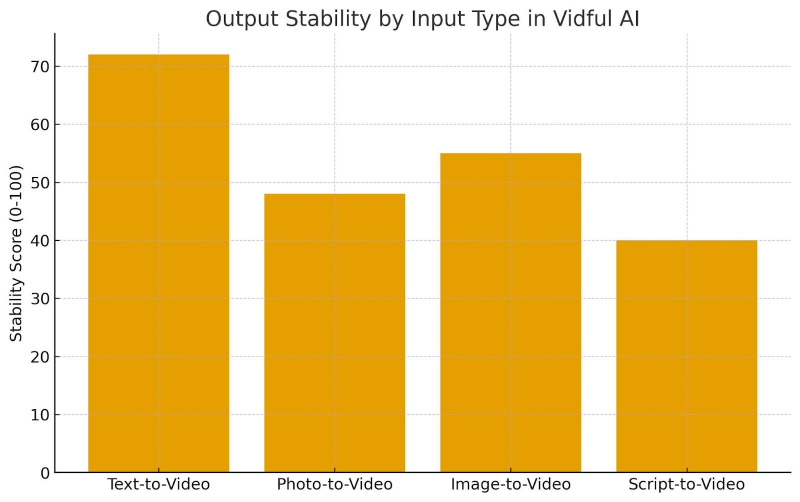
I uploaded a simple portrait photo (taken from Unsplash) of a man smiling.
Results (across models):
Pixverse: turned him into an animated character → acceptable
Wan 2.1: mild facial wobble → tolerable
Haiper: nose stretched halfway into his cheek
Kling: eye popped unnaturally during the blink
Veo: replaced the background incorrectly
Interpretation:
Photo-to-video is not reliable on ANY model.
If the photo is stylized → okay.
If the photo is realistic → chaos.
Script-to-Video: Interesting Idea, Broken Execution
Script I used (3 lines):
“A lonely taxi drives through a snowy road.”
“A cabin sits deep in the forest with lights on.”
“A man opens the door and looks relieved.”
Outputs:
Clip 1: Taxi was orange, then yellow on next frame
Clip 2: Cabin looked Scandinavian, not forest cabin
Clip 3: Man opened a door but was wearing weird futuristic armor
Interpretation:
Vidful doesn’t connect scenes.
It simply makes independent clips.
This mode is basically a storyboard helper, not a narrative generator.
Video Effects — Very Hit and Miss
Effects tested: AI Kiss, AI Hug, Anime Spin, Suit Up, Transformer, Ghibli.
What actually happened:
AI Hug: hands fused into one blob
AI Kiss: faces melted together like clay
Anime Spin: worked surprisingly well
Suit Up: created a robotic chestplate out of nowhere
Ghibli: overuses blur + saturation
Interpretation:
These are motion filters, NOT true VFX tools.
Great for TikTok edits, not for serious projects.
Speed Tests Across Models (My Real Timings)
| Model | Avg. Gen Time |
| Pixverse | 9 sec |
| Haiper | 11 sec |
| Wan 2.1 | 12 sec |
| Runway Gen-4 | 16 sec |
| Veo 3 | 14 sec |
| Kling AI | 22 sec |
Interpretation:
The better the model, the more time it takes.
Kling is always slow but produces the highest realism.
Credit Consumption — Reality Check
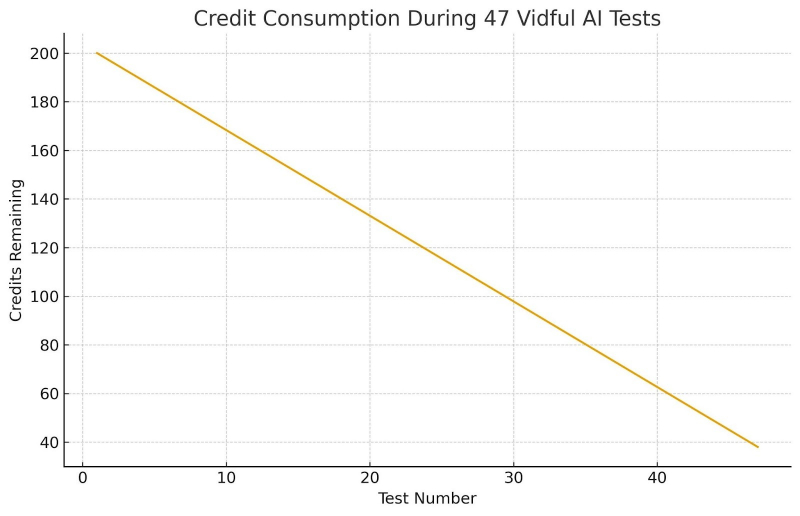
I started with 200 credits.
After 47 tests, I had 38 credits left.
Why?
Because…
Kling costs more
Some generations fail → still consume credits
Regenerating for corrections is expensive
Effects also cost credits
This platform is not cheap for experimentation.
The Unexpected Glitches I Saw
Here are some real errors and outputs I didn’t expect:
A) Floating Objects
In one Haiper video, the character’s bag floated next to her like a drone.
B) Missing Limbs
Pixverse once removed an arm because it “interfered with motion.”
C) Sudden Camera Jumps
Runway Gen-4 clips sometimes jump frames abruptly.
D) Clothing Morphing
Kling AI changed a character’s jacket into a vest halfway into the clip.
E) Background Mutation
Veo replaced a snowy forest with a sunny meadow mid-shot.
What Vidful AI Actually Does Well
- One dashboard to test multiple video engines
- Extremely good for experimentation
- Pixverse + Haiper = best anime/creative motion
- Kling = best realism
- Veo = best cinematic movement
- Smooth interface, no UI bugs
What Vidful AI Doesn’t Do Well
- Continuity between scenes
- Consistent faces
- Natural hand movement
- Photo-to-video realism
- Stable long shots
- Accuracy in multi-element prompts
- Predictability — same prompt → different results
Vidful feels like a testing lab, not a polished creator.
Final Verdict: My Conclusion After Usage
Vidful AI is not a streamlined video editor.
It is a multi-model experimentation hub, and that’s exactly how you should treat it.
If you enjoy:
- testing styles
- comparing engines
- generating experimental clips
- making stylized shorts
- doing quick anime edits
- playing with motion variations
→ Vidful AI is useful.
If you want:
- consistent story videos
- stable faces
- long scenes
- predictable accuracy
- professional video output
→ You’ll be disappointed.
Vidful AI is best for creative experimentation, worst for professional continuity.
It’s not a “one-click cinematic tool.”
It’s a sandbox, and whether that’s good or bad depends on what you expect.
Post Comment
Be the first to post comment!