At first glance, UltraViewer looks almost suspiciously perfect. A remote desktop tool that weighs less than a selfie, installs in seconds, works on ancient Windows machines, and doesn’t aggressively demand a credit card every five minutes. In a market dominated by expensive, restrictive software, UltraViewer presents itself as the quiet overachiever.
Then the reviews start appearing.
And suddenly the story gets… complicated.
This is not a tale of a fake product or shady code. It is a story about how a legitimate tool became a magnet for scammers, confusion, and wildly different user experiences,all at the same time.
Official site: https://www.ultraviewer.net/en/
The First Impression: “Why Is This So Easy?”
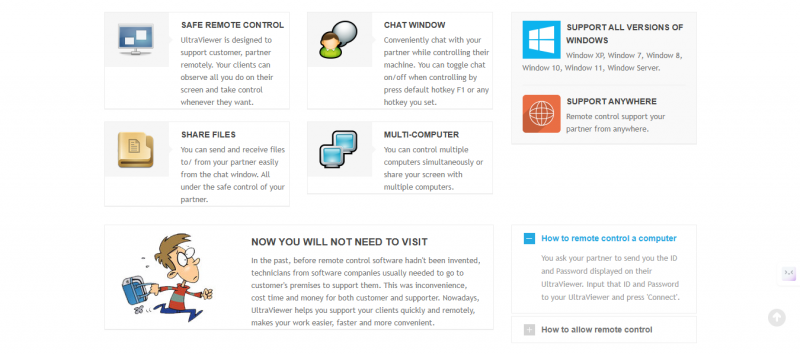
UltraViewer wastes no time trying to impress. The installer is roughly 1.5 MB, which in modern software terms feels almost illegal. Installation takes seconds. No account creation. No complex setup. A simple ID and password appear, and suddenly one computer can control another from anywhere in the world.
This simplicity is exactly why many users fall in love with it immediately. The software feels designed for people who just want things to work, IT technicians helping clients, family members rescuing relatives from printer disasters, or users accessing their own home computer from afar.
It runs smoothly even on older systems, doesn’t hog resources, and works through firewalls without configuration gymnastics. In short, it behaves like software from an earlier, more trusting internet era.
What UltraViewer Actually Does
UltraViewer handles the fundamentals well. Screen sharing is responsive, mouse and keyboard control feel natural, and file transfers are straightforward. Built-in chat makes it easy to explain what’s happening during a session, which is especially useful for remote support.
Paid plans add practical enhancements rather than gimmicks: higher file transfer limits, session recording, better performance tuning, address books, and the ability to handle multiple sessions simultaneously. The pricing is aggressively low, with an annual premium plan costing less than many competitors charge for a single month.
This pricing alone explains why UltraViewer attracts freelancers and small businesses. Compared to TeamViewer or AnyDesk, it feels like finding the same functionality at a clearance sale.
Then Comes the Internet’s Favourite Plot Twist: Scammers
Here’s where the tone shifts.
UltraViewer didn’t become infamous because it failed. It became infamous because it worked too well.
Scammers discovered that UltraViewer’s simplicity made it the perfect tool for social engineering attacks. Fake “Microsoft Security Alert” pop-ups, panic-inducing phone calls, and convincing scripts all end with the same instruction: “Please install UltraViewer so we can help you.”
And people do.
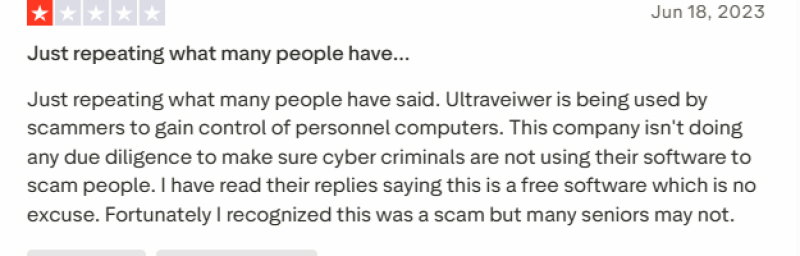

Once installed, scammers gain full control of the victim’s computer. Trustpilot is filled with heartbreaking stories,elderly users, widows, grandparents,losing thousands of dollars in minutes. Importantly, these incidents are not caused by malicious code inside UltraViewer. They are caused by humans being deceived.
Still, reputation doesn’t care about nuance.
A Design That Trusts Users a Little Too Much
Even for legitimate users, UltraViewer’s interface raises eyebrows. Active session visibility is limited, making it hard to immediately tell whether someone is connected. If a password is compromised, repeated reconnections can occur without dramatic warnings or visual alarms.
For tech-savvy users, this is manageable. For non-technical users, it is dangerous.
Security experts often say the weakest part of any system is the human. UltraViewer’s design quietly agrees,and that agreement comes at a cost.
The Free Version: Generous, but Questioned
UltraViewer’s free version allows unlimited use, which feels almost rebellious in today’s software economy. No forced timeouts. No constant nags. This generosity earns genuine praise.
However, some users report instability in the free version, claiming crashes mysteriously disappear after upgrading. There is no hard evidence of intentional sabotage, but the perception exists,and perception matters online.
Add claims of fake reviews into the mix, and trust becomes harder to measure.
Security on Paper vs. Security in Reality
Technically, UltraViewer checks the expected boxes. AES-256 encryption, RSA keys, brute-force protection, signed binaries,all present. Against hackers, the software holds its ground.
Against scammers with a phone script and a sense of urgency? No software wins that battle alone.
UltraViewer has added reporting tools and responds to some abuse reports quickly, but critics argue this is reactive rather than preventive. Competitors have taken more aggressive stances, and users notice.
Who UltraViewer Quietly Works For, and Who It Absolutely Does Not
In the right hands, UltraViewer is efficient, affordable, and surprisingly capable. For trusted internal use, personal device access, or small support teams who know exactly who they are connecting to, it does the job without drama.
For elderly users, non-technical individuals, or environments involving sensitive financial or medical data, it is simply the wrong tool. Not because it is evil, but because it assumes a level of awareness that not everyone has.
The Final Mood, Not a Verdict
UltraViewer is not a villain. It is not a miracle. It is a reminder that powerful tools amplify both good intentions and bad ones.
It delivers real value at an unusually low cost, performs well, and avoids the heavy-handed restrictions of bigger competitors. At the same time, its reputation has been shaped by how easily it can be misused,and how quietly it operates once installed.
In the end, UltraViewer is like leaving your front door unlocked in a friendly neighborhood. For some, it’s convenient. For others, it’s an invitation.
And the internet never forgets the difference.
Post Comment
Be the first to post comment!