Wordle solvers are everywhere, but not all of them are built with the same purpose. Some aim to hand you the answer instantly. Others try to improve how you play. The Try Hard Guides Wordle Solver claims to fall into the second category, a lightweight, strategy-focused helper designed to narrow down possibilities without completely killing the fun.
So does it really help you get better at Wordle, or is it just another browser tool that sounds smarter than it actually is?
This review looks closely at how the solver works, where it performs well, where it struggles, and when you’re better off using something else.
What the Try Hard Guides Wordle Solver Is Designed to Do
The Try Hard Guides Wordle Solver is a browser-based helper where you input:
- Green letters (correct position)
- Yellow letters (in the word, wrong position)
- Grey letters (not in the word at all)
It then generates possible answers and even suggests optimal guesses, often prioritizing words with high-frequency letters to improve your odds.
It’s important to be clear about expectations here. This tool is not a guaranteed answer generator, and it does not pull daily solutions from the official game. Instead, it works through probability and elimination.
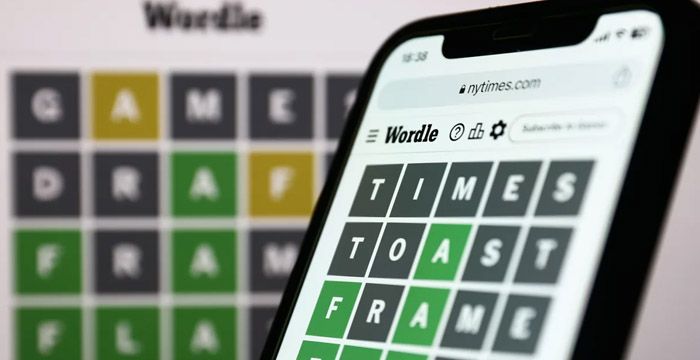
How the Try Hard Guides Wordle Solver Works
Using the solver is straightforward:
- Enter green letters into their fixed positions
- Add yellow letters and mark where they don’t belong
- Input grey letters to eliminate impossible options
- Review the list of suggested words
- Use probability-based suggestions for your next guess
The tool updates instantly, making it easy to experiment with different letter combinations and strategies.
My Experience: Where the Solver Helps
Strategy-Focused Suggestions
Rather than dumping every possible word, the solver favors guesses that include high-frequency Wordle letters such as A, E, R, O, S, and T. This mirrors how experienced players approach early and mid-game guesses.
Clean, Low-Distraction Interface
Compared to many solver sites cluttered with pop-ups and aggressive ads, Try Hard Guides keeps the layout readable and fast. It feels more like a tool than a content farm.
Improves Pattern Recognition Over Time
Repeated use naturally teaches you:
- Which starting words eliminate the most options
- How vowels tend to cluster
- Why certain consonant combinations appear more often
Over time, this improves your gameplay even without the solver.
Cons and Drawbacks
Despite its usefulness, the solver has clear limitations.
Dictionary Mismatch With Official Wordle
Some suggested words are not accepted by the official Wordle dictionary. This can be especially frustrating late in the game when you’re relying on precision.
Weak Mobile Experience
On smaller screens:
- Buttons feel cramped
- Inputs can be slightly unresponsive
- Desktop usage is noticeably smoother
Limited Variety in Edge Cases
In certain scenarios, the solver cycles through similar word patterns instead of offering radically different elimination strategies.
These issues don’t break the tool, but they do limit reliability in high-pressure guesses.
Tips for Getting the Most Out of It
- Try 2–3 guesses manually first, then use the solver. This keeps the game fun and helps you learn.
- Cross-check suggestions, especially on later attempts.
- Use desktop when possible, the UI is much smoother.
- Treat it as a learning tool, not a cheat engine.
If you’re exploring ways AI enhances learning beyond puzzles, check out AI creativity tools like Udio AI or viral-video generators like Pippit AI, both show how AI is transforming creative thinking and digital problem-solving.

User Statements: What Others Are Saying
Positive Experiences:
- “It’s a good way to learn new strategies. I’ve started to notice which letters are most common, and my first guesses have definitely improved.”
- “I appreciate that the website isn’t cluttered with ads. It’s easy to use, even when I’m in a hurry.”
Negative Experiences:
- “Sometimes the tool suggests words that aren’t accepted by the official Wordle game, which is frustrating when I’m on my last guess.”
Alternatives to Consider
| Platform | Main Features | Unique Aspects |
|---|---|---|
| NYTimes Wordle | Official Wordle game, daily puzzles, stats tracking | Original, ad-free, integrated with NYT Games |
| Nerdle | Math-based puzzle, guess the equation | Focuses on numbers and operations |
| Quordle | Solve four Wordles at once, more challenging | Multi-board gameplay, higher difficulty |
| Capitalize My Title | Wordle solver, answer finder, hints for other daily games | Probability-based suggestions, multi-game hints |
| Mashable (Tips Page) | Wordle tips, strategies, and community advice | Editorial, not a solver, but great for learning |
When the Try Hard Guides Solver Makes Sense
This solver works best if you:
- want quick suggestions without heavy ads
- enjoy learning Wordle strategies
- play casually rather than competitively
- prefer lightweight tools over complex dashboards
If you’re a strict Wordle purist or rely on flawless dictionary matching, other tools may feel more dependable.
Final Verdict
After testing it across multiple puzzles, here’s my honest take:
The Try Hard Guides Wordle Solver is a solid strategy assistant for casual players.
It improves elimination logic and letter awareness, but it is not flawless in dictionary accuracy.
It works best as:
- A thinking aid
- A probability filter
- A pattern recognition tool
It is not:
- A guaranteed answer generator
- A competitive-level optimizer
Overall Rating
Utility & Speed: 8.5/10
Interface Simplicity: 8/10
Dictionary Accuracy: 6.5/10
Strategic Depth: 7/10
Mobile Experience: 6.5/10
Final Score: 7.5 / 10
For casual Wordle players looking to improve without heavy distractions, it’s a dependable and easy-to-use option.
For advanced or streak-focused players, more precise alternatives may offer better reliability.
FAQ Section
Q1: Is the Try Hard Guides Wordle Solver free to use?
Yes, it’s completely free and doesn’t require registration.
Q2: Does it work on mobile devices?
Yes, but the mobile interface can feel cramped. A desktop version offers a smoother experience.
Q3: Will the solver always give correct answers?
Not always, some suggested words may not be in the official NYT Wordle dictionary.
Q4: Can I use the solver for games other than Wordle?
Yes, but it’s optimized for Wordle. For other games, try alternatives like Word.tips or The Word Finder.
Q5: How does the solver choose its suggestions?
It uses letter frequency analysis and your provided clues (green, yellow, grey letters) to generate the most probable answers.
Post Comment
Recent Comments
Michael Johnson
Jul 4, 2025One thing I love about this tool is that it’s completely free from intrusive ads. It’s rare to find a tool like this that doesn’t bombard you with pop-ups or distractions. It makes the experience much smoother and more enjoyable, especially when I’m trying to solve a tough Wordle


David Lee
Jul 4, 2025There are times when the tool suggests words that don’t quite fit the clues I’ve entered, or words that aren’t even accepted by the official Wordle game. This can be really frustrating, especially when I’m down to my last guess and the suggested word doesn’t work. It’s definitely something they could improve.