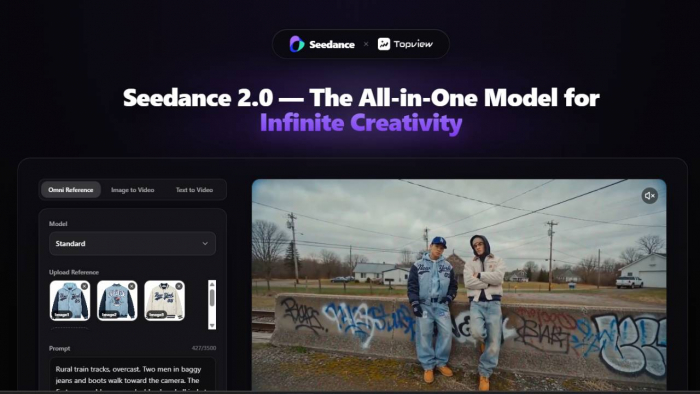
As a content creator, I’ve always been on the lookout for ways to improve the efficiency and quality of my work. Video production has traditionally been a time-consuming process, requiring hours of filming, editing, and tweaking. When I heard about Seedance 2.0, I was intrigued by its promise to streamline this entire process. After testing it out for myself, I can confidently say that Seedance 2.0 has fundamentally changed how I approach video creation.
This is my review, where I’ll walk you through my experience using Seedance 2.0, its capabilities, strengths, and a few areas where I think it could improve. My goal isn’t to sell you the tool but to provide a clear, honest assessment based on actual use.
What is Seedance 2.0?
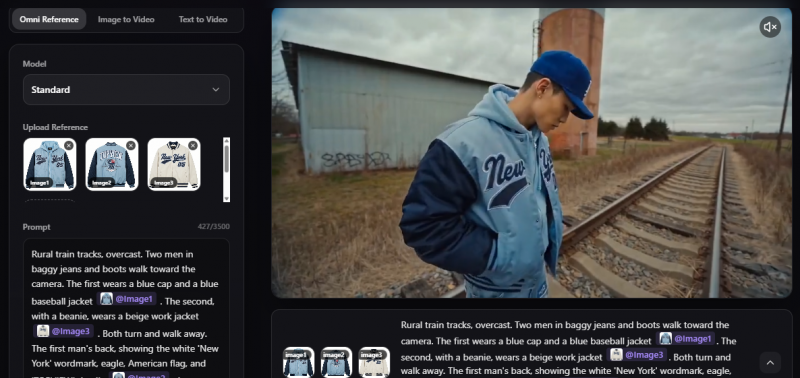
In simple terms, it’s an AI-powered video creation tool that lets you generate cinematic-quality videos from text prompts, audio files, and reference images. Gone are the days of spending weeks filming and editing. With Seedance 2.0, I can now create a fully-fledged video in minutes, and the best part is, I don’t need any fancy video production gear or years of editing experience.
It’s designed for both professionals and beginners, offering a level of control and flexibility that can work for almost anyone. From action-packed sequences to product showcases, Seedance 2.0 can generate it all with just a few clicks.
First Impressions: Simple Yet Powerful
When I first decided to give Seedance 2.0 a try, I wasn’t sure what to expect from an AI tool that promised to generate high-quality videos in such a short time. As someone who usually spends hours editing and tweaking video content, the idea of an AI system that could handle most of the heavy lifting sounded almost too good to be true.
Topview makes it easy to get started with Seedance 2.0, offering a 7-day free trial to all users. This was a great way for me to test out the platform and explore its features before committing to a paid plan. I didn’t have to worry about making a financial investment upfront, which gave me the freedom to experiment and really understand how the tool worked. After using the trial, I could see how powerful the tool was and how much time it could save me in the future.
Once I logged in and started experimenting, I noticed how intuitive the platform was. The interface was clean, with a straightforward setup that allowed me to dive straight into video creation. All I needed to do was input a simple text prompt, upload some reference images, and add audio files. Within seconds, the AI generated a fully-formed video sequence. The process felt seamless and quick, and I didn’t need to spend hours learning the platform.
Another feature that immediately caught my attention was the growing library of templates available in Seedance 2.0. Topview continually expands this library, offering pre-built templates across multiple industries. Whether I was creating a product demo, e-commerce ad, or social media content, there were templates ready for me to use. These templates gave me a solid starting point, making it easier to create professional-quality videos with just one click, without needing to design everything from scratch. It felt like having a ready-made toolkit at my disposal, saving me a lot of time and effort.
Seedance 2.0: Key Features That Impressed Me
1. Cinematic Video Quality
One of the major selling points of Seedance 2.0 is its ability to produce cinematic-quality videos in minutes. The videos I created had the same lighting, depth, and camera movements you’d expect from high-budget productions. Whether I was creating a high-speed chase or a dramatic dialogue scene, Seedance delivered visually stunning results.
The realism in the motion tracking and physics simulations was another highlight. Seedance doesn’t just generate static clips; it creates dynamic, fluid videos that look like they were shot with professional equipment. As someone who has worked with video production tools before, I was impressed with how accurate and cinematic the footage turned out.
2. Speed and Efficiency
When it comes to speed, Seedance 2.0 is a game-changer. Traditional video creation often involves multiple rounds of editing, color grading, and syncing, which can take days or even weeks. Seedance, on the other hand, generates high-quality videos in seconds. I was able to experiment with different prompts and video ideas, and within moments, I had a final product ready to use. This rapid generation made it easy for me to iterate on my ideas and create content faster than ever.
The fact that I could generate entire video sequences (with multiple shots, angles, and transitions) in just one click was particularly useful. It eliminated the need to stitch together separate clips and adjust them manually, making the entire production process much faster.
3. Audio-Visual Syncing
As someone who’s created music videos and product demos before, I can tell you that audio-visual syncing can be a huge headache. It’s always tricky to get the sound to match the visuals perfectly. Seedance 2.0 handles this with ease. The AI synchronizes the audio with the video automatically, so I didn’t have to spend extra time adjusting sound and visual beats manually. This was particularly helpful when I created music videos or action sequences where timing is critical.
Seedance 2.0: Areas for Improvement
While Seedance 2.0 is impressive, it’s not without its limitations. Here’s what I think could be improved:
1. Customization and Advanced Controls
Seedance 2.0 offers a good amount of customization, but I feel like I could benefit from more granular control over certain elements.
2. Collaboration Features
Seedance 2.0 is primarily designed for individual use, which works well for me as a solo creator. However, if I were working on a team project, I would find the lack of real-time collaboration a bit limiting.
Seedance 2.0 Scorecard
| Criteria | Rating (1–10) | Comments |
| Ease of Use | 9/10 | Intuitive interface that made getting started quick and simple. No steep learning curve. |
| Speed | 10/10 | Video generation in seconds. Great for fast-paced content creation and rapid prototyping. |
| Cinematic Quality | 9/10 | High-quality, cinematic visuals with realistic motion and camera effects. Could use a bit more flexibility in certain customization areas. |
| Customization & Flexibility | 8/10 | Good customization options for style, but more control over specific elements (camera angles, motion, etc.) would improve flexibility. |
| Audio-Visual Sync | 9/10 | Automatic sync of visuals and audio makes for a seamless experience, especially for music videos and dynamic sequences. |
| Multi-Style Output | 8/10 | Ability to switch styles is a huge benefit, but more options (like 3D animation or retro styles) would add more variety. |
| Collaboration Features | 7/10 | No real-time collaboration yet. It works well for solo creators, but teams may feel limited without this feature. |
| Cost Efficiency | 9/10 | Extremely affordable for the quality it provides. A great value compared to traditional video production costs. |
| Overall User Experience | 9/10 | A smooth, efficient, and professional tool that saves time and produces quality content quickly. |
Conclusion: Is Seedance 2.0 Worth It?
After testing out Seedance 2.0, I can confidently say that it’s a powerful AI tool for video creation. From its cinematic quality to its speed and audio-visual syncing, Seedance 2.0 has significantly streamlined my video production process. It’s a tool I’d recommend to content creators, marketers, and anyone looking to generate high-quality videos quickly and affordably.
While it excels in speed and quality, I think there’s room for improvement in customization and collaboration features. However, even with these limitations, Seedance 2.0 offers a solid solution for creators who want to produce professional content without the hassle.
If you’re looking for an AI-driven tool that can save you time and help you create stunning videos with ease, Seedance 2.0 is definitely worth exploring. It has changed the way I work, and I believe it can do the same for you.
Post Comment
Be the first to post comment!