There is a strange irony in modern writing. We use AI to write faster, then worry that the same AI “sound” will get flagged by detectors or rejected by editors and institutions. If you lean on tools like ChatGPT or other language models for first drafts, you already know the pattern: clean structure, slightly too even sentences, and a tone that feels a bit polished but also strangely generic. SafeWrite AI was built to sit on top of that workflow and try to fix it. It rewrites AI drafts to sound more like natural human prose and, at the same time, checks how likely that text is to be flagged by common AI detection systems.
What SafeWrite AI Is
SafeWrite AI is a web based tool that combines two capabilities in one place. On one side, it acts as an AI “humanizer” that rewrites machine generated text into something that reads more like an edited human draft. On the other side, it behaves as an AI detection hub, letting you see how that rewritten text performs across several detectors in a single scan.
| Aspect | SafeWrite AI in practice |
| Tool type | AI humanizer with built in AI detection |
| Main purpose | Rewrite AI drafts so they read more human |
| Extra tools | Integrated checks with multiple AI detectors |
| Primary users | Writers, students, marketers, professionals |
| Access | Browser based interface |
You still use your usual AI writer for the heavy lifting of the first draft. SafeWrite steps in when you want that draft to sound less like a machine and more like something you would actually submit under your name.
What SafeWrite AI Actually Does With Your Text
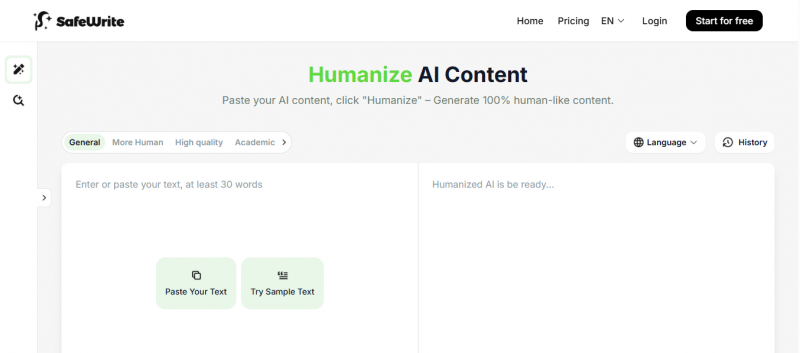
When you paste AI generated text into SafeWrite, the system does not just swap words for synonyms. It analyses sentence structure, rhythm, phrasing patterns, and other signals that often give away machine written content. It then rebuilds the paragraph with different wording, varied sentence lengths, and more natural flow, while keeping the original meaning intact.
Once the rewrite is done, you can run an AI detection scan directly in the same interface. Instead of visiting several detection sites one after another, SafeWrite pulls in results from multiple engines and shows you how “AI like” or “human like” the text appears across them. The typical workflow looks like this:
- Paste AI generated content into the SafeWrite editor.
- Apply the humanizer to produce a more natural sounding version.
- Run the integrated detection scan to see how it scores.
The aim is not to magically guarantee that no detector will ever flag your text. The realistic goal is to polish AI assisted writing so it reads more like a human draft and to give you a quick sense of how detection systems might classify it before you publish or submit.
Main Features Explained in Real Use
AI Humanizer
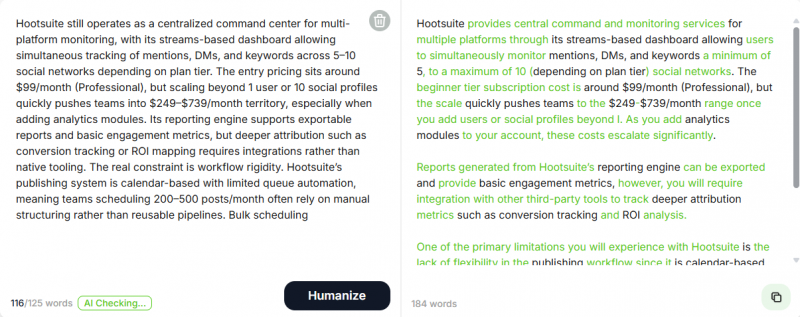
The humanizer is the core feature. It rewrites AI text with more variety in tone and structure. Typical changes you see include:
- Less repetitive sentence patterns
- More natural transitions between ideas
- Slightly more personal or conversational phrasing when appropriate
When I tested it on AI written paragraphs that had obvious “AI fingerprints” such as repeated phrasings and very balanced sentences, the SafeWrite version felt closer to something a human editor would hand in. It did not suddenly sound like a completely different writer, but it removed a lot of the stiffness and predictability that detectors and experienced readers notice.
Multi Detector Integration
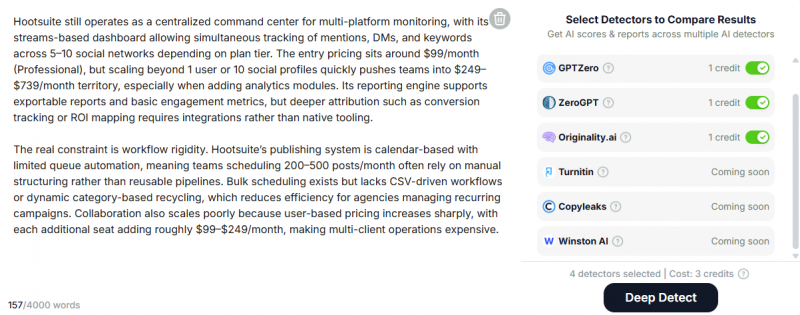
Instead of opening separate tabs for tools like GPTZero, Copyleaks, or similar services, SafeWrite lets you run one scan and see multiple detection results in one report. This is useful if you are sending work to institutions or platforms that rely on different detection engines.
In practice, this means you can adjust a piece, run a single check, and quickly see whether the new version looks less suspicious across several detectors at once, rather than playing “guess and check” on three or four different sites.
Style Personalization
SafeWrite can also adapt to your writing style over time. It looks at samples of your own writing and then tries to bring the rewritten text closer to that pattern, including your usual word choices and sentence style.
For people who mix AI drafts with their own writing, this matters. It reduces the “voice switch” that sometimes happens when a paragraph clearly sounds different from the rest of the document. The closer the tool can get to your natural style, the less obvious it is that AI was involved at all.
Multi Language Support
Another plus is that SafeWrite does not restrict itself to English. It can work with multiple languages, which is helpful if you write or study in bilingual or multilingual environments. You can feed non English AI drafts into it and still get a more natural sounding version plus detection checks.
Feature Snapshot
| Feature | What it gives you | Why it matters |
| AI Humanizer | Rewrites AI text into more natural language | Makes drafts easier and nicer to read |
| Multi AI Detector | Runs checks across several detectors at once | Saves time and gives broader view of risk |
| Style Customisation | Adjusts output to match your own writing | Keeps your voice consistent |
| Language Support | Works with multiple languages | Useful beyond purely English content |
| Detection Reports | Shows AI probability and risk scores | Helps decide whether a draft is ready |
Together, these turn SafeWrite into a polishing layer rather than a primary writing engine.
My Experience Using SafeWrite AI
To see how SafeWrite fits into a real workflow, I used it on several AI generated pieces, including blog sections, explanatory paragraphs, and short essay style texts.
- In the first test, I pasted a blog section created by an AI assistant. The original text was clear but had the usual signs: repeated phrases, overly smooth transitions, and a rhythm that felt slightly mechanical. After running it through SafeWrite, the rewritten version used more varied sentence lengths and slightly more direct, human sounding transitions. It still said the same thing, but it felt less like a model talking and more like an editor summarising.
- I then ran the detection scan. Instead of visiting different detector sites one by one, I saw several results in one report. Some detectors still showed traces of AI involvement, which is realistic, but the scores were generally lower than for the untouched draft. For a user who wants to reduce the chance of automatic flags, this consolidated view is more practical than individual checks.
- With longer paragraphs, SafeWrite did something more interesting than just swapping words. In many cases, it reshaped the order of sentences, merged repetitive lines, or broke long blocks into shorter, more readable segments. This change made the text feel less formulaic. There were still moments where I wanted to tweak tone or adjust a word choice myself, but the heavy lifting of restructuring was already done.
Overall, the process felt like a useful intermediate step between a raw AI draft and a final human edited version. It did not remove the need for manual edits entirely, but it reduced the amount of work needed to reach a natural sounding final draft.
Based on how it performs and how it fits into a realistic writing workflow, here is how I would rate SafeWrite AI.
| Category | Rating (out of 10) | Comment |
| Ease of use | 9.0 | Simple interface, clear three step flow |
| Humanization quality | 8.7 | Noticeably less “AI like”, still needs polish |
| Detector integration | 9.0 | Very convenient to have multiple checks in one |
| Style matching | 8.5 | Good alignment once you feed enough samples |
| Overall score | 8.8 | Strong post processing tool for AI drafts |
As a primary writing tool it would not score this high, because it is not designed for that. As a companion that improves AI written content and helps you check it, it does its job well.
What Other Users Tend to Say About SafeWrite AI
The people who get the most out of SafeWrite AI tend to share one thing in common. They already use AI to write and they are not trying to eliminate human effort entirely. They just want the final draft to sound less like it rolled out of a language model and more like something they would actually hand in under their name.
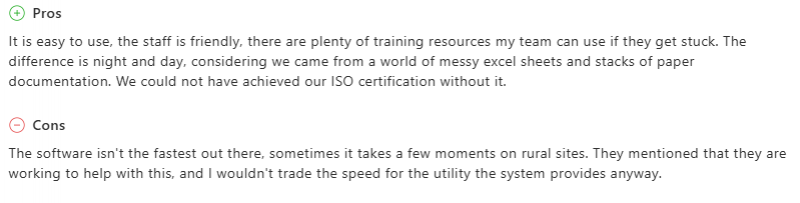
Across review platforms and writing communities, the personalisation feature comes up again and again as the real differentiator. SafeWrite builds a private writing model from your own samples over time, which means the longer you use it, the more the output starts to reflect your actual voice rather than a generic, neutrally rewritten version. Writers who invest a few sessions training that layer report that the edited text reads noticeably closer to their own editorial style. For content professionals and students who write frequently, that difference is worth a lot more than a basic synonym swap.
The integrated detector dashboard also gets consistent praise. Being able to check content against GPTZero, Copyleaks, Turnitin, ZeroGPT, and similar tools inside one interface, without copying and pasting between multiple sites, saves a meaningful chunk of time in a typical editing session. Reviewers often describe this combined workflow as the main reason they stick with SafeWrite over simpler humanisers that only rewrite without verifying.
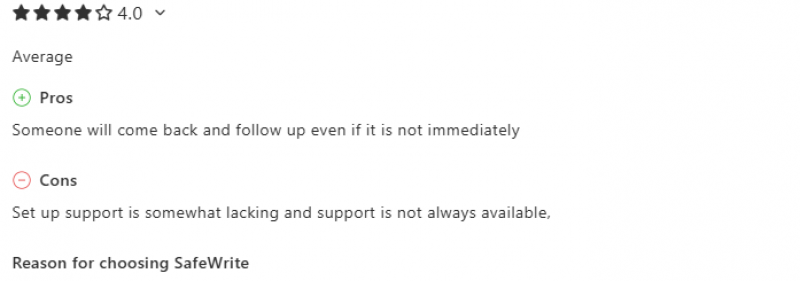
On the flip side, the honest feedback is equally clear. Users who skip the personalisation setup and run text through the default rewriting model tend to get more generic results. A few writers in online communities also point out that no humaniser can fully guarantee a clean pass across every detector every time, because detection systems update regularly and the gap between what gets flagged and what does not keeps shifting. SafeWrite is not an exception to that reality. It improves your odds and makes the text feel more natural, but it is not a permanent bypass solution. The tool works best when you still do a final manual read through and treat it as a strong first edit rather than the last word.
Overall, people who use SafeWrite as part of a careful, multi-step workflow come away satisfied. Those who expect it to take fully robotic AI text and make it undetectable with a single click sometimes find the results need more attention than they hoped. The tool holds a overall good rating, with particularly strong scores for customer support and value for money. That is a solid reputation for a relatively young platform in a competitive niche.
Pricing: What SafeWrite AI Costs
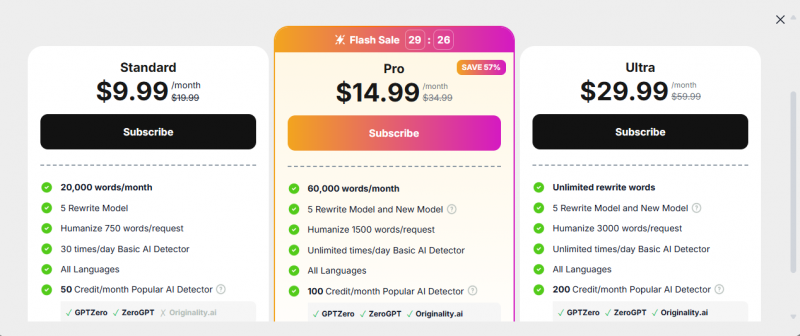
SafeWrite uses a subscription model with a free trial to get started.
| Plan | Price | Words Limit | Key Highlight |
|---|---|---|---|
| Standard | $9.99 | 20K/month | Basic usage |
| Pro | $14.99 | 60K/month | Best value |
| Ultra | $29.99 | Unlimited | Full access |
The free trial is enough to see if the humanizer and detector combo fits your process. The standard plan suits regular users who run AI drafts through it a few times a week. Heavy users who edit large volumes of AI content or run many detection scans in a month will need one of the higher tiers to avoid hitting limits too quickly.
Where SafeWrite AI Makes Sense
SafeWrite AI is most useful if AI writing has already become part of your process and you care about how that content reads and how it might be classified. Typical users include:
- Students who draft essays or research sections with AI but want them to read more naturally before submission
- Bloggers and SEO writers who use AI for first drafts and then refine the output for clients or their own sites
- Marketers who generate landing pages or email copy with AI and need it to fit a brand voice
- Professionals who rely on AI for reports or documentation but still want to sound like themselves
For purely human written content, SafeWrite is less necessary. For people who mix AI and human writing, it acts as a bridge that brings machine generated text closer to something they feel comfortable owning.
Final Verdict
SafeWrite AI exists because AI writing alone is no longer enough. As detectors and human readers become better at spotting machine generated patterns, it is not only about speed, but also about how natural the final content feels.
By combining a humanizer with integrated detection checks, SafeWrite simplifies a process that would otherwise require several different tools and a lot of copying and pasting. It does not replace careful editing, and it cannot guarantee that no detector will ever flag a sentence, but it can move AI drafts much closer to a human sounding baseline and help you see detection risks in advance.
For writers, students, and marketers who rely on AI but still care deeply about authenticity and readability, SafeWrite AI works well as a polishing step between the first machine draft and the final version you send out into the world.
Post Comment
Be the first to post comment!