Roblox players have always sought ways to access the game anywhere, anytime, and on any device. now.gg steps in as a cloud gaming service promising instant access to Roblox in-browser no downloads required. But does it live up to the hype? This article compiles genuine user reviews, tool insights, and a deep dive into features, letting you judge whether now.gg Roblox really delivers what modern gamers need.
What is now.gg and How it's Work
now.gg is a cloud gaming platform that lets users stream mobile and browser-based games primarily Roblox on various devices including PCs, tablets, and Chromebooks. The platform handles processing remotely on secure servers, advertising no-lag gameplay and instant access.
Key Features
Explore the most valuable now.gg offerings:
- Play Roblox Instantly: No downloads or installations just open in your browser, sign in, and start your game.
- Cross-Device Continuity: Switch freely between mobile, PC, Chromebook, and Mac without losing progress.
- Cloud Performance Boost: All processing is handled server-side, promising improved gameplay for users with lower-end devices.
- Content Creation Tools: Group management, event hosting, and collaborative functions make it easy to organize and share in-game experiences.
- Real-Time Communication: Built-in chat tools help teams coordinate fast, improving multiplayer strategy.
- Earn Rewards: Opportunities to earn free “NowBux” for Robux credit (US desktop users) by participating in quests and playtime challenges.
- Intuitive Interface: Clean menus and quick navigation make jumping into games simple for all ages.
Advantages and Disadvantages: A Perspective Of Users
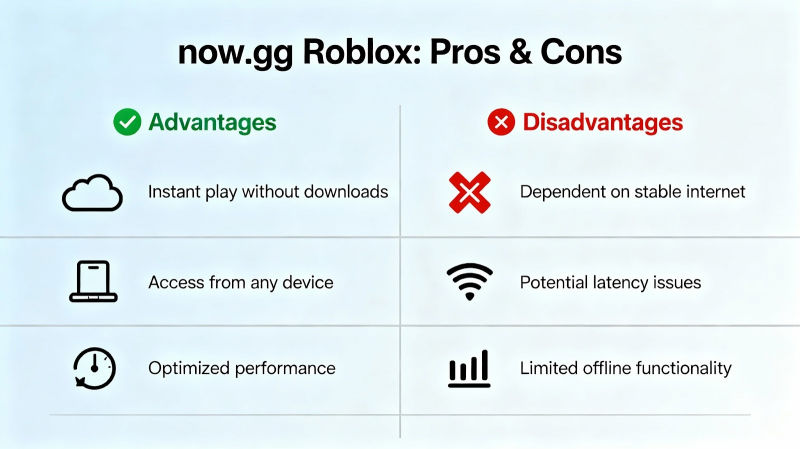
Let’s balance the hype with honest pros and cons, styled for real-world relevance:
Good Stuff
- Easy access from school or work devices Roblox possible even with restricted downloads.
- Saves device storage; Roblox streams without large installs.
- Good for quick gaming sessions or trying Roblox without long-term investment.
- Lag-free gaming for some, especially on powerful connections.
Not-So-Good Stuff
- Frequent lag, glitches, and unpredictable performance, especially on lower bandwidth.
- Paywall after brief play no longer fully free, monthly and day-pass prices added.
- Annoying ads sometimes even for paid users.
- Poor customer support cited in multiple reviews.
- Possible account security concerns and frustration over lost progress.
Mobile Constraints on Desktop Gameplay
Another often missed point is that now.gg streams the mobile version of Roblox, not the full PC client. Because of this, games that are built around keyboard-and-mouse controls or PC-style interfaces don’t always work smoothly. Some experiences feel limited or uncomfortable to play.
While touch controls and gamepad options exist, they can’t fully match native PC input. This problem is minor in simple or casual games but becomes much more obvious in complex or competitive Roblox experiences.
Pricing: A Creative Breakdown
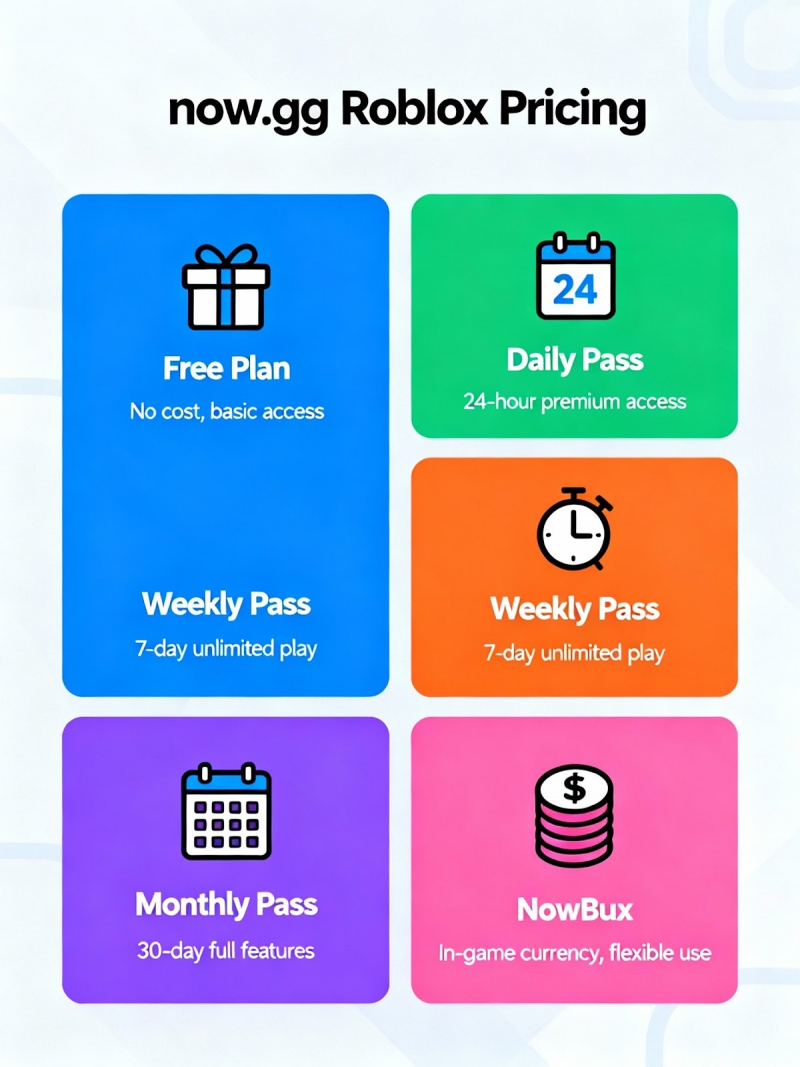
now.gg’s pricing is often described as confusing. Here’s a straightforward view:
- Day Pass: Pay for a limited 1-day Roblox access (around $9.99 per play session).
- Monthly Subscription: Offers Roblox cloud access for roughly CAD $11/month. May vary by region and currency.
- Earn Free Play: US desktop users can earn free NowBux and redeem Robux codes ideal for maximizing play without direct payment.
- Ad-Supported Play: Free access may feature mandatory ad viewing; some users suggest this could be expanded for more “freemium” play.
Price details can change rapidly, so check the latest on the official now.gg Roblox page.
Safety & Legitimacy
Legitimacy:
now.gg is a real cloud-gaming platform that has been around for years. It is not a fake or phishing website.
Official status:
now.gg is not owned or endorsed by Roblox. It works as a third-party service that streams Roblox through a browser.
Device safety:
Since the game runs on remote servers, nothing is installed on your device. This lowers the risk of viruses or malware.
Account safety:
You have to log in through a third-party interface, which is slightly risky. Using 2-step verification and avoiding your main account is safer.
User experience:
Many users report lag, ads, session limits, and sudden paywalls. It works, but performance and reliability are often poor.
Genuine Customer Reviews: What Real Users Say
Drawn from major review platforms and gaming forums, here are key user opinions:

- TrustPilot: Mixed response, many complaints about lag, forced payment, excessive ads, and frustrating support. Sample: “It was so terrible always kicked me out and lagged” .
- Reddit: Used mainly on school laptops; appreciated for bypassing download restrictions. However, reliability and safety questions persist. “My only way to play at school”.
- G2: Lower ratings, most users cite technical glitches and paywall issues.
- Capterra: Moderately negative reviews focus on server issues, lag, and shifting payment model. Link: Capterra
- SoftwareSuggest: Higher reviews for technical innovation but complaints about inconsistency. Link: SoftwareSuggest
- GeniusFirm/FirmSuggest: Noted for innovation and school-device access, but most users prefer alternatives.
How to Use now.gg Roblox Effectively
For best results, follow these power-user steps:
- Choose a stable, high-speed Internet connection for optimal cloud gameplay.
- Log in via browser (Chrome recommended), sign in to Roblox, and enable popups.
- Use a school tablet or low-end laptop to unlock games otherwise blocked by admin policies.
- Join community Discord or Reddit for troubleshooting and event tips.
Tips to Maximize Value
Get more out of now.gg Roblox with these expert hacks:
- Use NowBux earning features to collect free Robux gift codes (US PC users).
- Switch devices seamlessly great for traveling or switching from work to home.
- Avoid peak server times for smoother gameplay (afternoons/evenings may be more congested).
- Stay informed follow now.gg’s Twitter or Discord for update alerts and server maintenance news.
- Test alternative cloud gaming services for comparison if now.gg limits you.
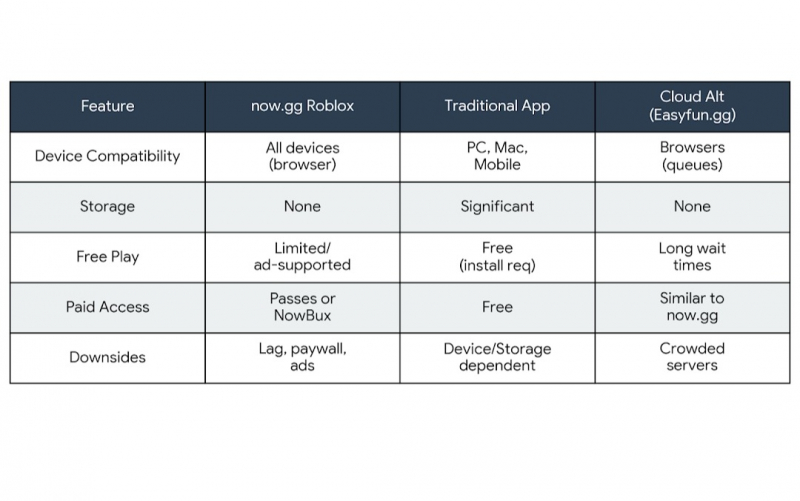
Summary Comparison Table
Summary Comparison Table
Conclusion
now.gg Roblox shines when you need instant, on-the-go access to Roblox without download hassles. It delivers decent gameplay for short sessions or restricted devices. Yet, common user complaints lag, sudden paywalls, lots of ads, and rough customer support make it hard to recommend as a primary Roblox solution. Check real reviews before making a commitment, and compare alternatives for the best fit.
Personalized Recommendation
If you’re a student or gamer with restrictive device policies, now.gg may seem useful, but it comes with performance and control trade-offs.
Post Comment
Be the first to post comment!