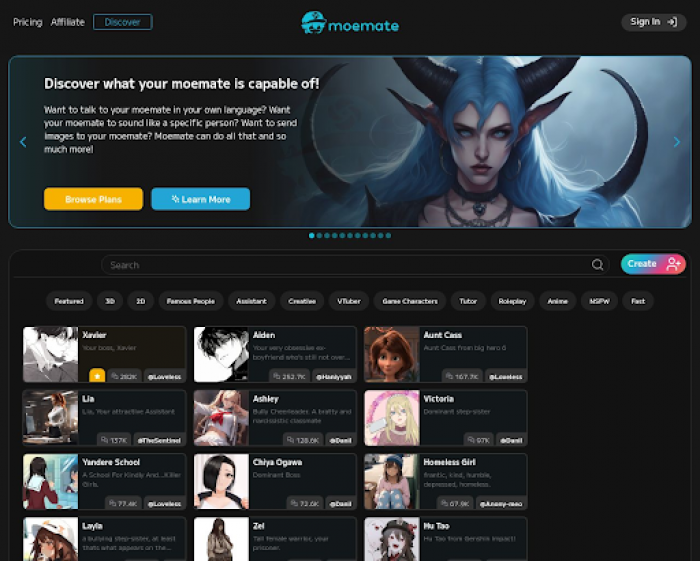
Moemate is an AI platform that lets you create, customize, and chat with virtual characters. These characters are powered by large language models, which means they can understand and respond humanely. You can use it through the web as it doesn’t require a download.
You can use Moemate to:
- Talk to AI characters
- Build your own AI persona
- Add voice and memory to characters
- Upload your documents or knowledge
- Train AI assistants to do custom tasks
Key Features of Moemate
Here’s a breakdown of the top features that make Moemate unique:
1. Chat with AI Characters
- Choose from a public library of characters
- Filter by tone, gender, or use case
- Engage in text or voice chat
2. Create Your Characters
- Write a backstory
- Set their tone and language
- Choose how they act and respond
- Add goals or traits
3. Voice Cloning
- Make characters speak like you
- Use different tones or emotions
- Create real-time voice replies
4. Upload Knowledge (Knowledge Injections)
You can upload PDFs, Word documents, or plain text. The AI then uses that data to:
- Answer questions
- Create summaries
- Give smart replies
For example, a business can upload manuals and create a character that answers support questions. A student can upload a textbook and study by chatting with it.
5. Skills (Custom Abilities)
- Writing emails
- Scheduling events
- Translating text
- Explaining math problems
6. Long-Term Memory
This feature allows characters to remember:
- Past conversations
- Your preferences
- Important facts you mention
With memory turned on, your AI becomes smarter over time. This is helpful for users who want a consistent companion or a virtual assistant that grows with them.
7. Quests
You can set up interactive tasks (called quests). These can be:
- Personal goals
- Step-by-step challenges
- Creative storytelling missions
8. User Personas
You can also create your profile (a persona) and link it to how characters respond to you. For example:
- You can set your name, tone, age, and interests
- AI characters then adjust their replies to suit your profile
This creates a deeper, more customized interaction.
9. Modules and Tools
- Web search tools
- Image generators
- AI writing tools
These help characters go beyond basic replies. You can create a multi-functional assistant that browses the web, writes content, or helps design things.
10. Custom LoRAs (Behavior Tuning)
LoRAs are small custom models that fine-tune how your character behaves. You can use them to:
- Adjust mood or attitude
- Change vocabulary
- Make characters act differently in different contexts
11. Public Memories
Moemate gives you the option to share memory settings publicly. This means:
- Other users can build on your work
- You can use memory setups made by others
12. Generators
Moemate includes tools that generate:
- Stories
- Ideas
- Images
- Responses
13. Recommendation Engine
Moemate learns from your activity and suggests:
- New characters
- Useful tools or modules
- Better skill settings
It helps you get more value from the platform without needing to search.
Who is Moemate Best For?
Moemate is not a one-size-fits-all solution. It offers a wide range of tools, but how effective it is depends on the user’s goals and experience level. Here's a more detailed look at who may benefit the most and what each type of user should consider:
| User | What They Can Do | Keep in Mind |
| Writers | Create story characters, plot ideas, dialogues | May need to edit AI responses for accuracy |
| Gamers | Build AI roleplay companions | Memory may not handle long game sessions |
| Teachers | Make bots that teach or quiz students | Needs time to upload and check content |
| Business Owners | Set up product or service assistants | Tuning needed to avoid wrong replies |
| Students | Chat with AI tutors to get summaries | Check for errors in AI answers |
| Creators | Use voice tools, write scripts, create content | Voice setup takes effort and clean input |
| Casual Users | Talk for fun or emotional support | Not meant for mental health advice |
| AI Users | Try skills, LoRAs, and deep features | The learning curve can be high at the start |
Pricing
Moemate currently uses a credit-based system and optional subscriptions.
Typical ranges include:
| Plan | Price | Includes |
|---|---|---|
| Free | $0 | Basic chat, limited memory |
| Standard | $9.99/month | Unlimited characters, voice, memory |
| Pro | $19.99/month | Custom LoRAs, advanced skills |
| Creator | $29.99+/month | High-level tools + team features |
Moemate vs Competitors
| Platform | Best For | NSFW | Personalization | Voice | Knowledge Upload |
|---|---|---|---|---|---|
| Moemate | Advanced creators, roleplay, assistants | Yes | ⭐⭐⭐⭐⭐ | Yes | Yes |
| GPT Girlfriend | Relationship-style AI | Yes | Medium | Limited | No |
| JuicyChat AI | NSFW-focused conversations | Yes | Limited | No | No |
| Character AI | Safe roleplay, personality chat | No | Medium | No | Limited |
| Replika | Emotional companionship | Limited | Medium | Yes | No |
Pros & Cons
Pros
- Extremely customizable
- Real-time voice
- Knowledge upload
- The memory system works well
- Web-based (no installation)
- Useful for both entertainment & productivity
Cons
- Occasional memory inconsistencies
- No dedicated desktop/mobile app yet
- Complex features may overwhelm casual users
Final Thoughts
Moemate is one of the most creative AI character platforms available right now. It’s flexible, powerful, and perfect for users who want more than basic chat, whether you're building worlds, training assistants, or experimenting with voice and memory. It requires a bit of learning, but once you get comfortable, it becomes a genuinely impressive tool.
If you want depth, customization, and control, Moemate delivers
FAQs
Q1: Is Moemate free?
Yes, but advanced features require a paid plan.
Q2: Does Moemate support NSFW?
Yes, but it is optional.
Q3: Does Moemate have an app?
No, it is fully web-based.
Q4: Does Moemate allow voice chat?
Yes, with real-time voice cloning.
Post Comment
Be the first to post comment!