Table of Content
- Detailed Quick Overview
- First Impressions: Suspiciously Easy to Start
- Text to Image Test: Good Understanding, Slightly Artificial Finish
- Image to Image Test: Cartoon Conversion With Color Drift
- Image to Video Test: Ambitious Feature, Slightly Wobbly Results
- Speed and Workflow Experience
- Pricing Breakdown
- Performance Snapshot
- Real User Sentiment
- Pros and Cons
- Final Verdict: Worth Trying, With Clear Limits
AI image tools in 2026 all promise the same thing. Better quality. Faster speed. Studio-grade visuals without the studio-grade bill. Most of the time, reality politely disagrees.
Vheer AI caught attention because it flips the usual model. It offers free, no-signup access to image and video generation right inside the browser. Naturally, that raised one big question. Is this actually useful, or just another shiny demo that falls apart under real prompts?
So I put it through proper hands-on testing. Real prompts. Real expectations. And yes, a few moments where the AI clearly chose chaos. Here is the honest breakdown.
Detailed Quick Overview
| Attribute | Details |
|---|---|
| Product | Vheer AI |
| Category | AI image and video generator |
| Access model | Web based, no install |
| Account required | No for basic usage |
| Free plan | Yes, unlimited quality model |
| Paid tiers | Premium and Advanced |
| Credit system | Yes for Pro and Max models |
| Best use case | Casual graphics, concept art |
| Not ideal for | High precision commercial work |
| Learning curve | Very beginner friendly |
| Generation speed | Fast under normal load |
First Impressions: Suspiciously Easy to Start
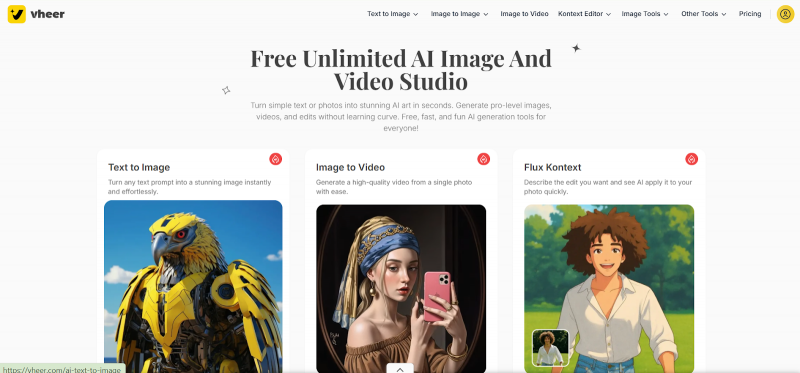
The first thing Vheer absolutely nails is friction. Or more accurately, the complete lack of it. You open the site and you are already generating. No login drama. No email verification. No emotional commitment required.
From a usability standpoint, this is refreshingly smooth. The interface is clean, the prompt box is obvious, and beginners will feel comfortable within seconds. Power users, however, may immediately notice the limited fine controls.
My early reaction was cautiously impressed. The experience feels fast and friendly. The real test, of course, is what happens after you hit generate and start judging pixels like a detective.
Text to Image Test: Good Understanding, Slightly Artificial Finish
Prompt used:
"Steampunk mechanical spider, brass legs, gears turning, moving through a foggy Victorian city street, glowing red eyes. A confident rapper standing in an urban street setting, facing the camera with a serious and focused expression. He wears a stylish hoodie layered with a designer jacket, ripped jeans, and fresh sneakers. Thick silver chains hang around his neck, and a watch shines on his wrist. His hands are slightly raised as if mid-verse, showing natural rap gestures. His posture is strong and relaxed, shoulders back, chin slightly lifted. The mood feels powerful, authentic, and street-inspired."
Generated image:
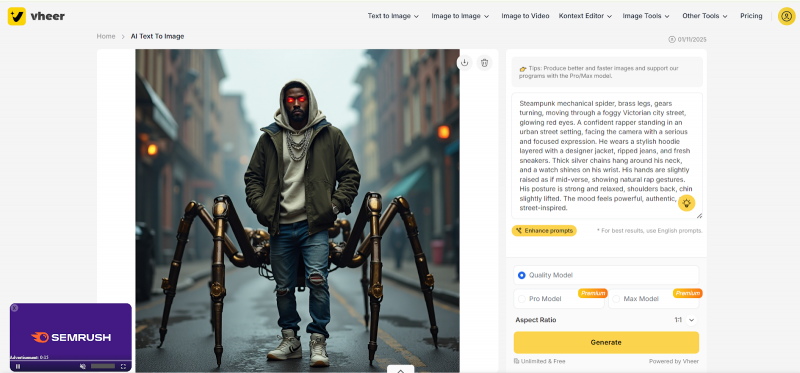
The model did understand the prompt surprisingly well. Composition was broadly correct and the subject appeared where expected. For a free tool, prompt adherence is actually respectable.
However, visual appeal is where things became mixed. The image looked slightly overprocessed and not fully realistic. Instead of a clean photoreal finish, the output had that familiar AI gloss that quietly whispers, “I was born in silicon.”
Textures and lighting were decent but not elite. From a distance, it works. Under closer inspection, small inconsistencies appear. For social media graphics, perfectly usable. For high-end commercial work, you will notice the gap.
Image to Image Test: Cartoon Conversion With Color Drift
Prompt used:
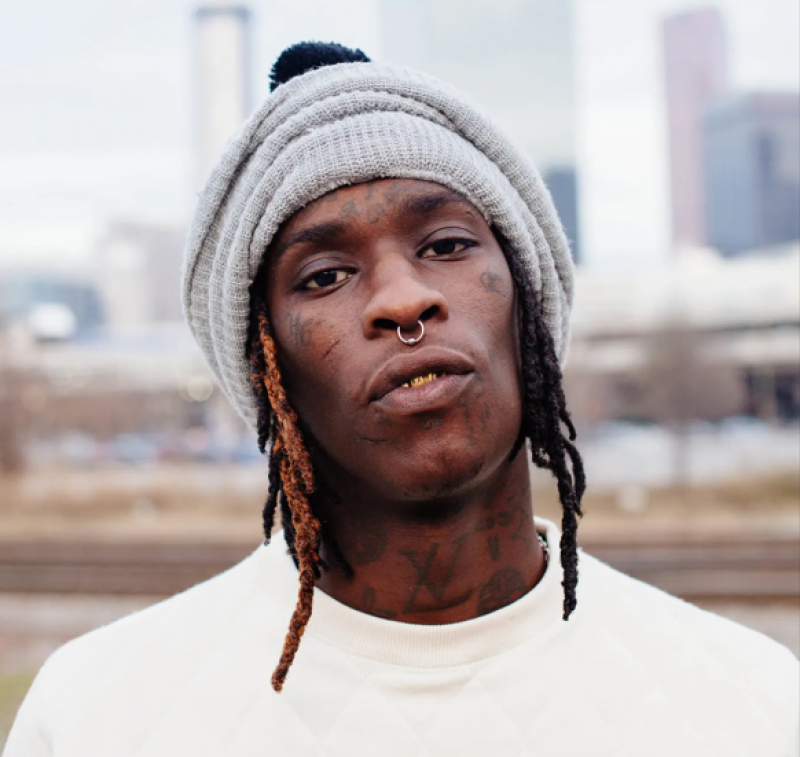
"CHANGE THE FOLLOWING IMAGE INTO CARTOON STYLE IMAGE"
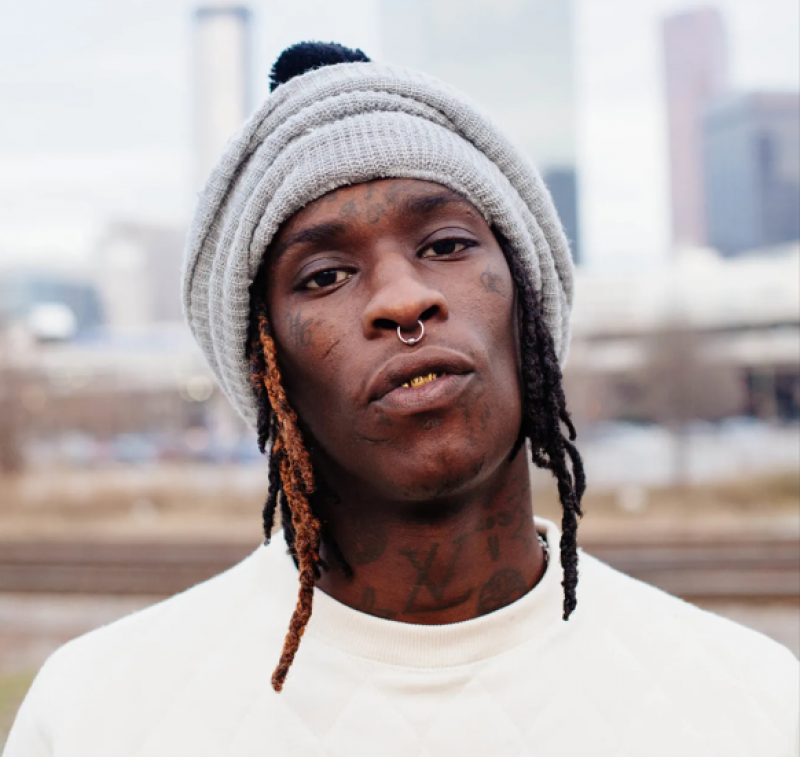
Original image:
Cartoon output:
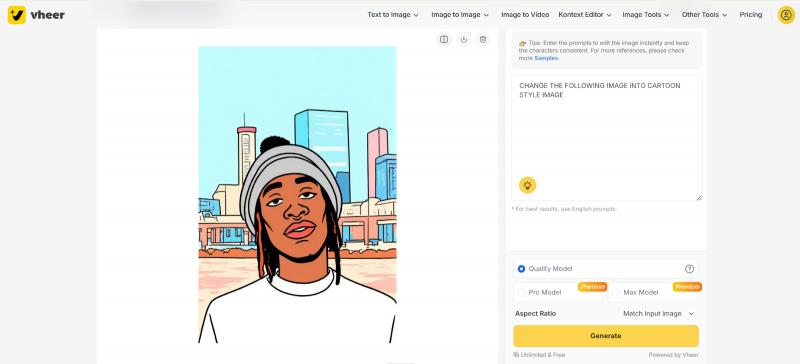
Structurally, the tool followed instructions. The subject remained intact and the cartoon transformation clearly applied. For quick stylistic conversions, the feature is functional.
The issue showed up in color accuracy. The generated version noticeably drifted from the original palette. Some tones shifted just enough to be annoying if you care about visual consistency.
This is not catastrophic, but it does matter for brand work. The tool understands what you want. It just occasionally decides to add its own artistic opinion.
Image to Video Test: Ambitious Feature, Slightly Wobbly Results
Base image prompt:
"A confident rapper standing in an urban street environment. He faces the camera with a serious, focused expression. He wears a hoodie layered under a stylish jacket, fitted jeans, and clean sneakers. A chain hangs around his neck, and he lightly adjusts it with one hand while the other rests near his waist. His posture is relaxed but powerful, shoulders back and chin slightly raised. The overall mood is bold, authentic, and street-inspired."
Camera prompt:
"Medium shot at eye level with a slight low-angle tilt to enhance presence and dominance. Use a shallow depth of field to keep the rapper sharp while softly blurring the background. Natural lighting or soft side lighting to create subtle shadows on the face. Slight push-in or steady handheld feel to add realism and energy."
Generated output:
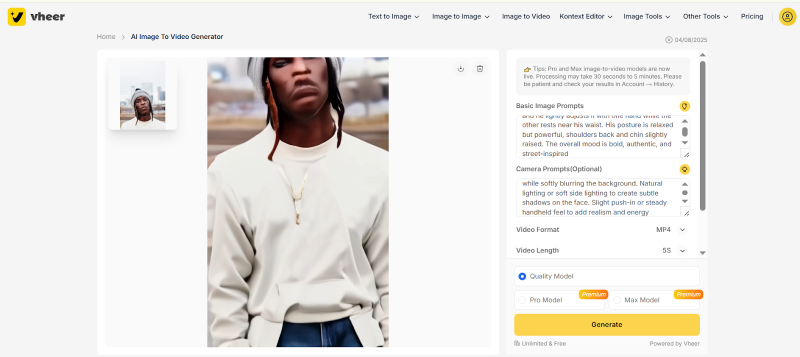
Technically, the animation works. Movement is there and the system clearly tries to follow the cinematic instructions.
But the overall quality is where expectations and reality politely shake hands and disagree. Motion felt basic, and facial abnormalities appeared during movement. Instead of smooth realism, the output leaned toward experimental demo territory.
For quick social clips, it is usable. For serious marketing work, it is not quite ready for prime time.
Speed and Workflow Experience
Under normal conditions, Vheer is actually quick. Most image generations landed in the 5 to 10 second range during testing. Even during heavier periods, wait times rarely became frustrating.
The workflow is extremely beginner friendly. Type prompt, click generate, download result. There is almost no learning curve, which is great for newcomers and slightly frustrating for control enthusiasts.
The main tradeoff is depth. Advanced users who enjoy tweaking every parameter may feel somewhat boxed in. Vheer clearly prioritizes speed and accessibility over surgical precision.
Pricing Breakdown
Subscription Plans
| Plan | Monthly | Yearly | Credits | Ads | Best For |
| Free | $0 | $0 | Unlimited quality model | Yes | Casual users |
| Premium | $9.99 | $69.99 | 600 per month | No | Regular creators |
| Advanced | $19.99 | $99.99 | 1500 per month | No | Heavy users |
The free plan is genuinely generous. You can do a lot without paying, which is increasingly rare in this space.
Premium and Advanced tiers mainly improve speed, quality, and access to Pro and Max models. If you generate frequently, the upgrade makes sense. If you are just experimenting, free is enough.
Pay As You Go Credits
| Credits | Price | Best Use Case |
| 100 | $3.99 | Light testing |
| 500 | $9.49 | Short bursts |
| 1000 | $18.49 | Moderate usage |
| 1500 | $26.99 | Frequent creators |
| 2000 | $34.99 | Heavy sessions |
| 5000 | $69.99 | Power users |
This flexible model is useful if you dislike subscriptions or only generate occasionally.
Performance Snapshot
| Test Area | Result | Verdict |
| Text to image realism | Good but not elite | Usable |
| Prompt adherence | Mostly accurate | Reliable |
| Image to image colors | Slight drift | Needs improvement |
| Video smoothness | Basic | Early stage |
| Speed | Fast | Strong |
| Ease of use | Very easy | Excellent |
Real User Sentiment
| Platform | Overall Rating | Sentiment | What Users Like | What Users Complain About |
| Trustpilot | Mixed positive | Generally favorable | Free access, ease of use | Inconsistent realism |
| Mixed | Curious but cautious | Good for experimentation | Strange outputs sometimes | |
| Creator communities | Positive leaning | Hobbyist friendly | No signup needed | Limited controls |
| Casual users | High satisfaction | Happy with free tier | Fast and simple | Not always consistent |
The pattern is clear. Users love freedom. They just do not fully trust it for mission critical work.
Pros and Cons
Pros
- Truly usable free tier
- Very fast to start
- Beginner friendly interface
- Good results for simple prompts
- Flexible credit system
Cons
- Realism can feel slightly artificial
- Color accuracy issues in image to image
- Video output still rough
- Limited advanced controls
- Occasional facial inconsistencies
Final Verdict: Worth Trying, With Clear Limits
Vheer AI does something many tools fail to do. It actually delivers a usable free experience. No bait and switch. No aggressive paywall five minutes in.
For hobbyists, social media creators, and anyone experimenting with AI visuals, it is genuinely worth trying. The speed is solid, the interface is friendly, and the barrier to entry is basically nonexistent.
Where it starts to show limits is polish and consistency. It performs well for quick creative work, but heavy users and perfectionists will notice the ceiling fairly quickly. Use it as a fast creative sandbox, not your final production engine.
Post Comment
Be the first to post comment!