Table of Content
- What is Inworld AI?
- Core Capabilities
- Use Cases
- Personal Step-by-Step Guide — Building a Living Memory on Inworld AI
- Step 6 — Set Up the Memory Companion
- Inworld AI: Limitations & Where It Falls Short (Real Experience)
- Inworld AI Pricing Structure (Usage-Based, 2026)
- Combined Sentiment Table (Across Sources)
- Competitors: How Inworld Compares
AI characters are everywhere right now. Demos look impressive, marketing videos promise “living NPCs,” and every platform claims it’s the future of games and interactive media. But after working with enough AI tools to know the difference between a good demo and a production-ready system, I wanted to answer a simple question:
Is Inworld AI something you can actually ship with?
So I spent about a week digging into Inworld AI. I read the documentation end to end, explored the Studio, reviewed benchmarks, watched real demos, and compared user feedback from review platforms and developer forums. I wasn’t trying to break it—but I also wasn’t treating it gently.
The short answer: Inworld feels less like a chatbot and more like an engine. That’s both its biggest strength and its biggest responsibility for the teams that adopt it.
What is Inworld AI?
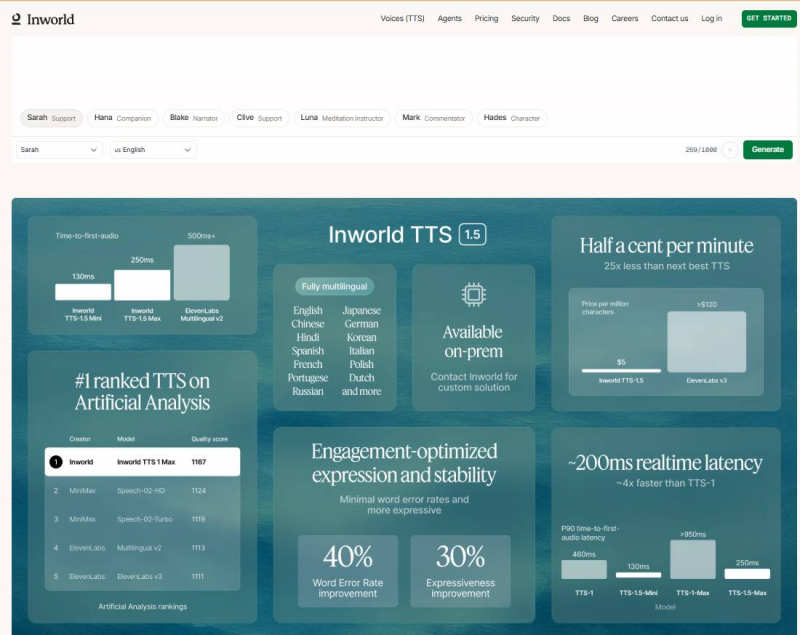
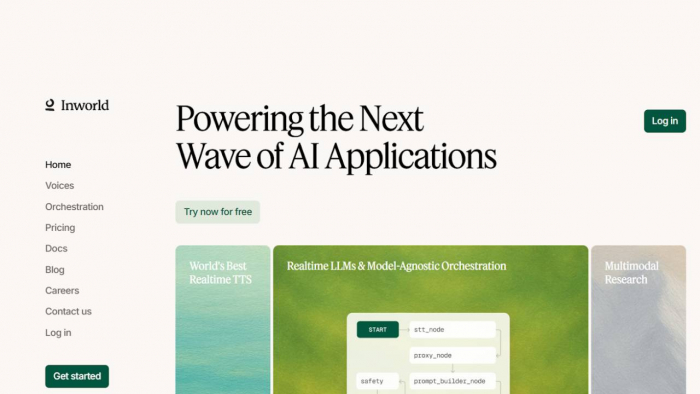
Inworld AI is a developer platform that enables creators to build realistic, interactive AI characters — digital personas that can think, speak, remember, and respond naturally in real time. These characters are used in games, virtual worlds, AR/VR experiences, brand activations, training simulations, and more.
At a high level, Inworld combines:
● A visual character design studio
● Persistent persona and memory systems
● Real-time voice synthesis
● Runtime APIs and SDKs for games and apps
Rather than simple scripted dialogue, Inworld characters use generative AI models, memory systems, and emotion frameworks to deliver dynamic and context-aware interactions that feel lifelike. This makes them far more engaging than traditional NPCs or rule-based chatbots.
Core Capabilities
1. AI Character Creation
Inworld offers tools like Inworld Studio that let creators define a character’s personality, memory, goals, emotions, and behavior using natural language — not code. These characters can then converse and react in real time.
2. Real-Time Conversational AI
With Inworld Runtime, developers get a scalable backend for conversational experiences that can serve millions of users with low latency. Runtime supports automatic speech recognition (ASR), natural language processing, and text-to-speech (TTS) integration.
3. Multimodal Interaction
Inworld’s system orchestrates multiple machine learning models — including LLMs (large language models), TTS, memory engines, and emotion systems — to produce natural, contextually rich responses.
4. Voice & Speech Features
Their TTS (Text-to-Speech) models offer expressive, multilingual voice synthesis with real-time streaming and optional voice cloning from short recordings.
Use Cases
Inworld AI is used in several areas:
● Games & Interactive Worlds: Create dynamic NPCs that respond naturally to player dialogue and actions.
● AR/Brand Experiences: Embed AI sales assistants or mascots in augmented reality environments.
● Training & Simulation: Deploy AI characters in mock scenarios (e.g., sales training).
● Media & Entertainment: Enhance narratives with AI-driven narrators or interactive hosts.
These use cases show Inworld is versatile, with strong adoption across entertainment and immersive tech.
Personal Step-by-Step Guide — Building a Living Memory on Inworld AI
The Living Memories template lets you take a still image (like a photo of someone you care about) and turn it into an interactive memory companion — capable of:
● speaking with you
● remembering past conversations
● generating talking video with natural lip movement
It combines Inworld AI’s voice clone / TTS, the Runtime engine, and an external service (Runway ML) for lip-sync video generation.
Step 1 — Prepare Your Environment
Before you begin, make sure you have:
Required Accounts & Keys
● Inworld AI account / API Key
→ Register at the Inworld platform and get your API key.
● Voice Clone & Voice ID
→ Inworld lets you clone voices using sample audio (or use a preset).
● Runway ML Account & API Key
→ Required for performing video animation (lip syncing).
● UseAPI Token (optional)
→ For some Runway workflows.
Tools Installed (Locally)
● Node.js (v20+)
● npm (Node package manager)
These are standard prerequisites before running the Living Memories project locally.
Step 2 — Clone the Living Memories Template
This template is a full-stack Node.js demo that shows an interactive memory companion plus a lip-sync video generator.
In your terminal:
git clone https://github.com/inworld-ai/living-memories-node.git
cd living-memories-node
�� This grabs the full template including server, UI, and memory companion interfaces.
Step 3 — Install Dependencies
Inside the project directory:
npm install
⚠️ Important:
This template uses @inworld/runtime v0.8.0 — the version that works with the current Living Memories demo.
Step 4 — Configure Your API Keys
Duplicate the .env.example file into a .env file in the project root.
In your .env file, set:
● INWORLD_API_KEY → Your Inworld API key
● VOICE_ID → The voice you want your memory companion to use
● RUNWAY_API_KEY → Runway key to generate videos
(Optional)
● USEAPI_TOKEN and other configs needed for advanced Runway workflows
This step connects your local project with Inworld’s platform and Runway’s video tools.
Step 5 — Run Your Local App
Now start the development server:
npm run dev
● After the server starts, open your browser
● Navigate to: http://localhost:3000
You’ll be taken directly to the Memory Companion page of the template.
Step 6 — Set Up the Memory Companion
Once the app loads:
�� Enter Keys & Config
● Paste your Inworld API key
● Paste the Voice ID (from the Inworld Portal)
● Paste your Runway API Key
This lets the tool talk to both Inworld and Runway services.
�� Companion Configuration
Here you define:
● Persona (the memory’s personality)
● Background / Relationship
● Optional starting prompts
This tells the AI the context of the memory — who the companion “is” and what it’s supposed to remember.
�� Tip: Spend extra time writing these fields — they define how the character will respond to conversation and recall past interactions.
Step 7 — Upload a Photo
Now upload an image you want to animate into a living memory — for example:
● a family photo
● a picture of someone meaningful
● an old portrait
This photo becomes the visual representation of your companion.
�� The system uses this photo later to create a lip-synced animation when combined with speech.
Step 8 — Generate the Animated Memory
Once you’ve configured settings and uploaded a photo:
�� Optional Prompt (for animation style)
You can enter text that guides how the animation should behave. For example:
“Look around warmly and speak softly like a conversation starter.”
This text helps shape the AI’s animation timing and mood before lip sync is generated.
�� Next, click Generate animated video.
Behind the scenes:
● Inworld Runtime creates dialogue and voices
● Runway ML generates a talking motion animation
● A lip-synced video is returned to you
This connects powerful models so the image can not only speak, but also move its lips naturally in the video.
Step 9 — Recording Your Voice & Conversing
On the Memory Companion page:
● Press and hold a record button to capture your voice
● Speak naturally to your AI companion
● The companion replies with voice + memory context
Real Memory Interaction
Each time you converse, this character:
● Stores things you tell it
● Pulls relevant past info into future replies
● Continuously evolves the memory
This is different from one-off chat — it’s a continuously growing recall system powered by Inworld’s Runtime + memory graph logic.
Example experience the video shows:
The companion recalls shared experiences and tailors responses as if remembering past dialogues — just like talking to someone familiar.
Step 10 — (Optional) Generate a Lip-Synced Talking Video
If you want visual output beyond voice:
1. Go to the LipSync section of the local app
2. Enter:
○ Inworld API key
○ Voice ID
○ UseAPI token
○ Runway ML email
3. Upload a portrait-style photo
4. Enter text you want the photo to speak
5. Generate speech first (review it)
6. Hit Generate video
This generates a downloadable video where the photo speaks the text with synced lips.
Inworld AI: Limitations & Where It Falls Short (Real Experience)
1. Steep Learning Curve
Inworld isn’t plug-and-play. You need to understand persona, behavior, memory, scenes, and voice settings before results feel good. My first character worked, but it took several iterations to feel natural.
Improvement:
Add guided onboarding and persona quality checks for beginners.
2. Output Quality Depends Heavily on Persona
Weak or vague personas lead to bland or inconsistent responses. Inworld doesn’t auto-correct poor setup, so bad inputs show immediately.
Improvement:
Provide persona suggestions and live feedback while writing.
3. Memory Can Drift
If memory is too broad, characters start exaggerating or contradicting past interactions over time.
Improvement:
Add memory health indicators and easier pruning tools.
4. Voice Costs Add Up
Voice quality is excellent, but testing with voice enabled can consume credits quickly if you’re not careful.
Improvement:
Show voice cost estimates before or during sessions.
5. Hard to Debug “Why” a Response Happened
When a character gives a bad answer, it’s not always clear whether persona, memory, or behavior caused it.
Improvement:
Add response explanations showing what influenced the reply.
6. Overkill for Simple Use Cases
For basic chatbots or quick demos, Inworld feels too heavy and complex.
Improvement:
Introduce a lightweight “simple mode” with fewer controls.
7. Integration Requires Engineering Effort
Unity, Unreal, and web integrations are solid but not drag-and-drop. Small teams may underestimate the effort.
Improvement:
More starter projects and ready-made demo scene
Inworld AI Pricing Structure (Usage-Based, 2026)
| Pricing Component | Unit | Rate / Cost | Notes |
| Inworld TTS-1.5 Mini | Per 1M characters | $5.00 ≈ $0.005/min | Standard TTS voice cost on Inworld’s platform. |
| Inworld TTS-1.5 Max | Per 1M characters | $10.00 ≈ $0.01/min | Higher-quality voice option. |
| LLM Input Tokens | Per 1M tokens | Varies by model | Inworld passes through model costs at provider rates (no markup). |
| LLM Output Tokens | Per 1M tokens | Varies by model | Costs depend on model chosen (e.g., Claude, OpenAI, Mistral, etc.). |
| Runtime API Usage | Pay-as-you-go | Charged per interaction / token usage | No upfront fees; you only pay for what you consume. |
| Free Credits | Monthly | Included automatically | Users receive free credits each month before billing. |
| On-Prem / Enterprise TTS | Contact Sales | Custom pricing | For on-prem deployments or enterprise volume. |
Combined Sentiment Table (Across Sources)
| Review Source | Scope | Typical Rating | Strengths | Weaknesses / Notes |
| Glassdoor | Internal employee reviews | ⭐ 4.9 / 5 | Strong culture, great team, excellent onboarding | Demanding pace, fast environment |
| Product Hunt | Developer community | ⭐ 5.0 / 5 | Excellent TTS quality, affordable, expressive voices | Small sample size |
| FeaturedCustomers | B2B testimonials | Qualitative | Scalable tooling, solid real-world use cases | Not rated numerically; testimonials only
|
Competitors: How Inworld Compares
Here’s how Inworld stacks up in practice:
| Platform | Best At | Limitations |
| Inworld AI | Real-time NPCs with voice & memory | Complexity, cost |
| Character.ai | Creative chat characters | No production deployment |
| Replica Studios | Scripted voice acting | No live conversation |
| Convai | Indie NPC experimentation | Less mature voice stack |
Inworld is the most end-to-end solution, but also the most demanding.
Final Verdict: Is Inworld AI Worth It?
After a week of hands-on evaluation, here’s my honest conclusion:
Yes — Inworld AI is worth it If you need immersive, voice-driven, persistent AI characters, Inworld AI is one of the strongest platforms available today.
It’s not one of the cheapest tool, but its worth using it.
Inworld doesn’t replace good design or careful testing—but when paired with them, it enables experiences that simple chatbots just can’t deliver.
If you’re building something serious, Inworld is absolutely worth your time.
Post Comment
Be the first to post comment!