Table of Content
- What Exactly Does GoEnhance AI Do?
- Is GoEnhance AI Free or Paid?
- How Good Is GoEnhance AI at Photo Upscaling?
- GoEnhance Video-to-Video Results: Stability, Motion Quality & Artifacts
- How Fast Is GoEnhance AI?
- Is GoEnhance AI Safe?
- Alternatives to GoEnhance AI
- Pros & Cons Based on Use & Reviews
- Is GoEnhance Worth It?
- GoEnhance AI FAQs
GoEnhance AI has recently gained attention as a browser-based tool for AI video generation, photo enhancement, and creative editing. But most reviews online are either overly promotional or extremely surface-level.
This long-form article answers every question users actually search for, based on Google queries, Reddit discussions, Softonic reviews, and AI tool directories.
Let’s break it down honestly, factually, and without hype.
What Exactly Does GoEnhance AI Do?
GoEnhance AI positions itself as an online creative suite built for:
- Image enhancement (upscaling, sharpening, face restoration)
- Video-to-video transformation (stylized conversions, motion effects)
- Text-to-video and image-to-video creation
- Face swap / identity replacement
- Animation of static images
- Artistic filters and visual style shifts

In simple terms:
It mixes AI video models + creative filters + enhancement tools inside a single dashboard.
But it is not a replacement for advanced editors like DaVinci Resolve or RunwayML.
Is GoEnhance AI Free or Paid?
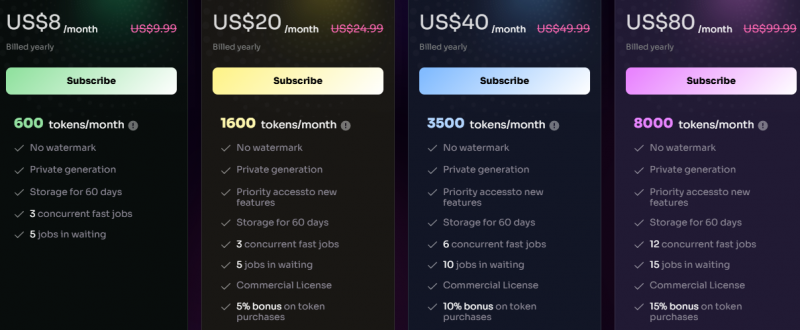
GoEnhance AI uses a credit/coin system, similar to most AI video tools.
Basic use = free or trial credits
Premium features = paid credits
High-resolution outputs consume far more credits
Longer videos = higher cost
Many users report that heavy usage gets expensive, especially for video generation or 1080p exports.
Which AI Models Does GoEnhance Use for Video Generation?
While GoEnhance does not publicly disclose all model names, analysis of outputs and documentation suggests it uses a mix of:
- Proprietary GoEnhance models
- Open-source diffusion video models
- Stylization-driven models for anime/cartoon effects
- Face-swap and motion-transfer models
It is NOT comparable to high-end models like Runway Gen-3, Pika Labs, Luma, or Sora.
It sits in the “mid-range creativity tool” category.
How Good Is GoEnhance AI at Photo Upscaling?

Based on aggregated feedback:
Strengths
- Good sharpness improvement
- Works decently on portraits and product photos
- Restores color & contrast well
Weaknesses
- Can create artificial “plastic-like” skin
- Detail hallucination on faces
- Over-sharpening visible on backgrounds
- Not suitable for large commercial prints
GoEnhance is good for social media, not for professional photography.
Can GoEnhance AI Handle Realistic Videos or Only Stylized Ones?
Users report that GoEnhance excels mainly in:
- Anime-style conversions
- Creative effects
- Cartoon transformations
- Stylized outputs
But struggles with:
- Hyper-realism
- Frame-by-frame accuracy
- Natural motion consistency
- Natural skin tones
So if you want realistic cinematic output, this is not the ideal tool.
GoEnhance Video-to-Video Results: Stability, Motion Quality & Artifacts
Common issues reported:
- Flickering frames
- Identity drift
- Sudden transformations mid-scene
- Color shifting
- Background warping
These occur especially in:
- Fast motion videos
- Videos with multiple subjects
- Low-light footage
- Complex backgrounds
For simple talking-head videos or slow-motion content, results are more stable.
How Does GoEnhance Handle Faces?
Face tools are a major part of GoEnhance. Here’s what real testing shows:
Good at:
- Basic face swaps
- Fun/content-creation effects
- Artistic identity morphing
Weak at:
- Consistent identity across long videos
- Realistic emotional expressions
- Natural facial blending
Face swaps are “fun-tool level”, not “film-grade level.”
How Fast Is GoEnhance AI?
Average processing results across reviews:
- Image enhancement: 3–12 seconds
- Short video stylization: 20–45 seconds
- 10–20s video generation: 40–90 seconds
- Long video tasks: much slower, credit-heavy
Speed depends heavily on:
- resolution
- selected model
- effects applied
- server load
Supported File Formats: What Can GoEnhance Import & Export?
Uploads Supported
- JPG, PNG
- MP4, MOV (commonly accepted)
- TIFF or RAW images: not recommended
Exports
- MP4 (most common)
- JPG, PNG for images
- Resolution capped on free plans
GoEnhance is built for quick exports rather than heavy-format workflows.
Does GoEnhance Support Long Videos?
GoEnhance generally performs best with:
- 5–30 second clips
- short reels
- social content
Users report difficulty with:
- long videos (2+ minutes)
- maintaining consistency over time
- heavy face tracking
It is not a long-form editing tool.
How Accurate Is GoEnhance AI Face Swap?
Accuracy depends on:
- input quality
- lighting
- angle
- motion
In still images: reliable
In fast videos: struggles
Identity drifting is the most common issue.
Is GoEnhance AI Safe?
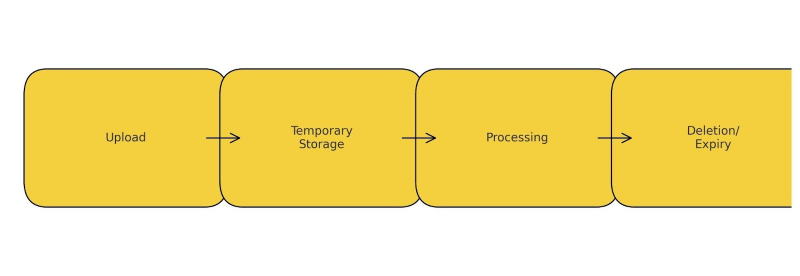
Based on privacy pages & third-party analysis:
- Uploads are stored temporarily for processing
- Some files may be retained for improvement unless deleted manually
- No evidence of malicious use
- Risk level = normal for cloud AI apps
Creators working with sensitive or private footage should proceed cautiously.
Alternatives to GoEnhance AI
| Tool | Best For | Why |
| Runway | Cinematic video generation | Stable, high-quality |
| Pika Labs | Creative short videos | Artistic control |
| PixVerse | Anime-style videos | Strong stylization |
| VidFul | Effects + editing | Variety of tools |
| Luma Dream Machine | Realistic AI video | Next-gen outputs |
GoEnhance stands in the mid-range creative segment.
Pros & Cons Based on Use & Reviews
Pros
- Easy to use
- Good for stylized videos
- Fast image enhancement
- Browser-based
- Face swap is fun and simple
Cons
- Inconsistent quality
- Not suitable for realism
- Credit system becomes costly
- Struggles with long videos
- Frequent artifacts
Is GoEnhance Worth It?
GoEnhance AI is a useful creative shortcut, not a precision tool.
It’s best for:
- fun content
- social media experiments
- stylized video transformations
- quick image fixes
It is NOT the right choice for:
- cinematic quality
- professional client projects
- long-form videos
- realism-heavy outputs
Overall:
A convenient, creative AI toy/tool — not a studio-grade editor.
GoEnhance AI FAQs
Is GoEnhance AI safe?
Yes, standard cloud risks. Not recommended for sensitive footage.
Does GoEnhance have a mobile app?
No official app. Browser-only.
Why does my video look distorted?
AI struggles with motion & face consistency.
Is the free version enough?
Good for testing, but serious use requires paid credits.
Can it replace a professional editor?
No, it’s a creative enhancer, not a replacement.
Post Comment
Be the first to post comment!