Gamma can spin up a full deck in seconds, but drop those slides into a board meeting and the gloss evaporates—fonts swap, gradients flatten, and the file no longer feels like yours. Marketing realigns colours, sales fix charts, and design sighs. Speed means nothing if every export needs surgery.
In 2026 you have nine better options. Some live inside PowerPoint or Google Slides and inherit your master template; others add AI while respecting strict brand kits or carrying the compliance badges IT needs. We’ll score each on six criteria—template fidelity, integration, AI quality, flexibility, collaboration, and security—to help you choose the best fit.
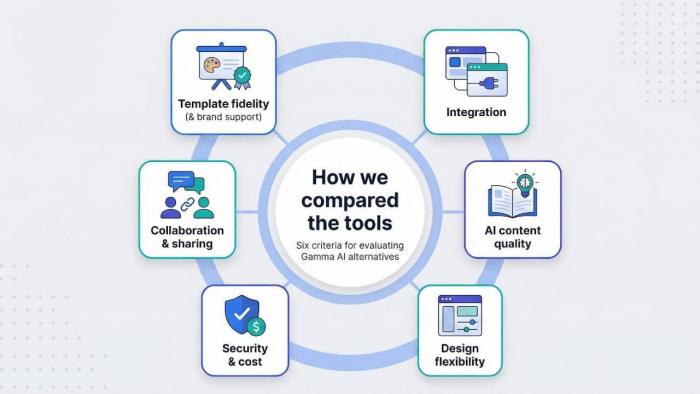
How we compared the tools
Choosing an AI slide generator is not about shiny demos; it is about how well the app fits your day.
We posed six direct questions and pushed every platform through the same test.
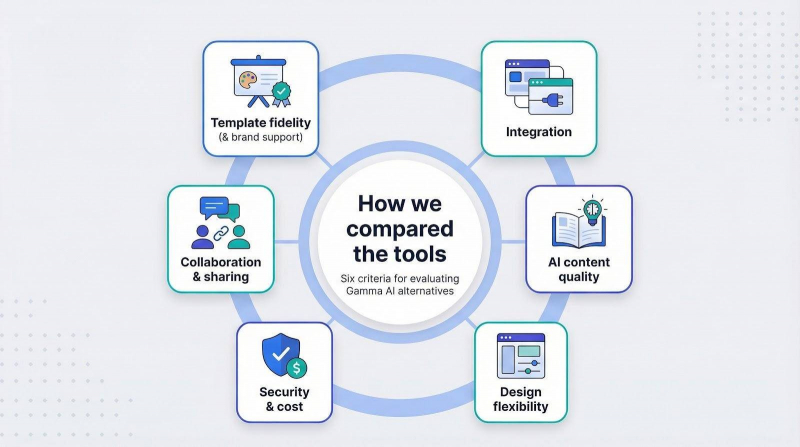
First, Template and brand support. Does the AI keep the fonts, colours and master layouts your design team approved?
Second, Integration. Does it run inside PowerPoint or Google Slides, or at least export a file you can edit without pain?
Third, AI content quality. Speed is meaningless if the copy sounds off or the visuals miss the story.
Fourth, Design flexibility. After the first draft, can you adjust every layout or are you stuck in rigid frames?
Fifth, Collaboration and sharing. Modern decks are team projects, so instant co-editing and easy links matter.
Sixth, Security and cost. Enterprises look for compliance badges, while freelancers watch the price tag. We scored both.
For example, Plus AI’s security page confirms the service has completed a SOC 2 Type II audit—the same compliance standard procurement teams often request before green-lighting a new SaaS tool.
That independent badge helped Plus AI secure full marks on our security scorecard.
1. Plus AI: best for PowerPoint and Google Slides users
With more than one million installs and 4.6-star marketplace reviews, Plus AI is an ai presentation maker that works like a power switch inside the editors you already use. Install the add-on, open the sidebar, and type a prompt; it drafts a full deck on your company template with no copy-paste scramble.
Because Plus works in your file, every slide keeps the fonts, colours and masters your design team approved. Enterprise teams can send their brand deck once, and Plus locks the palette for all future drafts.
Early adopters cut deck prep time in half while design leads stay happy because nothing looks off brand. If you want faster slides without a new platform or another compliance review, Plus AI is the straightforward win.
2. Beautiful.ai: best for automatic design and brand governance
Beautiful.ai turns the idea of a built-in designer into reality. Set a Team Theme once with your logo, colours and fonts, and the software locks those elements across every deck your colleagues build. No late-night brand audits, no stealth Comic Sans emergencies. That rigidity is the advantage. (Team Theme overview)
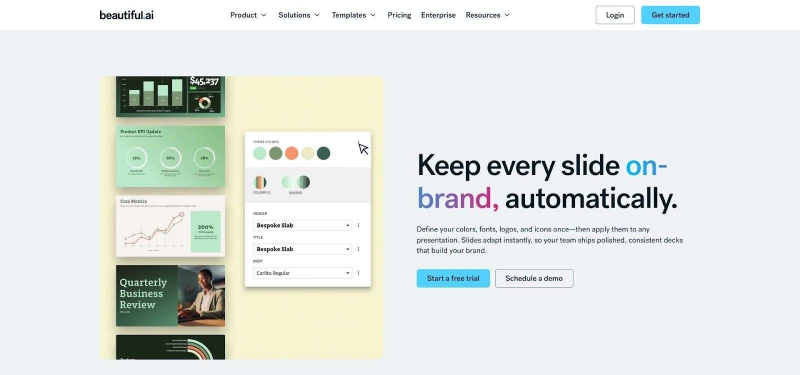
Beautiful.ai Team Theme and Smart Slides interface.
Smart Slides manage layout for you. Drop a chart or quote onto the canvas and everything snaps into perfect alignment. The consistency scales: marketing teams ship client proposals without waiting for design approval.
Beautiful.ai reports that the platform carries SOC 2 Type II credentials, a badge many newer AI startups still pursue.
If your goal is to tame creative chaos and keep every slide on brand, Beautiful.ai is the near-automatic choice.
3. Canva: best all-purpose design suite with AI on tap
Canva already lives on millions of desktops, so switching on its Magic Design feature feels more like opening a hidden room in a tool you trust. Type a topic and watch Canva draft an outline, set a coordinated colour scheme, and drop in relevant images. The bones appear in seconds; you polish from there.
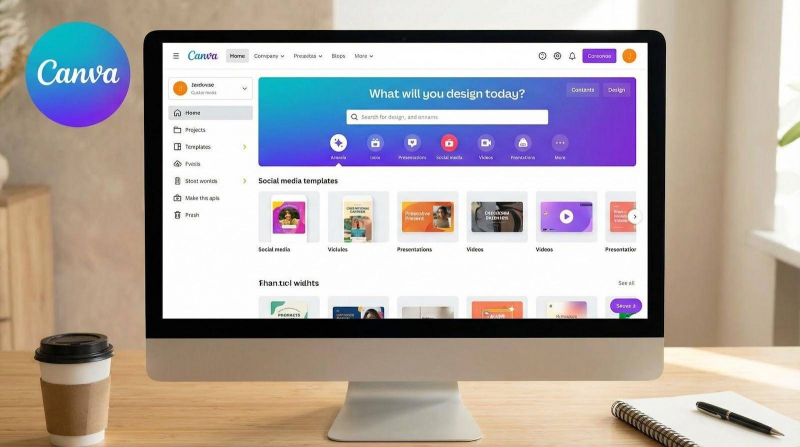
Canva Magic Design feature for presentations.
Brand consistency sits in Canva’s Brand Kit. Add your logo, choose approved fonts and colours once, and every new deck defaults to those choices. The guardrails may not satisfy the strictest brand auditors, yet they keep most teammates on palette.
Price helps, too. The generous free tier offers hundreds of presentation templates and Magic Design; upgrading to Pro mainly adds stock assets and lets large teams share multiple Brand Kits, according to tech-news site MSPowerUser.
For creators juggling social posts at 9 a.m. and a sales deck by noon, Canva keeps everything in one tab, with just enough AI to skip the blank-slide stare without giving up creative control.
4. Pitch: best for real-time collaboration
Pitch treats a deck like a shared Google Doc. You can watch teammates’ cursors move across slides, add time-stamped comments, and jump into a video call without leaving the canvas. Work that once bounced through email chains now wraps up in one sitting.
Brand setup takes minutes. Recreate your master once, upload the company fonts, and lock colours. From then on every draft, whether AI generated or hand built, starts compliant. Designers stop policing, sellers stop apologising.
Pitch’s AI assistant is still early yet helpful. Feed it a brief or a Notion page and it sketches a storyline you can refine together. You keep the voice while the blank-page dread fades.
If your biggest headache is coordinating people, not polishing pixels, Pitch feels like the workspace your team needs.
5. Visme: best for data-driven storytelling
Some decks live and die by numbers. Visme was built for those moments. Open a slide, link a chart to your data, and the platform animates bars, lines or maps in brand colours. The output feels closer to a mini dashboard than a static screenshot.
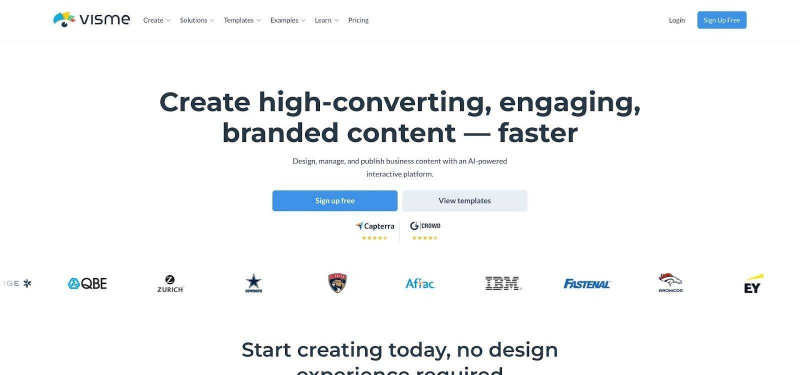
Visme data-driven presentation with animated charts.
Visme’s Brand Kit stores multiple identity sets. Agencies can move from blue-and-white SaaS graphics at 10 a.m. to bold retail palettes after lunch without reconfiguring anything. Teams within one company simply lock the kit and start building.
AI support arrives as a chat assistant. Ask for a slide headline or a quick paragraph and you receive copy tuned to your topic. It offers gentle help, not a full-deck generator, which suits presenters who want control over every data point.
If your aim is to turn raw numbers into visuals that still follow the style guide, Visme gives you the right tools and then steps aside.
6. Presentations.ai: best for fast, client-ready polish
Presentations.ai aims for executive polish from the first click. Paste a short brief or upload a Word doc, hit Generate, and you receive a tight business deck complete with tasteful stock photos and gentle slide transitions.
Templates lean corporate: muted colours, clean typography and subtle motion. That focus lets you spend less time fixing wild colour choices and more time refining the story.
Brand controls are lighter than Beautiful.ai’s guardrails yet stronger than Gamma’s defaults. Pick a colour theme up front and the algorithm keeps every slide consistent. Drop your logo once and it appears in the right corner across the deck.
Speed pairs with presentation analytics. Share a link and you will see who opened which slide and for how long, useful insight before a follow-up call.
If you need a board deck tonight and design is busy, Presentations.ai is the fast route that still feels buttoned up.
7. Tome: best for storyboarding big ideas
Tome treats a presentation like a screenplay. Give it a single sentence such as “Pitch a plant-care app to Series A investors,” and the AI drafts a clear beginning, middle and end, complete with custom images it creates in real time.
Themes stay minimal: bold text, generous white space and dark-or-light backgrounds. The restraint helps concepts stand out during brainstorms, though it will not match the exact corporate template your brand team protects. Export to PowerPoint when you are ready, then layer on brand styles.
Because Tome runs on the web, sharing is instant. Stakeholders leave feedback in context, and you iterate without juggling file versions.
If your goal is to unblock creativity—whiteboard first, polish later—Tome delivers momentum with a single prompt.
8. SlidesAI: best lightweight boost inside Google Slides
Sometimes you do not need a new platform, just a quick helper. SlidesAI lives as a sidebar in Google Slides. Highlight bullet points, click Generate, and the add-on expands each idea into a full, formatted slide. No exports, no extra logins.
Because it works inside your file, every slide inherits the theme your organisation already approved. Change the theme later and the generated content follows suit, keeping the brand team happy.
The free plan lets you create three decks each month, helpful for occasional brainstorming. Paid plans raise the cap for teams that present daily and add priority processing for faster results.
If you love the simplicity of Google Slides and only want a small AI assist, SlidesAI is the easiest upgrade to install.
9. PowerPoint + Copilot: best for “no-new-tool” enterprises
Sometimes the safest move is to stay put. If your company already runs Microsoft 365, Copilot upgrades PowerPoint without adding another vendor to the security checklist. Click the sparkle icon, explain what you need, and Copilot drafts slides on the template your brand team approved years ago.
Because you never leave PowerPoint, fidelity problems vanish. Master layouts, custom fonts and animations behave exactly as before, only faster. Need a new slide? Ask in plain English. Want a summary from a 40-page deck? Copilot writes one in seconds.
Collaboration stays native. Co-authoring, version history and sensitivity labels work as they did yesterday, so IT signs off and users ramp up in minutes.
If change management is your biggest barrier to AI adoption, Copilot inside PowerPoint is likely the simplest path forward.
The quick-glance scorecard
We just reviewed each platform, but choosing is faster when every key metric sits on one line. The table below compares the nine contenders so you can spot strengths at a glance.
| Tool | Template loyalty | Where it lives | AI strength | Flexibility | Collaboration | Compliance note | Entry price |
| Plus AI | Uses existing PPT or Slides master | Add-in | Full-deck generator | Bound by your template | Native co-edit | Leverages Microsoft or Google cloud | Free tier |
| Beautiful.ai | Locked Team Theme | Web app | Layout automation | Rigid by design | Shared libraries | SOC 2 | $12 per user per month |
| Canva | Brand Kit guidance | Web app | Outline and design boost | Highly editable | Live editing | ISO 27001 | Free |
| Pitch | Custom fonts and theme | Web and desktop | Draft assistant | Moderate | Real-time multi-user | EU hosting | Free |
| Visme | Multi-brand kits | Web app | Chat helper | Deep data widgets | Team workspaces | GDPR-focused | Free |
| Presentations.ai | Theme pick at start | Web app | One-click deck | Moderate | Link analytics | Cloud startup | $10 per month |
| Tome | Minimal themes | Web app | Story first | Limited styling | Share links | Standard cloud | Free |
| SlidesAI | Inherits Slides theme | Slides add-on | Slide expander | Google layouts | Native co-edit | Google-vetted | Free tier |
| PowerPoint + Copilot | Existing slide master | PowerPoint | Content, summary, rewrite | Full PPT control | M365 co-authoring | Microsoft tenant | Included in Copilot plan |
How to read this table
If brand guardianship tops your list, start with the first column. Plus AI and Beautiful.ai keep colours, fonts and masters consistent from slide one.
Need zero change management? Check “Where it lives.” Copilot and SlidesAI operate inside tools your team already opens daily.
For brainstorm speed, look at AI strength. Tome and Presentations.ai trade fine-grained control for rapid generation.
Finally, review Compliance note if security or legal standards guide every purchase. Microsoft, Google and SOC 2 vendors often shorten procurement cycles.
Use the grid as a shortcut, then return to the detailed write-ups above for deeper context
Decision cheat-sheet
Still deciding? Match each tool to the question that best fits your workflow.
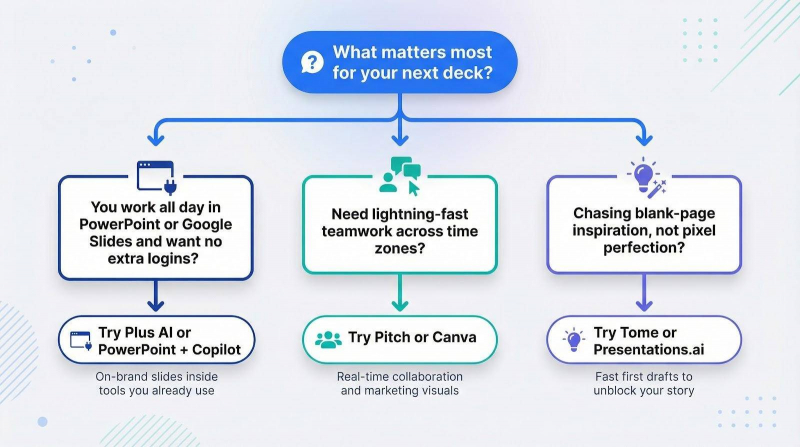
If you work all day in PowerPoint or Slides, and prefer no extra logins, choose Plus AI or Copilot. Both follow your approved template and keep IT relaxed.
Need lightning-fast teamwork across time zones? Pitch provides real-time editing with brand controls, while Canva adds the same speed plus social graphics for the marketing squad.
Chasing blank-page inspiration, not pixel perfection? Tome and Presentations.ai draft first versions in seconds. Export later to a stricter tool once the storyline feels right.
Use these scenarios as a guide, then test the short-list option that solves your biggest daily pain.
FAQs
Does Gamma let me use my exact PowerPoint template?
According to Answers.org, Gamma’s Pro and Team plans let you adjust colours and fonts, but you cannot import a full .pptx master. During export, elements often shift and fonts switch, so many teams realign every deck. If staying pixel-perfect matters, start with Plus AI, Beautiful.ai or Copilot.
What is the easiest free way to try AI slides today?
Canva’s free plan includes Magic Design, SlidesAI lets you create three Google Slides decks per month, and Gamma offers ten credits before its paywall. All three run in the browser, need no credit card and apply basic on-brand colours from your chosen theme.
Is my data safe with these tools?
Prioritise vendors that run inside your existing cloud tenant (Plus AI, Copilot, SlidesAI) or show independent audits such as SOC 2 (Beautiful.ai). Review each privacy page to confirm whether the service trains models on your content and whether you can opt out. For highly confidential decks, generate slides inside PowerPoint or Google Slides so everything stays within your corporate environment.
Conclusion
The best Gamma AI alternative depends on your priorities. If brand fidelity and seamless workflow matter most, start with Plus AI or Copilot. Teams chasing collaborative speed might lean toward Pitch or Canva, while those seeking raw creative momentum can explore Tome or Presentations.ai. Evaluate each option against your template requirements, security standards and budget, then choose the tool that moves your presentations from draft to done with the least friction.
Post Comment
Be the first to post comment!