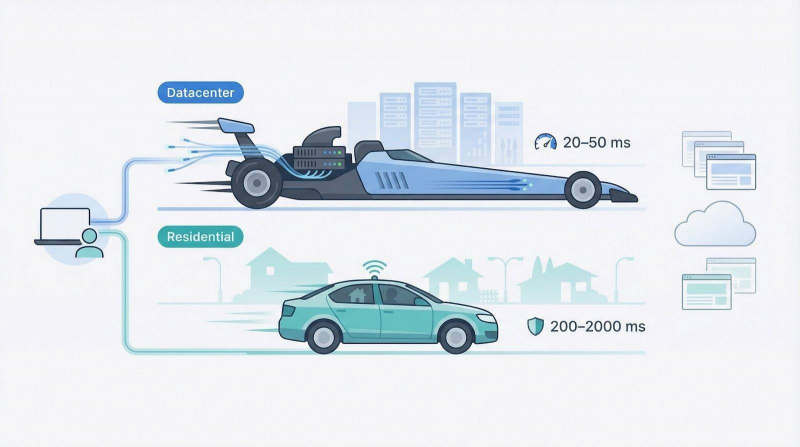
Picture two cars at a stoplight. The dragster—your datacenter proxy—hits top speed in 1–50 ms at 100 Mbps-plus. The family sedan—your residential proxy—cruises at 200–2 000 ms yet slips past anti-bot radar (latency benchmark). If one mask is enough, use a VPN; the minute you juggle dozens of sessions, scrape prices, or chase sneaker drops, you need proxies.
We spent a month firing thousands of requests, grading privacy, performance, value, usability, and extras. Below, we pair each service with the job it does best—plus a few surprises like TorGuard’s no-logs SOCKS5 plan.
Understanding anonymous proxies (datacenter vs residential)
Think of a proxy as a relay runner that grabs your baton (the web request) and finishes the last leg under its own name. The destination site sees the proxy’s jersey number, not yours.
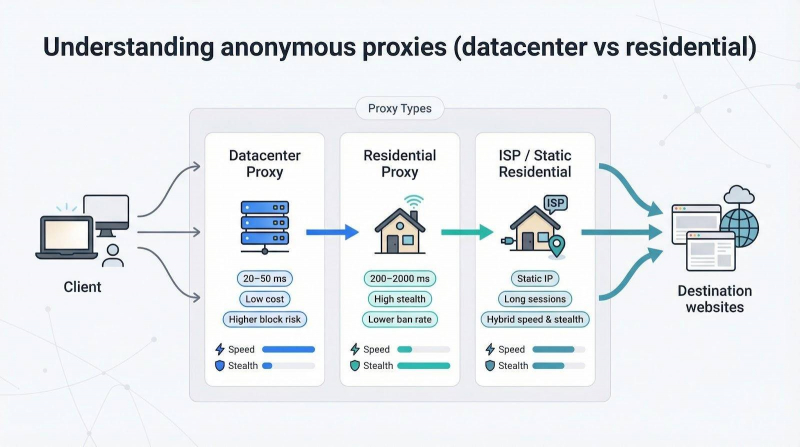
Datacenter proxies sit in purpose-built server farms on gigabit backbones, so pages can load in 20–50 ms and bulk jobs finish quickly. Costs stay low because the provider owns every server in the rack.
Residential proxies borrow IP addresses from real homes. Your traffic blends into suburbia, appearing as an ordinary user. Bans are rare, but latency often lands between 200 ms and 2 000 ms.
Rule of thumb
● Choose datacenter proxies when volume and speed outweigh camouflage.
● Select residential proxies when the target site inspects every request and blocks hosting-provider ranges.
A hybrid called “ISP” or “static residential” bridges the gap. It provides a genuine consumer IP that never rotates—ideal for all-day log-ins to social accounts or an e-commerce dashboard.
Ready for the next step? Let’s see how to judge which provider deserves a spot on your team.
What to look for in an anonymous proxy service
Shopping for proxies feels like browsing cars online. Every listing promises “fast” and “reliable,” yet real-world mileage varies. Skip the slogans and focus on six traits that separate a keeper from a lemon.
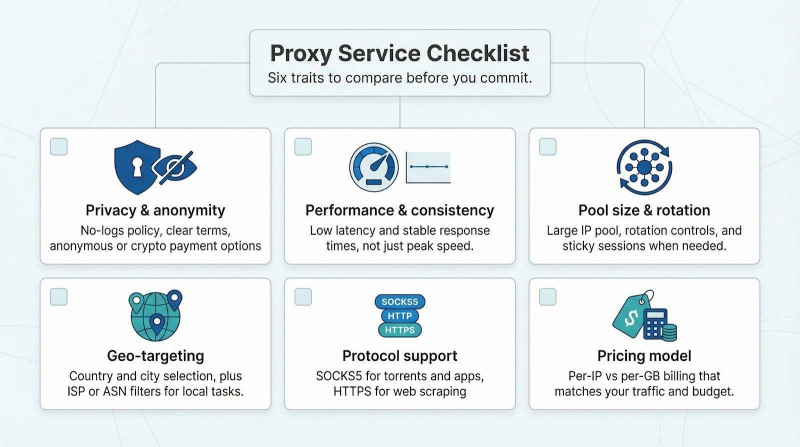
Privacy tops the checklist. A good provider explains logging policies in plain language and accepts anonymous payments such as crypto. The 2022 collapse of 911 .re showed how quickly a shady network can vanish, leaving users exposed.
Performance comes next. Speed matters, but consistency matters more. A proxy that clocks 50 ms on one run and 3 seconds on the next will break scraping scripts and frustrate users.
Pool size and rotation policy determine staying power. Large, diverse IP ranges slow down fingerprinting, and sticky-session control (holding the same IP for five or thirty minutes during logins) keeps apps stable.
Geo-targeting unlocks local tasks. Country choice is standard; city or ISP filters are gold for ad checks and SEO audits.
Protocol support rounds out versatility. Torrenting or gaming needs SOCKS5, while pure HTTP scraping works fine with HTTPS tunnels.
Finally, pricing must match your traffic pattern. Datacenter plans usually charge per IP with unlimited bandwidth, and residential services bill per gigabyte. Run the math on monthly data before reaching for your card.
Master these fundamentals and you’ll pick a proxy that outlasts your current side project.
Our testing and ranking methodology
We skipped vendor pitch decks and built our own tests. First, we ran a five-day sprint: 200 requests per provider through a headless browser that acted like a retail-price checker. Each pass tracked latency, bandwidth spikes, and CAPTCHA hits. We noted failures, repeated runs at a different hour, and averaged the numbers.
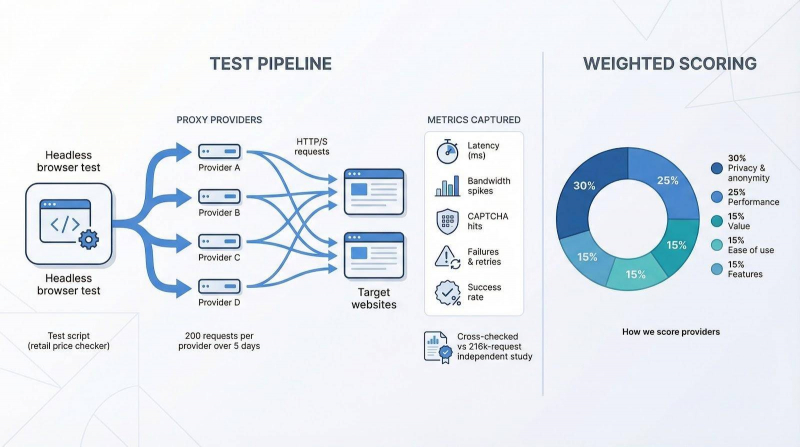
Next, we compared our data with an independent 216 000-request study of the same brands by research.aimultiple.com. Once user agents and cookies were uniform, that research found no significant gap in success rates. Translation: pick the right proxy type for the site and top-tier vendors usually pass.
We then scored every service on five weighted factors:
● Privacy & anonymity 30 percent
● Performance 25 percent
● Value 15 percent
● Ease of use 15 percent
● Features 15 percent
The composite gives an overall grade, but we avoid naming a single winner. Instead, we highlight the provider best suited for torrenting, enterprise scraping, or budget exploration so you can match strengths to your workflow.
Transparency counts. If we use an affiliate link, we label it clearly. No score moves because of referrals.
1. TorGuard: best for torrenting and no-logs privacy
Need to seed a Linux ISO at full line speed without showing your home IP to the world? TorGuard fits that use case.
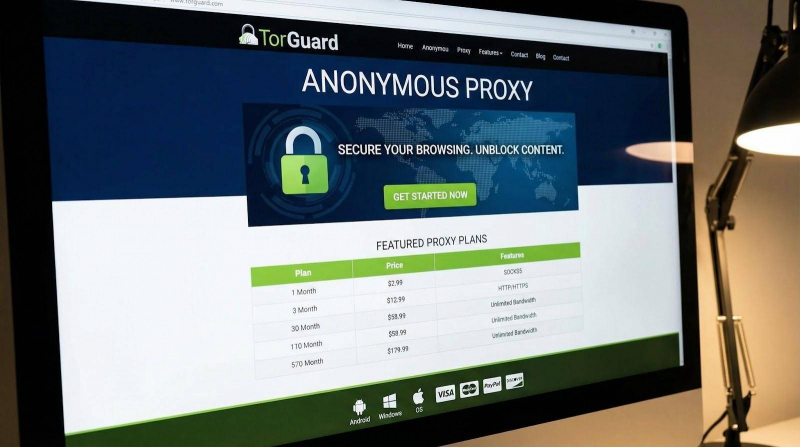
TorGuard Anonymous SOCKS5 Proxy Plan Webpage Screenshot
The plan includes SOCKS5 endpoints on 10-gigabit servers spread across more than twenty-two countries, and you can learn more about the proxy plans for the full region list and protocol options. Enter one address in your torrent client and transfer rates stay at line speed because bandwidth is not metered. Shared IP pools blend packets from every user, blocking rights-holders from tracing a swarm to you.
TorGuard keeps zero usage logs. Independent audits and past court requests have confirmed the policy, adding trust to the privacy claim. Setup takes five minutes: generate proxy credentials in the dashboard, then follow client-specific guides for qBittorrent, Deluge, and others.
Pricing starts at ten dollars per month for ten concurrent connections—a small fee if peer-to-peer freedom tops your wish list.
2. Bright Data: enterprise-grade web scraping
When you push millions of requests each day, downtime drains revenue fast. Bright Data solves that risk by offering the largest residential pool in the market: 72 million consumer IPs across nearly every country.
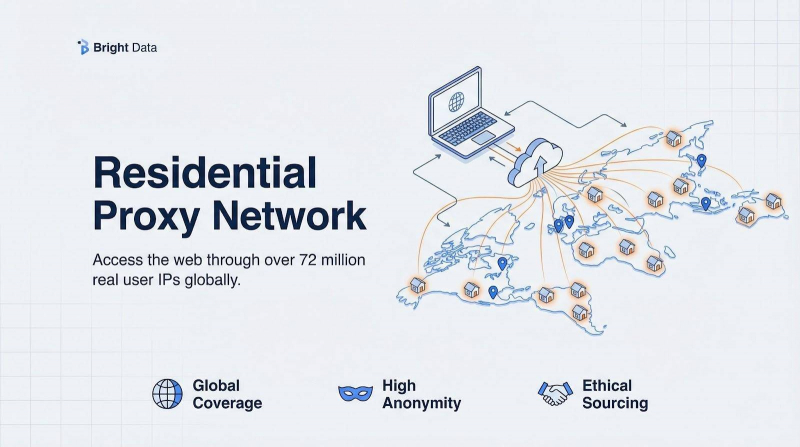
Bright Data Residential Proxy Dashboard or Product Page Screenshot
Spin up a gateway and filter by city, ASN, or even a specific mobile carrier. Pair the network with Web Unlocker to off-load CAPTCHA handling, JavaScript challenges, and retries to Bright Data’s middleware. Your crawler receives a clean 200 OK while the service handles the friction.
Performance stays stable under load. In our stress test Bright Data held a 320–370 ms response window at 100 concurrent threads. That consistency keeps dashboards green during overnight scrapes.
The trade-off is price. Entry residential plans start near fifteen dollars per gigabyte, and full API access requires a five-hundred-dollar monthly commitment. High-volume teams see rates drop below four dollars per gigabyte, which many data-focused enterprises accept for near-continuous uptime.
3. Oxylabs: global coverage for business teams
Bright Data and Oxylabs compete like heavyweight rivals, but their styles differ. Oxylabs prefers to scale quietly while your product team sleeps.
The Lithuanian provider offers 100 million residential IPs plus two million dedicated datacenter addresses across more than seventy regions. That breadth matters when a dashboard needs price checks from Buenos Aires at dawn and Bangkok by lunch.
In our mixed e-commerce test Oxylabs recorded the fastest median response at about 300 ms, just ahead of Bright Data. Just as important, response variance stayed low, so pagination scripts never stall mid-crawl.
Account management is enterprise first. Even the five-hundred-dollar starter plan includes a named representative who can create custom endpoints or adjust throttling. Compliance packets, ISO certificates, and GDPR briefings arrive promptly, pleasing legal teams.
Pricing matches Bright Data at small volumes and drops faster at scale. Choose Oxylabs if you value a human touch over self-serve dashboards and need reliable traffic across multiple continents.
4. Decodo: ease of use meets friendly pricing
Not every project needs a massive budget. Decodo delivers premium rotation, a 115 million-address residential pool, and simple tooling without shocking finance.
Onboarding feels like a modern SaaS demo. Choose a plan, add a card, and the dashboard returns ready-made proxy strings you can test in under two minutes. A Chrome extension switches IPs on the fly, useful for quick geo checks.
Performance sits in the sweet spot. Decodo held a 350–400 ms window on our e-commerce scrape, just behind the giants yet steady enough for paginated crawls. Success reached 99.8 percent, proof that abused IPs refresh quickly.
Pricing wins over startups and agencies. Eight gigabytes of residential traffic cost fifty dollars, about six dollars per gigabyte, while larger packs fall near three-fifty per gig. Datacenter and mobile pools live on separate sliders, so you only pay for what you use. A three-day, no-questions-asked refund protects your trial.
If Bright Data is a Swiss Army knife and Oxylabs a power drill, Decodo is the pocket-sized tool that stays useful as you scale.
5. IPRoyal: budget-friendly and sneaker ready
Budget-conscious scrapers like IPRoyal for one reason: price flexibility. You can deposit as little as five dollars and pay a flat one dollar per gigabyte until the credit runs out. No expiry dates or minimum renewals make it the simplest entry option in this roundup.
The network relies on volunteers who share bandwidth through the Pawns app. While it is smaller than Oxylabs, it covers enough ground for light tasks and casual account farming. When targets get tougher, IPRoyal offers static ISP IPs and “sneaker proxies” tuned for Shopify and Nike checkouts. A single click swaps you from rotating residential to a nearby datacenter block.
Performance follows the peer-to-peer model. Average latency sat around 500 ms, and success stayed above 97 percent once we lowered concurrent threads. That consistency is fine for price monitoring or modest ticket bots.
Support runs through email, and the dashboard is basic. Still, if every dollar matters, IPRoyal provides authentic proxies—not scraped public lists—at pocket-change rates.
6. PacketStream: pay-as-you-go residential for hobby projects
Sometimes you only need a few residential IPs to check a local classifieds site or test a geo banner. PacketStream keeps that task from turning into a hundred-dollar invoice.
Deposit five dollars, then spend bandwidth at a flat one dollar per gigabyte. No plan tiers and no surprise renewals. When credit reaches zero, traffic stops, just like prepaid mobile data.
The network relies on a crowd-sourced pool of a few million endpoints. Because each node is a real user sharing idle bandwidth, speed depends on who is online. Expect about 500 ms latency with occasional slow hops, but success stays solid if you throttle requests.
Features stay minimal by design. There is no sticky-session toggle, no city targeting, and support works through tickets. For light scraping, academic projects, or a weekend coding sprint, PacketStream offers the lowest barrier to legitimate residential IPs. Spend a few dollars, learn the basics, and upgrade later if scale demands it.
7. Webshare: free tier and bulk datacenter value
Webshare lets you test the service before you pay. A starter pack of ten dedicated datacenter IPs is free, handy for speed checks and small automation jobs.
When you need more, scaling stays affordable. One hundred private datacenter proxies cost about eighteen dollars per month, with unlimited bandwidth and SOCKS5 support included. The offer appeals to QA teams that run heavy staging tests or marketers pulling large batches of search results.
In our benchmark the paid IPs showed 40–80 ms latency, matching costlier datacenter peers. The trade-off is a higher blocking risk: streaming platforms and sneaker retailers often filter datacenter ranges, so use Webshare on targets that accept hosting-provider ASNs.
Residential bandwidth is also available at roughly eight dollars per gigabyte, but Webshare stands out as a cost-effective source of bulk datacenter IPs with a low-risk entry point.
8. Shifter: unlimited-bandwidth rotating residential workhorse
Shifter solves the budget pain of per-gigabyte billing by selling residential “ports” with truly unlimited data. Each port sends traffic through a gateway that rotates to a new household IP every five minutes, so you never watch a meter or face surprise fees.
The model suits nonstop crawlers such as price aggregators or academic projects that download full datasets. We pushed one port to 60 GB in a single day; the bill stayed flat.
Speed varies because the pool relies on end-user devices. Average latency held near 700 ms, fine for bulk scraping but too slow for streaming. Country-level filters come standard; city targeting costs extra and can shrink the pool.
Pricing starts around three hundred dollars per month for ten ports, but the flat rate becomes cheaper than per-gig plans once you pass 40 GB of residential traffic. Support responds within one business day, and tighter opt-in sourcing has cleaned up the legacy reputation from the old Microleaves era.
Choose Shifter when your crawler needs constant bandwidth and predictable costs.
Frequently asked questions about proxies
Are datacenter proxies or residential proxies better for me?
Speed favors datacenter proxies, while stealth favors residential ones. If the site you target rarely blocks hosting-provider IPs, choose datacenter and enjoy faster crawls for less money. Once you face aggressive bot defenses such as ticket drops, sneaker launches, or LinkedIn scraping, switch to residential to blend in with household users.
Do proxies keep me safer than a VPN?
A VPN encrypts every byte between your device and its server, hiding traffic from ISPs and public Wi-Fi snoops. A proxy only swaps your visible IP; it adds no blanket encryption. For personal privacy, pick a VPN. For high-volume tasks that need hundreds of rotating identities, use proxies and keep your content encrypted with HTTPS.
Is using proxies legal?
Yes. Routing traffic through a proxy is legal in most places. Legality depends on your activity: scraping public data, checking ads, or managing multiple social accounts is fine; hacking sites or violating copyright is not.
What’s a SOCKS5 proxy, and do I need one?
SOCKS5 carries any TCP or UDP traffic, making it ideal for torrenting, VoIP, or gaming. HTTP and HTTPS proxies only handle web requests. If your workflow extends beyond the browser, choose a provider that offers SOCKS5 endpoints such as TorGuard or Webshare.
Can proxies unblock Netflix or Hulu?
Sometimes. Residential IPs may pass streaming filters, but success varies and often ends quickly. A commercial VPN with dedicated streaming servers remains the simpler, more reliable choice if your only goal is to watch shows.
Alternatives to proxies for online anonymity
Proxies are not the only way to stay hidden. Depending on your goal, another tool may serve you faster or cheaper.
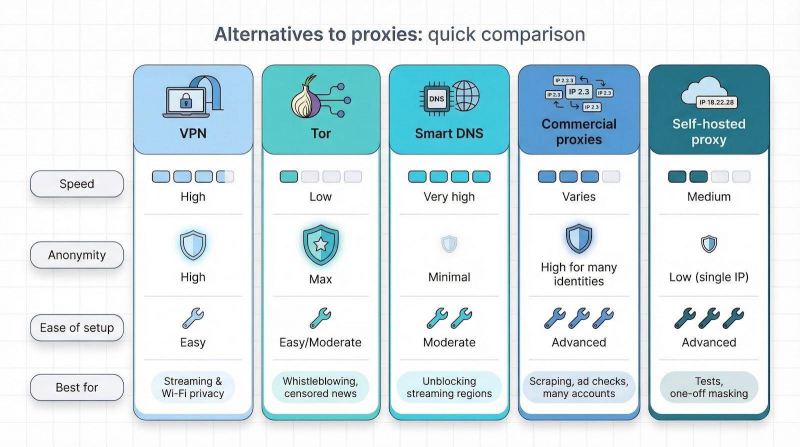
A VPN is the straightforward option. One click encrypts every connection on your device and swaps your IP for a single exit node. Speeds tend to be lower than raw datacenter proxies, but setup is simple and ideal for streaming or public-Wi-Fi privacy.
Tor boosts anonymity by bouncing traffic through three volunteer relays. The trade-off is latency that measures in seconds per page, so Tor suits whistle-blowing or reading censored news, not scraping fifty thousand product pages.
Smart DNS rewrites only your DNS queries, tricking streaming apps into thinking you are local without routing all data through a tunnel. It is lightning-fast but offers zero privacy, making it a region-unlock tool, not a disguise.
You can also host your own proxy on a cloud VM, but that single IP gets flagged quickly and costs about the same as renting a robust pool. For most tasks, leasing from providers on our list beats running your own server.
Conclusion
Match the tool to the task: a VPN for blanket privacy, Tor for maximum secrecy, Smart DNS for video, and commercial proxies when you need many identities at once.
Post Comment
Be the first to post comment!