Table of Content
- Browser-First Architecture and Accessibility Implications
- Retouching Automation and Facial Processing
- Background, Object, and Watermark Removal Accuracy
- Image Transformation and Stylization Outcomes
- Processing Speed and Batch Workflow Considerations
- Output Consistency and Predictability
- Overall Assessment
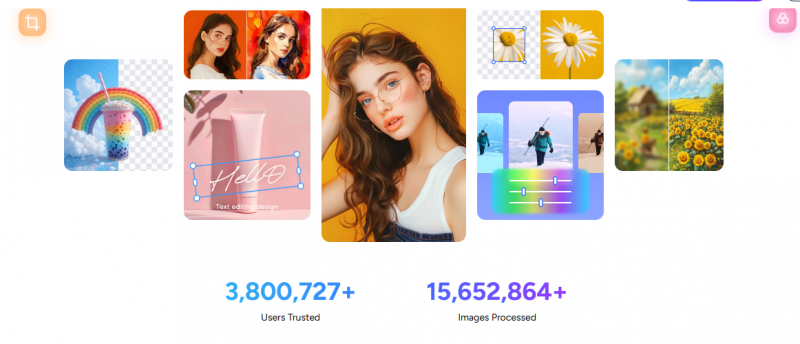
AI-driven photo and video editing tools are increasingly positioned as time-saving alternatives to traditional design software. AIEASE (also referred to as AI Ease) operates within this category by offering browser-based automation for a wide range of visual editing tasks. Rather than focusing on creative control or professional-grade compositing, the platform emphasizes accessibility, speed, and template-led workflows.
Positioning Within the AI Editing Ecosystem
AIEASE occupies a middle ground between lightweight mobile editing apps and full-featured professional tools. Its design choices suggest a target audience that values output speed and convenience over precision.
Unlike tools built for designers, AIEASE does not center around layers, brushes, or manual masking. Instead, it relies on automated AI models that abstract away complexity. This makes the platform easier to approach but also constrains how much control users have over final results.
The tool is therefore better described as a workflow accelerator rather than a creative workspace.
Browser-First Architecture and Accessibility Implications
The browser-first approach eliminates the need for software installation, which lowers entry barriers for casual and first-time users. This design also allows AIEASE to operate across devices without dependency on local system performance.
However, this architecture introduces trade-offs:
- Processing depends on server availability
- Output speed can vary during peak usage
- Offline work is not possible
Mobile apps expand access but largely mirror browser functionality rather than offering advanced mobile-native editing.
Image Enhancement and Restoration Behavior
AIEASE includes several tools focused on improving image clarity and perceived quality. These include upscaling, sharpening, noise reduction, and color restoration.
In practice, these tools prioritize visual cleanliness over texture fidelity. Faces and flat surfaces often appear smoother, while fine details such as fabric grain or hair texture may be softened.
This approach works well for:
- Social media images
- Small-format displays
- Archival previews
It is less suitable for print-grade restoration or forensic-level detail preservation.
Retouching Automation and Facial Processing
Retouching tools in AIEASE function through generalized AI models rather than selective editing. Skin smoothing, blemish removal, and wrinkle reduction are applied globally to detected facial regions.
While this ensures consistency and speed, it removes user discretion over:
- Area selection
- Intensity variation
- Preservation of natural imperfections
As a result, outputs may appear visually uniform across different faces, which can be acceptable for profile images but limiting for nuanced portrait work.
Background, Object, and Watermark Removal Accuracy
Background and object removal tools are among the most utilitarian features on the platform. Performance is strongest in scenarios where the subject is clearly separated from its surroundings.
Challenges emerge in cases involving:
- Fine hair edges
- Transparent or reflective objects
- Overlapping elements
Watermark removal is functional in predictable visual contexts but less reliable where background textures are complex or irregular. The tool focuses on plausibility rather than reconstruction accuracy.
Image Transformation and Stylization Outcomes
AIEASE includes tools that transform images into stylized outputs, such as cartoonization, anime effects, or artistic filters. These transformations rely on predefined styles rather than adaptive interpretation.
Outputs tend to be visually consistent within each style but lack variation across repeated uses. This makes the tools suitable for experimentation or branding aesthetics but less appropriate for creative exploration requiring originality.
Face swap and hairstyle simulation features function primarily as novelty tools rather than precision-driven utilities.
Image Expansion and Recoloring Mechanics
Image expansion tools generate new visual content to extend image boundaries. While these results often blend seamlessly at a glance, close inspection may reveal inconsistencies in lighting or texture continuity.
Recoloring tools modify object hues effectively when boundaries are clear but struggle with complex shading or layered materials. The AI prioritizes speed and general accuracy rather than exact color science.
Video Templates and Motion Effects Scope
Video-related features in AIEASE rely on preset animation templates rather than timeline-based editing. These effects convert static images into short animated clips.
Use cases include:
- Social media reels
- Promotional visuals
- Novelty animations
The platform does not support:
- Manual keyframes
- Audio synchronization
- Multi-scene video editing
As such, it functions as a motion generator rather than a video editor.
Processing Speed and Batch Workflow Considerations
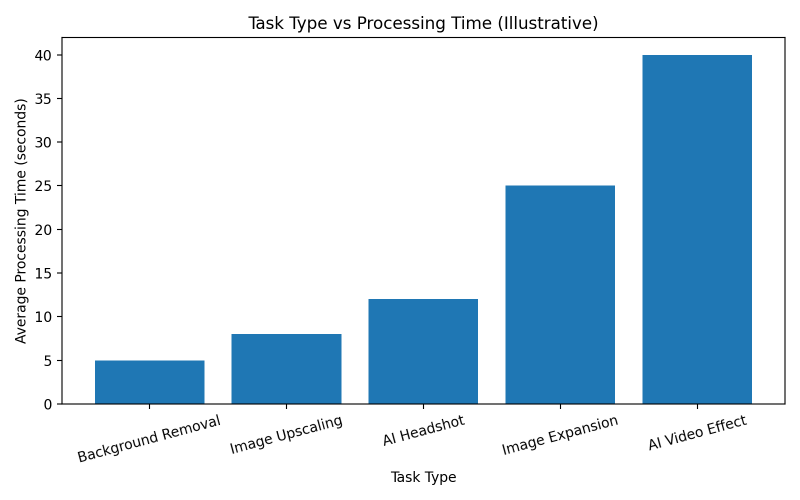
One of AIEASE’s defining characteristics is processing speed. Most automated tasks complete quickly, even for higher-resolution images.
Batch processing, available in paid tiers, enables parallel handling of multiple files. This is practical for repetitive tasks such as catalog image preparation or content scheduling.
However, speed gains diminish when tasks involve complex generative operations rather than deterministic edits.
Access Model, Usage Restrictions, and Feature Gating
AIEASE operates on a freemium structure that separates casual usage from sustained workflows.
Free access allows exploration but imposes limits on:
- Daily usage counts
- Output resolution
- Watermark removal
Paid tiers primarily remove friction rather than unlocking fundamentally different technology. The AI models remain the same; access levels determine throughput and convenience.
Output Consistency and Predictability
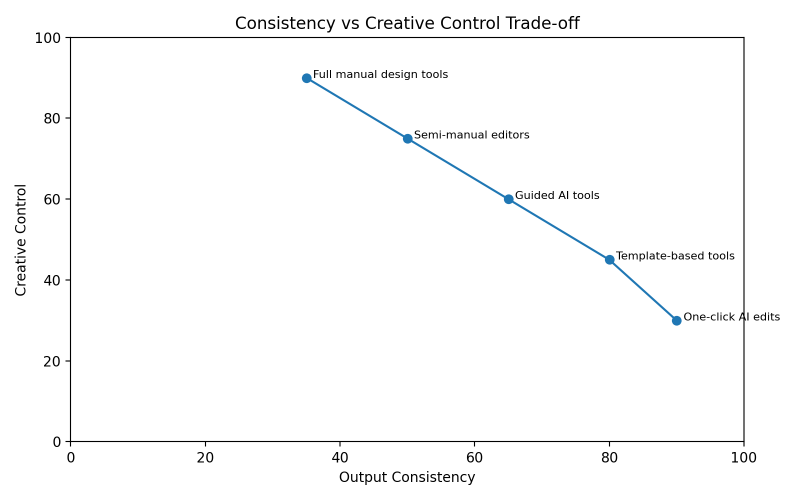
Across features, AIEASE outputs are consistent in style and quality. This predictability benefits users who need uniform assets but limits creative variation.
The absence of manual overrides means users must accept AI decisions as final. For high-stakes or brand-sensitive visuals, this lack of control may be a constraint.
Data Handling and Privacy Considerations
As a cloud-based service, AIEASE processes user-uploaded media on remote servers. This involves temporary storage and automated analysis.
While this is standard practice, it introduces considerations for:
- Sensitive images
- Proprietary designs
- Client assets
Users should avoid assuming local-only processing and review privacy documentation before uploading critical content.
Typical Use Cases and Mismatch Scenarios
AIEASE aligns well with:
- Content creators working at scale
- Small businesses without design teams
- Marketers producing frequent visual assets
It is less appropriate for:
- Professional photo retouching
- Complex compositing
- Creative workflows requiring iteration
Understanding these boundaries prevents misuse and unrealistic expectations.
Overall Assessment
AIEASE functions as an automation-first visual editing platform. It trades creative depth for speed, accessibility, and simplicity. This trade-off is intentional and consistent across features.
The platform performs reliably within its design constraints. When used beyond those constraints, its limitations become apparent rather than hidden.
Closing Perspective
AIEASE reflects a broader trend in AI tooling: reducing friction rather than expanding creative possibilities. It is best understood as a productivity layer for visual tasks rather than a creative environment.
Evaluating it fairly requires judging it on operational consistency, not feature volume. When approached with clear expectations, it behaves predictably and transparently.
That predictability, not innovation, is its defining characteristic.
Post Comment
Be the first to post comment!