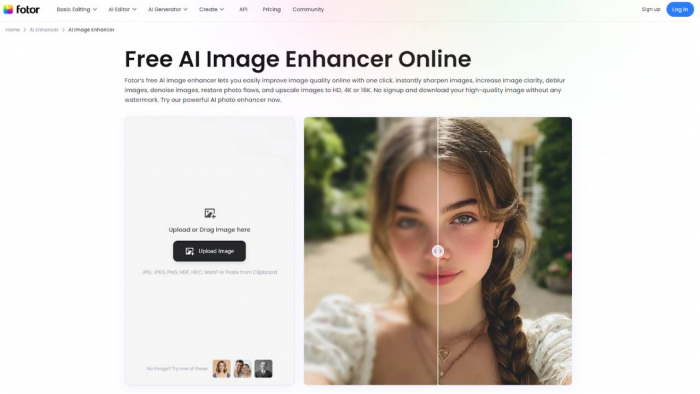
Bloggers, marketers, and social media users need to have high-quality visuals. But a lot of individuals do not have higher editing capabilities or professional programs. This void has given rise to the quick flourishing of AI-generated photo editing software that can automate difficult editing processes. Fotor is one of these tools, and it has gained a pretty popular following among the category of users eager to obtain fast and credible results without having to master the intricacies of the workflow.
This paper will discuss its image improvement technology that uses AI, the operation of the technology, its features, and whether it fits the needs of the average user. It is also an assessment of the usability, the performance and pricing framework of the platform in order to make the readers decide whether this platform is a viable option to enhance their pictures.
Understanding AI Image Enhancement
The editing of digital images has changed with the advent of artificial intelligence. Rather than having a user manually manage the exposure, noise, contrast and sharpness, AI algorithms examine a photo, and automatically make corrections depending on the subject and scene identified.
Casual user tools are focused on simplicity. Instead of providing dozens of complicated sliders, they are based on automated analysis and one-click processing. This system enables all people to improve pictures within the shortest time possible without having to understand professional editing techniques.

Among them, such platforms as Fotor can be distinguished by providing both browser-based usage with the automation of the improvement process. The platform is meant to bring about improvements in real-time and in the meantime, maintain a simple workflow.
Overview of Fotor AI Image Enhancer
Its AI picture enhancer belongs to a greater array of online photo editing and designing services that millions of creators around the world utilize. The tool scans photos with the help of AI algorithms that identify the lighting conditions, problems with the quality of the image and visual elements and implements automatic enhancements. The sharpening of blurred regions, color matching, brightening and contrast, and overall clarity are the general processes of the improvement. These modifications occur in the form of automated processing not manual editing.
Its advantages include accessibility. As the platform is accessed with the help of a web browser, users do not have to install software or make complex settings. It is just possible to upload and enhance the images with the help of a single click and download them in better quality. This is one of the reasons many users consider it a reliable best Ai image enhancer for quick editing tasks. The system is especially useful to people who have to produce their content (social media, blogs, online stores, etc.) regularly. They do not need to waste their time learning higher-order editing tools, but they can use AI to make most improvements automatically.
Key Features of the AI Image Enhancer
1. One-Click Automatic Enhancement
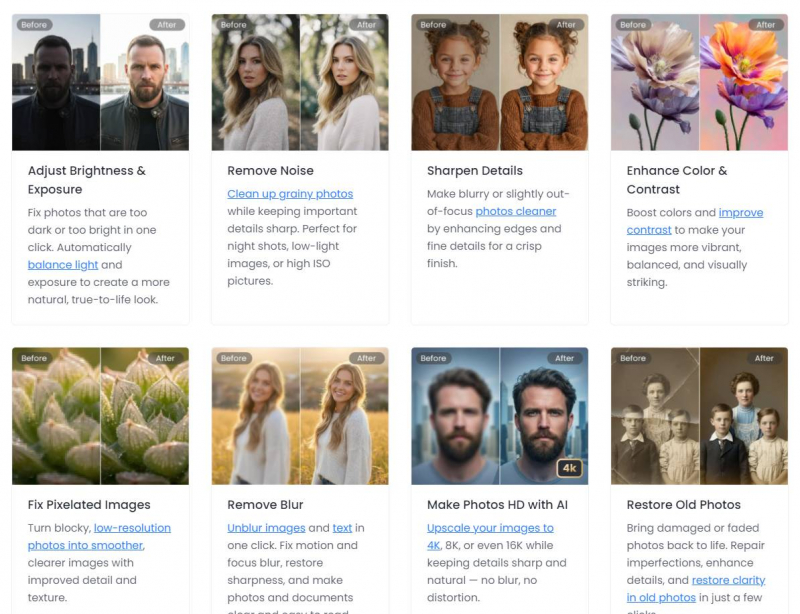
The essential feature of the tool is to be improved automatically. Upon uploading an image, AI is used to scan and refine the exposure, contrast, and vibrancy to come up with a better and more balanced version of the photo. This removes the use of manual editing and enables users to edit photos within seconds.
2. AI Image Upscaling
AI upscaling technology can be used to enhance images that are of low quality. The system enhances the quality of photos in terms of their resolution and maintaining details and minimization of pixelation.
This feature is particularly handy in case of older devices used to capture the image or the web-based image that is compressed.
3. Noise Reduction and Detail Enhancement
Images shot during the times of low light frequently have grains and unsharpened details. The AI enhancement tool automatically identifies the patterns of noise and removes them and enhances meaningful visual features. It is the outcome of a better-looking image with better clarity and smoother textures.
4. AI Portrait Retouching
Portrait enhancement features enable the user to enhance facial details automatically. These tools are able to flatten skin, minimize blemishes, and enhance the state of light. These adjustments assist in producing better quality portraits without necessarily having to use an elaborate editing process.
5. Background and Object Editing
Besides image enhancement, the site also provides the filters to remove background and unwanted objects. These AI-powered features allow one to optimize images to use as marketing tools or social media posts.
Such an integration of enhancement and editing tools provides the users with a full image workflow on how to enhance images.
6. Image Extension and Smart Editing
The other helpful feature is the AI image extension that extends images up to their maximum size. The technology is used to create more background contents that are similar to the pre-existing scene, enabling one to adjust the image composition without having to crop them.
These features are indicative of the way that AI editing tools are moving beyond the enhancement process to complete creative support.
User Experience and Interface
Ease of use is one of the platform’s most important advantages. Many professional editing applications require significant training and technical knowledge. In contrast, this platform prioritizes simplicity.
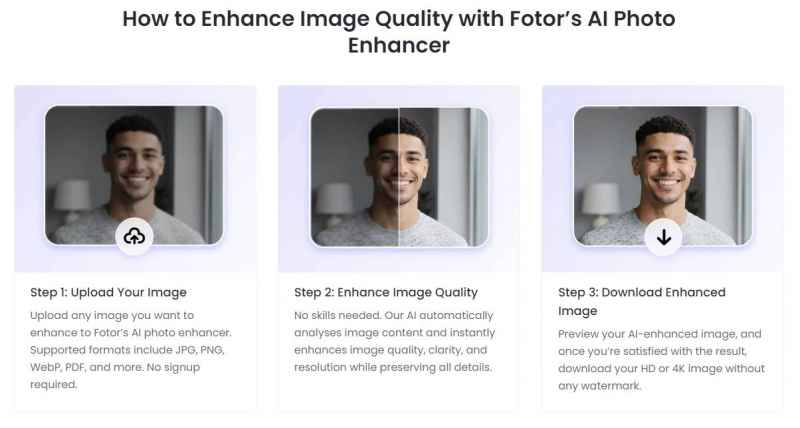
The interface follows a straightforward workflow:
➢ Upload an image.
➢ Apply AI enhancement.
➢ Review the improved result.
➢ Download the enhanced image.
Because the process is largely automated, beginners can quickly achieve professional-looking results.
The platform is also accessible across multiple devices. Users can edit images through web browsers as well as mobile apps, making it convenient for people who create content on different devices. This cross-platform availability is particularly useful for casual users who need quick edits on the go.
Who Should Use This Tool?
The AI enhancer is designed primarily for everyday users who need quick image improvements.
Typical users include:
➢ Bloggers and content creators
➢ Social media managers
➢ Small business owners
➢ Online sellers
➢ Casual photographers
For these audiences, speed and simplicity are often more important than advanced editing controls. Since the platform runs online and requires minimal setup, it can easily become part of a regular content creation workflow.
Professionals who need advanced features can go with a paid plan to perform their tasks. However, casual users generally benefit from the automated approach.
Strengths and Limitations
Like any AI tool, this platform has both advantages and limitations.
Strengths
● Easy-to-use interface suitable for beginners
● Automated one-click enhancement
● Web-based access without installation
● Multiple AI editing features in one platform
● Affordable subscription options
Limitations
● Advanced control is limited to manual control.
● Particular features are paid subscriptions.
● More customizable tools may be liked by professional photographers.
Irrespective of these shortcomings, the platform has remained a viable option to people who want fast solutions and not serious manipulations on the manual.
Pricing and Subscription Packages
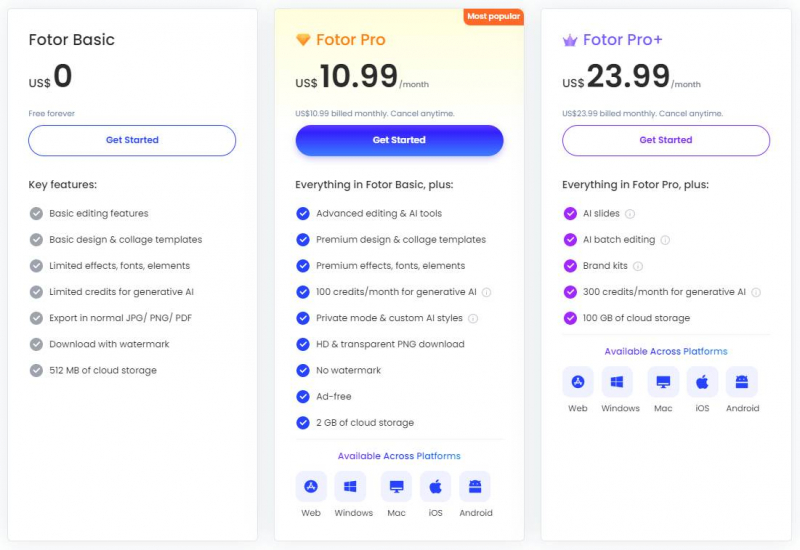
The platform follows a freemium pricing model that allows users to access basic tools without payment while offering advanced features through paid subscriptions.
● Free Plan (Basic)
The free option includes the key editing features and partial artificial intelligence. Nevertheless, the image that is exported can contain watermarks and some of the features are limited. This tier is also restricted in cloud storage. The given option is appropriate when it comes to users who upscale images on a regular basis and do not need high-resolution downloads.
● Pro Plan
The Pro version opens access to a range of editing features, as well as eliminates the watermark on exported photos. The users can also have access to the premium templates, advanced AI and high-resolution downloads.
The average monthly fee of this plan is approximately $10.99/month or $47.99/year, and its affordability is rather high among freelancers and small creators. Other advantages are the presence of additional AI credits, batch editing, and increased storage.
● Pro+ Plan
Pro+ plan is offered to users that require more detailed editing features and extra AI features.
It is typically priced around 23.99/ month or 99.99/ year and is based on everything that is included with the Pro plan and more AI credits, additional storage, and enhanced features like a batch background editing and brand management features. This level is better suited to groups or artists that generate images at the rate of production.
Final Thoughts
The use of AI in editing programs is changing the way individuals enhance digital photographs. They do not have to use complicated software and technical knowledge to edit pictures; now, users may automatically improve photos with a few clicks. To support the needs of the casual creators who seek the adequate Ai image enhancer the websites such as Fotor give a good balance between the simplicity, speed, and cost. The artificial intelligence-based upgrade tools and the easy to use interface coupled with the pricing structure of a typical image editing tool, make it a viable choice in daily image editing work.
It might not compete with other professional editing programs in the high-end workflow, but it conquers the demands of bloggers, marketers, and amateur photographers that require fast and dependable image enhancement.
Post Comment
Be the first to post comment!